The IC 4017 can be considered as one of the most useful and versatile chip having numerous electronic circuit applications.
About IC 4017
Technically it is called the Johnsons 10 stage decade counter divider. The name suggest two things, it’s something to do with number 10 and counting/dividing.
The number 10 is connected with the number of outputs this IC has, and these outputs become high in sequence in response to every high clock pulse applied at its input clock pin out.
It means, all its 10 outputs will go through one cycle of high output sequencing from start to finish in response to 10 clocks received at its input (pin#14). So in a way it is counting and also dividing the input clock by 10 and hence the name.
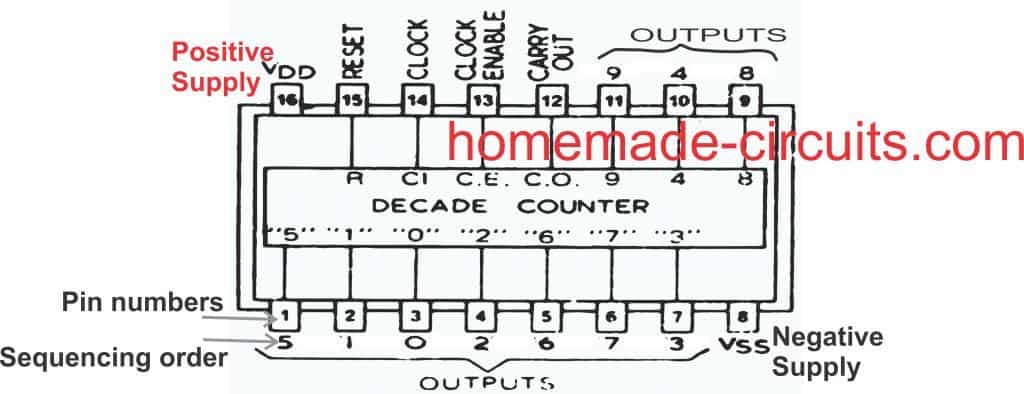
Understanding pinout Function of IC 4017
Let’s understand the pin outs of the IC 4017 in details and from a newcomer’s point of view: Looking at the figure we see that the device is a 16 pin DIL IC, the pin out numbers are indicated in the diagram with their corresponding assignment names.
What do Logic High, Logic Low Mean
The pinout which are marked as outputs are the pins which are rendered logic "high" one after the other in a sequence in response to clock signals at pin#14 of the IC.
"Logic high" simply means attaining a positive supply voltage value, while "logic low" refers to attaining zero voltage value.
When the IC 4017 is initially switched ON, it gets reset, and a logic high appears at pin#3 by default. We will discuss the resetting process in the later paragraphs.
In this position, when the first clock pulse is applied at pin#14, the existing logic high at pin#3 jumps from pin#3 to the next pinout that is pin#2. The logic high remains locked on pin#2 until the next clock is applied on pin#14, which causes the high logic at pin #2 to jump from pin#2 to the next output pinout that is pin#4, and this sequencing of logic high goes on until it reaches the last pinout of the IC which is pin#11, after which the logic high sequence jumps back to pin#3, and the cycle repeats again.
What is the Output pin Sequencing order?
To be precise, the sequencing movement happens through the pinouts: 3, 2, 4, 7, 10, 1, 5, 6, 9, 11...
After pin#11 the IC internally resets and reverts the logic high at pin #3 to repeat the cycle.
Why Pin 15 Should be Grounded
This sequencing and resetting is successfully carried out only as long as pin#15 is grounded or held at a logic low, otherwise the IC can malfunction. If it is held high, then the sequencing will not happen and the logic at pin#3 will stay locked.
Please note that the word “high” means a positive voltage that may be equal to the supply voltage of the IC, so when I say the outputs become high in a sequential manner means the outputs produce a positive voltage which shifts in a sequential manner from one output pin to the next, in a “running” DOT manner.
Pin 14 Needs External Frequency (Clock Signal)
Now the above explained sequencing or shifting of the output logic from one output pin to the next output is able to run only when a clock signal is applied to the clock input of the IC which is pin #14.
Remember, if no clock is applied to this input pin#14, it must be assigned either to a positive supply or a negative supply, but should never be kept hanging or unconnected, as per the standard rules for all CMOS inputs.
The clock input pin #14 only responds to positive clocks or a positive signal (rising edge), and with each consequent positive peak signal, the output of the IC shifts or becomes high in sequence, the sequencing of the outputs are in the order of pinouts #3, 2, 4, 7, 10, 1, 5, 6, 9, 11.
Pin 13 is Opposite of Pin 14
Pin #13 may be considered as the opposite of pin #14 and this pin out will respond to negative peak signals. Meaning if a negative clock is applied to this pin will also produce the shifting of "logic high" across the output pins
However normally this pin out is never used for applying the clock signals, instead pin #14 is taken as the standard clock input.
Therefore pin #13 needs to be assigned a ground potential, that means, must be connected to the ground for enabling the IC to function.
In case pin #13 is connected to positive, the whole IC will stall and the outputs will stop sequencing and stop responding to any clock signal applied at pin #14.
How Pin 15 Works Like reset Pin
Pin #15 of the IC is the reset pin input. The function of this pin is to revert the sequence back to the initial state in response to a positive potential or supply voltage.
Meaning, when a momentary positive voltage hits pin 15, the output logic sequencing comes back to pin #3 and begins the cycle afresh.
If the positive supply is held connected to this pin #15, again stalls the output from sequencing and the output clamps to pin #3 making this pinout high and fixed.
Therefore to make the IC function, pin #15 should always be connected to ground.
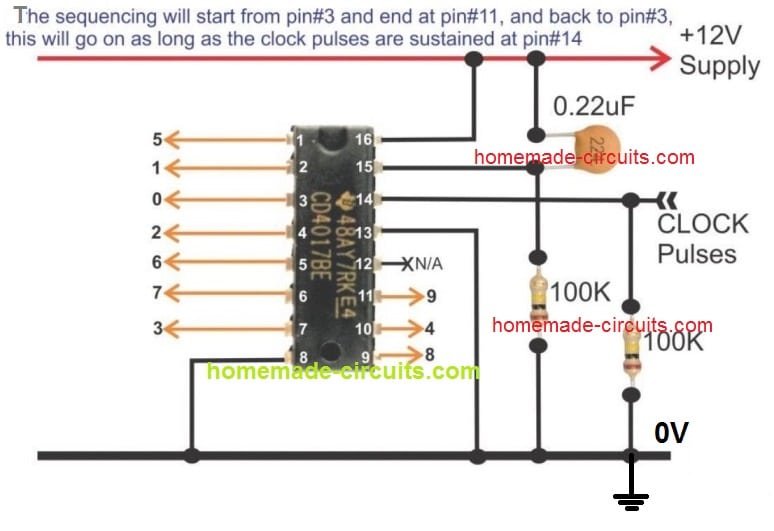
If this pinout is intended to be used as a reset input, then it may be clamped to ground with a series resistor of 100K or any other high value, so that an external positive supply now can be freely introduced to it, whenever the IC is required to be reset.
Using Pin#15 to Reduce the Number of Output Sequence
As I have explained above, there are 10 outputs in the pinout order of 3, 2, 4, 7, 10, 1, 5, 6, 9, 11.
The sequencing begins from pin#3 and ends at pin#11, where the IC resets and the sequence reverts to pin#3 to begin a new cycle.
However, suppose you do not want to use all the 10 output sequences, instead want to limit the sequence to 5 numbers only. Meaning, you want to use the output sequencing in order of 3, 2, 4, 7, 10. The sequence is supposed to begin from pin#3 and end at pin#10 and return back to pin#3.
However, this cannot happen as long as pin#15 is connected to ground. To limit the sequencing to a desired lower count, the pin#15 should be disconnected from the ground line, and connected to output pin which comes just after the last sequence pinout.
In the above example, where we want the sequence to end at pin#10, the next pinout that comes after pin#10 is pin#1, so pin#15 must be connected to this pin#1, to ensure that whenever the sequencing hits pin#1, it is instantly reverted to pin#3 for a new cycle, and the maximum output sequencing is limited to 5 count only.
In the above manner you can limit the output sequencing to any other desired count below 10.
Ground pin and Carryout Pin
Pin #8 is the ground pin and must be connected to the negative of the supply, while pin #16 is the positive and should be terminated to the positive of the voltage supply.
Pin #12 is the carry out, and is irrelevant unless many ICs are connected in series, I will elucidate it some other day. Pin #12 can be left open.
Have specific questions?? please feel free to ask them through your comments...all will be thoroughly addressed by me.
Basic IC 4017 Pinout Connection Diagram
Application LED Chaser Circuit using IC 4017 and IC555
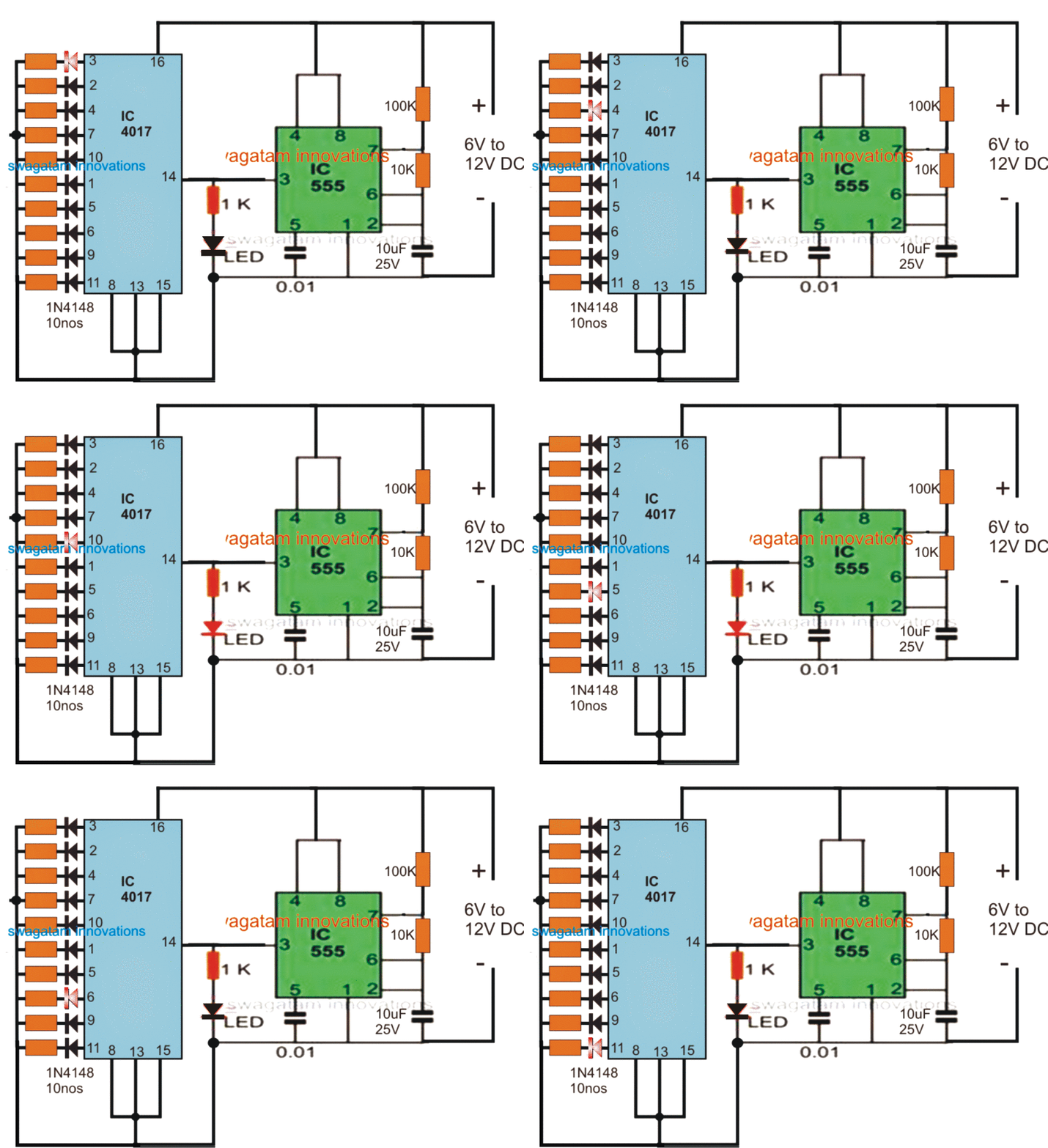
The following example GIF circuit shows how the pinouts of a IC 4017 is usually wired with an oscillator for obtaining the sequential logic high outputs. Here the outputs are connected to LEDs for indicating the sequential shift of the logics in response to each clock pulse generated by the IC 555 oscillator at pin#14 of the IC 4017.
You can see that the logic shift happens in response only to the positive clock or positive edge at pin#14 of the IC 4017. The sequence does not respond to the negative pulses or clocks.
IC 4017 Working Simulation
Video Clip:
How to Cascade Two 4017 ICs for Getting 17 Sequencing Outputs
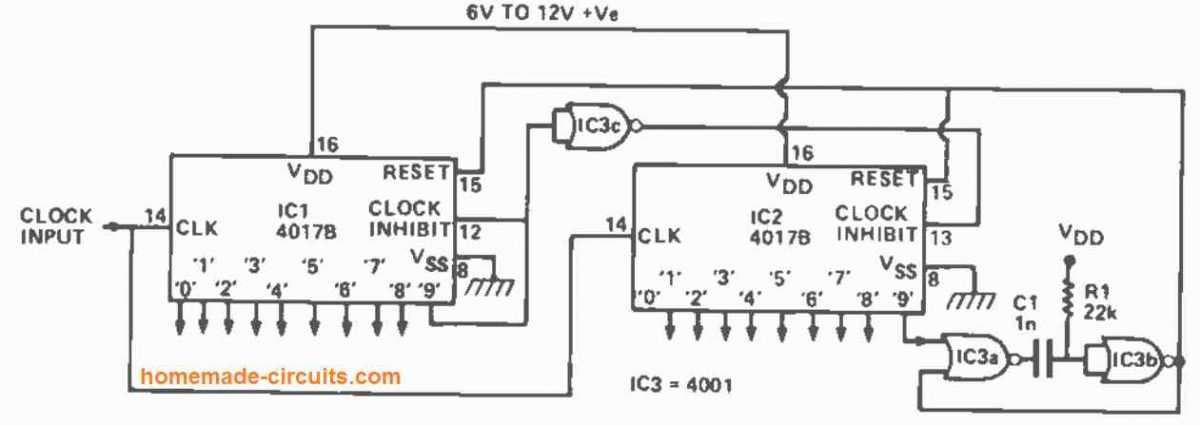
The diagram above shows how to connect two 4017s together to create a 10-to 17 stage counter/decoder. It shows how to cascade two 4017 ICs to get 17 sequencing outputs instead of only 10 from a single IC. The circuit is shown configured to divide by 17.
The clock signal is supplied in parallel to IC1 and IC2. As soon as the count falls below 9, the '9' output of IC1 turns low, causing the clock inhibit pin of IC2 to be set high through IC3c, preventing IC2 from being impacted by the clock signals.
The '9' output of IC1 rises high when the 9th clock pulse comes, inhibiting IC1 from further clocking action, while simultaneously driving the clock inhibit terminal of IC2 low through IC2c, allowing IC2 to respond to further clock signals.
When the 17th clock pulse arrives, the '9' output of IC2 swings high for a brief period, triggering the IC3a -IC3b 15uS monostable. This 15us pulse resets both counters to the empty or '0' states.
After that, the counting sequence starts again by itself. Because the '9' output of IC1 and the '0' and '9' outputs of IC2 are "lost" in the counting process, the circuit only has 17 counter/decoder stages available. By connecting the "free" input pin of IC2a to the matching output pin of IC2, the circuit can be made to count by any number between 10 and 17.
How to Cascade Three IC 4017 for Getting 25 Sequencing Outputs
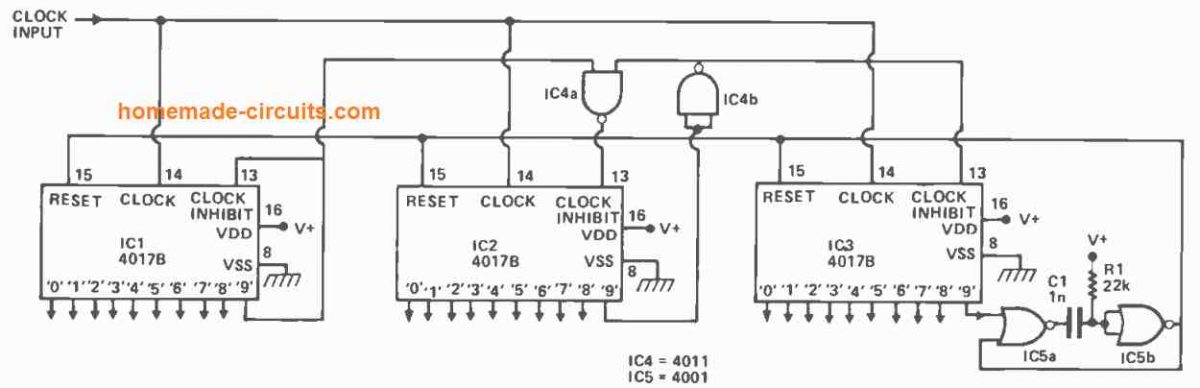
The configuration for creating an 18 to 25 stage counter/decoder from three 4017s can be seen in the diagram above. IC3 is inhibited by IC4b and IC2's low output '9,' whereas IC2 is inhibited by IC4a and IC1's low output '9,' until the 9th clock pulse. Between the 10th and 17th clock pulses, IC1 is inhibited by its high '9' output, while IC3 is inhibited by IC4b and IC2's low output '9'.
Subsequently, between the 18th and 25th clock pulses, IC1 is inhibited by its high '9' output, and IC2 is inhibited through the high '9' outputs of IC1 and IC2 using IC4c, and the whole circuit is reset to the '0' state by means of the IC5a and IC5b monostable.
How to Cascade Four IC 4017 to get 33 Sequencing Outputs
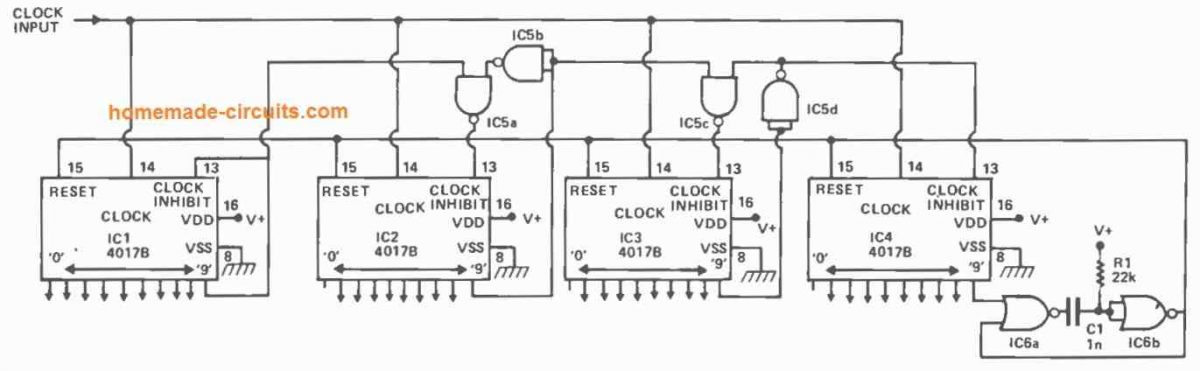
Using a divide-by-33 operation, the above setup shows how to make a 26 to 33 stage counter/decoder set. By interposing extra IC2-1C5a-1C5b stages between 1C2 and 1C3, this design may be extended to provide a ny number of decoded output stages. Each subsequent 40178 stage adds eight decoded outputs to the system.


Questions & Answers
disculpen la molestia , pero lo que deseo saber es que tipo de circuitos integrados son los que aparecen en el diagrama: IC3a, IC3b, IC3c, IC4a, IC4b, IC5a, IC5b POR EJMPLO
The IC numbers are given in the diagram, IC 4001 and IC 4011…
buen dia
En los diagramas mostrados aparecen los circuitos IC1, IC2, IC3, IC4 E IC5. Quiero saber que tipo de circuitos so esos (555, otro?) Y COMO ES SU CONEXXION
555 IC is used as an oscillator IC to feed the clock signals, or the ON/OFF alternate pulses to pin14 of the 4017 ICs.
hi, my name is hank, my question is the 18 to 25 count circuit schematic at the top is connected for the divide by 18 or is it 25… I need a system that give me a 1 output only every 18 pulses ….which pin of the cd4017 do I need to use….12-13-25 @ 4:AM thank you hank…..
Hi Hank, that circuit is divide by 25 circuit…
Please go on counting from 1st to the last pin of IC1, IC2, IC3, to get the 12, 13, 25 outputs serially.
I have built many fine circuits with your advice; I just did one as an LED driver for mini-Christmas lights on a dollhouse. I was thinking about adding a small capacitor to each of the 4 outputs I am using to act as a delay bleed down to the gate of the 2222 transistors I am driving. I am thinking this will give me a more incandescent look to the lights as they switch off.
My question is will this cause any issues with the chip if I do not first install a diode on each output before the cap?
Sounds great! Yes, adding a slight delay will certainly give the LEDs an incandescent filament bulb type of lagging ON/OFF switching appearance.
nice one. thanks. but in my circuit, for the first counts 3, 2,and 4 also, the pin 12 is high. seems they must be low . i have let the pin12 floating as i do not use it in my applicaiton. also, after 3 counts, i want to reset the IC to restart from pin3 onwards. but it is not happening. can you help me.
Greetings, dear friend, probably the base connection of an ic555 is not connected to the negative
Thanks Babu, that is correct, pin#12 will be high for the first 3 counts and then become low until pin#9, then again high until pin#4. You can keep it floating or open if you don’t need it.
If you want to reset the IC after pin#4, then just connect the pin#15 with pin#7.
To make sure the IC starts always from pin#3 during power ON, make sure to connect the above mentioned pin#15 with pin#7 through a 10k resistor, and then connect pin#15 with positive rail through a 0.1uF capacitor.
hi, Swagatam its long time follower of you, Need Led Chaser for making aerrow of 10 sets of coloured 5mm led x 2 set for both side. The Led arrange sequence in no. 1-3-3-3-3-3-3-3-3-3 which is same in another side. Lighting Sequence needed blinking start from right and End in 1 and after that total set glowing at a time for 20 sec and again the sequence repeat. Can it be possible in 12 volt 1-2 amp max besic smps driver because it used in road and housing would be 32 mm or maz 40 mm waste pipe housing. Again Besic 4017 and 555 IC Circuit can Perform this. Basically I need this With Showing your regular cheap circuit. Thank You. Waiting For Your Circuit review with Components and Diagram by which I Can make It. Waiting for your convenient.
Thank you Rajib,
So you want the chasing effect on the LED string by initially flashing of the single LED then remaining groups of 3 LEDs chasing forward? Do you want the 3 LED groups to shut off after each 3 LED lights up, or to hold the illumination until the whole array lights up and then shut off together?
If you want them to hold until the whole string is lit up, then you may want to do something as explained in the following article:
https://www.homemade-circuits.com/welcome-chasing-led-display-circuit/
Let me know your opinion….
Hi Swagatam,
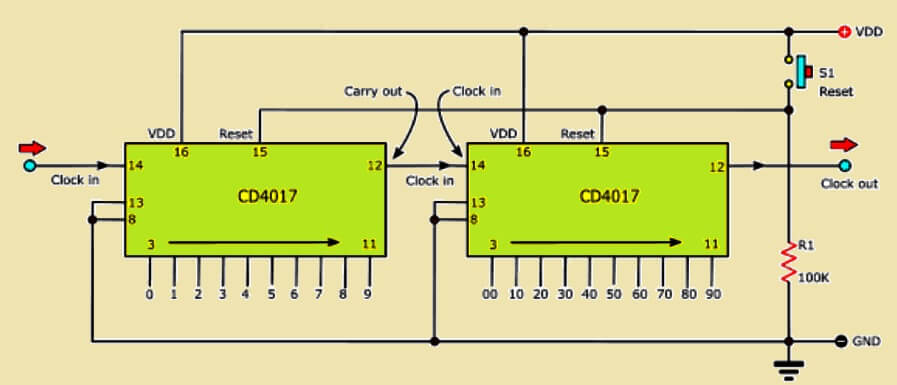
In cascading, why can’t I cascade the chips directly as shown in this website
Using the CarryOut pin?
Thanks.
Hi Nelio,
The pin#12 of the IC 4017 is HIGH for 5 clock pulses and LOW for the next 5 clock pulses in one complete cycle of 10 counts.
So I don’t know how this cascading can cause a continuous sequential flow across the outputs of the two ICs to generate 20 continuous output sequences. If that would be so simple then i wouldn’t have used such complex methods to cascade the 4017 ICs.
But I could be wrong, so I would request you to try this method and let us know if that works or not?
Hi, Swagatam,
I have assembled the circuit Cascade with 3 chips 4017, making the stop at Output 3 of the 3rd 4017, since I’m only lighting 20 LED’s, but I have a situation: LEDs connected to Output 0 of 2nd 4017 and Output 0 of 3rd 4017 are always ON, turning OFF when the sequence passes through them, but lighting ON again when reset occurs.
How can I solve this?
Nélio
Hi Nelio,
Did you modify the IC5a input which is connected to pin#9 of IC3 4017? You might need to connect it to pin#4 of IC3 4017?
But I think these circuits are overkill, they can be much simplified using BJTs.
Hi, Swagatam,
Has I mentioned, «making the stop at Output 3 of the 3rd 4017» Output 3 which is pin 4 of the 3rd 4017 is connected to the input of IC5a.
I have reviewed the connections several times, but the LED’s connected at Output 0 (pin #3) of 2nd and 3rd 4017 are always ON, turning OFF when the sequence passes by them, but turning back ON when resets occur.
Hi Nelio,
Yes, pin#3 is always ON by default whenever the IC 4017 is in the “standby” position.
So, while your 1st 4017 is operating the other two are “waiting” and in the standby position, which means its pn#3 will be ON.
The easiest way to eliminate this is simply not use the pin#3 of the 2nd and the 3rd ICs.
Or the other method is to power ON the subsequent ICs only when the previous IC has finished counting upto 10. In this way if the ICs have no power in the standby mode, their pin#3 will be off.
If you want this method, I can draw it for you…
I’ll probably try another approach…. will test the cascade configuration of the datasheet of the 4017, using a single AND chip.
Thanks anyway.
Nélio.
Ok, great! let me know how it goes…
Hi, Swagatam,
The cascade works but not in full sequence.
As soon as the 1st 4017 reaches Output 9, the next 4017 advances from Output 0 to Output 1, and the 1st 4017 resets.
The second 4017 only advances whenever the first 4017 reaches Output 9
Thank you Nelio,
So the results are not correct, and that cascading is not effective.
Hi Swagatam,
I cannot get a simple 4017 5 LED chaser to work. Have checked and checked and still cannot see what is wrong. All LEDs flash together and sometimes change but not in the expected order. Same problem I had with previous 4017s but have replaced witha brand new one today and see the same problem. Any ideas what may be causing this? I have pin#1 connected to pin#15 to only cycle the first five outputs. Also have input from 555 to pin 14 with 100K ohms pin #14 to ground…
Do I need to put 1K from the unused pins to ground?
Thanks for any help.
Cheers
Hi Michael,
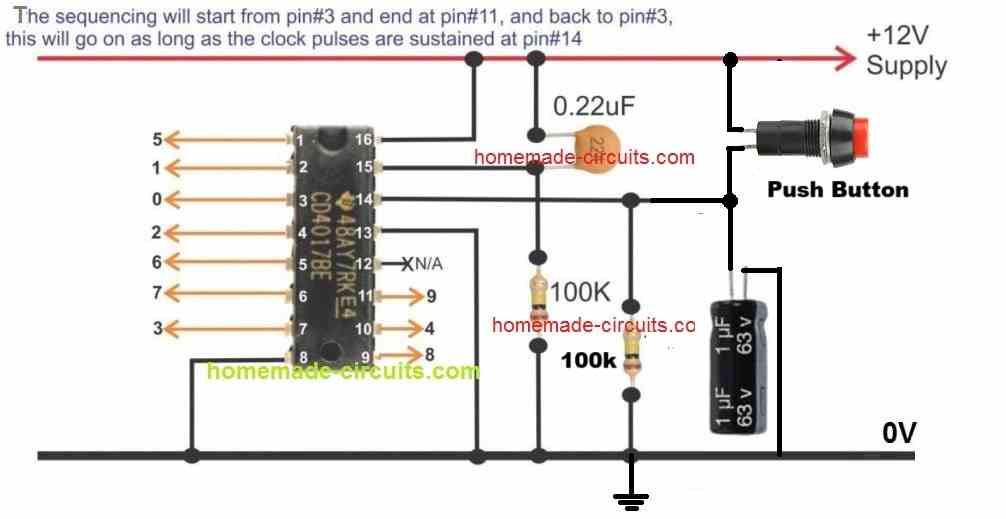
You just need the following basic setup, please try it with a push button first and check whether the output logic sequences or not in response t each pressing of the push button:
Please keep a pause of at least 2 seconds between each pressing.
If it works then your IC is good, and now you can remove only the 1uF capacitor and keep everything else as is, and integrate the 555 oscillator’s pin#3 with pin#14 of the 4017
Hi Swagatam,
This has been a work in progress for a little while but now that I have a handle on the 4017 circuit I need to incorporate it into a circuit you provided called “motor-control-using-photo-interruptor”. You may recall it was triggered by a flash/pulse and was to run for only a few revolutions.
I can send the image you linked if you cannot locate it. I actually need to trigger the 4017 circuit simultaneously with the pulse that starts the motor and stop the motor after the number of revolutions counted by the 4017 circuit (this is done by a microswitch on a cam driven by the motor. Each rev will increment the counter like in the push button option you sent earlier). So I need to also add a switch which will replicate the pushbutton and after 5 revs turns off the power to the circuit. Does this make sense?
Hi Michael,
Yes I remember it, and it make sense, however when do you want the 4017 outputs to advance, is it when the light of the photo interrupter is just blocked or after it is just released?
Let me know about it, I will try to figure it out.
Hi Swagatam
I am removing the photointerrupter and replacing it with a microswitch – closed when pushed otherwise open – so it will be the switch circuit that inputs to pin14 on the 4017IC.
Thanks
Thank you Michael,
So after 5 revs you want the power supply to the 4017 IC circuit should be shut off automatically and permanently, which can be reset back manually through a separate push button maybe, is that right?
Hi Swagatam.
So after 5 revs when the microswitch is closed by the cam on the motor, the power to the motor should go off until another starting pulse is sent to the main circuit. At 5 revs as I understand it, the 4017 should already be reset so the next time the motor starts it will be at the start of rev 1.
Hope this helps
Ok, understood, so it looks pretty easy actually.
We simply drive the motor through a PNP Darlington transistor whose base is controlled by the 5th output from the 4017 IC.
As soon as this 5th output becomes high, the PNP driver transistor is turned OFF, which turns off the motor.
Hi Swagatam,
Thanks for the new circuit design. It makes sense. I will look into the reed switches a little more – seems they may have an issue with longevity though?
Problem – I have breadboarded the circuit you sent and have sent 7 ICs and a few PNPs to the graveyard. I am using a 12V power source but would think they should handle it. I do need the 12v for the motor to run.
Hi Swagatam,
Still persisting with this. Have fried numerous 4017s I will send you the full circuit schematic once I get it finalised and perhaps you can why its popping my ICs. In the whole circuit its only the 4017 that cant handle it. Can I send the KiCad file or do I just send a image? What is the best email for this?
Hi Michael, you can send the image of the schematic too my email, I will check it out and continue the discussion under this comment…
homemadecircuits
@gmail.com
Hi Michael,
The circuit which I provided you is perfect and 100% correct.
12V is the correct and preferable supply DC for any CMOS IC, I hope you are using a CMOS version of the 4017 IC, otherwise it could instantly burn.
The transistor can burn if it is not rated as per the motor current.
Since you said your motor was very small, i assumed that BD140 would be enough for it, nevertheless you can upgrade the transistor to TIP127 for better safety, if required.
Let me know if you happen to troubleshoot the issue…
Its just a small motor. Testing so far indicates there is virtually no inertia once the power goes off. In fact I am thinking I will need a small capacitor to actually push it past the microswitch. Well fingers crossed anyway 🙂
In that case you can try replacing the microswitch with a reed switch for a frictionless operation.
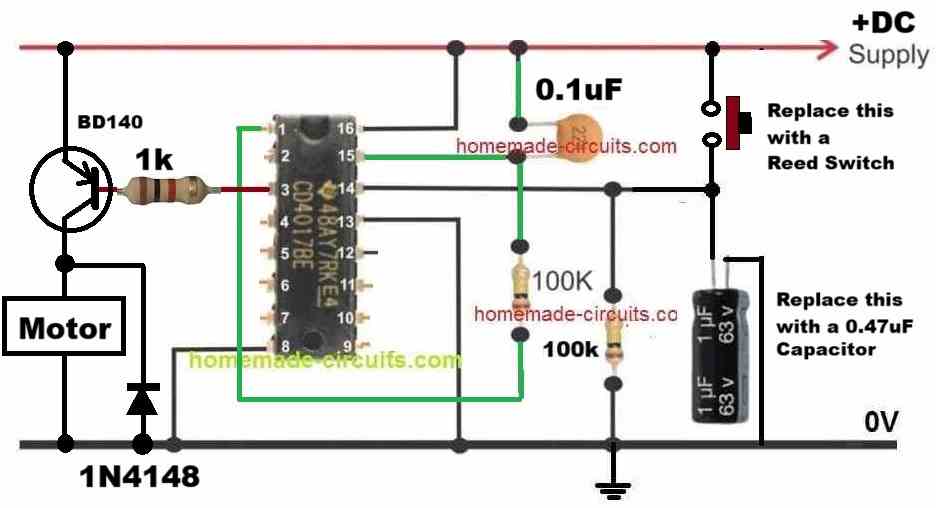
The following diagram should do the job:
Ahh good. Forgot the reset will happen at the same time pin1 goes high. The “looping” circuit is also basically triggered by the starting pulse for the motor. So I need the following circuits to work together (a small challenge for you … well maybe not) :-
a) a circuit that has slow fading/glowing LEDs which are on/off with main power source so this happens regardless of any pulse to the circuit (I have this already)
b) a pulse initiated circuit to power the motor which is only active while pin3 on the 4017IC is low (will this control the start of the motor if the initial pulse is also sent to pin14?)
c) a pulse initiated circuit to count 5 revs (each count is manually triggered by a cam on the motor closing a microswitch at zero degrees rotation)
d) a flashing LED circuit that only has power while the motor is rotating (I have this already).
Does this all make sense and can they work together?
Thanks again for your efforts with this project.
All the above things can be designed, but I am wondering how would you stop the motor rotational inertia. Even if the motor supply is turned off at pin#3, the motor shaft may keep rotating due to inertia and keep triggering the microswitch and never turn off?
Does that mean there will be only 4 revs? Do the pin assignments need to be advanced by 1?
It will be 5 revs:
3 to 2 = 1 rev
2 to 4 = 2 rev
4 to 7 = 3 rev
7 to 10 = 4 rev
10 to 1 and reset to 3 = 5 rev
So I assume then that because 4017 pin1 then goes low, the next pulse will be able to start the motor again for 5 revolutions. Correct?
Oh, I forgot that at the 5th pulse at pin#14, the 4017 needs to reset also, which means the PNP transistor would switch OFF only momentarily and then turn ON again instantly.
OK, so we can do one thing, instead of pin#1 we can use the pin#3 with the PNP base to shut off the motor, and let pin#1 be solely for the resetting purpose, connected with pin#15.
This should take care of everything perfectly.
Sorry. Was using a 10uF capacitor. 1uF works for each push to advance. I will try converting to the 555 input and let you know.
Ok no problem, just make sure to remove the 1uF after you connect the pin#3 of 555 with pin#14 of the 4017.
Hi Swagatam,
Actually interesting thing now but I think I have worked out what has been happening…
When I remove the capacitor all the LEDs start flashing in sync with the input at pin14. So same problem returns. Capacitor back in and it works nicely.
My 555 circuit has been adjusted to a 50/50 duty cycle so I am guessing that this has been the reason for the strange behaviors I have been seeing. Must be related to how the 4017 handles the pin14 input.
Thanks Michael, for the updates,
CMOS ICs can be specifically sensitive to RF noise and disturbances, the pin#14 being a sensitive input of the IC might be getting rattled by some sort of RF noise existing in your setup, it is not due to 555 IC’s 50/50 duty cycle.
Anyway, glad the problem is solved now through a capacitor.
Thanks for the quick reply. No luck. I added the push button. The circuit starts with pin3 on but nothing happens when I press the button. But all the LEDs have stopped flashing when the button is pressed (=output from 555).
Hi Swagatam,
I have built the above circuit from the LED Chaser simulation GIF. Checked and checked but my LEDs do not really chase. They flash randomly with the clock signal from the IC555. I have even swapped the IC4017 to be sure. I have pin1 connected to pin15 as I am only using 5 LEDs connected to pins 3,2,4,7 and 10. I have diodes between the LED cathode and ground. Any ideas as to why they are flashing and not chasing?
Hi again
Just wondering about the 555 LED. Should it be more OFF and flash ON, or mostly ON and blink OFF (which is what it’s doing now).
Thanks
Hi,
the ON/OFF time is not critical because the 4017 pin#14 will respond and trigger only to the switch-ON rising edge of each pulse…
Hi Michael,

Is the LED at pin#3 of IC 555 flashing correctly, as per the following diagram which you built?
Your pin#15 connection with pun#1 is correct, and this should allow the 5 LEDs through pin#3,2,4,7,10 to sequence.
Diodes between LED cathode and ground are not required, instead you must resistors.
The above circuit connections are perfect and should enable your 5 LEDs to sequences as intended, please check your circuit again and let me know.
Actually the 555 LED may be wrong. It is blinking …. not flashing. So, it is ON when power starts and then blinks OFF about every second (10 blinks over 7-8 seconds). The setup for the 555 seems ok though. Have checked it against the sample circuit again.
Thanks
10 blinks per 8 seconds is nothing bad, it looks fine to me.
I think something may be wrong with your 4017 IC, I hope you have correctly connected pin#8 and 13 of IC 4017 with ground.
Also please make sure the voltage input is strictly between 5 and 12V DC.
You can also try adjusting the IC 555 10k resistor to tweak the PWM of the input pulse fed across the pin#14 of the 4017 IC.
Hi Swagatam,
Thanks for getting back so quickly. The 555 LED is flashing correctly and consistently.
What resistance should be used normally? And how should this ususally be determined?
Thanks
Michael
Thanks Michael,
If your 555 is blinking correctly, then the 4017 output must also sequence accordingly and correctly.
To calculate and set the output flashing rate of the IC 555 you can use any online “555 astable calculator software”
Let me know if you have any further issues…
Thanks, Swagatam! The 1 uF cap and 100 ohm resister in series with the output from the CD4017 to the transistor base worked perfectly. This allows the 555 one shot to work properly. Thanks again for your help!
That sounds great, Norman! Glad it worked, and thanks for updating the info!
Hi Swagatam,
I think I have found a way around the problem. While testing, I found that the FLM038A can be triggered with a +voltage pulse without a transistor. Therefor I split the TTP223 touch module output with two 10K resistors. One of the split signals is used to trigger the advancement and play of the FLM038A and the other split is used to trigger pin 14 of the cd4017. Each time the touch switch is touched, the 4017 advances with nothing connected to its outputs except pin 11. Pin 11 drives a transistor through a 10K resistor that grounds pin 2 of a 555 one shot. The 555 one shot output drives a transistor to ground the Piezo Siren. Works on the breadboard, so I am now going to build it. I still would like to know if there is a way to produce a short pulse from the outputs of the 4017 for future reference. Thanks!
Thanks for updating the info Norman, Glad it is solved now.
I have replied to your earlier comment regarding how to use 4017 with a short pulsed output, please check the comment reply.
Hi Swagatam,
Is there any way to convert the outputs from a 4017 to a single short pulse instead of a continuous signal? If not, what about another IC such as a 74164 or a 74595? Thanks!
Hi Norman, yes that’s a good idea.
You can implement this simply by adding a 1uF capacitor and a 100 ohm resistor in series between the 4017 output and the transistor base.
The 1N4148 must be removed in this situation.
Try to make the capacitor value smaller, as far as possible.
The zeners are not working. I tried using a single transistor and two transistors and two reed ralays. None of them works. The only way it works is if I skip every other 4017 output.
The system runs off of 5v. Should the zeners be forward or backward? The black bar away from the 4148 or toward the 4148. I tried it with a 3,3v zener since the circuit runs on 5v.
For 5V, you can try 3.3V zener diodes.
The black bar of the zener diode should meet the black bar of the 1N4148 diode.
Hi Swagatam,
I am working on a CD4017 circuit and need some help. The circuit uses a TTP223 touch module to advance the 4017 through its 10 outputs. All 4017 outputs are equipped with 1N4148 protection diodes. Outputs 3 2 4 7 10 1 5 6 9 all trigger a BC547 to trigger a FLM038A doorbell module. Each time the FLM038A is triggered, it advances and plays a different sound or melody. Output 11 of the 4017 is used to trigger a 555 one shot that triggers a piezo siren circuit. I have found that I have to skip outputs 2 7 1 6 11 because the BC547 is continuously triggered if all 4017 outputs are connected. I tried using two separate output rails with two separate transistors. That doesn’t work either. Only one of the output rails triggers the FLM038A. Both the transistors are parallel connected to the FLM038A pins. Could you please suggest a remedy for my problem. I can email a circuit schematic if you need that. Thanks!
Hi Norman,
It is happening because there’s no deadtime between the 4017 IC outputs, which means the transition between the two outputs is seamless without any breaks.
To induce a deadtime you can try adding a 6V or 9V zener diode in series with the 1N4148 diodes and check if that helps to break the transition between the pinouts?
Let me know how it goes?
Good explaination how a 4017 ic works
Hi Swagatam, is it possible to use the 4017 as a one shot counter and at the end of the sequence the pin to remain “High”
I have found your site to be very interesting.
Thank you
Thank you Yeboyeah, 4017 cannot be used as a one shot counter. To make this happen you will need an additional 555 astable or an oscillator circuit with a push button latching facility.
Thank you for your prompt reply, much appreciated.
Would I not need a 555 as a monostable, triggered from the last output of the 4017?
Thank you
The 4017 requires a pulsed input at its pin#14 so an astable would be required to supply the pulses to the 4017 pin#14 in order to create a sequential output from the 4017 outputs.
The last output pin which is pin#11 can be latched or freezed by connecting it with the pin13 of the IC.
Hi I learned about the 4017b as a kid a number of years ago and I think this is the clearest description maybe of any cmos circuit I have ever read so thank you for sharing it in such plain language, it’s been a huge help for beginners in this really awesome line of cmos ic’s.
I have a project/idea I’m working on and I’d like to drive relays or perhaps transistors or I suppose both may be needed for using the 4017’s outputs to switch various audio line level signals. At 20mA I don’t think there is a relay that would function at such low current, my guess is that it would starve the circuit or worse so I wanted to ask your opinion on how I should go about it. My idea was outputs to bases of transistors which would switch by collectors to relay coils but there may be a smarter way to accomplish this ? I’m pretty new to transistors so any help would be hugely appreciated. Again thanks so much.
Thank you Stonelion, I am glad you found the post useful.
Yes transistor relay drivers is the common method for switching a load across a 4017 outputs, however if your load current is small then tiny relays can be employed. These relays are typically rated at 10 mA so these can be directly connected with the outputs of the 4017 IC.
Hi,
Great explanation of this IC.
But I am a bit of a newbee and the 4017 doesn’t want to do what I tell it to.
Here’s is what I did.
I connected 8 and 15 to negative of a CR2032 cell. 16 to the positive.
Then 3 to via a LED to negative of another CR2032.
I use 14 to create positive pulses from the last CR2032.
I expect the LED to flash every 10 contacts of 14. But it doesn’t. What am I doing wrong?
I want to use this for my treadmill to create a ANT+ signal via my Garmin bike-sensor.
This sensor has a magnet switch which reacts to the passing of a magnet on a bike-wheel.
Eventually I want this sensor, the magnet switch, to create the pulses for 14.
But, as it seems, I am far away from that point.
Hi, thanks for liking the above post.
Did you connect all the negatives of the CR2032 in common with the negative of the IC?.
Meaning, the negative side of all the cells must join with pin#8, pin#15 and pin#13 of the IC.
Make sure pin#13 is also connected to the ground line.
Ok, now I have only 1 cr2032 connected.
Negative to 8, 13,15, 3
Positive to 16
I use a wire to 14 to connect pulses to CR2032 positive.
On 3 there is a LED connected so I can see the result of my pulses.
I also had a LED connected to 1 to see if the counting works.
Most of the times the lights start blinking fast without needing a pulse.
After about 5 seconds they stop blinking..
Just one time the LEDs reacted to my pulses.
I can’t replicate it. So i must be doing something wrong.
3V is the minimum limit of the IC 4017, and anything under 3V will cause the IC to work abnormally.
So I would recommend you to use a proper 5 V or 12V supply for testing your circuit.
If you are using a CR2032, you can use two of them in series to make the supply above 5 V.
Thanks for all your help but I am about to give up.
I tried 3V, 6V, 9V (3 CR2032 in series).
The blinking has stopped but it seems to count at random.
I tried another 4017BE with the same results, I tried Q0 for another count sequence.
The LED blinks at contact. When pulsing sometimes it stays on until the next pulse, fully shining, somethings it is shining just a little, sometimes a flash. The count is really not consistent. It may be 4 or 7 or 11.
The only thing my setup differs from your scheme is the capacitor. I don’t have one at hand so I can not solder that in.
I am running out of options.
4017 IC is a very straightforward IC and should start responding correctly immediately without faltering, I am not sure why you are having problems with this simple procedure?
I think your positive clocks at pin#14 is not proper. Try connecting a 1uF capacitor or some other value capacitor between pin#14 and ground, and I hope you already have a resistor between pin#14 and ground. So a capacitor and a resistor across pin#14 and ground should ensure proper clocking of pin#14 and proper sequencing across the output pinouts.
The above capacitor very crucial.
Hello Swagatam,
I apricate your explanation of the 4017 IC. I have created a wire continuity checker using the the 555 and 4017 . The 4017 outputs drive a LM358 circuit that checks installed wires at 1 ohm or less. Currently I send Pin 11 (output 9) to Pin 15 to reset the counter. My issue is that I will be using this tester to for multiple combinations of cables with several of them under 9 wires. So I would like to find a way for the counter to go back to Pin 3 with less than 9 wires. Is there a way through dip switches or something else to make it reset based on a variable number of inputs? Thank You.
Thank you Ed, you can probably use a rotary switch to select and set the desired reset output from the IC. The following images provide more information regarding the subject.
Thank you Swagatam for the response. I did find find a schematic using a rotary switch after I emailed you. I think that will work well for my application. However, you added the 1M resistor on the ground side which I did not see on the other schematic. Being a newbie, my assumption is that is used to pull down the voltage on the selected output. That is very helpful to know. Thank you again.
You are welcome Ed!
The 1M is for pi#15, to make sure this pin never stays floating even for a second while the rotary switch is being moved. All inputs of CMOS IC must be terminated to a ground or positive potential as preferred, by default, to ensure proper working of the IC.
Thank you Swagatam that makes sense. Yesterday I incorporated the switch into the circuits and was testing it only on three of the nine. I was having issues with it working correctly. On the continuity tester circuits, there is an electrolytic capacitor on the power to the LM358. Once I removed them, the switch worked as needed. My guess is that the capacitor was causing pin15 to “float” as you stated.
Thanks for the update Ed, you may be right, however the exact reason could be confirmed only after checking the schematic visually.
Thank you again Swagatam for all your help. I have the rotary switch in the circuit and fully functional. My last addition to the circuit would be to add a momentary switch to reset the IC on demand. Since the 4017 is being driven by a 555, sometimes after power is turned on it does not start with the first output. This will be used as a cable tester and it may confuse an operator not familiar with how the circuit works if when powered on it does not start at output Q0. So I would include a switch as a manual reset. Thank you.
That’s great Ed! Glad it is working now. For ensuring that the 4017 always starts from the first pinout (pin#3) whenever power is switched ON, you just have to add a capacitor between the positive line and the pin#15. The capacitor can be any small value such as a 0.22uF or 0.47uF etc.
However, for this to work, the 4017 outputs associated with pin#15 must be connected through a high value resistor such as 10K
Hi Swagatam,
I added a .47 uF as you suggested and it works great. That is a much better option that using a rocker switch. I apricate all your help and education.
Thank you Ed, I’m glad it worked. It is a standard auto resetting method employed in all CMOS ICs which has a reset pin.
Hi, superb explanation! How do I set up to toggle between 2 led’s and all off before resetting?
Thank you and glad you found it useful.
You just have to disconnect pin#15 from the ground and connect it with the pinout which comes just after the last LED pinout.
For example if you want to toggle between two LEDs, you will connect the first LED to pin#3 and second one to pin#2, and then to make sure the sequence keeps returning back to the first LED you will need to connect the pin#15 with pin#4, which comes right after pin#2 (second LED).
Also you have to make sure that the IC always resets and starts with pin#3 whenever the power is initially switched ON.
For this make sure to connect pin#15 with pin#4 through a 10K or 100K resistor, and connect a 1uF capacitor between pin#15 and the positive supply line.
Wow, lightning reply…..Superb! Been trying to find a way to jump between 2 LED’s and OFF with one toggle button. Simple I thought…. Nah, not till I found this site.
Will this touch ic work as a switch signal along with (any) 4017?
Many thanks.
I am glad to help! You do not need any external circuits for the touch activation. It can be simply done using a couple of transistors attached to pin#14 of the 4017 IC.
You can try the second circuit from the following article:
https://www.homemade-circuits.com/simple-touch-sensor-switch-circuit/
Hi,
There seems to be a relationship of pin 16 voltage to reset and clock voltages. For example, If I run the chip at 12v, it seems to take 12v to reset it. Also, the clock pulses must be 12v. No sites make this very important announcement.
Hi, these are logic ICs so just 5V is enough to reset the circuit. even if the supply Vcc is 12V, according to me.
I am just learning. I would like to understand the gates you show when connecting two or more IC 4017’s. Are they just 3 pin connectors?
Hi,
I am working with a 4017s connected to the FET outputs of a PLC, and then voltage divided at the board down to nominal voltages. However, I recently encountered malfunctions of the counters and the only thing I can find is that pin 15 isn’t completely clean. Has about 150millivolts(from the PLC) My question is… at how many millivolts(+) on pin 15… will failure begin.
Thank you so much,
Hi, the 4017 IC being a CMOS IC and pin#15 being one of its inputs, it can start malfunctioning (partial resetting) at around 1V or 2V, however I don’t think a mV on pin#15 can reset the IC or cause it to malfunction. You can try adding a 1uF capacitor from pin#15 to ground and see if that helps.
Thank you for this advice!
Mr Swagatam, I am building the sequencer circuit using cascaded 4017s. I only need 13 Leds to sequence. From reading the above comments I can see that you must do something with the unused outputs. Could you clarify that for me? Thank you and happy New Year!
Hello Bob,
Thank you Robert,
you can probably try the following concept, and in the lower 4017 IC connect D4 end to pin#1 of the IC instead of Pin#3. Hope this helps!
Thank you very much!
Bonjour Monsieur,
Pouvez-vous me dire combien je peux mettre de led en parallèle (20 mA) sur chaque sortie du CD 4017 ?
Afin de ne pas le bruler. Bien merci pour votre réponse
Hello Jean,
you cannot use 20mA LEDs in parallel, because IC 4017 can produce only around 20 mA current across its output pins. If you put two LEDs in parallel, the light will be slightly dim.
However you can put 4 in series with high brightness if the supply input is 12V
Bonjour et merci d’avoir été très réactif a me répondre j’ai oublié de vous dire que je voudrai utiliser seulement 4 sorties avec 4 led en parallèle et surtout que chaque circuit doit clignoter rapidement,
donc dans ces conditions pourriez – vous être plus tolérant ?
You can use 4 LEDs across 4 outputs of the IC, with single LED on each output with individual resistors. But you cannot use 4 LEDs in parallel on each output.
Hi,
Senior Citizen here. I am making a lighthouse with 6 sequential LED’s.
I used your “IC 4017 Working Simulation”. The LED’s sequence in order, however there is a PAUSE after the 6th LED goes out before the 1st LED begins. How can I make it be a Continuous Sequence whereby it keeps going (which is what I need for my lighthouse. I am not sure how old your messages are and not sure if you are still monitoring them. In the event you are, could you please advise what I can do to eliminate the pause? Thank You, Richard (Massachusetts)
Hi,
I guess you have used only 6 channels instead of all the 10 channels as shown in the diagram. If you don’t want to use all the 10 channels, rather want to use a lesser number of channels, then you must connect the pin which is next to the last channel with pin#15.
This will ensure continuous sequencing of the LEDs without any pause.
Meaning, if your last LED which is the 6th LED is connected with pin#1 of the IC, then the next pin#5 which follows, must be connected with pin#15.
But remember, for the above connections, the pin#15 must be first disconnected from the ground line and then connected with pin#5.
I hope you understood the procedure.
Mr Swagatam,
Please tell me how can I use pin 13 to catch negative signal clock.
What changes must be made?
Thank you
Hello Hakim, According to me, you connect pin#14 to ground, disconnect the pin#13 from ground and connect a 10K from pin#13 to positive. After this with each ground signal applied to pin#13 will cause the output to sequence from one pin to the next.
Can a 4017 output be used to energize the 12vdc coil of an ice cube relay?
The IC outputs cannot be used to drive a relay directly, you will need a transistor driver stage in the middle
Hello Swagatam, impressive web you have, congratulations! Like all the other people I have a question, its about the 555/4017. Is it there any simple after each 4017 cycle to stop the counter for a moment, the time doesn’t matter but anyway it can be about one full 4017 cycle as well. I was thinking to stop it through 555 pin4 reset, or through 4017 pin13 enable but not sure if it can be done that way. Thanks!
Thank you Matey, you are right, the delay can be achieved either through a feedback at pin#4 of IC 555 or at pin#13 of IC 4017. I would prefer using the pin#13 option. You can implement it in the following way:
First connect the pin#13 to ground line via a 100K resistor. Next, select the pin#11 which is last pin in the output sequence, and connect it to pin#13 via a 100uF 25V capacitor. This capacitor value will decide the delay time for which the IC 4017 halts at pin#11 and then resumes back.
Works perfect in the simulator 🙂 thanks a lot Swagatam, I have been scratching my head full afternoon! So easy although I clearly have my theory rusty (kind of a begginer) as I can’t see how positive voltage shows on the negative side of the capacitor. One caveat for pursist: with this system pin#3 which comes after #11 is always less than full length because it picks the clock pulse at a random position thus the total duration of the 4017 cycle is slightly different each time. I am not after that much precission and not using pin#3 so doesn’t bother me. One more question, is there a simple way to delay the initial start of the process either through the 555 or the 4017? My goal is to energize the circuit in the process iluminating some fixed leds and after a while the 555/4017 kicks in driving its own leds.
That’s great Matey, glad it is working in the simulator!
The initial delay can be fixed using the pin#4 of the IC 555. Connect pin#4 of the IC 555 with the positive line through a 100K resistor. Next, connect a 100uF/25V between pin#4 and the ground. The resistor, capacitor value will decide the delay length.
Before this, make sure that the pin#15 of the IC 4017 is configured with the resistor/capacitor network, as indicated in the above diagrams
Thanks Swagatam, I came to the same solution and it would have worked, unfortunately pin#4 is not really meant to work this way, I looked into the datasheet and pin#4 exits the reset state too early, not sure the exact value but it was only about 0,4V which makes it not really suitable. I opted for a more convoluted solution using a 556 double timer. The first timer makes the delay with a capacitor to positive then a resistor to ground and in between hooked Trigger and Treshold pins. Once output is high it stays in this state until the circuit is de-energized. The output of the first timer is conected to the reset pin of the second timer which once hight turns it on. Surely not the simplest way but anyway, big big thanks Swagatam for the great help!!! 🙂
That makes sense Matey, thanks for the useful update, appreciate it very much!
Hello, the engineer swagtam!
i’m godwin shonga from malawi, and would want to thank you for the description for the ic HCF 4017 very understandable details about this logic ic and from now on i, will able to use this ic in my different applications, so i, thank you sir.
Godwin Shonga
You are most Godwin, glad you found the above post helpful! I wish you all the best!
hi. Can you tell me if it is possible to have to leds stay on after it has made a full sequence on the 4017 decade counter.
Many thanks.
Hi, it is not possible, unless you connect an SCR on each output terminal of the IC, as done in the following concept:
https://www.homemade-circuits.com/sequential-bar-graph-turn-light/
G’day Swagatam,
What a great service you are providing here, I am modelling a 3 aspect train signal consisting of a green, amber and red led that will cycle green, amber, red and return to green. The system will be activated by an infared led train detector and relay and I was going to use a 555 ic and a 4017 ic to do the counting. I would require the 4017 to stop at a 3 count and return to green that will remain illuminated until the system is triggered again by the ir detector. What pin do I terminate the count, is it pin 4 and where do I connect the re trigger to keeping the green signal illuminated, I would greatly appreciate your advice and assistance, Regards, Alexander.
Thank you Alexander, it is pin#7 that needs to be connected to pin#15 in order to return the sequence to pin#3 after every 3 counts from 3 to 2, 2 to 4, and 4 to 7, back to 3
Thank you very much for that information, the speed of your reply was fantastic. Doing that would keep the 4017 cycling with a 3 count but after the 3 count I would require the counting to stop and keep the first outlet, the green led illuminated and for the count to restart only when the ic would receive an external restart momentary signal from the ir detector circuit, is that possible, thank you very much once again.
In that case you should connect the pin#15 with ground through a 10k resistor, and connect pin#7 with pin#15 through a 0.33uF capacitor.
For the momentary IR signalling some thinking will be required
G’day Swagatam,
thank you once again, every time I see my model train signals activate your excellent assistance will instantly spring to mind. I can’t express my gratitude enough for your assistance, you do a fabulous job helping novices like me who just need a little kick along to understand more the field of electronics,
Best Regards,
Alexander. (Australia).
(P:S. I already have the ir detection figured out thank you).
Thank you so much Alexandar, It was a pleasure helping you, and I appreciate your kind thoughts.
Sir I made a digital clock using 4017 and 4026 with seven segment display. I connected pin #4 of one 4017 of ones display of hours and pin #2 of Second 4017 To the input pin#1 and pin#2 of And gate 7408 and output pin #3 of and gate to pin 15 of both 4017 to reset the hours after 11, I mean after at 12o clock the hours should show 00. I have not connected the pin#15 of 4017 to ground through any resister. The clock is resetting randomly. Please help me to fix the problem.
Rajendra, no resistor is required for connecting pin15 with ground, unless you want to implement some external switching on pin15.
Try using battery for the power supply and check the results…
What a great site! I haven`t found anything as reliable as this site on the net yet. WOW!
I have a question about the 4017:
I run a chasing LED light with the 4017, clocked by a NE555.
The sequence of the LEDs should start triggered by a switch or an LDR an run just once. So it should stop after the last LED was lit. And then the circuit should be ready to be triggered again.
The LEDs illuminate a marble run. So the marble activates a switch/LDR and therefore activates the LED chase.
How do I manage to make the 4017 stop right after the last LED and be ready to be triggered again?
Many thanks for your help from Germany.
Best wishes and stay healthy
Thomas
Thank you, and glad you found the site useful!
You can stop the LED at the last pin11 by connecting pun13 with pin11. Meaning, you will have disconnect the pin13 of the IC and connect it with pin11, that’s all.
I built two chaser circuits each using a 555 and a 4017 ic each with 6 LEDs. I wired them identically and checked the pin placements dozens of times. One works perfectly,but the other one does not chase and only led 2 from 4017 pin 2 lights and remains on . I have checked the components and have found no faulty ones. Perhaps I should be grateful that I have one functioning circuit.
CWatson
Hello Swag i asking for a division by 4 where do i need to put pin 15 with(pin 13 to gnd)thank you!
Hello Mathieu, connect pin15 with pin1
sorry, connect pin15 with pin10 to get 4 counts
Good evening sir. Thank you for your interest in teaching us many of these circuit. Please I want to design a 4017 circuit connected to a relay that will drive a motor in both direction for few seconds. That is the motor will run clockwise for about 10sec, stop for 3sec and run anti-clockwise for 10sec, and stop for 3sec. This is just the basic working of a washing machine. with the use of relays i can drive the motor for both direction. but i am using the 4017 IC to give me the sequence but i need a circuit that will generate clock in every 3sec for the 4017 IC to follow the sequence. I’ve tried other pulse generators, but they are too fast for the timing.
Hi Elvis, There are many oscillator circuits which you an opt for, IC 555 astable being the most fundamental one.
Hi Swagtam, i recently made the led chaser circuit using 555 and 4017 like a turn indicator like AUDI CAR in which output 1 to output 10 will high one by one but no low from beginning. But after output 10 all led will LOW mad high one by one. I have connected 4148 diode from output2 to output1. Output3 to output2 and so on. But the circuit show no such effect. It only show on-off from output1 to 10 one by one..pls guide
Hi Chandrashekhar, you can try the following concept:
https://www.homemade-circuits.com/sequential-bar-graph-turn-light/
Hi sir.
How can I force output to low when 555 timer in astable mode is low in repeating manner?
For example when input clock is high for 1 s then after 1 s and before second clock high, output remains low? Not simultaneously?
Thank much
Hi Samo, which output are you referring to, is it 4017 IC output, that may not be possible, because the output of 4017 will get latched to high with each input pulse
Hi Swagatam, I hope you are doing well in these troubling times. May I ask if this circuit could be expanded to a total of 60 leds. The reason I ask is I am wanting to have 60 leds to represent the seconds of a clock, so one would come on then go out then the next one and so forth and keep revolving.
Regards Geoff
Hi Geoff, you can cascade any number of 4017 ICs by connecting them in the following manner:
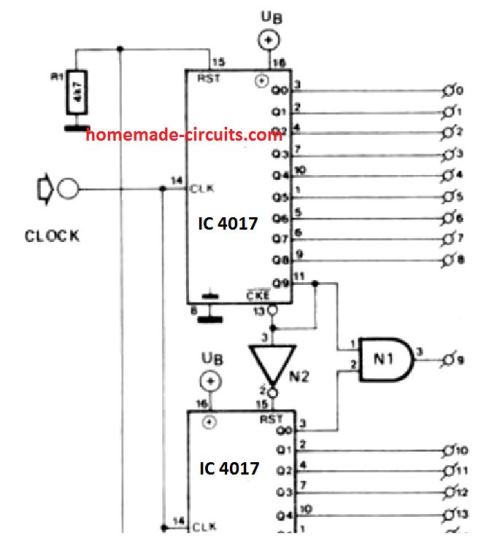
N2 can be any NOT gate such as from the IC 4049, and N1 can be any NAND Gate such as from IC 4011
sir Excelent web site
You are most welcome R.A.LAYANAL!
Hi Swagatam, Thank you for circuit picture. N1 is a AND gate such as from IC 4081.
You are absolutely correct, Murat….
Hello sir recently i have encounter the problem. I connect one single 555 output to two 4017 ic with a relay as shown in diagram. I want to connect it to my CAR backlight. whenever the car brake applied the backlight led will be dual strobe and when the car head light is on the Backlight will be act as Knight Rider LED sequence. My problem is when I connect the circuit the 1st dual flash light not blink. It is blink only below 7-8volt.
Hi Chandra, you can add a 7809 IC for regulating the voltage to the IC 555/4017 circuit, this might ensure that your circuit runs correctly even at 12 V and higher. Also make sure to add a 100uF/25V capacitor right across the supply terminals of the IC 4017 to suppress electrical spikes.
Dear sir. i want to make only 3 LED running light continuously to one side, (not chasing). how i can do that please explain? and also i want to get above running 3 led’s Positive side to be common, is that possible sir?
Jayanth, running effect and chasing effect are one and the same, for 3 LED chasing effect disconnect the 100k of pin15 from ground and connect it with pin7
Hello Swagatam,
I have an issue which I don’t understand. Perhaps you can help.
I have the following IC’s – a 555 timer, 4081 ‘and’ gate and then 2 x 4017’s
The first 4017 must complete it’s cycle before the second 4017 starts it’s cycle.
pin 3 of the 555 provides output to pin 2 of the 4081 and pin 14 of the first 4017, Pin 3 of the first 4017 resets the second 4017 thru pin 15 (of the second 4017)
Pin 9 of the second 4017 resets the first 4017 thru pin 15.
The problem that I am having is that pins 1 and 3 of the first 4017 output both hi and lo signals. All other outputs on either 4017 are fine.
I will probably have to send you a diagram. Can you please provide me with a link address or email to do this.
I’m trying to build a circuit from a book. The first game uses the 4017 and 555 ICs and has a switch between pins 5 and 15 to allow switching between cycling through 6 LEDs or 10 LEDs, with a 56k resistor betwen pin 15 and +9v when the switch is open. I can get it to cycle through 6 LEDs but when switching to 10 it just freezes on LED 1.
I’ve tried varying various component values without success but I’m out of ideas. Any thoughts?
I have put 100K resistors connect to ground on both 4017’s on pins 14 and 15 as you explanation above suggests. Connecting pin 13 on the first 4017 doesn’t work.
Hi Royden, the link that you gave me is not opening, shows an error 404 not found.
https://photos.google.com/photo/AF1QipMyKtf26XKQqhfpS4p0JTTCtxo90joDW0kBOBdR
Hello Royden,
Can you please upload the pic to any “free image hosting site” online and provide me the link here, I’ll check it and try to solve it for you!
Hi Swagatam. Do you need to password to see the image?
Password is not required, there are many free image hosting sites which can be used for uploading images and for sharing them through the given links
Waal, thanks very much let me try it. You are the best.
Glad to help!
Hi sir.
Is it possible to control 2 switches(a momentary switch and a latching switch) using a single push button to switch both switches initially then momentary switches off when button is released and when the button is pressed again, it switches off the latching switch without interfering with the momentary one?
Hi aBhunu,
Do you mean to control two relays, one momentary and another latching?
Yes, that’s exactly my inquiry and whether if its possible to use the same push button to switch off the latching one.
Please remove the capacitor at pin2, replace it with a wire link
You can try this:
Hello! Thank you for the nice explanation! Here’s my problem: I want to use a 4017 to “downscale” the pulses from a speedometer hall sensor. I changed the gauges on my bike with the ones from a later model, and everything works ok except the speedometer, more precisely its needle goes high, above 120km/h while I barely have 10km/h. The wheels on both bikes have the same teeth number for the hall sensor, so either the sensors are different or the newer gauges have different interpretation of the pulses coming from the sensor. I would try to first divide the pulses by 2 using the 4017, will your circuit work? ? In my understanding I would need to connect the wire coming from the hall sensor to the pin 14 of the 4017 and get the output from one of the output pins, corresponding to what value I want to divide by. Is that correct?
Yes that looks feasible, first the Hall signal will need to be amplified to at least 5V for activating pin#14 of IC 4017. For divide by two output you can use pin#2 as the output and join pin#4, pin#15 together. Make sure pin#14 has a pull down resistor.
How can I measure the signal of the hall sensor? My guess is that the signal should be around 12V, as the bike (it is a maxi scooter in fact) has a 12V electrical installation, I donțt think this signal gets lower voltage anywhere. And what about dividing by 3 or 4? Following your explanation, for dividing by 3 I should use pin #3 as output and join pin #5 and pin #15 together, is that right? What value should the pull down resistor on pin #14 should have? And for the rest of the circuit everything should be left as in your schematics right? I mean I still have to also connect pin #14 to GND using a 100K resistor and also to connect the pin #15 to positive supply using a 0.22uF capacitor and to GND using a 100k resistor.Really sorry for so many questions, I am below newbie level in circuitry, but at the same time would be easier for me to just get the right sensor and cable from the second bike, but I just want to have some fun building this divider, maybe, just maybe it will work. I have everything ready in front of me to build the thing. Thank you for your time, patiently waiting for reply, cheers.
Check to what supply voltage the Hall effect’s supply pin is connected, if it’s 12V then the output will be also 12V, and thn you can connect it directly with the pin#14 of 4017.
Don’t use the pin#3 as the output, instead use the last pin in the order. The order of sequence will be: 3, 2, 4, 7, 10, 1, 5, 6, 9, 11.
If you want to divide by 3, then you will have to use pin#3,2,4 an connect pin#15 with the pin that is next to the last pin in the order, here it will be pin#7 because it is next to the last pin pin#4.
But as shown in the basic diagram, the pin#15 is connected with a 100K to ground. In your case disconnect the end of this resistor from the ground and connect it with the pin#7. Let the 0.22uF be as is.
In the basic diagram a 100k pull down is already shown at pin#14…so you can keep it exactly as shown, no need of adding any extra resistor.
Hello again. I am a bit deluded… my circuit doesn’t seem to have any effect on the hall signal. I have tried dividing by 2 and by 4, but the needle still goes to full. To divide by 4 I have connected pin #7 to output and joined pin #10 with pin#15 via 100k resistor. I suppose that is correct. Now, what if I would like to divide straight by 10? I presume that I have to use pin #11 for output, but what pin needs to be tied to pin #15 in this case? Thanks
Hello, if its not working with divide by 2/4 then it might not with divide by 10 either because the problem may be somewhere else!
Connect LEDs from the 2 or 4 pins to ground via 1 K resistors for each LED, and check the response. The LEDs must sequence verifying the hall signal processing correctly.
For divide by 10 connect the pin#15 as shown in the basic diagram, that is to ground via 100K resistor.
One more time, just to make sure I got this right:
To divide by 2:
– use pin #2 as output
– join pin #4 with #pin15 with a 100k resistor in between.
– no resistor between pin #15 and GND.
To divide by 3:
– use pin #4 as output
– join pin #7 and pin #15 with a 100k resistor between them
– no resistor between pin #15 and GND.
Is this right or I am 100% dumb?
That’s perfectly correct!
I was trying to make a calculator out of 3 4017 ICs. But every time that turn it on, all the LEDs start to flash like crazy, so fast that the LED’s are continuously on. The effect is the same as the “4017 AC Detector” that flashes LEDs whenever the 4017 detects AC voltage. (Here is a link to the schematic: ). But you see, I DON”T WANT MY CALCULATOR TO ACT LIKE AN AC DETECTOR! I’ve tried to fix the problem multiple times but nothing would work! Do you have any ideas on how I can fix this problem? Thanks in Advance!
-John Crespo
How did you connect the 3 ICs with each other? Pin#14 will respond to each “high” clock signals and produce a corresponding sequential shift across its outputs. If the clocks are too fast the shifts will be also too fast.
The shown idea is actually not recommended as an AC signal detector, because for any CMOS IC the inputs should never be kept floating, it must be either terminated to a + or a – supply rail, otherwise it may lead to a slow deterioration of the IC performance.
How do I make a counter count up to five? Pin 10 should be connected to pin 15?
Pin#1 should be connected to pin#15 for getting 5 sequential repetitions.
Hi, thanks for the circuit. Happy Christmas.
I want to build the sequencers for use with eurorack music modules to provide adjustable control voltages. The clock pulse will be supplied whenever a drum pad is played.
Because the clock signal will therefore be intermittent, should I clamp pin 14 to negative supply with a 100K resistor in a similar way to pin 15 clamped to ground?
Hi, Happy Christmas to you too!
yes a 100K to ground is OK, and also a 10uF capacitor in parallel with this 100K will be required, you can tweak this value to suit the needs… this capacitor will actually help to rectify the intermittent signals and enable a constant voltage to the pin14 of the IC….
yes I was doing a traffic signal using 4017 and 555 timer, and the circuit shows 12 connected to the red LED, I understood the working of yellow and green, but I did not understand why red was connected to pin12
pin#12 of IC 4017 is the carry out pinout, which will enable carrying forward the frequency from the IC 555 to probably a next similar stage.
Hi thank you for posting this . I built a sequencer for a tone generator and it works but when I turn the rate up to a certain point it stalls and won’t go faster. Recently reconfigured the casing and it suddenly worked in process but now back to stalling any ideas? Thanks
There is a 555 and a 4017, I’m not sure which one is acting up. What I have is an “Atari punk console” with a four tone sequencer , 4 100k potentiometers for tones and a 500 ohm (I think) for speed. It works but when it is running and I increase the speed, it will only go so fast and then stop on one of the tones. I was adding a keyboard to it the other day and so I was moving the boards around and such and I was testing it while I was working on it to make sure things were still working and I noticed it would then go as fast as I wanted it to, like to infinite. When I repackaged the whole thing and it was finished it was back to stalling again. So im not sure if it’s the 555 or the 4017. Sorry kind of a newbie thanks for quick response.
I figured it out thank you two pins on the 555 needed to be soldered together
OK, good!
Hi, which IC stalls? is it the IC 4017, can you tell me what exactly happens?? I’ll try to solve it for you….
Good day Sir, I want to 4017 and band switch to on two LED which means I need only two pins to work (0,1) and it should restart again and the pressing of the switch will control it.
How can I do that Sir.
OLuwatoyn, you can try the following concept
https://www.homemade-circuits.com/2013/08/single-push-10-step-selector-switch.html
just replace pin#10 with pin#7…pin#10 can be left unused
pls how do i build a a reading lamp of 24 LEDs with 6volt 4.5amp battery ?
make 12 strings of LeDs having 2 LEDs in series on each string…connect all the ends of these 12 strings with the battery terminal with correct polarity.
Hello .
I am tryingto build a Device by using 555 +4017 as an sequencers . Btw I have many questions but the later I'll discuss first I would like to know what ll be the voltage in 4017 outputs. This question is because , I am building a device in which every pins of 4017 outputs have been connected 3-4 LEDs and as well several ICSof 4017 are connected in series with the same outputs configurations so please let me know or if you have any better simple solution for me thankful for your concern ..
Hello,
the output from a 4017 IC will be almost equal to the supply voltage connected to its pin#16…
Thank you
hii Swagatam
i was trying to build an 8×8 LED display board using 74HC595 shift register to send data to eight anodes. and CD4017 to make sure that only one column is active at time. since 4017 is connected to cathodes of LED matrix, i need active low outputs from 4017 . so i used 2N3904 transistor as driver circuit and as inverter. but i doesnt find any useful outcome. whatever the input at base of transistor the output at collector is grounded ,litting all the leds in the matrix if all anodes are high. …. can you figure out and suggest the changes that should be made in the circuit. im using 5v supply
Hi Ramchandra,
It looks like your IC is faulty or the transistors are faulty,….because all the NPN cannot stay ON together when connected to an oscillating IC 4017 circuit.
You can put LEDs in series with the base of each transistor and check the response..if still you find the base LEDs also ON then definitely that would indicate a faulty IC 4017..make sure you have a 10K resistor at the bases of the transistors
and also make sure the 4017 sequencing is slow enough so that the LED response becomes viewable if it's too fast all LEDs would appear to be glowing together…
Hii
I used 4017 to lit 8 rows of led. So I connected output 8 to reset pin . But I doesn't see any sort of output/result. Is it the correct way to connect output 8 directly to reset pin
Pin#8 is the ground pin of the IC…
Hi, the sequence order of the IC is in the following way
#3, 2, 4, 7, 10, 1, 5, 6, 9, 11
Therefore for getting 8 channel effect, you must connect pin#9 with pin#15.
https://www.homemade-circuits.com/2011/12/how-to-understand-ic-4017-pin-outs.html
Hello sir
I make this circuit with 10 led.
I want to use this circuit in fence guard for when anyone traped in fence then count 10pulse after than it is off using 555 timer for small time and after than it continuous to work.
But problem is that I give 12v supply using battery.and using second battery I turn on fence guard .but I don't connect fence guard with any connection with counter circuit but every pulse it counts.as I remove 13pin from ground then also counter circuit counts.
As we know fence guard is generate 10kv pulse so due to mutual induction counter circuit start count.
Counter circuit and fence guard machine is totally isolated and keeping distance with 1feet but it counter starts and one by one led glow.
There is no connection between them.
How to remove this effect.
Hello Vikas, I cannot suggest until I see the entire schematic and how you have integrated the two stages with each other.
Anyway, pin#13 must be connected to the positive supply in order to stop the counting, just by removing it from the ground might not correctly inhibit the 4017 from counting….you can do this by connecting pin#13 with pin#11…so that as soon as 10 sequences are over the output locks at pin#11
Thanks Max,
In that you can simply connect pin#15 with ground through a 100K or any high values resistor, and also connect a 0.1uF capacitor from pin#15 to positive supply for ensuring that the LEDs always light up from pin#3 whenever the circuit is switch ON
Hj again Swagatam
I really appreciate your patience and extensive knowledge.
I don't think I made myself too clear in my previous post.
What I would like to do is to make 7 outputs strobe very fast for 1 cycle and then all 7 outputs should stay on while a positive voltage is present.
I wish to use 20 leds.
Should pin 15 be grounded via a 100R resistor?
Thanks again and keep up the good work. I learn more every time…
Max
Hi Max, the 4017 and N1 are responsible for the chasing action, N2 is used for producing multiple strobe flashes on the LED while it is chasing.
If you are intending to allow the LED to chase upto 7 sequences, in that case you eliminate the N2 output connection with the LED, and connect the LeD cathode ends to ground.
for stopping the chasing after 7 sequences could be done by connecting pin#6 with pin#13…pin#13 being removed from ground
connect pin15 directly with ground
hi,i just want to ask,how many voltage power that's in the pin 7(vss),pin 10 and 11(ac power)if my vdd is 12v?if cd4047 just could make the ac signal without amplify so it's not useful than an ac circuit?
I am using a 555 with 4017 to make tri color less with a common cathode dance. How would you do this ?
…sorry correction:
use the pins 3, 2, 4 for the LEDs and connect pin#7 with pin#15
use the pins 3,4,7 for the LEDs and connect pin7 with pin15
How do I get tri color less to run off a cd4017 if ? I need 20ma to leds
WHAT IS THE RESULT IF WE CONNECT 15 TH PIN TO THE 4TH PIN?
you can try IC 4022
will there be other ic that can substitute 4017? we cant find 4017 at our town here is our project
T-intersection of 2 way roads.
Requirement of 2 traffic lights.
Red is high for minimum of 5s
Orange/Yellow/Amber is high for 3s fixed
Green is high for minimum of 10s
Also have an indicator that will show where the cars can go (which way)
THANK YOU!!
me too there is no 4017 in our hometown
this is our project:
T-intersection of 2 way roads.
Requirment of 2 traffic lights.
Red is high for minimum of 5s
Orange/Yellow/Amber is high for 3s fixed
Green is high for minimum of 10s
Also have an indicator that will show where the cars can go (which way)
can you suggest a substitute for 4017?
THANK YOU!! 🙂
thank you
hello sir how are you now i am a big fan of yours
pls tell me sir how these ic are checked can this be done my multimeter then pls tell me how to check whether ic is faulty or not
Hello Puneet thanks!, there's no easy way of checking ICs such as 4017, the only way is to build a standard configuration and see if all the pins are responding as per the specs.
Sir how to ensure whether the output pins of 4017 carries the voltage equal to the supply voltage ?
…you can also refer to its datasheet for the same…
configure the IC as per its standard layout, don't put any clock at its pin14, keep pin14 connected to ground, and measure the output at pin3 or whichever pin may be high at that instant.
Hi Swagatam
Here are the LED dance floor modules (tiles) stacked.
i01.i.aliimg.com/wsphoto/v2/568475299_1/tricolor-rgb-led-dance-floor-sale.jpg
Here they are assembled as floor:

Each tile or module has its complete circuit. Multi-colored LEDs are arranged in various fashion/designs. The circuit can be operated in two modes:
1) AUDIO INPUT: The LEDs will be illuminated in response to the music signals received at the input of the circuit.
2) MANUAL INPUT: Each module is installed with a tap/weight sensor. The circuit will illuminate LEDs in different combination (randomly) in response to a tap or weight change detected by the sensor.
For the 1st option, an audio spectrum circuit can be used. For the 2nd option, I was considering to use the 4017 circuit.
The original circuit is based on microcontroller but, I am trying to do without it.
That's interesting Abu-Hafss, I'll try to include the idea in my blog soon.
HMM, AB GURU JEE AAYE RIGHT TRACK PAR 😉
Firstly, for the 1st set (of 4017+oscillator), we have to deploy a non-555 configuration to achieve such low frequency oscillation……right?
Secondly, where the push-button will be deployed?
Lastly, can a Random Bit Generator Circuit be used to achieve the goal instead of your above-suggested configuration?
Hi Abu-Hafss,
we can use a 4060 oscillator to facilitate the use of smaller timing capacitor.
The push button could be across pin2 and ground of the monostable.
Can you please explain how you would want to implement the same in your application (LED dance floor)??
Hi Swagatam
You didn't replied the first two questions.
Actually, I planned to integrate this circuit in a larger project (LED dance floor) which will illuminate LEDs in different configuration/colors, randomly in response to a foot-tap.
Thank you Bigboss,
I have seen a circuit of a Random Bit Generator using a few 2N3904 transistors and a TTL NOT gate, but not sure how it would perform for our application.
Another idea is to use an ordinary multicolor LED which generates quite a random automatic blinking rates, this could be integrated to the 4017 pin14 while the monostable output attached with pin13 (after inverting) of 4017 and directly with the common cathodes of the LEDs.
I would be publishing it soon in my blog for you to see.
Hi Swagatam
I want to use this IC for 10 random outputs.
According to my understanding, the CD4017 would keep on repeating its output cycle as long as the clock is fed at pin#14. My idea is to use a push-switch, which when pressed momentarily should send clock signals to CD4017. Ten LEDs are so connected that during the counting process no LED should light up. When the clock is disabled and the counting process stops, any one LED should light up randomly.
If the push-switch is used to trigger an monostable oscillator, which in turn activates a clock oscillator, the monostable would always stop the clock at fixed time which ultimately cause the CD4017 to stop it counting process at a fixed output pin.
Please let me have your valued suggestions.
Hi Abu-Hafss,
One easy way would be to use another set of 4017/oscillator stage fixed at 1 or 2 Hz sequencing rate, then use these sequencing outputs to provide randomly selected capacitors for the monostable.
This would continue for as long as the system stays powered, that means the monostable would be producing slightly different delays randomly for each flick of its pushbutton.
Hi Swaagatam
Yes, now you got it…..I "don't want the pressing duration to be influencing the result"….:)
may be I misinterpreted your requirement, you don't want the pressing duration to be influencing the result….in that case it will require some thinking and it would make the circuit a bit complex for achieving that.
The capacitor should charge relatively slowly, it should be dimensioned such that it takes about 10 seconds to get fully charged, Since nobody would hold the switch for so long would allow different charge level for the subsequent pressings.
Also the astable whose switch ON time would depend on the charge level of the above capacitor should be dimensioned for producing a very high frequency.
Together, the configuration would force perfect random results from the 4017 outputs, this is what I assume.
Again……., the level of charge of the capacitor will be directly proportional to the time for which the push-switch is pressed.
Monostable oscillator was just my idea as a starting line of action.
I just want a push button to be pressed momentarily which should (somehow) trigger clock signal to the CD4017, always for variable length of time !!!
…I mean the push button would charge a capacitor, whose level of charge would determine for how long the astable could supply the clocks to the 4017.
Hi Abu-Hafss,
OK now I got it, but why do we need a monostable anyway? We can use an astable instead.
Hi Swagatam
I mentioned in my very first post, "According to my understanding" which could be wrong. What I assumed is that in an electronic dice circuit, we have to press the ROLL-ON-DICE push button to send the clock signal to CD4017, which will start the counting process until the push-button is released. And during this counting process, the LEDs would turn ON/OFF in the counting sequence until the push switch is released, and then finally one set of LED would light up.
IN SIMPLE WORDS, THE RANDOM SELECTION DEPENDS UPON THE DURATION OF THE TIME FOR WHICH THE PUSH BUTTON IS PRESSED.
Whereas, in my case, if we deploy a monostable oscillator to trigger the clock signal to the CD4017 then the monostable would always stop the clock signal after FIXED TIME PERIOD as set by the timing components. This means the clock signal would always be fed for that fixed time and ultimately the CD4017 would always stop the output at a specific pin.
Hi Abu-Hafss,
According to your requirement:
"Ten LEDs are so connected that during the counting process no LED should light up. When the clock is disabled and the counting process stops, any one LED should light up randomly"
That's exactly what will happen if we implement the method suggested by me in the previous comment.
You present question is contradicting the previous question, I did not get it.
By "one particular LED" are you assuming that the 4017 would get reset and pin3 LED would always light up??
No, that wouldn't happen, as soon as the clock stops a random LED could be seen lit up
Hi Swagatam
Thanks for such a simple solution. But as I mentioned earlier, the monostable would always stop after a specific time hence, the clock would also stop after that time which ultimately would always light up only one particular LED. How to resolve this issue?
Hi Abu-Hafss,
Yes it is possible, the monostable would also be responsible for feeding the negative to the common ends of the LEDs after it stops the oscillator stage, this would illuminate the particular LED at the end as required by the application
Hi I'm making a dice circuit with a cd4017 and a 555timer but I can't get the LEDs that are connected to different outputs on the 4017 to light at the same time. For example, I connected four corners together to make 4, and two middle to make two, but I don't know how to make them both light to make six! It seems like the cd4017 can only have high output on one pin at once? Anything will help, thank you
You can use scrs at the output of the 4017 for latching the switched pinouts of the IC, please refer to the first diagram in this article:
https://www.homemade-circuits.com/2013/03/sequential-bar-graph-turn-light.html
Hi I am going to be using this IC in the LED dice with slow down project and I'm looking to connect a sound generator circuit with a flip flop to produce a sound when the LED's come to a stop. I wanted to know what pin on the 4017 will have a positive output once the LED sequence has come to a stop? Hence so I can connect the input of the second circuit (the flip flop) to that pin.
The output will be random and never fixed to a definite pin. It will depend on how many clocks are applied at pin14 of the IC. It will begin from pin3 and sequence by one pinout in response to every positive pulse at its pin14, as soon as it reaches pin11, the sequence returns back to pin3 for repeating the cycle.
sir,my name is karthie…i need to know where where this was used…?
Hi Karthik, one example can be seen in light chaser circuits, just type "light chaser" in the search box above, you will find the related articles.
Is it possible for me to get my desired pulse from cd4017 that if I need five pulse then the led light should be turned off five times and if 8 plus wanted then eight times the led light should be turned off.
Yes that’s possible by connecting pin#15 to the next pinout which comes just after the last output pin of your LED sequence.