In this article I have explained a simple walkie talkie circuit that can be easily built by any hobbyist and used for communicating between rooms or floors or simply for having some fun across neighbors and friends. The range of this system is around 30 meters.
A walkie-talkie, also commonly referred to as handheld transceiver is a small, portable hand-held two-way radio transceiver, which enables voice communication across a specified radial distance without using physical wire connections across the devices.
The initial research on walkie talkie concept during the 2nd world war era, has been variously credited to Donald L. Hings, Alfred J. Gross, and engineering experts at Motorola.
Walkie talkies were first supplied for infantry use, and soon it also became indispensable among field artillery and tank units.
Due to their outstanding wireless communication ability, these units quickly became popular among the masses and became a commercial product for the various manufacturers.
Circuit Operation
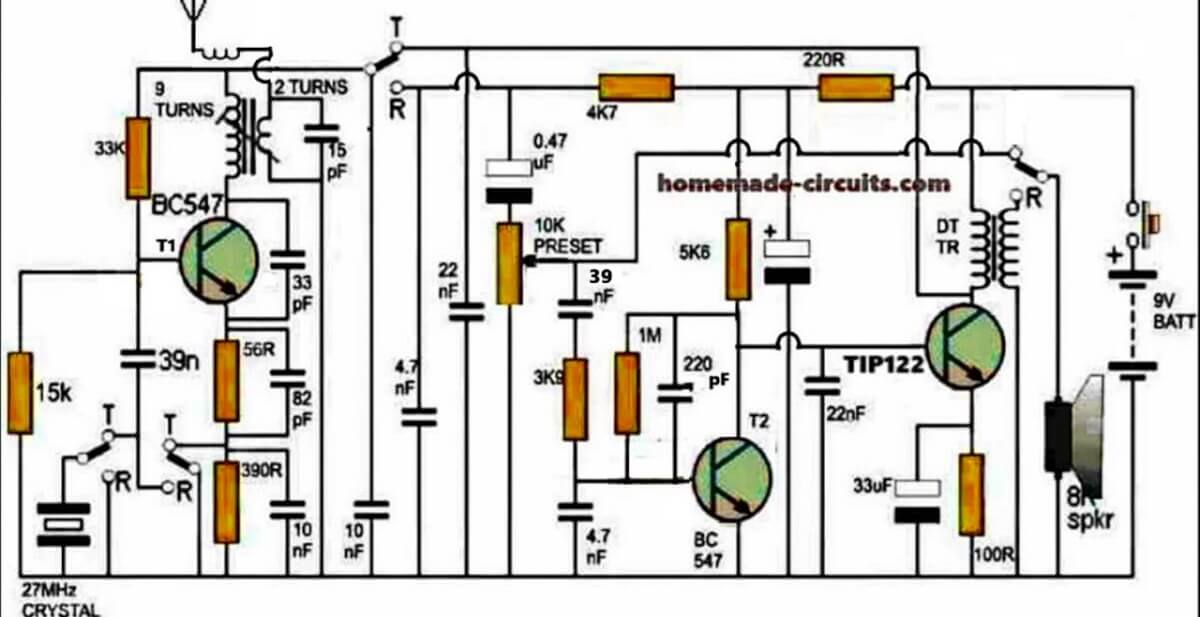
The figure shows a four stage transistorized circuit which behaves both like a transmitter and a receiver unit, making the design very economical and versatile.
An ordinary “4-pole double throw” switch serves the purpose well for transforming the unit either to a transmitter or a receiver while communicating with another identical transmitter/receiver set.
As can be seen in the diagram three transistors are directly coupled for making an audio amplifier stage set to operate at a significantly high gain.
The first transistor functions as a pre-amplifier which pulls the minute voice signals to some higher level and feeds to the next high gain Darlington stage which further amplifies the received audio frequencies and dumps it across the primary of a driver transformer.
How Driver Transformer Works
The driver transformer steps up the level of the signals such that it becomes clearly audible over the connected loudspeaker.
The speaker may be salvaged from an old small transistor radio or from a landline phone (earpice).
The speaker in the shown design is configured in an interesting manner. Depending upon the position of the walkie talkie switch, the speaker works like a sound reproducer when it’s in the receiver mode and like a super dynamic microphone when the switch is toggled in the transmitter mode.
While the speaker is being used as a sound reproducer or simply in the receiver mode, the first transistor acts like a signal receiver, picking up the audio across the 4k7 load resistor through the 0.47uF capacitor.
The signals then has to pass through a connected volume control stage to finally reach the three transistor amplifier stage discussed above.
However while the proposed walkie talkie circuit is flipped in the transmitter mode, the speaker gets rigged right at the input of the amplifier stage such that the spoken voice hits the speaker diaphragm and gets amplified by the same transistor stage.
This amplified voice signal is now applied in the form of supply voltage for the circuit in the transmitter mode. The switch also makes sure that the 27 MHz crystal gets connected with the first stage while the transistor gain is uplifted by eliminating the 390 ohm resistor and using a 59 ohm resistor at the emitter of the transistor.
In the transmitter mode the speaker transformer secondary now has no connection with the voltage step-up function rather simply acts like a series inductor for coupling the output of the audio amplifier with the supply rail and for sending the signal across the winding to the transmitter stage in the form of a fluctuating supply voltage.
As the above signal witnesses a rise and fall in response to the spoken voice, the gain of the first transistor stage is forced to change correspondingly which in turn results in a varying amplitude for the carrier waves transmitted by this stage over the attached antenna.
Thus the spoken voice now gets converted to an amplitude modulated (AM) RF 27MHz signal which may be picked by another identical unit placed in the vicinity for the same reason.
Parts List
All resistors are 1/4 watt 5% CFR
100 ohm - 1
220 ohm - 1
5.6K - 1
4.7K - 1
3.9K - 1
1M - 1
15K - 1
33K - 1
56 ohms - 1
390 ohms - 1
10 k preset - 1
Capacitors Electrolytic
33uF/25V
100uF/25V
Capacitors ceramic disc
0.47uF - 1
22nF -2
220pF- 1
4.7nF - 2
10nF - 2
82pF - 1
33pF - 1
15pF - 1
39nF - 1
Transistors
BC547 - 1
TIP122 - 1
Miscellaneous
Crystal 27MHz - 1
TPTT 3 pole triple throw switch - 1
Audio transformer - 1
small speaker 8 ohm 1 watt - 1
9V battery - 1
Inductor as I have explained below
How to Wind the Antenna Coil
The coil associated with T1 (BC547) collector is the antenna coil. It is constructed over a ready made variable inductor slug (see image below) having an approximate 3mm diameter and around 7 to 10mm height.
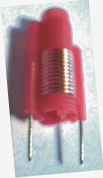
The wire used is a 0.3 to 0.5mm super enameled copper.
Start with the primary 9 turns first, directly on this wind the secondary 2 turns.
The coil in series with the antenna is s simple air core coil made by winding 5 turns of 0.3mm with 5mm diameter.
How to Wind the speaker coil
You may use a small audio transformer for the shown speaker transformer, or alternatively build it by winding around 70 turns for the primary (left side), and 500 turns at the secondary (speaker side).
The wire may be a 0.2mm super enameled copper wire wound over a 3 inch long iron screw.
How to Set up the Circuit
After you have built the above explained walkie talkie circuit it's time to check its response by powering it with a 9V PP3 battery.
Initially let the switch contacts be positioned for activating the transmitter stage.
For knowing whether the transmitter is generating the required 27MHz frequencies or not you will first need to make an RF sniffer circuit as explained HERE
Switch ON both the circuits, position the above RF detector circuit about 10 inches away from the walkie talkie antenna, and begin adjusting its variable inductor slug gently using an insulated screw driver which are typically used for adjusting FM radio GANG trimmers.
If every thing's done correctly you'll hopefully see the RF detector LED glowing brightly at some point of the adjustment process.
Seal and glue the variable inductor at this position, and you can assume your walkie talkie to be all set for having some great time with your friends.
However you would need to build another identical set for exchanging the conversations with the other guy, otherwise a single unit wouldn't have much of an importance.
What's the Range of this Walkie Talkie
The range of this 27 MHz walkie Talkie can be around 1 Km, provided the trimmers are correctly adjusted and the antenna is long enough for the wide radial transmission.



Questions & Answers
hi
how much length of antenna wire
Hi, 6 inches flexible wire should be enough..
I think there’s an error in the schematic. In the speaker switching section, the pin corresponding to transmission is connected to positive. This means that when the speaker is in transmission mode, the 9V from the battery is directly connected to the speaker winding, which could damage the speaker and cause the circuit to malfunction, as it’s also sending positive voltage to the center preset pin.
Theoretically, the solution is simple.
Just disconnect the positive connection to the speaker switching pin, and the circuit should work.
Thank you very much, you are right…I have corrected the diagram accordingly, please check it now.
Creo que hay un error en el esquema. En la sección de conmutación del parlante el pin que corresponde al la transmisión va a positivo. lo cual hace que cuando está en modo transmisión al bobinado del parlante le lleguen directamente los 9V de la batería pudiendo llegar a dañar el parlante y haciendo que el circuito no funcione ya que también está enviando tensión positiva al pin central de preset.
En teoría la solución es simple.
Solo con anular la conexión que va a positivo en el pin de conmutación del parlante el circuito debería funcionar.
Hi, you are absolutely right, and thanks for pointing out the mistake in the article diagram, that wire connecting positive to the speaker switch is a mistake and must be removed, here is the actual diagram for you:
https://www.homemade-circuits.com/wp-content/uploads/2020/12/walkie-talkie-circuit-compressed.jpg
hola me encanta los proyectos que haces, ahora voy a cursar mi segundo año de electronica y telecomunicaciones y tengo que hacer un proyecto, el del walkie es demasiado para lo que quiero? hablando en dificultad. Tambien queria preguntarle si tiene cuenta en youtube o alguna red donde explique de forma visual los pasos de sus proyectos, me ayudaria mucho, gracias un saludo.
Hey, Thanks so much for liking the projects on this site. I understand that you are interested to do the above project…
However, honestly the above circuit is not for the newcomers, it is recommended only for those who have previously constructed FM transmitter circuits or other audio projects and is well versed with soldering and stuff..
Yes, I have an youtube channel, you can check it out in the following link:
https://www.youtube.com/@Homemade-circuits/videos
hi. can I make this 11 turns not connect after 9 turns and 2 turns only two pins connect first and last…..second as you say you can use variable slug which has two legs…and when I make this….. the two legs which components it will be connect
Hi, 11 turns will change the frequency, and make it around 32MHz or something like that. Anyway you can finally adjust the slug to bring it back to 27 MHz.
Yes you can use the two legs of the slug to connect with either the primary 11 turn ends or the 2 turn legs, as you wish. The other two wires can be directly connected on the PCB…
The connections will be as per the schematic…
hi you have said 70 turns on primary and 500 turns on secondary this transformer is step upping or step down and second what diameter of screw needed
Hi, the audio output transformer is for stepping up the audio signal into the speaker. You can also buy this transformer readymade with the name “audio output transformer”
The transmitter coil winding details is already furnished in the article…please check it under: How to Wind the Antenna Coil
I’m little bit confused can I make the nine turn and cut it and then make connections and another two turn cut it and then make connections….and I don’t want to use slug because I don’t have
If you are not using slug type core, then use a trimmer capacitor for the 15pF, so that you can adjust the frequency.
hi
can I use 24mhz crystal
Yes you can use it as shown in thee diagram…
hi
in schemetic after 9turn it connect with bc547 collector and after in 2 turn the capacitor is connected 15p is this right …..I think the capaciter 15p it will connect start point and end point all 11turn
Yes, the 9 turn winding ends are connected across 9V positive and the BC547 collector. The 2 turn winding ends are connected across the 15pF capacitor, and one of its ends is also with the ground. If the transmitter fails to respond, just try swapping the 2 turn winding ends, and check again…
Dear Swagatam, i am having trouble understanding how this circuit works. The way i understand is that when the switches are on the T state, the speaker generates votlage through my voice, that small voltage gets amplified through T2 (BC547) and that amplified signal gets also amplified by the darlingtop pair of the TIP122. Later that amplified signal gets to the antena. But i still dont understand what the left part of the circuit does. In my understanding it creates a 27MHz signal which is amplified with T1. Could you please explain to me what each stage does. I would be very thankful to you! With best regards, David
Dear David,
Yes your understanding is almost correct but there is one small difference. The amplified audio signal from the TIP122 does not directly go to the antenna. The TIP122 amplifies the audio signal from the speaker and then this audio signal is used for modulating the 27 MHz RF signal.
When the switch is moved to the T position, the speaker acts like a microphone. So when you speak near the speaker, it generates a small changing voltage according to your voice. This small signal is first amplified by T2 BC547 and then further amplified by the TIP122 Darlington stage.
Now this amplified audio signal is applied to the transformer, and the transformer causes the supply voltage to the T1 RF stage to fluctuate according to your voice signal.
The left side part is actually the main 27 MHz RF oscillator stage. The crystal forces the T1 stage to oscillate at around 27 MHz. So T1 is not simply amplifying an already generated 27 MHz signal but it itself is generating the 27 MHz RF signal.
The audio signal from the TIP122 makes the voltage feeding T1 go up and down according to your voice. Therefore the amplitude of the 27 MHz signal generated by T1 also goes up and down according to the voice signal. This is how the voice gets added or modulated on the 27 MHz carrier.
I hope this makes the circuit working more clear.
What diameter should the coil cores have, and what should their inductance be?
The details are given in the article, inductance is not required to build this coil, the number of turns are sufficient..
Thank you very much for clearing up my confusion! I now understand it way better. Though i have a question still. You said The Left transformer brings the amplified voice signal to the 27Mhz stage. But how does it do that? Doesn’t the primary generate the voltage in the secondary which is just connected to ground? I am a bit confused on how the signal gets transferred. Also if the secondary isn’t connected to R switch, isn’t the inductor coil more like a capacitor? Thank you in advance! David
Yes now I can understand your confusion better, actually I should correct one small thing from my previous reply also.
The 9 turns and 2 turns coil on the left, it is an RF coupling transformer. The 9 turn winding is connected with the BC547 oscillator circuit, which generates the 27 MHz RF signal. This RF signal is magnetically coupled into the 2 turn winding, and then goes to the antenna.
The transformer near the TIP122 is the audio transformer. The TIP122 amplified voice signal is applied to one winding, and through magnetic coupling the audio signal appears in the other winding and is used for modulating the T1 RF stage.
And no, if the R switch contact is disconnected, then coil does not become like a capacitor. It is still an inductor, only that winding may not have any current path at that time. Of course all real coils have some small parasitic capacitance also.
So there are two transformers here, the left one is for 27 MHz RF coupling, and the right one is for audio coupling.
Ok thank you very much !
Thank you for sharing your work! I’m planning to build this for a school project, and I was wondering if you’ve personally built and tested this circuit—did it work well for you?
I previously tried making a similar walkie-talkie circuit from a YouTube tutorial, but the audio quality was really poor—I could only hear high-frequency noise and couldn’t understand any speech. So I just wanted to check your experience before I start.
Hi, sorry, no I haven’t tested this practically, however I can assure you that if you build it correctly and stage-wise then this circuit will definitely work.
You can start with the only left side transistor FM circuit and check separately if it sends the signals correctly to a nearby FM radio, once this is confirmed, then you can assume the circuit to be perfectly fine and then you can proceed with the whole setup further…If you have any issues, let me know, I will try to solve it for you…
I am not able to find TPTT 3 pole triple throw switch in market can i use different switch . when i searched for this ,a big switch is being shown
Please Google with the following phrase: 3-pole triple throw toggle switch
The toggle switch with 9 pins is the one you can try…
These switches are not big…
Hello
why does the rf transformer have only two terminals even though circuit shoes 4?
Hi, the image shows an example of the RF coil with an adjustable slug which you can use and modify it with the winding details as given in the article.
im unable to find the slug on any virtual platform as well as electronics shop sir, any advice?
Then you can ignore the slug type inductor and use a fixed inductor and for tuning the frequency you can use a trimmer capacitor for the 15pF capacitor
Hello I try to do same circuit but for 9 turn to 2 turn thing will be variable transformer or variable inductor I couldn’t understand or did you just use the plastic piece to connect the primary and secondary wiring? Because when I look internet about it variable inductor just have 2 pins.
On the plastic former, wind the 9 turns first, then wind the 2 turns over the 9 turns.
To enable firm fixing on the PCB, you can solder the two pins of the plastic former. These two pins can be connected to the 9 turn winding wires.
Then what about 2 turn wire because on diagram you use 4 pins instead of 2 pin
Or basically I just gonna do normal transformer with 9 turn primer and 2 turn seconder wiring.
I am sorry if I don’t get it
The two leads of the plastic former is only to provide a firm support to the transformer by soldering the two leads on PCB. So that it allows a comfortable adjustment of the slug. You can keep these two leads blank without any wire connections. Solder the two leads on a blank pads of the PCB. Now you can solder the 9 turn, 2 turns separately on the relevant points of the circuit.
How to make the variable transformer, I’m having trouble understanding on how to make it with the variable inductor coil slug
You can purchase it online:
https://www.google.com/search?q=buy%20variable%20coil%20slug%20screw%20type&tbm=isch&tbs=rimg:CQ15bFxpX3nPYagcvGgxWOFDsgIQCgIIABAAKAE6BAgBEAFAAcACAA&hl=en&sa=X&ved=0CBsQuIIBahcKEwi4gqXOzLr9AhUAAAAAHQAAAAAQCA&biw=1583&bih=757
Just let know I found the Audio Transformer it is 1K x 8 ohm.
Hard to find to day. Today I can find 1.3K x 8ohm.
The biggest limit to range is the antenna.
The walkie talkie used about 36″ or 1 meter. I did find on high smog from 6 to 7 also also limit the range. After 9 pm and no smog day with give best range and using a longer antenna gave max range.
Dave
Thanks for the update! Glad you found the important parts. Hope you are able to assemble them correctly and get the intended results.
Check on parts on hand.
The equivalent for the Transistors BC547 and BC338 is a 2N2222. Do you know if 2N2222 will work for both BC547 and BC338?
Are there any photos of past on builds of the walkie talkie?
Thank you
Yes 2N2222 will work.
I don’t have any photos but the above circuit is a tested one.
Do you now hhe power out put?
The power output is around 80 mW