The clap switch circuits explained here will toggle a connected load ON and OFF in response to alternate clap sounds? Here I have explained 4 unique and simple designs which can be selected as per user preference.
The article talks about what the title suggests – a clap switch. A small electronic circuit when built and integrated to any electrical appliance can be made to switch ON/OFF through mere hand clapping.
The proposed design when integrated to any of your electrical appliance can be used to switch it ON and OFF simply through alternate clapping of your hand.
The device becomes more interesting and useful because it does not require any external mechanism or device to carry out the specified operations.
How Sound Vibrations Trigger the Circuit
As you must have noticed the clapping of hands creates a loud sound and is sharp enough to move quite a distance.
The generated sound is in fact strong ripples or vibrations created due to the sudden compression of air in between our striking palms.

A mic is connected to the amplifier stage; the sound vibrations made by clapping hits the mic and get converted into tiny electrical pulses. These electrical pulses are amplified to suitable levels by the transistors or IC and are fed to the flip/flop.
The flip flop is a bistable relay circuit which switches ON/OFF the attached relay alternately in response to each clap sound.
The circuit presented here is basically made up of two stages, the first stage is a two transistor hi-gain amplifier and the second stage consists of an efficient flip/flop.
The flip/flop stage alternately switches the output relay driver in response to every subsequent clapping. The load connected to the relay thus also gets activated and deactivated correspondingly.
The circuit may be further understood with the following explanation.
1) Clap Switch Circuit Using IC 741.
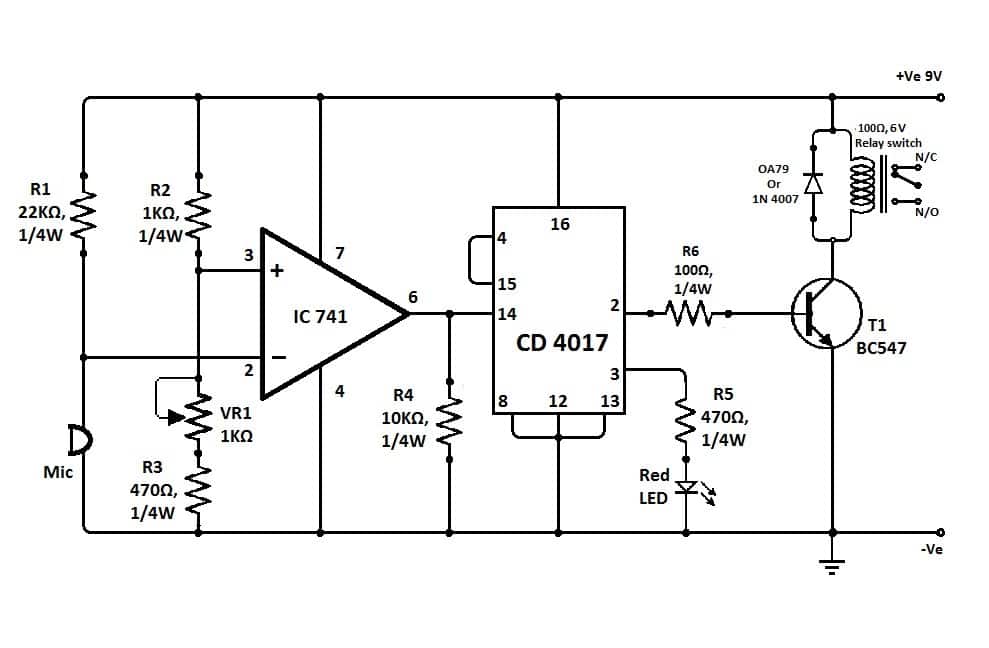
The above clap operated relay circuit was provided to me by one of the keen readers of this blog Mr. Dathan.
The circuit is very easy to understand:
The opamp here is configured as a comparator, meaning it is positioned to differentiate the slightest of voltage differences across its two inputs.
When the clap sound hits the mic, a momentary drop of voltage is experienced at pin#2 of the IC, this situation raises the voltage at pin#3 of the IC for that instant.
As we know, with pin#3 at higher potential than pin#2 makes the output of the IC high, the condition puts the output of the IC go high momentarily.
This high response triggers the IC 4017 pin#14, and forces its output to either move from pin#2 to pin#3 or vice versa depending upon the initial situation of the outputs.
The above action switches the load accordingly either to ON or OFF position.
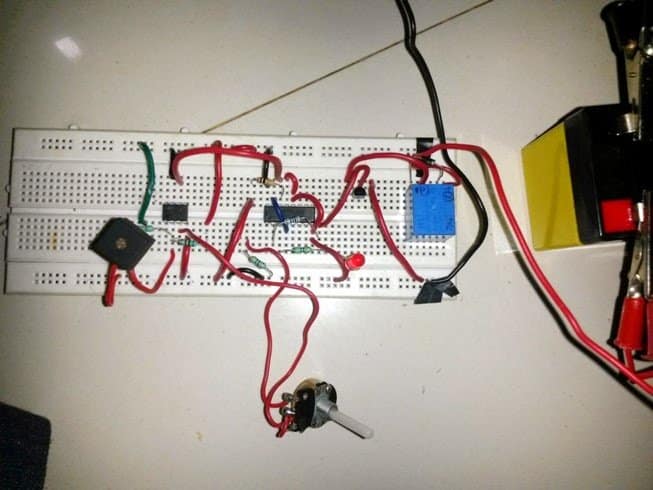
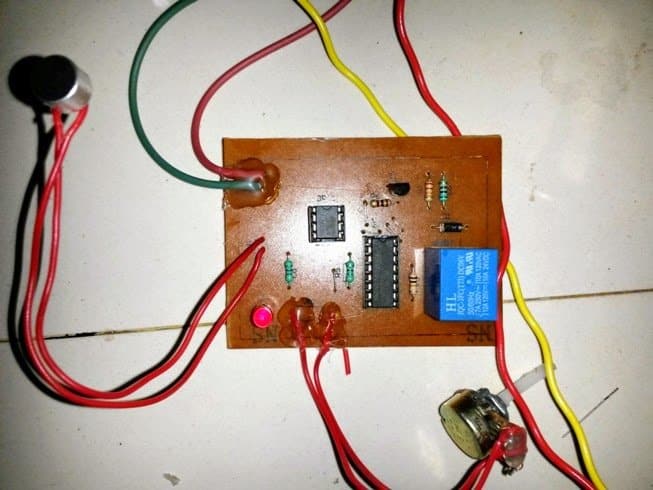
The above 12 V clap triggered switch circuit using IC 741 was successfully tried and tested by Mr. Ajay Dussa. The following prototype images for the same were sent by Mr. Ajay.
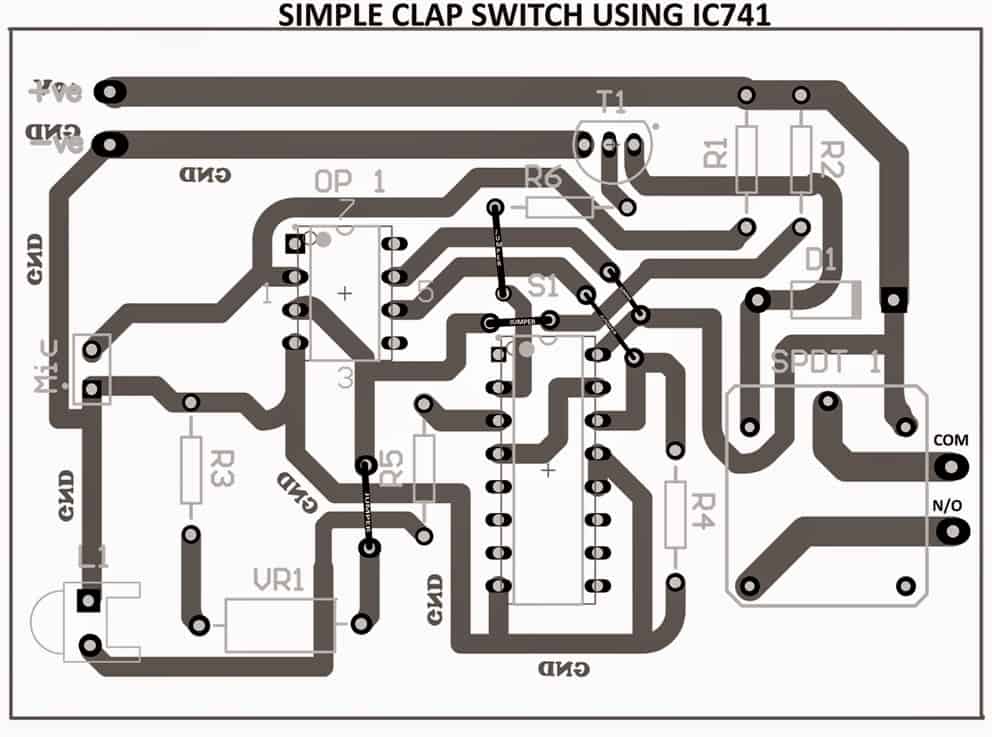
The PCB design (track layout) for the above can be seen below, as designed by Mr. Ajay:
Parts List
| Category | Part | Specification | Notes |
|---|---|---|---|
| Semiconductors | IC1 | 741 operational amplifier | |
| IC2 | CD4017 decade counter IC | ||
| T1 | BC547 NPN transistor | ||
| D1 | OA79 or 1N4007 diode | Flyback diode for relay protection | |
| Capacitors | - | No capacitors in the schematic | |
| Resistors | R1 | 22kΩ, ¼W | |
| R2 | 1kΩ, ¼W | ||
| R3 | 470Ω, ¼W | ||
| R4 | 10kΩ, ¼W | ||
| R5 | 470Ω, ¼W | Connected to LED | |
| R6 | 1kΩ, ¼W | Base resistor for T1 | |
| Potentiometer | VR1 | 1kΩ variable resistor (trimmer) | Used for sensitivity adjustment |
| LED | - | Red LED | Indicator output |
| Microphone | MIC | Electret microphone | Sound detection input |
| Relay | K1 | 6V, 100Ω SPST relay switch | Used for switching external load |
| Power Supply | B1 | 9V battery | Circuit power source |
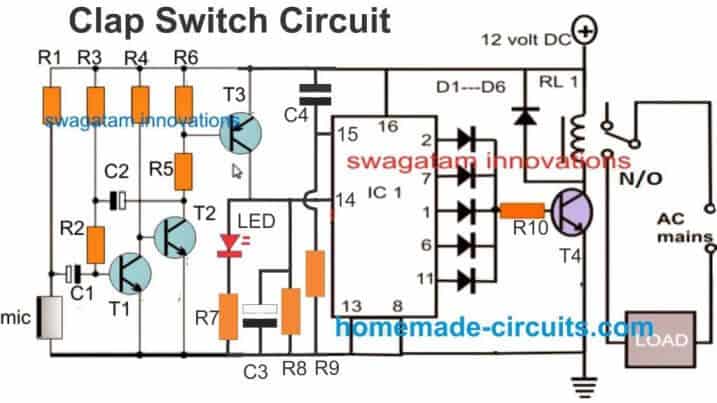
2) Clap Switch Using Transistors or BJTs
In the above explanations I have explained a simple clap activated switch circuit which incorporated an IC for implementing the desired ON/OFF toggling actions. The present design uses a different principle and utilizes only transistors for the above triggering actions.
Clap Switch Video Demonstration
Parts List
- R1 = 5k6
- R2 = 47k
- R3 = 3M3
- R4 = 33K
- R5 = 330 OHMS
- R6 = 2K2
- R7 = 10K
- R8 = 1K
- R9, R10 = 10K
- C1, C4 = 0.22uF
- C2 = 1uF/25V
- C3 = 10uF/25V
- T1, T2, T4 = BC547
- T3 = BC557
- All IC diodes = 1N4148
- Relay diode = 1N4007
- IC = 4017
- Relay = 12v / 400 ohms
How it Works
The figure above shows a straight forward two stage sound activated switch.
The first stage comprising T1, T2, and T3 forms a hi-gain common emitter amplifier configuration.
A mic is connected at the base of T1 via blocking capacitor C1.
Strong sound vibration hitting the mic is instantly picked and converted into tiny electrical pulses.
These are in fact small AC pulses easily make there way through C1 into the base of T1.
This creates a kind of push-pull effect and T1 also conducts in the corresponding way.
However the response of T1 is relatively weak and requires further amplification.
Transistors T2/T3 are introduced exactly for this and help to improve the voltage peaks created by T1 to appreciable levels (almost equal to the supply voltage.)
The above voltage pulse is now ready to be use for toggling the relay ON/OFF and is fed to the relevant stage.
IC 4017 as we all know produces sequential shifting of its output pin-outs (logic high) in response to every positive pulse at its clock input pin 14.
The amplified clap sound voltage pulse is applied to pin 14 of the above IC, this flips the output of the IC to either a logic high or a logic low depending upon the initial status of the relevant pin-out.
This triggered output is appropriately collected at the diode junctions and used to toggle a relay through a relay driver transistor T4.
The relay contacts ultimately goes to a load or an appliance which is correspondingly switched ON and OFF with every subsequent claps.
Using BJTs and Power Supply
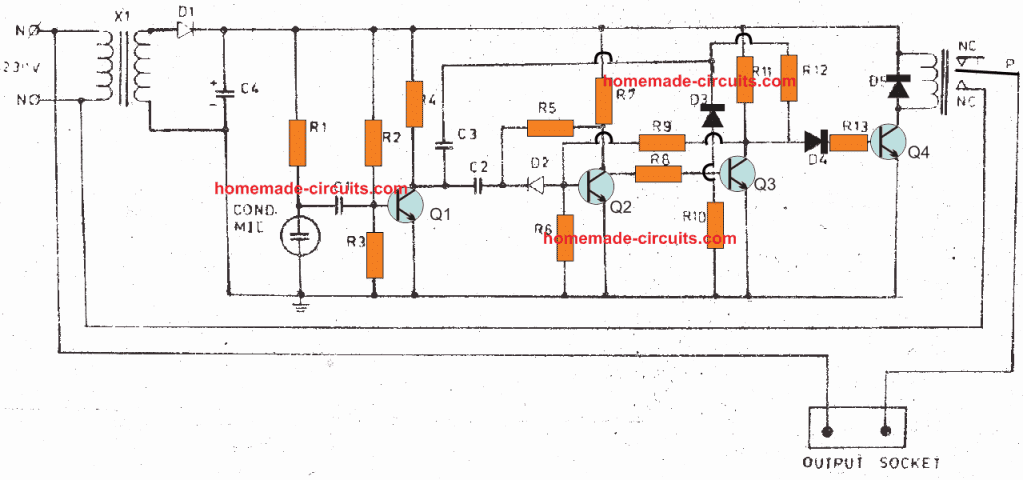
Looking at the circuit diagram we see that the entire circuit has been configured around ordinary general purpose transistors.
The functioning of the circuit may be understood with the following points:
Transformer X1 along with the D1 and the capacitor C4 forms the basic power supply circuit for providing the required power to the circuit.
The first stage which includes R1, C1, R2, R3, R4 and Q1 form the input sensor circuit.
The next corresponding stages consisting of Q2 and C3 form the flip flop stage and makes sure that the signals from the input sensor stage is appropriately converted into alternate toggling of the output.
The output stage consists of a single transistor Q4. It is basically configured as a relay driver stage for translating the alternate ON/OFF actions from the previous stage into physical toggling of the connected load across the relay terminals.
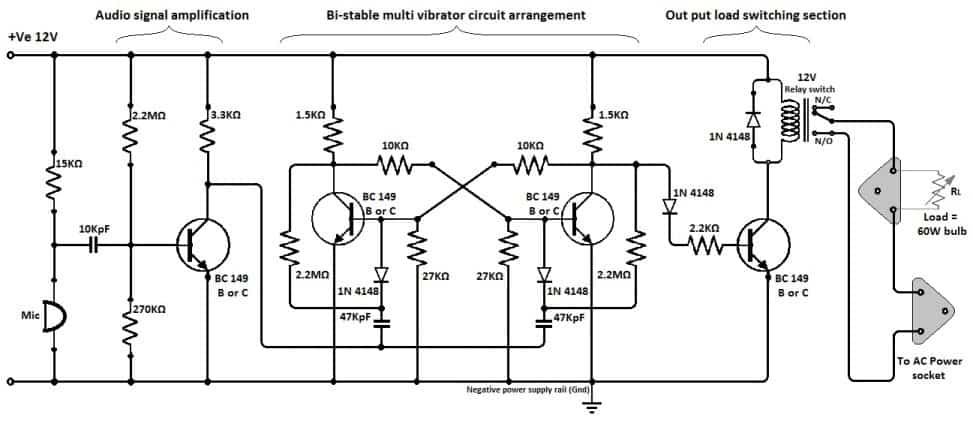
The design is very old, I built it in my school days by assembling a kit. The circuit diagram using transistors is shown in below:
Parts List
- R1 - 15K
- R2,R5,R12- 2m2
- R10, R3 -270K
- R4 - 3K3
- R6 - 27K
- R7,R11 - IK5
- R8,R9 - 10K
- R13 - 2K2
- C3, C1 - 10KPF Disc
- C2,3 - 47KPF Disc.:
- C4 - 1000uF/16V;
- Q1,2,3,4 - BC547B
- D1 - 1N4007
- D2,3,4,5 -1N4148 _
- Xl - 12V/300mA Transformer .
- MIC - Condenscr Mic
- RLY — 12V Single Charge over relay
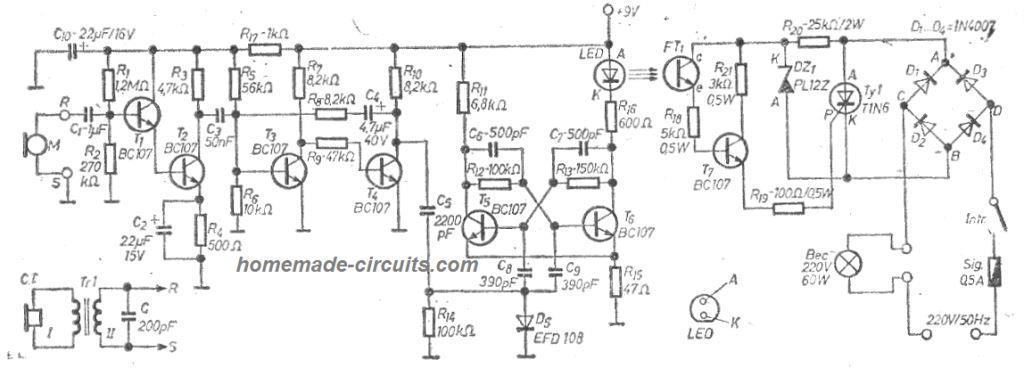
Another version of the above can be seen in the following diagram:
3) Double Clap-Clap Switch Circuit
All the clap-on switch circuits explained above have the ability to operate only with single alternate clap sounds.
This feature makes the circuit vulnerable to external sounds which might occur occasionally triggering the connected load with the circuit.
A double clap operated circuit thus becomes more suitable and resistant to spurious triggering due to the fact that it would toggle only in response to two subsequent clap sounds instead of one.
The explained circuit is simple yet effective and does not employ microntrollers for the implementation unlike other circuits on the net.
The circuit has been tested by me, but it is a fairly complex design it's important to first understand the stages convincingly, and then build it to avoid failures.
Circuit Operation
The proposed clap-clap circuit or double clap circuit functioning may be understood with the following points:
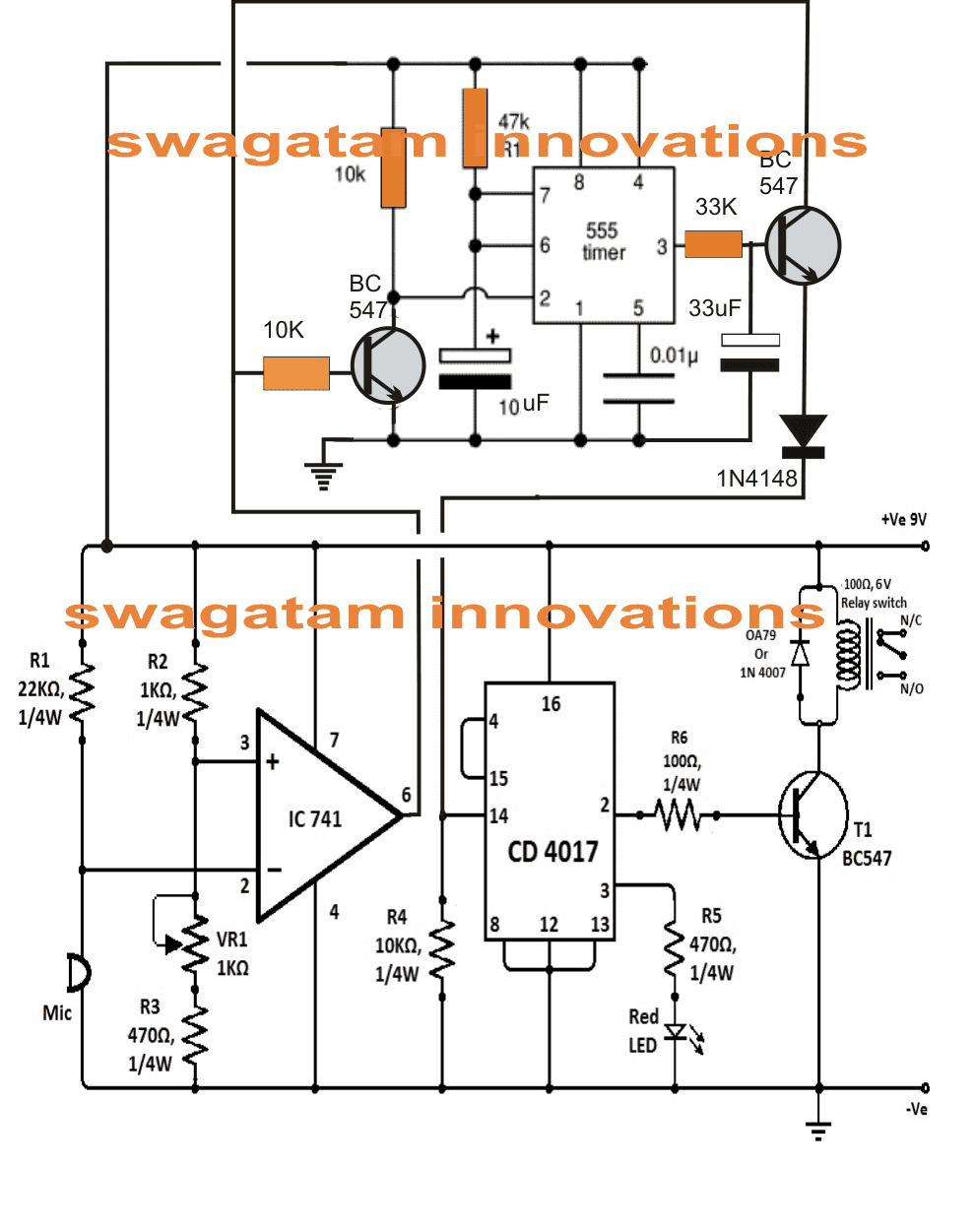
The lower stage is basically a simple sound activated switch circuit which would activate with any loud sound.
The IC 741 is rigged like a comparator with its pin#2 referenced at some optimal fixed potential determined by the setting of the given preset VR1.
Pin#3 of the IC becomes the sensing input of the IC and is connected with a sensitive mic.
The adjoining IC 4017 is a bistable stage which activates the connected relay driver stage and the load alternately in response to every positive high pulse at its pin#14.
When a loud sound such as a "clap" hits the mic, it momentarily grounds pin#2 of the IC741 resulting in a momentary high pulse at its pin#6.
If we connected this output to pin#14 of IC4017 would have resulted in an instant toggling of the load with every single sound input which we don't want here to happen, therefore the response at pin#6 of IC741 is broken and diverted to an IC 555 monostable stage.
How IC 555 is Configured
The IC 555 circuit is rigged in such a way that when its pin#2 is grounded, its output pin#3 becomes momentarily high for some period of time depending upon the values of the 10uF capacitor.
When a sound hits the mic, the high pulse from IC741 output triggers the BC547 attached to pin2 of IC555 which momentarily grounds pin#2 of IC555, which in turn put its pin#3 high.
However the instantaneous high at pin#3 of IC555 takes a while to reach the connected BC547 due to the presence of the 33uF capacitor.
By the time the 33uF charges and switches ON the transistor, the potential at the collector of the transistor is already gone due the absence of the clap sound which happens only momentarily.
However with the application of the immediate subsequent clap provides the required potential at the collector of the transistor which is now allowed to the reach pin#14 of the IC 4017.
Once this happens the relay driver triggers or deactivates depending upon its initial condition.
The toggling of the load thus takes place only in response to a pair of clap of sounds making the circuit reasonably foolpoof.
Another Double Clap Switch Circuit
High pitched sound generated by clap of hands, click of fingers and a various other methods can be used to trigger the next circuit.
The design necessitates a minimum of two intense clap sound pulses to initiate the triggering.
This significantly minimizes the chance of unwanted haphazard switching of the device, due to spurious accidental sound.
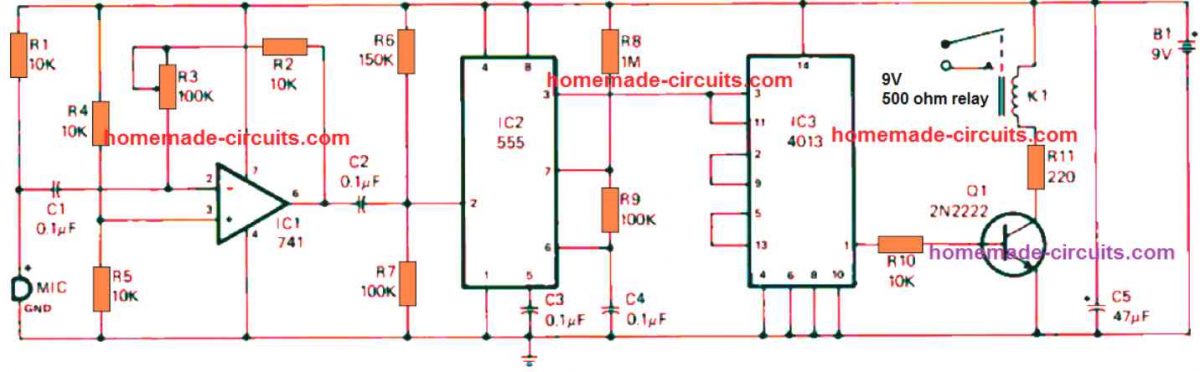
The first sharp hand clap is detected by the electret microphone and is fed into operational amplifier ICI's inverting ( -) input at pin 2 via C1.
The signal negative peak at the pin 6 output of IC1 subsequently activates 555 timer IC2, that is set up like a monostable multivibrator.
The trigger signal reaching the pin 2 input of IC2 is internally extended to toggle the dual D flip-flop IC3. With the help of the three-state counter configuration of IC3.
Not one but two sharp clap sounds are necessary to create a positive output at pin 1 that causes Q1 into switch ON. When Q1 activates the relay and switches its contacts to N/O points.
Any electrical appliance attached to the relay's contacts now switches on.
As soon as pin 1 of IC3 becomes high, it continues to be in that situation until a subsequent two powerful hand claps hit the MIC to repeat and revert the condition.
Thus, it requires two loud sound inputs to switch off the electrical load hooked up to the relay's contacts after the circuit is activated.
PCB Design and Component Overlay
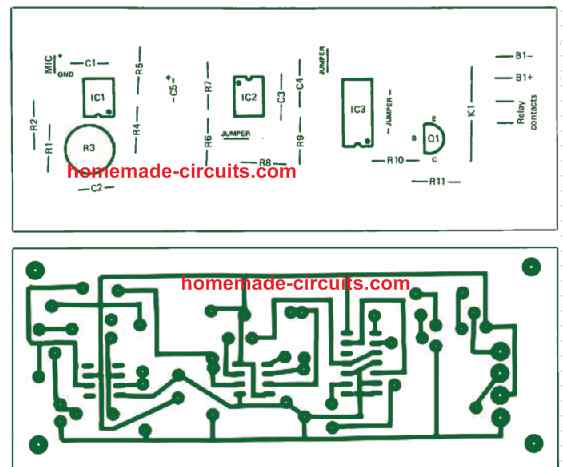
Part List
| Category | Part | Specification | Notes |
|---|---|---|---|
| Semiconductors | IC1 | 741 operational amplifier | |
| IC2 | 555 timer | ||
| IC3 | 4013 dual D flip-flop | ||
| Q1 | 2N2222 or similar general-purpose NPN transistor | ||
| Capacitors | C1, C2, C3, C4 | 0.1 µF ceramic disc | 15V or more |
| C5 | 47 µF electrolytic | 15V or more | |
| Resistors | R1, R2, R4, R5, R10 | 10,000 ohms (10kΩ) | ¼ watt, 5% tolerance |
| R6 | 150,000 ohms (150kΩ) | ¼ watt, 5% tolerance | |
| R7, R9 | 100,000 ohms (100kΩ) | ¼ watt, 5% tolerance | |
| R8 | 1 megohm (1MΩ) | ¼ watt, 5% tolerance | |
| R11 | 220 ohms (220Ω) | ¼ watt, 5% tolerance | |
| R3 | 100,000-ohm (100kΩ) PC-type trimmer potentiometer | ||
| Miscellaneous | B1 | 9-volt transistor battery | |
| K1 | SPST reed relay with 5V DC coil (Radio Shack Cat. No. 275-232 or similar) | ||
| MIC | Electret microphone element |
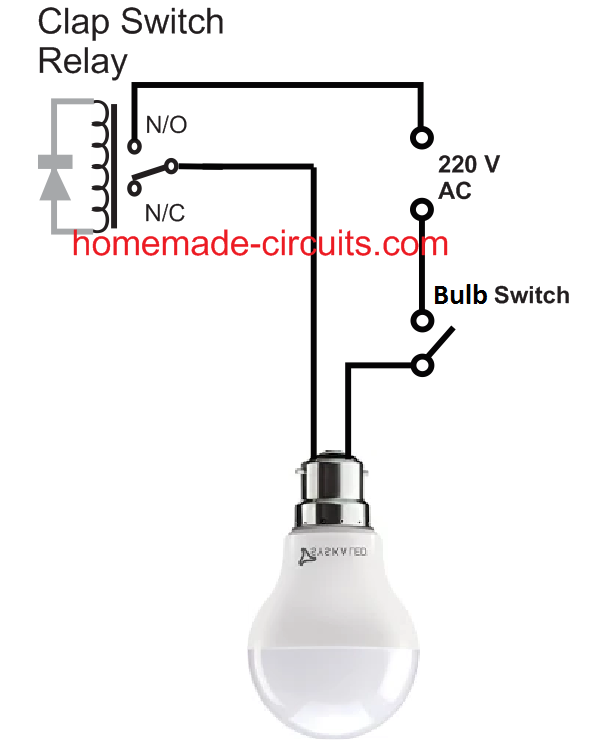
How to Connect 220V Load to Clap Switch Relay
The main application of the clap switch circuits described below is for controlling home appliances like light bulbs and fans.
Suppose you want to connect a ceiling fan with this circuit so that you can switch it ON or OFF with alternate clap sound, you can easily do it, by wiring the fan 220 V AC input through the relay of the circuit.
Similarly, if you wish to switch a tube light or any 220 V or 120 V AC lamp, just wire it in series with the relay of the clap switch.
The following image shows how to connect fan with the relay
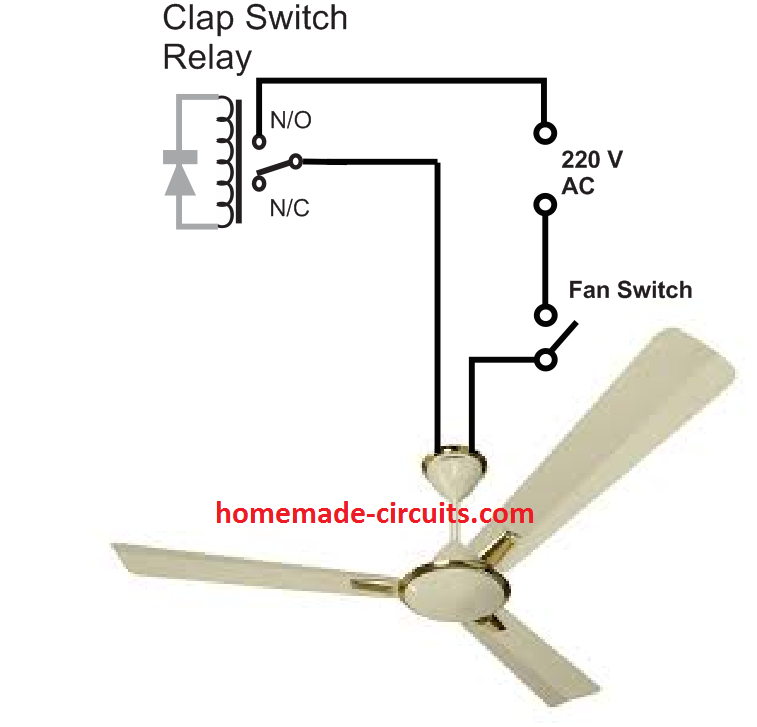
The fan regulator can be connected anywhere in series with the wiring.
Any light bulb can be connected with the clap switch relay as given in the folowing figure
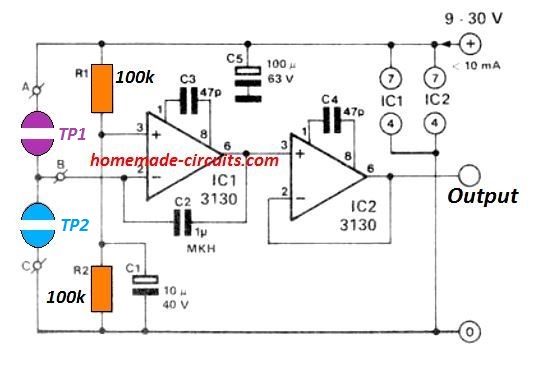


Comments
Hello, I was interested in your pattern. Please write where the resistor 10k is to be connected at the front, because it enters the base of the BC transistor 547 in an extensive diagram with 555, 741 and 4017. Is it to be connected to “+ power supply and pin6 output of the 741 chip.
Please answer me
Mieczyslaw
Thank you very much for your help.
Hi, the 10k from the base of the left BC547 goes only to the pin#6 of the IC 741, and the collector of the right side BC547 transistor…and nowhere else.
Please let me know if you have any further doubts…
Sir I done this circuit but the light doesn’t not turn on no response to clap light is very dim.I don’t know what is wrong can u please tell me and after doing this i should attach a relay but circuit is not working I tried many times but no response
Mark, it is very difficult to know why your circuit is not working, just by seeing the image…But I think your circuit connections are not exactly as per the following image, please compare and do the corrections:
https://www.homemade-circuits.com/wp-content/uploads/2018/08/clap-switch-using-transistors.png
Ok if I put a led just below the last diode and add a 560 ohms resistor will it work without connecting a relay
Yes, it might indicate the ON/OFF situations of the output transistor.
I am just an electronic hobbyist. I tried assembling the clap switch with the first diagram using two transistors. I know it is tested by you and working OK, but my assembly failed to work. I used new components, and checked and rechecked the assembly and did not find any mistake in connections. Let me know step by step how to rectify the fault. The voltages at the transistor bases are .03v and 3.3v at the collectors. I used 12 volt 800 Ma SMPS module for the power supply.
As soon as I switched it on, the bulb glows. Clapping has no effect. If I scratch the base of the first transistor with a screw driver, the relay clicks and the bulb goes off momentarily, but the relay clicks back again and the bulb glows again. If the signal input at pin 14 of the IC is disconnected and touch pin 14 by a screw driver the relay clicks on and off but not regular (sometimes need to scratch twice or more to make the relay click on or off).
If I supply voltage at the junction through 10K resistor where the mic and the 10 uf capacitor is connected, the result is – as long as I touch the base of the first transistor with the screw driver, the bulb will glow, and switches off as I removed the screw driver. Please let me know where the problem or fault lies. Thank you.
Regards,
B. Momin
Hi, can you please try the following circuit. This will work without fail, as it has been thoroughly tested by me:
https://www.homemade-circuits.com/wp-content/uploads/2018/08/clap-switch.jpg
Can you make a circuit to make a sound by buzzer when it hear two claps with in two seconds, (limitations -> we can use only one 555 timer and can’t use any other IC’s)
It may be possible by adding a transistor stage with 555, but the 555 output will be ON only for a few seconds, depending on the monostable RC values, and then toggle off, you cannot get bistable action in this circuit.
Ok I am trying to design the circuit and it still tricky.
Please let me know if you design the circuit in Multisim or any other software and it will be helpful.
I draw my schematics on Microsoft paint software.
Sir I reproduced his schema with Kicad. When checking the electrical rules I get the error: Input Power Pin not driven by an Output Power pins Pin 8 VSS 4017
Should I discard it? Thanks
Hi Rosario, it may not be possible for me to suggest on the Kicad problem…but if you build the circuits practically I can assure you these will work perfectly and if there’s any issues I can solve them with a step by step troubleshooting.
I try to post the problem in the Kicad forum.
Can I show your schema? Do I have your authorization?
Sure, you can post the diagram, if possible post the article link also so that the forum visitors will know from where the diagram is taken.
Sir can I get proper circuit working for clap switch using bjt and power source.
Paresh, transistor circuit is already provided in the above article, you can refer to the following design:
https://www.homemade-circuits.com/wp-content/uploads/2012/04/clapswitch-1.jpg
Hi,
can you make & give a clap circuit to work on 9v battery, for 5mm – 5 leds (4 white & 1 RGB)
Hi, do you want the LEDs to switch ON/OFF with every clap, or just momentarily ON with every clap?
Thanks at Engr. Swaggatam.
Can the circuit use another source of power apart from battery ?
It drains battery easily .
Should I make a 9 volt power pack ?
Hi Ikenna, you can power the above circuits with a 9V or a 12V AC to DC adapter.
Hello Swagatam, its me Bios, the circuit looks so cool but the resistors 33k and 330 ohm are difficult to get, which value can I use instead. Sir
Thank you Bios, Those values are not critical, slight difference will not have any effect on the working of the circuit. Alternatively you can try connecting assorted values in series and parallel combination to get the actual values of the parts.
Hi, thx for thoses circuits, utiles projects as always 😉
Can I use IC TC4001 ,or IC TC4011, or IC TC4019, or IC TC4020, instead of IC 4017??
I would like to know because, those are the model I got a disposition.
Thx you.
Hi, thanks, do those alternatives have a sequential response to input clocks? If yes then they can be used. I think 4020 is OK, but not 4001, or 4011
Thx you, but wow, your question is a bit complicated for me. I guess I ll go with 4020, and hope it works ))
No problem, you can use 4020
Hi, First, thanks for the circuits.
I want to do the doucle clap circuit using a LM358 so
1- can I power it using a 9V Battery? I don’t have symetric power supply
Also, as the LM358 has 2 op amp, then
2- can I use one part of LM358 for an non-inverting amplification then one part like a comparator? Or is the amplification useless?
The mic will be at 1,5meter of the circuit meaning there will be some loses.
Hi, thanks for liking this circuit.
You can power it from 9V battery but the relay must be also rated accordingly so that the battery doesn’t drain quickly.
No extra op amp is required, since the first op amp itself will be sufficient for amplifying the MIC, even if it is wired at some distance
Please Sir could you guide me to use it as a final year project work?I needed a clapswitch to be made with a password such that only the owner have access to use it.
Lawal, how would you use the password with the clap switch?
Please Sir, I assume by combining a four
output clapswitch with a four key password switch, with the clapswitch changing its outputs with upon a single clap and each changing output activates the password switch. The password switch are numbered in a written form .So by varying the number of claps to activates each of the different
four keys of the password switch, for example 2,4,1 and 3 orderly but successive number of claps needed to activate the four keys of the password switch to activate the clapswitch
It is possible but will require 4no IC 4017, and 4 small SCRs, and other parts.
Thank you Sir, I am very grateful for your response. Please Sir could you send me with the design to experiment on.I needed build it as my final year project work.
Hello Lawal, I have designed the basic first stage, once this is confirmed by you, you can replicate 3 more similar stages with slight different modifications:
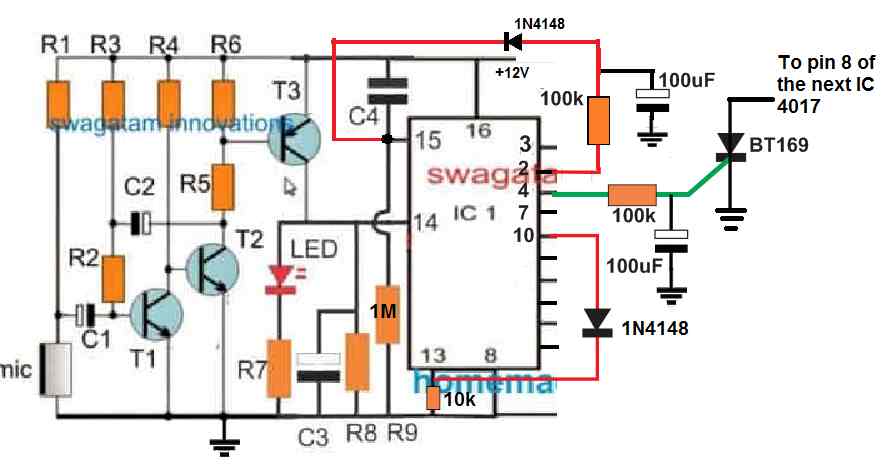
The RC diode network shown at pin#2 should be repeated at pin#7 also.
This stage is for 2 claps code.
The circuit is supposed to work in the following way:
When two claps are made relatively quickly, the 4017 output logic reaches at pin#4. Here the user has to wait for a few seconds until the SCR gate capacitor charges fully, and the SCR latches to switch ON the next 4017 IC.
Now suppose the person who does not know the 2 clap code for this first stage, he will try to clap quickly, moving past pin#4 and reach pin#10 of the IC, which will cause a permanent latching of the IC due to the connection of pin#10 with pin#13.
If the person tries to clap with delays, then the logic at pin#2 will cause the 100uF to charge and send a positive pulse to pin#15 of the IC which will keep resetting the IC back to pin#3.
Suppose the person claps initially quickly and then stops at pin#7 then again the circuit get reset due to the relevant RC/diode network.
The same concept will need to be repeated for the other subsequent IC 4017 with the other specified code numbers, accordingly.
Hi,
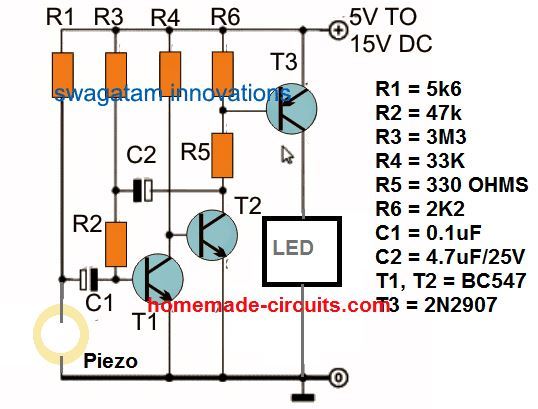
I’m trying to make a bass drum flash (a 230v 30wLED that lights up only when i hit the drum and then turns off) is it possible to do this with a piezo transducer and a solid state relay? As follows:
—— -12vDC —>|———–|| | S.S.R.|
—— +12vDC—>|———–|<——————-• L
Am i missing anything?
I am awaiting your answer.
Thank you for your time!
Hi, it is possible, but the solid state relay is not required, instead a transistor driver will be enough:
hi, sir i designed the second circuit which requires transistors… i assembled all component on my Vero board, i’m using a 9v battery with a 12v relay. my problem is once my circuit comes on, my LED come on too and if i make a clap it doesnt go off, pls sir i need a response to why its not responding and i’m connecting directly to my 240v light blud.
i would be glad if you reply me
thanks
Hi, as you can see in the video the circuit works perfectly and there’s hardly anything complex in the second design.
You can remove C2 and check the response again….C2 is for delaying the switching OFF action of the relay and the load.
thank you sir, but i have one more question. is it necessary for the led on circuit board to turn off when you clap?
The LED must turn ON momentarily when you clap…please see the response of the red LED in the video
Mine is comes ON, when i attach my 9volt battery. And if i clap i won’t go OFF.
Is there an adjustment i need to make
Although impressive thumbs up, but it seems that 4017 can be removed from this circuit without losing the 2 clap on – 2clap off function. Don t u think so ?
Thank you! without 4017 the output will not lock ON/OFF, it will be momentarily ON and then switch OFF
Dear swagatam
Double clap switch is working from circuit’s near.What can i use about improving distance for mic?(I adjust trimpot) Is mic amplifier just enough?
Glad you could make it successfully. You can try the transistor circuit and replace the 741 circuit with it. Use the T3 collector to feed the transistors of the IC 555 monostable. Ignore the relay at T3 collector
It works but very sensitive i want adjust sensitive what should i do?(using pot?where?) i tried extended charging time(using 47uf it gains to me 2m 30sec ,4.7uf gains 15sec)
You can try adjusting (increasing) the series resistor which is connected between the MIC and the positive supply