In the following post I have explained a simple low battery indicator circuit by using just two inexpensive NPN transistors. The main feature of this circuit is its very low stand by current consumption.
The Circuit Concept
We have so far seen how to make a low battery indicator circuits using a 741 IC and a 555 IC, which are no doubt outstanding with their abilities of detecting and indicating low battery voltage thresholds.
However the following post relates yet another similar circuit which is much cheaper and employs just a couple of NPN transistors for producing the required low battery indications.
You may also this Low Battery Alarm Circuit
Advantage of Transistor over IC
The main advantage of the proposed two transistor low battery indicator circuit is its very low current consumption compared to the IC counterparts which consume relatively higher currents.
A IC 555 would consume around 5mA, a IC741 around 3 mA, while the present circuit would just consume around 1.5mA current.
Thus the present circuit becomes more efficient especially in cases where stand by current consumption tend to become an issue, example suppose in units which depend on low current battery supplies such as a 9V PP3 battery.
Circuit can Operate at 1.5V
Another advantage of this circuit is it's ability to work even at voltages around 1.5V which gives it a clear edge over the IC based circuits.
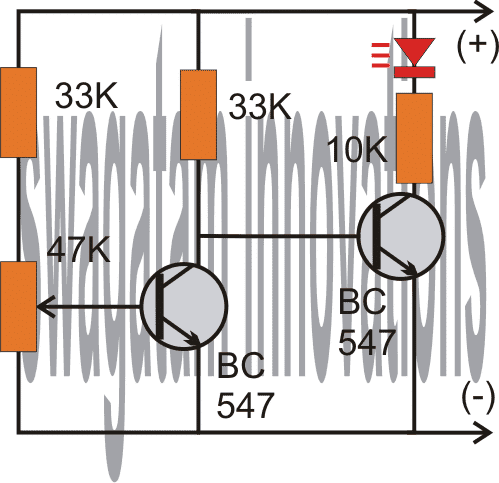
As shown in the following circuit diagram, the two transistors are configured as voltage sensor and inverter.
The first transistor on the left senses the threshold voltage level as per the setting of the 47K preset. As long as this transistor conducts, the second transistor on the right is held switched OFF, which also keeps the LED switched OFF.
As soon as the battery voltage falls below the set threshold level, the left transistor is no longer able to conduct.
This situation instantly switches ON the right hand side transistor, enabling the LED to illuminate.
The LED switches ON and provides the required indications of a low battery warning.
Circuit Diagram
Audio/Video Explanation:
The above circuit was successfully built and installed by Mr. Allan in his paranormal depletion detector unit. The following video presents the implementation results:
Upgrading the above Transistorized Low Battery circuit into a Low Battery Cut-off Circuit
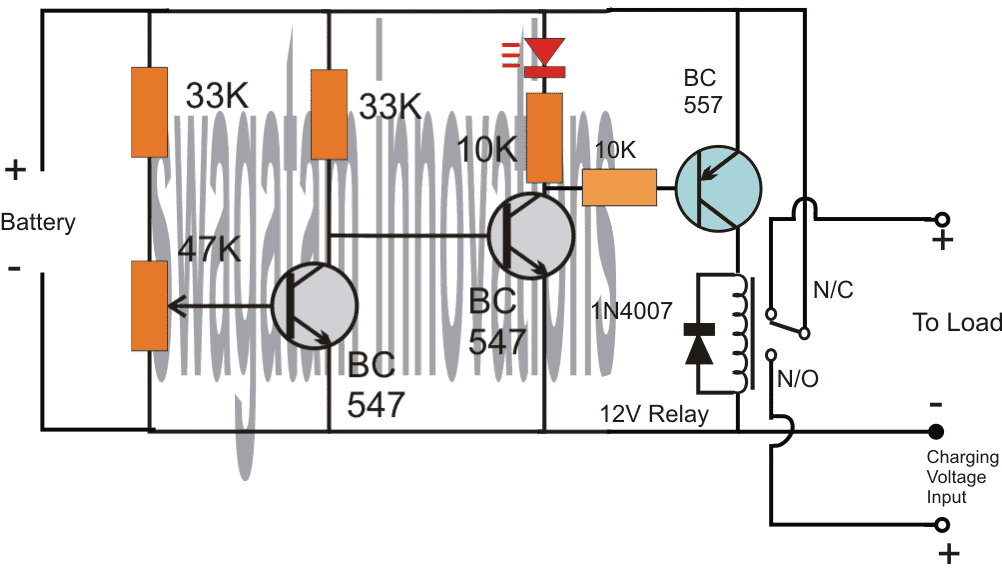
Referring to the above diagram, the low battery indicator is formed by the two NPN transistors, while the additional BC557 and the relay are used for cutting OFF the battery from the load when it reaches the lower threshold, in this state the relay connects the battery to the available charging input.
However when the battery is in its normal state the relay connects the battery with the load and allows the load to operate through battery power.
Adding Hysteresis
One drawback of the above design could be the chattering of the relay at the threshold voltage levels, due to the battery voltage dropping immediately during the relay changeover process.
This can be prevented by adding a 100uF at the base of the middle BC547.
However, this still wouldn't stop the relay from constantly switching ON/OFF at the low battery changeover threshold.
In order to rectify this, a hysteresis effect will need to be introduced which can be accomplished through a feedback resistor between the collector of the BC557 and the middle BC547 transistor.
The modified design for implementing the above condition can be seen in the following diagram:
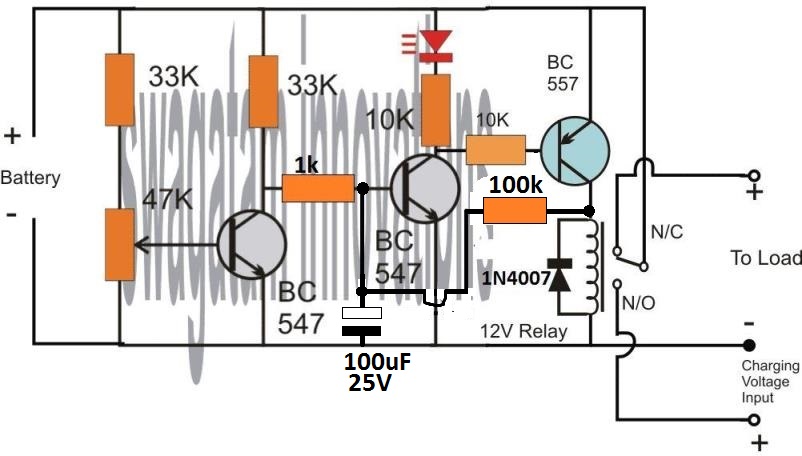
The two resistors, one at the base of BC547 and the other at the collector of BC557 decide the other threshold of the relay changeover, meaning the full charge cut off threshold of the battery.
Here, the values are arbitrarily selected, for accurate results these values will need to be optimized with some trial and error.
Low Battery Indicator using a PUT
This low battery indicator circuit is used with a programmable unijunction transistor (PUT), since the threshold characteristics of the UJT could be effectively defined, and can be designed to flash a connected LED indicator.
The PUT (Q1) is configured like a relaxation oscillator circuit.
As the supply voltage which is being monitored (Vmon) starts dropping, the gate voltage of the PUT (Vg) also begins dropping, while its anode voltage (Va) basically stays constant.
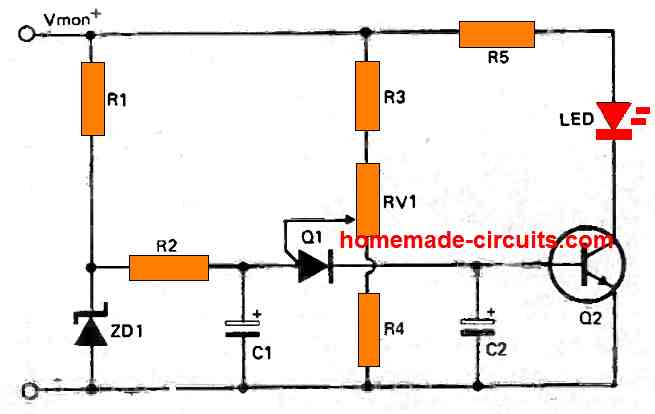
The PUT begins oscillating only as soon as the gate voltage drops below Va by 0.6 volts. As Vmon comes down further, Vg also drops accordingly and this situation triggers ON the PUT.
Therefore, the period of the cycle becomes lesser and this causes an increase in the frequency of flashing indicating that the battery has become too low and needs to be changed.
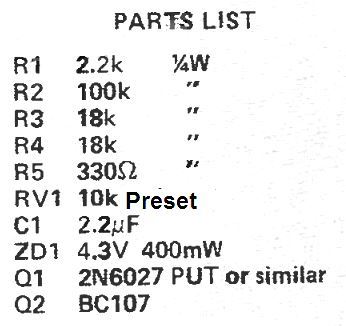
Parts List
Car Low Battery Monitor Circuit using a Single BJT
Here's a straightforward car battery monitor that eliminates the need for constant meter watching.
When your battery terminal voltage reaches a reasonable level, such as 12.5 volts as measured by a digital multimeter (DMM) or a reliable meter, you can adjust resistor R1 until the LED illuminates.
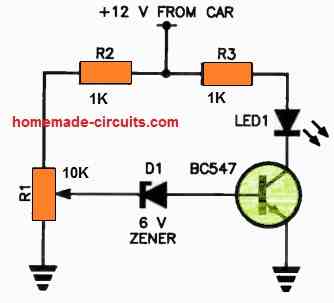
If the battery voltage drops below this threshold, the zener diode will switch to a non-conductive state, cutting off the base current to the transistor.
As a result, there will be no collector current, causing the LED to turn off.
If you don't notice the small indicator light shining on your dashboard, it could indicate a low battery condition!
It's advisable to use a green LED for better visibility. For R1, it's recommended to use a 10-turn trimpot for precise adjustments.


Questions & Answers
Hi Swagatam,
You are correct. I needed three resistors. One for the wiper and one for each of the side legs to voltage and ground. It works as expected. Thanks!
Thanks Norman, glad it is solved now…
Hi Swagatam. Referencing the top circuit of the 2-transistor low battery indicator, how can I replace the 47k variable resistor with a fixed resistor? I have tested the circuit with a 50k preset and determined that the resistance between the pin connected to voltage through the 33k resistor to the wiper to be 33.73k ohms. The connection between the ground connected pin and the wiper to be 15.48k ohms. I would like to replace the variable resistor with a fixed resistor in series with the 33k ohm resistor. I have tried it and it doesn’t work the same as the variable resistor. I am working with a 3.7v Lipo battery and would like the indicator to light when the battery voltage gets to 3v. Help! Thanks!
Hi Norman,
I hope you included 3 values for the resistances, 33k plus the two side-arm values of the preset.
In that case, it should have worked if the fixed resistor values are precisely the same.
The other easy option could be to replace the above resistances with a zener diode on the positive side and a 4.7k resistor on the ground side, and the base being connected at the junction of these two components through a 1k series resistor.
The zener value can be selected as a 3V zener.
Can you give me the circuit to indicate the 6v voltage drop of the 8.4v source?
You can use the first circuit from the above article.
Feed 6V as the supply DC, and tweak the preset so that the LED just lights up at this supply voltage.
For the low battery indicator (2 transistor type), would I need different components for a 24V battery setup? Also: Could I substitute a lamp holder with a #387 lamp (28V, 1.12W, 0.04A) for the LED without trouble, or would changes be needed?
You can use the same circuit without any changes for a 24V supply, but for a #387 lamp you will have to replace the right hand side BC547 with a 2N2222 transistor. The LED + 10k resistor can then be removed and replaced with the lamp.
I suppose I could use a 50k trimmer for the variable resistor instead of 47k?
Sure, you can use it…
I want to latch the other circuit when the battery voltage is low but I need a positive voltage for that can I change right side transistor connecting it’s collector to positive supply so that I can get positive from emmeter will it work
Which other circuit are you referring to?
Hello again and thanks another reply. Now I understand. I didn’t realize that the potentiometer it’s self functions as a voltage divider. My only experience with them before now was when wiring my guitars and I always thought of them as them as purely resistive components. Anyways, appreciate the responsiveness
No problem! I am glad I could help. All the best to you.
Thanks again for the reply. I understand the concept of the circuit, just not how with the given values it would work. If the 33k and 47k potentiometer/resistor serve as a voltage divider, then wouldn’t the voltage have to drop to around 1.5 volts before the first transistor would stop conducting?
The potentiometer can be used to adjust the cut off threshold to any desired value with respect to the battery voltage. So if you want the left BC547 to cut off at 11 V, you can adjust the potentiometer accordingly, similarly you can do the same for any other battrety voltage such as 10 V, 10.5 V or 9V etc. The potentiometer gives you the full freedom to adjust the cut threshold to any desired values, as required.
Hello, not understanding the circuit function of the first 3 diagrams. Wouldn’t more voltage drop across the 33-k resistor biasing the led transistor since there’s the additional 48 k at the base of the first? Also why is there any arrow pointing outward from the base of the first transistor being an npn? Thanks
Hello, the 47K resistors is a potentiometer, or it can be a preset, or a trimpot. The arrow indicates the wiper arm of the potentiometer which is connected with the base of the transistor.
Thank you for the response. I’m still not understanding how the first transistor stops conducting at the threshold voltage with it being above 0.7 volts or how the other transistor doesn’t conduct first being that there’s less resistance to its base? I’m new to electronics so I’m probably missing something obvious here.
Let’s assume the 47K trimpot is adjusted such that the base voltage of the left BC547 drops below 0.7 V when the battery voltage drops below 11 V. This means, as long as the battery voltage is above 11 V, the left BC547 remains switched ON, which causes the base voltage of the right side BC547 to be grounded. Due to this the right side BC547 remains turned OFF, and the LED also remains shut off.
Now, in a situation when the battery voltage drops below 11 V, the base voltage of the left BC547 also correspondingly drops below 0.7 V, which causes it to shut off. When this happens, the right side BC547 base starts getting the biasing voltage through its 33 K resistor and it switches ON. This also allows the LED to switch ON and indicate the low battery condition.
Nice, but a bit dated.
PMIC supervisor IC chips have long since advanced the art of low voltage detection. The operating currents are in the 10uA to 1uA (micro) range. The pin counts are down to 3 pins. Hysteresis is built in. Price is under 50 seconds for singles and dirt cheap for larger quantities.
Hello sir, please I need your urgent help with this; Is there a way you could modify your above circuit further to include another stage of switching so as to sound a buzzer alarm at 11 volts (for a case of 12v power supply) to warn of low battery before switching of the relay at about 10.5v. I have really tried this with a trial and error method several times, wasting a lot of transistors in the process. Please sir, I would be glad you illustrate with with a diagram. Thanks in anticipation.
Hello Chinomso, there’s no question of wasting transistors in the above circuits, because the transistors are safe and can never burn.
If you want a sharp response then instead of transistors you can use an opamp based design, as shown below:
This had been designed for SG3525 inverter, therefore ignore the pin#10 indication.
Also you can remove the 4k7 and 1k from the output of the opamp and connect the buzzer directly from battery positive to pin#6 of the op amp.
You can remove the hysteresis network which uses 1N4148 diode and series 1K.
You can make another similar circuit for activating a relay through a driver transistor. If you are using a transistor with the op amp then the 4k7 and 1k at the output should be included in the circuit, and the transistor base connected to the 4k7 / 1K junction.
Hello sir, can LM393 opamp be used in the two stage mode, such that : the pin 1 of the ic, for instance, controls the relay, while the pin 7 controls the buzzer for low battery warning?. If it can, please i would be very happy if you could provide me with good diagram to that design. I would love to use 741 opamp as you adviced, but considering space, power consumption and circuit ambiguity, I would want it on a single source. Thanks
Hello Chinomso, the IC 741 can be used with a single power supply, the -battery indicates the 0V or the ground of the Dc supply.
You can try the following configurations using the LM393 IC:
Thanks alot sir, I’ll try this
You are welcome Chinomso, there’s a small mistake in the diagram, the feedback diode 1N4148 must be connected to pun#3 of the opamp and its polarity must be reversed.
Thank you so much for the circuit, I really appreciate. However sir, i chose the transistor based because I really want to save as much power as I could. Hence, the circuitry should be such that it would be required to have a two stage switching, such that a set of transistors in TTL mode switches the buzzer on at 11 volts, then as the battery voltage reduces further to 10.5 volts, another set of transistor switches off the relay. I need this in my inverter circuit and would so much appreciate it I could get this from you. Thanks alot
Hello Chinomso, transistor circuit will not be able to provide precise cut offs, sometimes it may be at 10.5V and sometimes 10V or sometimes 10.8V
I really would be completely blind to these things If not for your help. I really appreciate you sir
I am glad to help Chinomso!
Can BC337 be used instead of BC547 in first circuit?
Yes, can be used.
Hi sir
Can this be optimized for 24 v system
Hi Gogulanath, you can use the same circuit without any customization for 24V also….for the relay circuit, you may have to replace the 12V relay with a 24V relay.
Thanks for this site and for posting this circuit. I have been getting back into electronics with my kids after many years off and your site is great for that purpose. I have a couple of questions about the first circuit (the one that only lights the LED).
1. In the 12.5V +/- 1V range using a 10k LED for the load this circuit will power the LED with 1.2mA. What LED works at 1.2mA? I usually see current ranges in the 20-30mA. I think I need to lower both the LED driving transistors base and collectors resistors substantially. According to LTSpice 10k and 390 are working values for those two resistors.
2. How stable do you think the triggering threshold be over time? Let’s say that it triggers at 12.5V at room temp using a BC547B (which may or may not have higher gain than BC547). How likely is it to trigger at the same over a long period of time and a range of different temperatures?
Thanks
Thank you for asking this question:
1) I normally use 10K for my red LEDs since they look too bright for any other lower resistor values. The resistor values can be tweaked, there are no criticality regarding the values of the resistors, because ultimately it’s the preset adjustment that decides the detection thresholds.
2) The transistors will start giving wrong results after around 37 or 40 degrees Celsius, under this the results can be expected to be fairly consistent. The preset quality will also affect the results over a long period of time, since the preset contacts may get dirty and loose or might deviate from the initial adjustment.
Thanks a lot sir, This circuit is very helpful to me and it is easy to understand ????
You are welcome Yogesh, I appreciate your kind feedback!
Hello
I have a battery holder that doesnt have a battery low indicator but I have access to the board.
This solution is exactly what I am looking for. Can you help not an EE
What help do you need?
As you know, I don’t know much but it looks like it might be easier to keep with your initial design for low battery but have it wired to an additional green LED that is manufactured to blink or flash. I think they make them like that. Am I right to stick with your old way and have the additional blinking green LED?
No Problem Dane!
I forgot to mention I will be using a 9 volt battery
I found a guy who is trying to design a PCB for me. I am very excited and will keep you posted.
Thank you so much for your help. I was wondering if you could help me again.
I am wondering if there is a way to adapt and change your low battery circuit to do what I need.
I have a switch that operates from 1 volt to 24 volts. It has 3 connectors. One is a Common. The other is a Normally Open connector that goes to my Green LED when the switch is on. It has a Normally Closed connector that goes to my Red LED when the switch is off. I would like to avoid adding another LED for the low battery indicator (was going to use a yellow led). Instead, is there a way to make my Green LED blink on and off when the battery gets low? Using only 2 LED’s would really help. Thank you again for your input.
That great news! However, getting the LED to flash can make the design a bit complex. You can try the last circuit explained in the following article, hope this might help you accomplish your requirement:
https://www.homemade-circuits.com/flashing-led-battery-status-indicator/
I will look into finding a company that can do that here. Thank you again!
Sure, I hope you find an appropriate source soon.
Great! Thanks for the clarification. I will start with the 2K2 and see if it’s bright enough. I have a hand drawn diagram of what I am trying to accomplish but it is terrible and I am too embarrassed to post it publicly. I think I am going to need someone to draw it out for me so that maybe I can have a small PCB made. Any ideas on who might be good to help with that?
Thanks again!
Thanks very much, I understand your problem, however I do not have anybody who can design PCBs correctly, since it is a specialized job and must be done in accordance with the standard PCB designing rules. I guess Only a PCB manufacturer will be able to draw it correctly.
Hi again!
Could you please clarify the circuitry of your low battery warning design?
The photo you sent me shows a 1k resistor (bottom right) but the diagram shows a 2k2 resistor.
Which one should I use?
Hi, It can be any value between 680 ohms ohms and probably 10 k for supplies between 9V and 15 V, so you can use any resistor between this range although the light will decrease as the value is increased.
Will do!
Thanks for the offer. I had planned on sending you a picture of my completed project for your opinion. Any idea how to attach a picture for you and how to send?
OK, for the picture you can upload it to any “free image hosting site’, and provide the link to me, I’ll check it and verify the details for you
Once again you have been very, very helpful. I have ordered all of the parts and will start testing the different resistors as soon as they all arrive. Thank you again so much and I hope you can some day make it to Florida!
The pleasure is all mine! please feel free to comment back if you face any problems with the projects!
Wow! That picture really helped a lot! That solves my low battery problem very well and thank you so much. Now I need to use the rest of the info you gave me to complete my project. Since I don’t need my green LED to be very bright but always “On” which resistor would you recommend for longest battery life for my 9 volt battery?
Thank you so much again!
(PS. If you ever come to Florida, at least let me buy you dinner!)
Thanks very much, Glad you found it useful! The green LED illumination will need to be checked practically since different brands have different quality standards. You can start with a 470 ohm resistor and then try a few higher values, like 560 ohms or 680 ohms until you find the right one which provides just the right illumination yet uses a reasonably high resistance value. The 330 ohm is the lowest threshold, so the value must be higher than this value.
It’ll be a pleasure meeting you if I ever happen to visit Florida, thanks for the invitation.
Thank you and I think that all makes sense. You have been very helpful however I know nothing about electronics and I don’t understand the electrical drawing showing the arrow coming from #2 on the IC 741 to the 10k Preset. It doesn’t look soldered to the preset. It just points at it.
Is there a way I can pay you to make one of what I am needing using the actual parts so that I can remake it here? I would LOVE to do that and pay for it.
That way I know I could follow what you are so kindly recommending.
Thank you again, Dane
Hi, thank you, I understand and appreciate your generosity, however payment may not be required, I’ll help you anyway until your goal is accomplished, because the concept is quite simple and basic.
Please go to the previous IC 741 link, and check the first diagrams, I have updated it in a pictorial format using real part images. This will help you to understand how each part needs to be connected practically.
Let me know if you have any more doubts.
Thank you so much for your response.
I need a lot of help designing a 9 volt alarm that we are going to make and resell. In this alarm, a piezo alarm will go off with a red LED light when switched to do so. ( I already have the switching device – it measures air pressure with normal NO NC and Common) The alarm will have a green LED that will be on all of the time unless air pressure is lost which is measured by the switch.
I need help selecting the right snap in 5mm LED’s (and or resistors) so the LED’s will last at least 10 years and not drain much of the 9 volt battery. A green LED will be on all of the time unless switched off at which point the alarm and red light switches on.
I need another properly designed LED (yellow) to light up when the 9 volt battery gets low and needs to be replaced. Either that or the green or red light could flash to warn of low battery. I don’t know how to make a low battery light up a yellow light or make a green or red flash.
Thank for your consideration and I would be happy to pay for your time
Dane Shearer
ddj100@aol.com
Hi, thanks, The requirement looks very basic so I will explain it to you here quickly. Assuming you are using the standard 20 mA 3.3 V LEDs, the resistor values that will limit the LEDs with 20 mA could be calculated using the following formula:
R = V – LED fwd V / LED current, where V is the 9 V, LED fwd V is 3.3 V, and LED current is = 20 mA or 0.02 Amp
Therefore R = 9 – 3.3 / .02 = 285 Ohms. However, choosing a higher value than this is recommended which will ensure lower current than the optimal 20 mA value and will enable the device to have a much longer life. So instead of 285 Ohms we can go for 300 Ohms or a 330 Ohms 1/4 watt 5% watt
Flashing the red or green LED may require a more elaborate electronics and part count, so illuminating a separate yellow LED will be a better option.
Since the response must be sharp and accurate I would suggest an op amp based low batt detector as shown in the first diagram from this article:
https://www.homemade-circuits.com/how-to-make-simple-low-battery-voltage/
The red LED should be replaced with a yellow. The LED resistor may be calculated as described in the previous paragraphs.
You can even go for higher resistance values than 330 ohms, may be up to 680 ohms, because today the modern LEDs are designed to produce high bright illumination even with minimal current supplies. Lower current or higher series resistor will mean longer life for the LEDs and the battery…
Hi there,
I am designing an alarm to be manufactured and resold by my wife and I. I know marketing not electronics. We need help designing a hopefully simple Green LED – “On”, Red – “Off” and Yellow (Or flashing Red) “Replace 9 volt battery” Are you available for such a project?
Thank you, Dane
Hi, I can try. Please provide the working specifications in detail, I’ll try to figure it out for you.
Thank you for your efforts 🙂
I’ve used the 1st circuit in a small project and it worked perfectly.
Is it possible to make the led blink instead of always ON without affecting the 1.5mA draw current?, (my goal is to make it more noticeable and save power)
You can perhaps try integrating the following circuit across the collector of the low battery circuit
https://www.homemade-circuits.com/how-to-make-single-transistor-led/
I looked into that before, and some other online circuits, my problem is that I need this flashing indicator for single 18650 (3.7v), the posted indicator circuit is working with low voltage but the flashing circuits I found doesn’t.
You can buy a readymade flashing LED that does not require any circuit.
it’s a simple and a perfect one (for my project)! minimal components but very effective. thank you for this, sir!
you’re welcome, sir. take care!
Glad you liked it, thanks for your feedback…
Also, I am charging the battery from a solar panel via charge controller. So during night time no means to charge the battery.
Dear sir,
when the led is on, let’s say at 5V as in the video, BC 557 conducts, and the relay-voltage drops to 5V .
the relay is supposed to go on, but the relay that is used is 12 V, so it is not sure that it’s gonna work at 5V…
You can modify one of the circuits from this article:
https://www.homemade-circuits.com/simple-dc-ups-circuit-for-modemrouter/
Replace the battery with solar panel. And put the battery in place of the Modem/Router
I have numerous 2S rc lipo’s 8.4v charged. We store them at 7.4 volts. I was wondering if this circuit would allow us to discharge the battery with a 5 amp load, and then have this circuit disconnect the battery at 7.4 volts. Y
yes you can try the last circuit for the mentioned purpose!
Good Day Swagat,
I made the 2nd circuit and I am using it in a 12 v battery to light up an a 12 v led & I have an issue, that just before cut off voltage the relay start chattering. I selected cut off voltage 10.7V. How can I avoid this issue?
Dear sir,
I have the same problem with the relay and placed the resistor 100Kohm and 100uf/25v , but at the threshold-voltage the relay starts chattering (only when the charging voltage is also present).
Due tot the fact that the charging voltage( 13,7 volt) takes over the working circuit , the circuit thinks that it can work as usual with full battery , it will try to switch the relay to normal (load) and then recognizes that battery is to low and then switches again to charger (and vice cersa)
Don’t know how to prevent that, but maybe you have a suggestion?
Hi Leo, you are right, and this can be prevented by adding a hysteresis effect in the circuit. The hysteresis or latching effect will work if a resistor is introduced at the base of the middle transistor…I forgot to mention this earlier. So please put a 1k resistor in series with the base of the middle BC547, and now connect a 100k resistor between the collector of BC557 and the base of the middle BC547.
will for sure try this, the 100kohm from bc557 to bc547 was allready placed, so the 1k must do the trick
thank you!
No problem….also I have updated the new design at the bottom of the article.
Good day Vaisakhan, you can try adding a 100uF/25V across the base/emitter of the BC557. negative terminal will go to the base.
Thanks for your quick response. Added the additional capacitor but not solved the issue. Once the load disconnected from battery due to low voltage, slowly battery voltage tends to rise & it is again connected the load. This cycle keep on repeating. Any way to solve this issue?
The remedy which I suggested was to prevent chattering of relay at the threshold, it won’t prevent the cyclic action when the battery voltage rises. If you wish to latch it, you can add a 100K resistor between the collector of BC557, and the middle BC547 base.
Please will this circuit work with a 4s lipo battery which is 14.8v. And 16.8v charged voltage?
Yes, it can work for all types of batteries
Yes… I conform it does work at Lipo voltages… I wish their was something you can add for a little hysteresis…
Good Day Sir! Looks like the circuit of 741 here is missing sir. 🙂 The one that automatically switch the load to source and battery 🙂
Hi Dhits, it was redirecting to a wrong post due to a site misconfiguration, here’s the actual you are looking for 😉 please check this out
https://www.homemade-circuits.com/2012/01/how-to-make-simple-low-battery-voltage.html
sorry i’m having so much trouble with this. the center lug of 547 near the 47 k resister is soldered exactly where? The center lug of the 47k trim pot goes under which base, the base of itself or the 547. also where can i find a diagram on how to hook up a on off switch to this? You can tell i have no experience.
thanks again
What is so complicated? Please make your assembly layout exactly as shown in the diagram, place the components on the PCB exactly as presented in the diagram, then you have any problems.
The 47k preset will have 3 leads, the center one connects with the base…out of the other two, one goes to the ground, the other to the 33K.
If you are making it over a breadboard then it can a lot confusing for you.
And make sure to check the base, emitter, collector pins of the BC547 correctly
sorry, forgot the last one. Is the 47k resester center lug soderd directly to the center lug of the bc-547?
it is directly connected to the base, because we already have a series resistor with the positive arm of the preset.
Hi, again, when using a power supply to set the low voltage on the 47k trim pot. i assume i hook up the leads positive to positive and neg to neg, but what voltage should i set the power supply at before turning the screw on the trim pot. This would be for a low voltage indicator of a 9v battery
apply 8.25V to the circuit, and adjust the preset such that the LED just begins illuminating, that’s all.
Hi, in the 9v depletion detector circuit the 47k variable resister is a preset for what voltage? With this circuit there is not pot to set correct? Also, my battery positive wire has a diode to prevent the battery from charging dc converter is plugged in, can I still use this circuit? Thanks Scott
the 47k preset can be used for adjusting the threshold at which the LED needs to light up and indicate the situation.
The diode will not have any impact of the the above circuit, you can still use it…
Sir I’m just a newbie hobbyist, I’m not yet well versed using Analog Multimeter and I’m really having a hard time using it. When you said series a bulb meaning, using 1 wire of the primary, breaking it then link it with both wires of the bulb?
Jindro, connecting in series means, break one of the input wures, and join the cut ends with the bulb terminals.
To trafo wire <------(bulb)---------> 220V <--------------> To other trafo wire
Sir can you help me to identify a certain scavenge transformer? sorry for asking here because it is not the topic here, but I don’t know where to go or ask, it is ok if you cant , tnx sir
you can feed 220V from the primary side, and check the AC voltage on the secondary side to verify the specs
tnx again Sir! for replying patiently, the transfo sir has 4 wires in the primary, the number from the first 2 wires from left is erased and the last 2 is 240 240
Jindro, first check the resistances across the wires, the pair which shows maximum resistance can be assumed to be the safest pair for the mains input.
Still, for 100% safety, use a 100 watt bulb in series while connecting it to 220V input, and make sure the 100 watt bulb remains almost shut, if it is illuminating brightly then the wires may not be specified for the 220V input, then you may have to investigate the other sets of wires in the same manner.
Sir I just scavenge the batts. from broken lap top batts. in junkshop, can I trust it to charge equally? just cut the charging using your fullcharge indicator?
if the two cells are not uniform with their charging specifications, then it can be a problem, and the results will be inefficient.
you can try the following arrangement if possible:
https://www.homemade-circuits.com/parallel-battery-chargerchangeover/
the diodes will need to be Schottky type not the normal rectifier diodes.
My problem Sir is, if I charge it individually and it is also wired in parallel as a powersource will it not charge also in parallel?
Jindro, ideally you must remove them and connect them separately while charging, however this may not be critical, you can charge them together in parallel, just make sure the supply voltage is strictly cut-off at 4.2V
Sir Good Evening! I will build this for my power bank circuit, I’m using 2 li ion bat. Can I use 2n2222 as alternative Sir?
Good Evening Jindro,
2N2222 can be used instead of BC547, no problem.
Good Morning Sir! Is ok to wire 2 li ion bat. in parallel for power source of phone charger then wire it individually to charge the battery individually? because I’m not sure if its ok to charge the battery in parallel.
Good Morning Jindro,
“2 Li-ion batts in parallel for power source of phone charger” I did not understand this statement.
Are you trying to make a power bank circuit?
Please clarify?
tnx again Sir for replying! yes sir I’m trying to build a powerbank and give it to my friend, there’s no electricity in there place, my idea is to make your lm7805 phone charger then use solar panel to charge the battery.
Hi Jindro, in that case it is OK to use two cells in parallel as the source for the mobile phone, and once discharged you can charge them separately.
Sir can I ask again what is the alternative for Bc 557? T.Y. very much Sir for patiently helping lots of people like me 🙂
you can try 2N2907, it will be compatible with your 2N2222
Hi,
Thank you for sharing this schematic.
I have few questions if you can help :
– Why using 2 transistors and not only one?
– I am trying to find a SMD sot-23 transistor but looking at the datasheets they all have a threshold voltage that has values like “min 0.6V, Typ 1V, max 1.4V” with such difference between min and max voltage threshold how is it possible to set correctly the (3.2V) low battery voltage?
Thanks !
Hi, two transistors are used to achieve better sensitivity and higher accuracy margin between the cut off points.
which specification are you referring to, is it the base/emitter voltage….??
Thank You
yes it can be used
the mentioned numbers will also work…..you can use them
Tip:
Instead of using the potentiometer as a potentiometer, use it as a variable resistor by only using one side.
From the 33k ohm resistor tie into the middle pin of potentiometer along with the base of the transistor that was already tied into it, and leave the top pin of potentiometer unhooked. This makes no difference as far as the workings of the circuit but provides a huge benefit I will explain.
If you do this you will more easily be able to convert this to a more permanent solution with all fixed resistors. If you have any type of device you are hooking this to that can be dropped, shaken, or simply have a flaky pot this can cause problems later and the set point could be off. I would only use the potentiometer as a test to begin with to help find the appropriate resistor value(s) to use so the potentiometer could be replaced with fixed resistors.
If you leave it as a potentiometer with both sides instead of variable resistor(only one side) then you have two changing values of resistance as you turn the knob, one on top in series with the 33k ohm resistor that is on top and the one below. There is no need for the extra resistance in series with the 33k ohm resistor.
So instead just take the 33k ohm from top and put it in middle pin of potentiometer leaving everything else the same. Then adjust the knob and voltage until it the LED comes on when you want it to. Then afterwards use a multimeter and check the resistance of the side of the potentiometer that you used(disconnect one or both of the pins used first before checking resistance so you aren't also getting resistance reading from anything else). This will give you the resistance that you need to put in place of the potentiometer. You may not find an exact value but may be able to get close by putting some you have in series or parallel depending on what you have and what value you need but this makes it a lot easier by not using both sides of the potentiometer.
For example I wanted my LED to come on at 5.2V so I did as I described and the resistance after testing the side of potentiometer with multimeter was 1430 ohms. I wound up replacing potentiometer with a 1.2k ohm and a 220 ohm resistor in series for 1420 ohms and it is working perfectly.
I also used 10k ohms instead of the 33k and used 330 ohm for LED.
Thanks again! I appreciate your keen interest!!The 10K is not a typo, yes, the circuit was initially built and tested with a 12V supply, and the 10K was intentionally selected to make sure that the LED did not respond to the transitions, rather lit up only when the threshold was actually close to the preferred point
Your welcome. I was curious though about the resistor showing in series with the LED which is why I chose my own value. I made circuit for use with 4AA batteries in series for 6 volts. And I figured in the voltage drop of LED 2V and and came to the conclusion that with 4volts across the 10k ohm resistor that it would be 0.4mA or 400uA. That was without figuring in any voltage drop across the transistor so it would actually even be less than that amount of current flowing to light the LED. Will an LED even light with that little current, I try to give mine around 15 to 20 milliamps and I came up with only 0.4 milliamps? I'm assuming if it does light with 10k(with 6V as I used) it would be extremely dim. Was that a typo that was supposed to read 1k ohm instead of 10k ohm? Or was this circuit originally designed to test much higher voltage? Either way I used smaller value 330 ohm, I was just wondering out of curiosity.
thanks for the interesting suggestions!!
Sir, i have to present project tomorrow and i have selected this circuit for that purpose. Please tell me that with exactly this circuit at which voltage the bulb will glow off. And at which voltage it will be off. Please give me reply soon.
It will depend on the low voltage level that you may have selected for the circuit.
This low voltage level trigger must be adjusted with the help of the preset, until the LED just lights up.
Sir,
I had made a Light sensor lamp that works when it goes dark and turns off when lights falls in it, with using minimum parts to conserve battery power, but the light output is very loq but light sensor works accurate.
i Had used a smartphone battery that i had an extra peice of 4.2v, a white 1-watt led, 1- 220k resistance, 1-LDR, 1- BC547 Transistor only..
my problem is when i give power from 4.2v battery directly to 1-watt white led it give maximum huge light, so do i was expecting to give that much light from the light sensor i created but when i connect the led from the light sensor circuit its power out becomes low, but sensor response is awesam it quickly gets on when dark and turns off when lights fall on it.
i want the same maximum light output from the sensir, is there is anyway to increase the light without increasing the battery power??
Rohit, please show me the schematic that you have built or you can comment under the same article which you are referring to, it will help me to view the diagram and provide an appropriate solution to your problem….
its working .. awesm..
thanx..
sir,
I had saw a screw driver looking type a dc tester, the body of screw driver was made of tranparent plastic just like ac tester, but this tester was dc., inside that i saw a red led with three button cells battery connected with a tiny kit., there were mainy three parts in that kit, two transistors one was BC557 and other was BC547 and resistance, from that tiny kit two wires where comming out ,one wire goes to the top and screwed to a small metal so that we can touch that with out finger and the other wire goes down to the tester connected with the metaltalic type screw.. when ever a person touch the top metal with the finger and touch any electronic compenent part and now touch the bottom part of the tester to the component, then the led glows as to check the continuty of that component is ok.. i saw that many years ago but i cant make that..
sir can u make that circuit.
Rohit, you can refer to the last circuit presented in this article:
https://www.homemade-circuits.com/2012/05/make-this-simplest-continuity-tester.html
It works on a similar concept
sir,
i had maked battery full circuit by replacing the transistors with BC557 and changing the led and power supply polarity. it works fine !
but my
problem is … when ever i connect the battery with the charger when the battery is low, the battery full indicator turns ON… what should i do to make led turn ON, only after battery is full..?
Rohit, please show me the schematic which you have made.
It should be done as shown in the following article:
https://www.homemade-circuits.com/2016/08/battery-full-charge-indicator-circuit.html
I am interested in using this circuit with a micro-controller that has a super low power sleep mode around 35uA. While 1.5mA is a small draw, it is large by comparison. I would only need to periodically test the battery level. To conserve power, can the battery indicator circuit be toggled on/off by a digital IO from my micro-controller?
yes that's very much possible, the above low batt circuit can be toggled ON/OFF intermittently for monitoring the batt status whenever required, the circuit does not need to be continuously ON.
Thanks so much for this circuit. I am testing with a bench top power supply and have adjusted the potentiometer so that the LED goes on at around 3.2V. It works wonderfully, except when power is turned on and off at a voltage higher than the 3.2V threshold – the led flashes briefly. Is there a way to prevent this from happening? Thank you.
Thanks for posting. I am also trying to use this circuit as a low voltage indication for 3.2V. I'm trying to work out the resisitance values I will need especially for the 47k adjustable potentiometer. Do you have a formula or do you just adjust the potentiometer? I'm guessing the other resistance values don't have to match yours exactly, but the ones that are the same, need to remain the same? (As in, instead of two 33k's, I could use two 10k's if I had those?)
For a 3.2V input you can use any resistor between 1K and 33K, same goes for the preset…. the values are not critical.
I can suggest formulas but that might require long explanation and anyway it's not important for the above simple design, so we can skip it.
the preset needs to be set manually, by applying the intended minimum threshold voltage to the circuit and adjusting the preset until the LED just begins glowing
It could be due to switch ON current surge….you can try adding a capacitor at the base/ground of the right side transistor and see if this checks the issue.
the capacitor value can be anything between 10uF and 33uF
Morning Sir,
Thank for your effort to help us hobbiests and engeneers.
Sir, I want use this circuit in my inverter inorder to monitor the battery level.
1) I want use S8050 inplace of BC546 for the low battery and S8850 instead of BC557 for the battery full, is this possible, and is there any difference in battery power consumption?
2) My design will include 4 LED look as follow;
>LED 1 will show fully charged level 100%;
>LED 2 will show 75%;
>LED 3 will show 50%
>LED 4 will show up If the battery level is down to 11v
Based on this, my questions are:
a. What level of the 12v battery is 100%, 75%, 50% and Low battery, inorder to save the battery life?
b. Instead of using VR or Pots can I use zener diod of required volt?
Thank you once again Sir.
Am very much proud of you!
Hi Aminu,
you cannot get all 4 indications with the above circuit, you will need the following circuit to implement this
https://www.homemade-circuits.com/2013/06/3-step-dc-voltage-level-monitor.html
14.4V can be considered as the 100% charging level for a 12V battery….just multiply the other percentage levels with it for getting the equivalents in volts.
11V is the lowest discharge level for 12V batt. that's 77% of 14.4V
Hi, thanks for the schematic. I was looking for a way to have the light turn off when the battery gets to a certain low voltage, or, actually interrupt a portion of a circuit, thereby disabling it. Would I be able to rearrange this circuit to do this?
Thanks.
Hi, yes it's possible, you will need to add a third BC547 in the circuit with its base connected to the collector of the right side BC547…the collector or the emitter of this transistor can then be appropriately integrated with the intended external circuit, depending on whether the disabling needs a "sink" or a "source" action from this BC547
could you use an opto-isolator in place of the led… or the led side of the opto-isolator, in parallel with the led… so you have a visual indicator, and the opto collector/emitter side to do the switching of something external?
Lis
This can be simply done by replacing the existing RED LED pins with the opto coupler LED pins
Thanks for your reply Swagatam, you and your contributions have been very helpful. I was not able to get the NPN BC547 to work, but when I thought about it, I realized it was a PNP transistor that was needed. I used a 2N3906, and that seemed to do it. I was also thinking that using other transistors, or another arrangement, a two transistor setup might work. Thanks for the help.
Cheers!
Thanks Swagatam, I see what you mean.
Both will work actually…BC547 will work better as a "sink" while the BC557 will work better as a "source"
the emitter/collector can be swapped for achieving the opposite from the both counterparts for triggering the external circuit as may be required.
It can be enhanced to any level, but we want to keep it as compact as possible so probably a single transistor improvement should be just enough.
Hi Swagatam, I have been working on this circuit trying to get it to work for some time now without success. I'm not sure what the problem is. I can get the original to work just fine, but I basically want the reverse of it. I've tried the load on either side of the additional BC547 (sink/source)? to no avail. Maybe I'll work on some schematics in case one can spot the fault.
Hi Alex, If you can specify your exact requirement then I can suggest the correct solution, because it depends on the type of the load you are using, if it's a logic input then it should easily work using the earlier idea but if it's a heavy analogue load then the circuit would probably need to be upgraded much more in order to make it work
Great circuit and very useful.
I have a question though could a second LED be used maybe even one that has 2 colors so it would be one colored when battery is high then switch colors to indicate when the battery is low?
Maybe something like a reverse able polarity Bi-Color LED or a 3 lead Dual Color LED?
Thanks.
thank you very much,
yes it could be done by introducing an additional transistor stage, as shown in the second diagram of this link:
https://www.homemade-circuits.com/2014/06/flashing-led-battery-status-indicator.html
the shown connections could be replaced with a single common-anode dual color LED, by connecting its common lead with the positive and the cathodes to the respective collectors of the BJTs via limiting resistors.
Hello, I'm going to use your circuit in my self switching off machine, but I have a problem. My machine runs on a 9v pp3 battery and I don't have a 47k pot. If you could give us a formula to calculate the resistance of the preset or give us some values for commonly used voltages, it would be nice. Thank you.
correction:
…sorry I meant….."since the resistor values are NOT so critical you can replace it with any nearby value…..
If you are intending to use a relay in place of the LED, and if the relay coil resistance is above 200 ohms, in that case you can simply replace the 33k resistors with 10k, and the presets with 1k presets.
however a 9v pp3 will never control any relay, so the above assumption cannot be true…but since the resistor values are so critical you can replace it with any nearby value, anything above 4k7 for the fixed resistors and also the presets would do.
A relevant article can be learned here:
https://www.homemade-circuits.com/2012/01/how-to-make-relay-driver-stage-in.html
Hi there, hope you can answer my question for this old post…
1) Using your circuit, how to switch on LED if the battery is 3v? My battery's fully charged is around 4.5v…
2) Is this circuit possible to run without getting off that Red LED. I mean it's still bright until minimum forward volts that LED has?
Thanks…
Regard,
~ Joko
Hi,
you'll need to adjust the given 47k preset such that the LED illuminates at around 3V, once it's illuminated it'll stay illuminated until the battery voltage has fallen below the forward voltage spec of the LED.
Will this ckt work for 1.5 volt battery ?
To indicate its low voltage?
Plz give proper details of ckt if not?
you can use the same set up as given above
Sir please suggest for 14.4 volt lithium ion battery .preset value resistor and normal resistor.please explain
yes it can be used for 1.5V also….reduce the 33k resistors to 1k that's all.
can u please send me the design of the above circuit
Can u please send the design of the above circuit.
can i use a different resistor than a 33k one??
yes will do.
Can i use a 68k one?
yes any nearby value will do +/- 20%
Ic 4017 is great but you are greater than it hence you made it easier for us to understand.thank you
You are welcome!
Dear sir You mentioned about the ic 4017 that it produces sequential output what does it mean kindly explain a bit.thank you.
Dear Mujahid,
please read this article for more details:
https://www.homemade-circuits.com/2011/12/how-to-understand-ic-4017-pin-outs.html
How would i make this work for a 36v battery with an alarm at 30v please?
you can use the same circuit for 36V also, simply adjust the preset for 30v LED illumination
Sir Swagatam circuit you recommended are great. The problem is that I cannot use an Ldr in open surroundings where it can be affected by sun light and other lights as well. I need circuit where there is specific light and its detector so when any object interrupt them means coming between the receiver and detector it should give alarm. I can configure the remaining circuit with scr application circuit.
Mujahid, you can keep the LDR enclosed inside a pipe like enclosure and align the laser beam such that only this beam enters the pipe, no other light is able to enter.
as shown in the last diagram in this ink:
https://www.homemade-circuits.com/2013/02/make-these-simple-cheap-home-burglar.html
otherwise you will have to go for an IR proximity detector circuit as given here
https://www.homemade-circuits.com/2013/10/accurate-infrared-motion-detector-or.html
Sir I would like to make a circuit which includes a laser light and laser detector where they both can face each other when any human body or any other object comes in between the laser light and detector it should give alarm. I don.t have good idea please help me in making the diagram and description of components needed.thank you..
Mujahid, you can try the first circuit shown the following link:
https://www.homemade-circuits.com/2012/03/how-to-make-simple-scr-application.html
replace the "sensor" points with an LDR
I made the above circuit it.s working marvelously now I need a battery full indicator circuit as simple as the above one.
Thanks!
To make it work as an over charge indicator you will need to alter the polarity of the transistors.
You will need to replace the transistors with BC557.
Its orientation will be exactly as given in the above diagram, just the supply will need to be reversed, and also the LED polarity.
sir can i use it for 12V supply? what changes do i need to do? thank you 🙂
yes you can use it for 12V also.
Good day sir!!! another question from your no. 1 fan!! :-)…
1.Do you remember the the Ultrasonic weapon circuit of yours? You mentioned about the power supply which is 12v to 18v. Can I use 2 x 6f22 9v battery which would become 18v? And in case yes, I will put the above circuit. What modification will I make so that the led will glow at 12v?
I will always credit you in my projects…
My teacher once asked me in one of my project like the transformer less emergency light, she said "who is this Swagatam Majumdar in your acknoledgement" I said "He is an Engineer from India."
Thanks very much Achiless I appreciate your enthusiasm!
9V PP3 battery will not work for too long, because the ultrasonic weapon circuit could consume considerable amount of power at a go…..therefore you will have to either go for mini SMF batt or arrange many 1.5V pencil cells in series…you would require 12 nos of them in series for optimum results.
Hi Swagatam,
I tried with 4th ckt. I am not getting Battery cutoff. When emitter is connector to base of bd140 indicator is not lighting up.
Hi Sham,
the suggested circuit is perfect, it's the ultimate way of doing it and should work.
When the low voltage LED lights up, check the voltage at the junction of collector of the BC557 transistor and base of BD140, it should be equal to the battery voltage.
check by keeping the meter prods across positive and base of BD140
with potential at base of BD140 equal to the battery voltage, there's no way it can conduct.
you may also try increasing the base/ground resistor of BD140 for better and instant response.
Hi Swagatham,
I tried the ckt you suggested. But no response. I did some rnd and found that the biasing of ldr ckt is taking over the 557 one.
When pos supply from transformer is applied to base of bd140, ckt switches off. That means pos supply from battery is not sufficient to turn off bd140. If i connect pos of transformer to 557 emitter, my requirement is not met, bcos in absence of power supply battery may get drained.
I know its straight forward solution. but its not happening. Hope to get better solution to this.
according to me it should have worked, anyway there's only way left now… revert the connections back to its actual form as shown in the above article.
Connect an additional BC557 transistor base via a 10k resistor to the collector arm of BC547 where the LED is present.
connect the emitter of BC557 to positive and collector to base of BD140.
adjust the 47k preset such that at 5V all the white leds just shut off
This is 100% work, otherwise the issue could be something else.
Yes Swagatham, tried that too before posting. Changed the resistor values to lower ones too.. 🙁
Hi Sham,
Remove the LED, connect the collector directly to positive and then check.
Hi Swagatham,
Hats off to your contribution. I tried this circuit https://www.homemade-circuits.com/2011/12/how-to-make-efficient-led-emergency.html, the second one with LDR, through another transistor bd140. It works like a charm. Initially i had set up the ldr ckt without low bat indicator for 440ma. R1 220E and p1 10k. I know one more stage of pnp is required to connect low bat ckt to LDR ckt to cutoff the battery power to LEDs. But i dono what to be used and where to connect to maintain the same 440 ma as output to LEDs. Plz suggest the circuit to be used. Thanks. Sham.
Sure Swagatham, will try this and give feedback.
Sham, please try the 4rth circuit as shown in this article:
https://www.homemade-circuits.com/2011/12/how-to-make-efficient-led-emergency.html
Ho… BTW addition to my previous reply, in ldr ckt, i hv used 10k pot instead of 100k at emitter and 470E for bd140 base and grnd. I hv connected ldr to grnd without 1k.
plz suggest where the 2nd bc557 collector to be connected?
I tried connecting the circuit as per your suggestion, but i could not get the desired result. So changed the values as given. I connected one more bc557 in the same manner as ldr ckt. Emitter to vc+ via 1k pot and other end to base of 2nd trans. Again base to grnd via 1k resis. Collector connected to base of bd140. Now ckt switches off with 5v battery when preset is calibrated but when replaced with 6v battery it continues in the same off state unless i have to recalibrate to new setting. Actually it should be ON since the voltage is more.
When checked at 2nd trans collector during LED off state at 5v it was reading 3.4 volts. When 6 volts battery was connected, it was showing 4.4 volts which keeps the bd140 base at high and hence it was still off.
Plz suggest me what to do.
Hi Sham,
thanks!
For adding a low voltage cut off in the circuit you can repeat another stage identical to the LDR stage, with the following changes.
Use a 10k preset instead of 100k, remove the LDR and use a series resistor equal to 10k for the ground link. Adjust the preset such that the LEds just shut off when the battery voltages reaches 5V
Probably not possible through this simple design, you will have use an opamp circuit for that, as shown here:
https://www.homemade-circuits.com/2011/12/how-to-make-simple-low-battery-voltage.html
I meant that the LED won't produce sharp turn ONs rather grow brighter slowly as the threshold is reached, but at the actual threshold the brightness would be optimal.
Dear John,
Thanks!
To make it work as an over charge indicator you will need to alter the polarity of the transistors.
You will need to replace the transistors with BC557.
Its orientation will be exactly as given in the above diagram, just the supply will need to be reversed, and also the LED polarity.
However it won't give a sudden glow, a dim glow could be witnessed when the level is within 0.5V near the set threshold.
hai sir, i want to use this circuit with 12V 4.5Ah battery but i dnt have 47k preset but am having 10K preset.. what to do now ??
10K preset will also work, you can use it.
47K is a preset to be precise,
yes you got it right about the 33k resistors, anyway nothing is crucial here.
That's correct!
The transistor orientation will be exactly as given in the above diagram, just the supply will need to be reversed, and also the LED polarity.
This circuit is going on my little single cell micro helicopter to light a super bright led when battery goes from 4.20volts down to 4.0 v. Currently I'm shrinking it down & taking it off the breadboard.
Wow! that's great….go on
hi sir,
i am not good in electronics please guide me how second transistor is off while the voltage level is high. And how second transistor is on while low voltage. thanks
At higher voltages the left transistor conducts and grounds the base of the right transistor so that it gets switched OFF, at low voltages the left transistor doesn't get enough voltage at its base to conduct and switches OFF itself which initiates and switches On the right transistor.
hello sir can i use this circuit for 12v battery?
yes it can be used with 12V supply also.