• Skip to main content
  • Skip to primary sidebar

Homemade Circuit Projects

Need circuit help? Post them in the comments! I've answered over 50,000!

Blog | Categories | About | Contact | Calculators-online
You are here: Home / Meters and Testers / Semiconductor Tester Circuit [LED, Transistor, SCR Tester]

DIY Circuits | Learn Basics | Arduino Coding

Semiconductor Tester Circuit [LED, Transistor, SCR Tester]

Last Updated on November 20, 2023 by Swagatam 2 Comments

The semiconductor tester circuit I have explained below performs continuity tests on SCRs, bipolar transistors, and diodes.

How the Circuit Works

A squarewave oscillator with a frequency of about 350 Hz is produced by a couple of IC 4049 gates, U1a along with U1b, R1, R2, and C1.
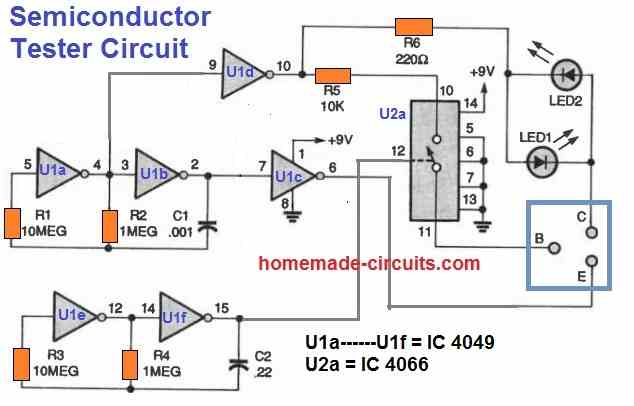
semiconductor parts tester circuit

The complementary outputs required for testing both NPN and PNP devices are provided by the NOT gates U1c and U1d, which work like buffers.

A square wave oscillator with a frequency of about 2 Hz is created by the NOT gates U1e and U1f, along with R3, R4, and C2. A 4066 quad bilateral switch IC, U2a, is controlled through one switch using the output of the above oscillator.

With the help of this switch, the AC signal is sent to the tester's "B" (base) port after passing via the current-limiting resistor R5. Current to LED1 and LED2 is controlled by resistor R6.

Testing BJTs

Bipolar transistors can be tested by attaching their emitter, base, and collector leads to the tester's corresponding terminals and pressing S1.

The transistor can be considered a good NPN transistor if you see LED1 flashing. Similarly a PNP transistor can be deemed good PNP, if you see LED2 flashing.

Testing Diodes and LEDs

 In order to test diodes, LEDs, and other similar semiconductor components, you need to insert the component's pins inside the tester's E and C ports and then toggle S1 ON.

LED1 or LED2 would continue to illuminate whenever the component is functioning properly and good.
In the event that LED1 glows, you can assume the anode (positive side) of the device is inserted to the tester's "C" (collector) port.

In the event that LED2, the cathode (negative side) may be assumed to be inserted into the collector port.

Testing SCRs

SCRs can be tested by connecting their cathode, gate, and anode terminals to the tester's E, B, and C ports, respectively, and pressing S1. 

In the case of a "good" SCR, LED1 will indicate this by flashing. The tester's E and C ports could be used for continuity tests.

LEDs 1 and 2 will illuminate to confirm a continuity and a good device.

You'll also like:

  • computerasoscilloscopeUse your PC like an Oscilloscope
  • logic probe pcb4 Useful Logic Probe Circuits Explored
  • 5 digit counter circuit5 Digit Frequency Counter Circuit
  • MeasuringmVUsingIC741Circuit252CDiagramAC Millivolts Meter Circuit Using IC 741

Filed Under: Meters and Testers Tagged With: LED, SCR, Semiconductor, Tester, Transistor

About Swagatam

I am an electronics engineer and doing practical hands-on work from more than 15 years now. Building real circuits, testing them and also making PCB layouts by myself. I really love doing all these things like inventing something new, designing electronics and also helping other people like hobby guys who want to make their own cool circuits at home.

And that is the main reason why I started this website homemade-circuits.com, to share different types of circuit ideas..

If you are having any kind of doubt or question related to circuits then just write down your question in the comment box below, I am like always checking, so I guarantee I will reply you for sure!

Previous Post: « Freezerless Refrigerator Circuit Diagram Explained
Next Post: LED Light Circuit for Street Vendors, Hawkers, Shopkeepers »

Reader Interactions

Comments

ian says:
November 5, 2024 at 9:12 pm

semiconductor tester. ic u1e is pin 11/12 left pin number missing
and c2 is it .22
thank you

Reply
Swagatam says:
November 6, 2024 at 8:04 am

Yes the missing pin is 11 and the C2 is 0.22uF

Reply

Need Help? Please Leave a Comment! We value your input—Kindly keep it relevant to the above topic! Cancel reply

Your email address will not be published. Required fields are marked *

Primary Sidebar

circuit simulator image

Subscribe to get New Circuits in your Email

Categories

  • Arduino Projects (95)
  • Audio and Amplifier Projects (133)
  • Automation Projects (18)
  • Automobile Electronics (103)
  • Battery Charger Circuits (87)
  • Datasheets and Components (109)
  • Electronics Theory (149)
  • Energy from Magnets (27)
  • Games and Sports Projects (11)
  • Grid and 3-Phase (20)
  • Health related Projects (27)
  • Home Electrical Circuits (13)
  • Indicator Circuits (16)
  • Inverter Circuits (95)
  • Lamps and Lights (159)
  • Meters and Testers (71)
  • Mini Projects (28)
  • Motor Controller (68)
  • Oscillator Circuits (28)
  • Pets and Pests (15)
  • Power Supply Circuits (91)
  • Remote Control Circuits (50)
  • Renewable Energy (12)
  • Security and Alarm (64)
  • Sensors and Detectors (106)
  • SMPS and Converters (34)
  • Solar Controller Circuits (60)
  • Temperature Controllers (43)
  • Timer and Delay Relay (49)
  • Voltage Control and Protection (42)
  • Water Controller (37)
  • Wireless Circuits (31)

Other Links

  • Privacy Policy
  • Cookie Policy
  • Disclaimer
  • Copyright
  • Videos
  • Sitemap

People also Search

555 Circuits | 741 Circuits | LM324 Circuits | LM338 Circuits | 4017 Circuits | Ultrasonic Projects | SMPS Projects | Christmas Projects | MOSFETs | Radio Circuits | Laser Circuits | PIR Projects |

Social Profiles

  • Twitter
  • YouTube
  • Instagram
  • Pinterest
  • My Facebook-Page
  • Stack Exchange
  • Linkedin

Recent Comments

  • Swagatam on Simple Tone Control Circuits
  • Ken on Simple Tone Control Circuits
  • Swagatam on Circuit Projects for Beginners and School Students
  • Swagatam on 10 Watt Stereo Amplifier Circuit Diagram
  • Swagatam on Triac Battery Charger Circuit

© 2026 · Swagatam Innovations