The driver board EGS002 was created especially for single-phase sinusoid inverters.
It makes use of an IR2110S driver chip and an ASIC EG8010 control chip.
Protection against voltage, current, and temperature is included into the driver board.
LEDs are used to indicate warnings, and fan control is included.
Jumpers enable the setting of dead time, soft start mode, and 50/60Hz AC output.
EGS002, which is an enhancement over EGS001, keeps the original interfaces of EGS001 compatible.
In addition, cross-conduction prevention logic is included into EGS002 for improved anti-interference performance.
For user convenience, an LCD display interface is provided, allowing the chip's integrated display capabilities to be used.
Here are some general datasheet for the EGS002:
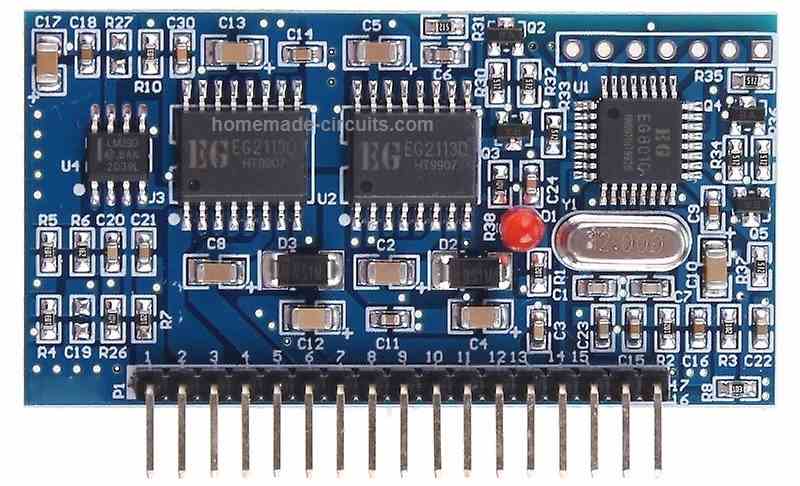
General Datasheet
- Input voltage range: +15V - +20V DC and +5V
- Output voltage range: 110V or 220V AC (depending on the transformer used)
- Output frequency: 50Hz or 60Hz (depending on the configuration of the chip)
- Maximum output power: approximately 300W
- PWM frequency: 16kHz
- Over-current protection: Yes
- Over-voltage protection: Yes
- Under-voltage protection: Yes
- Over-temperature protection: Yes
- Standby power consumption: less than 1W
The EGS002 is designed to work with a center-tapped transformer, and can generate a pure sine wave output waveform using a combination of PWM and SPWM modulation techniques.
It has a low standby power consumption, high efficiency, and comprehensive protection features that make it suitable for small-scale renewable energy applications.
Note that these specifications are general and can vary depending on the specific implementation of the EGS002 inverter board.
It's always best to consult the datasheet or technical specifications provided by the supplier or manufacturer for the specific board you are working with.
Circuit Diagram for External MOSFETs
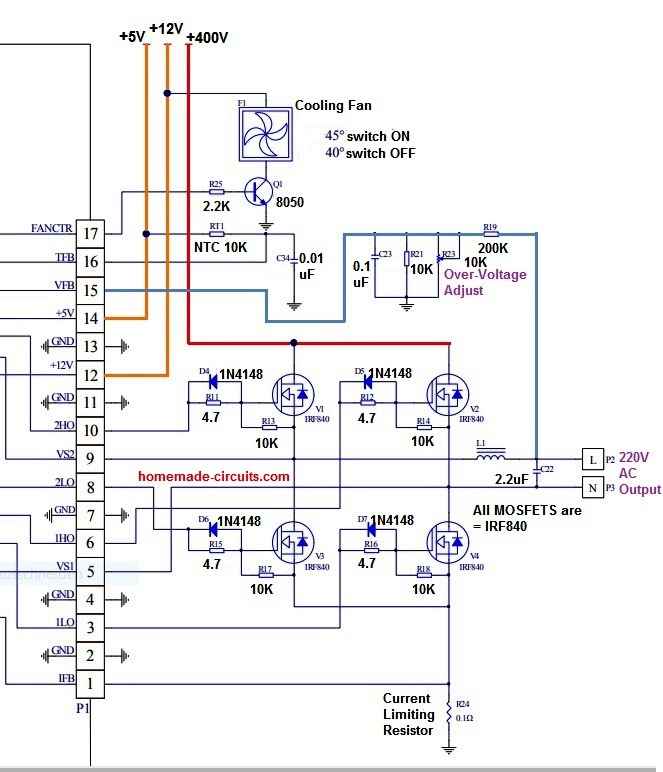
How to Connect
Connecting the EGS002 board to external MOSFETs is feasible, however it needs a few improvements to the board and good knowledge of the circuit design.
Listed below are the recommended methods to connect the EGS002 board to external MOSFETs:
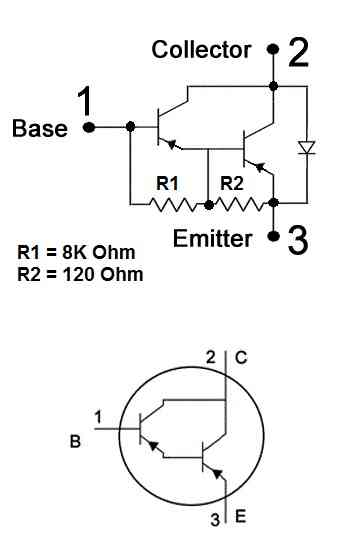
Get rid of the present MOSFETs from the EGS002 board.
This would call for desoldering the MOSFETs from the board and eliminating any associated elements (for example gate resistors and diodes).
Choose the external MOSFETs that you would like to work with.
Ensure these are rated for the voltage and current specifications of your application.
Connect the gate of each external MOSFET to the equivalent gate drive signal on the EGS002 board.
The gate drive signals are generally named as "G" on the board.
Hook up the drain of each external MOSFET to the positive output of the center-tapped transformer.
The positive output of the transformer is normally attached to the positive terminal of the output capacitor.
Hook up the source of each external MOSFET to the negative output of the center-tapped transformer.
The negative output of the transformer is usually attached to the negative pin of the output capacitor.
Insert any essential elements to the circuit, for example gate resistors and diodes, to guarantee correct functioning of the MOSFETs.
Customize the control jumpers on the EGS002 board make it possible for external MOSFET functioning.
This might demand modifying the jumper settings for the "EGS002/04" and "EGS002/05" pins on the board, along with setting up the "EGS002/01" jumper to "ext".
It is critical to remember that changing the EGS002 board in this manner could be complicated and necessitates a great knowledge of the circuit design.
If you are not knowledgeable in electronics or inverter design, it's best to speak with an experienced person or work with a pre-built inverter board that actually contains external MOSFETs
LED Warning Indicator
The EGS002 driver board is equipped with an LED warning alert feature that assists users in identifying potential issues based on the following patterns:
- Normal Operation: The LED remains continuously illuminated.
- Overcurrent Condition: The LED blinks twice, then turns off for a 2-second interval, repeating in a cyclic manner.
- Overvoltage Situation: The LED blinks three times, followed by a 2-second off period, and then repeats this cycle.
- Undervoltage Problem: A sequence of four LED blinks occurs, succeeded by a 2-second pause, and the cycle continues.
- Overtemperature Issue: The LED blinks five times, pauses for 2 seconds, and maintains this cyclic pattern.
Pin Description and Working Details for EGS002
| Pin | Name | I/O | Output Current Feedback/Descriptions |
|---|---|---|---|
| 1 | IFB | I | Pin voltage exceeding +0.5V triggers overcurrent protection |
| 2 | GND | GND | Ground |
| 3 | ILO | O | Right H-bridge Low side MOSFET gate driver output |
| 4 | GND | GND | Ground |
| 5 | VS1 | O | Right H-bridge high-side gate driver return path |
| 6 | 1HO | O | Right H-bridge High side MOSFET gate driver output |
| 7 | GND | GND | Ground |
| 8 | 2LO | O | Left H-bridge Low side MOSFET gate driver output |
| 9 | VS2 | O | Left H-bridge high-side gate driver return path |
| 10 | 2HO | O | Left H-bridge High side MOSFET gate driver output |
| 11 | GND | GND | Ground |
| 12 | +12V | +12V | +12V Input DC voltage input, can be between 10V-15V. |
| 13 | GND | GND | Ground |
| 14 | +5V | +5V | +5V DC supply |
| 15 | VFB | I | AC output voltage feedback to regulate the output voltage, requires +3V to activate. |
| 16 | TFB | I | Temperature monitored with overtemp protection at +4.3V pin voltage |
| 17 | FANCTR | O | Temperature-controlled fan. FANCTR turns the fan on (high output, 1) when above 45°C and off (low output, 0) below 40°C. |
Pinout for LCD Display Connection
| PinOut | Name | I/O | Description |
|---|---|---|---|
| *1 | +5V | Power Input | LCD power supply |
| *2 | GND | Ground | Ground connection |
| *3 | LCDDI | I/O | LCD serial data |
| *4 | LCDCLK | Output | LCD serial clock |
| *5 | LCDEN | Output | LCD chip select |
| *6 | LED+ | Power Input | Backlight power supply |
| *7 | LED- | Ground | Backlight ground connectionpen_spark |
Jumper Setting Details
| Designator | Name | Mark | JP jumper shorted selects [setting description] |
|---|---|---|---|
| 1 | FS0 | JP1 JP5 | JP1 shorted sets AC output to 60Hz Shorting JP5 sets the frequency to 50Hz |
| 2 | SST | JP2 JP6 | JP2 short enables 3s soft start JP6 short disables soft start |
| 3 | DT0 | JP3 JP7 | JP7+JP8 shorted: dead time 300ns JP3+JP8 shorted: dead time 500ns |
| 4 | DT1 | JP4 JP8 | JP4+JP7 shorted: dead time 1.0us JP3+JP4 shorted: dead time 1.5us |
| *5 | LED+ | JP9 | JP9 short: LCD backlight ON JP9 open: LCD backlight OFF |
Default Jumper Settings:
- Output Frequency: 50Hz (JP5 shorted)
- Soft Start: Enabled (JP2 shorted)
- Dead Time: 300ns (JP7 and JP8 shorted)
Jumper Customization:
These jumpers can be manipulated or changed as per users specific needs.
Note:
- Avoid Shorting Conflicting Jumpers: Only one jumper per function can be shorted at a time. For example, you cannot short both JP1 (60Hz) and JP5 (50Hz) simultaneously.
How to Test EGS002 Driver Board
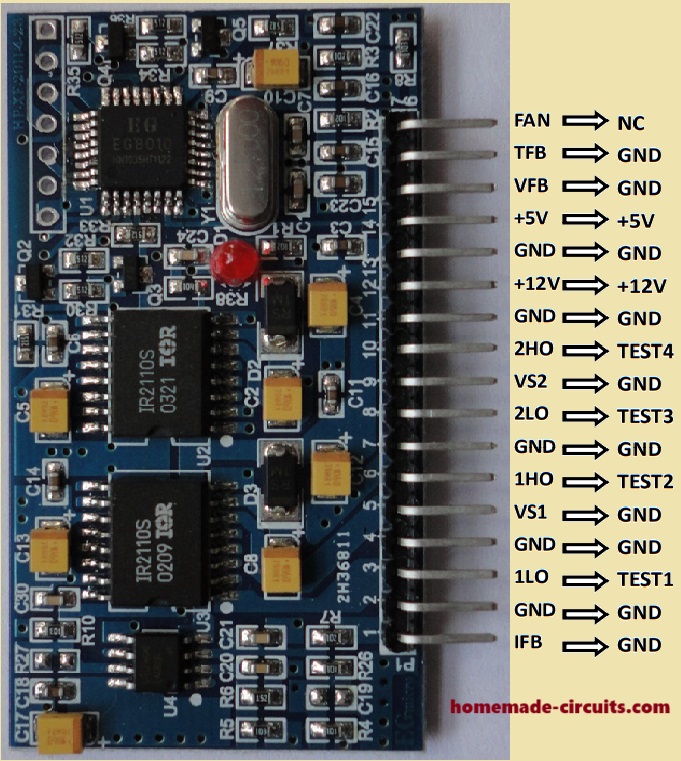
Initial Setup
- Grounding Test Points: During testing, connect the following pins to ground: IFB, VS1, VS2, VFB, and TFB.
- Power Supply Connections:
- Connect +5V DC to the +5V pin.
- Connect +12V DC to the +12V pin (voltage range: 12V to 15V).
Testing Procedure:
Waveform Observation:
- Connect an oscilloscope to test points TEST1 through TEST4 to check the waveforms.
- TEST1 & TEST2: Output fundamental frequency square wave (appears as the blue CH1 waveform in Figure 5-3).
- TEST3 & TEST4: Output unipolar modulation wave. When connected to an RC filter, these points will output the waveform shown as the red CH2 waveform.
Undervoltage Protection Test:
- Since the VFB pin is grounded, the undervoltage protection will activate after 3 seconds.
- This will cause TEST1 through TEST4 to shut down.
- An LED will blink four times, then turn off for 2 seconds, and this cycle will repeat.
- Reconnecting the EGS002 to the power supply will allow you to observe waveforms for another 3 seconds before the undervoltage protection activates again.


Comments
Hi everyone, I am working on a single phase inverter project using the EGS002 / EG8010 driver board.
I followed the typical application circuit from the datasheet/manual which shows a high voltage DC bus, around 400 V and a voltage feedback circuit for the AC output.
Because of that, I originally made my VFB voltage feedback circuit using that higher voltage level.
But, in my actual prototype test, I am now using only 12 V DC on the H bridge.
My question is: could this make the EG8010 think that the VFB pin is too low, almost as if it were grounded and so trigger the undervoltage protection after a few second then?
At first, I used the feedback resistor value shown in the reference circuit, around 200 kΩ.
Since I became aware that my test voltage was much lower than the voltage used in the datasheet example, I tried replacing that resistor with 10 kΩ to increase the feedback voltage going to VFB.
But, the circuit still did not work correctly, so now I am not sure if:
1. my feedback divider is still not giving correct voltage to the VFB pin
2. I am sampling the voltage from wrong point of the circuit
3. the EGS002 expect feedback from the final AC output after transformer/filter, not directly from the low voltage H bridge side
4. just changing the 200 kΩ resistor to 10 kΩ is not enough because the whole VFB feedback network needs to be recalculated.
From what I understand, EG8010 expect VFB signal to be around correct internal reference level during operation.
If the feedback voltage is too low, then it may spot undervoltage and shut down the SPWM outputs.
Could someone help me understand correct way to design VFB feedback circuit when testing H bridge with only 12 V DC then?
What voltage should I measure at the VFB pin during normal operation and how should I figure out the resistor divider for a low voltage test setup?
Any doable solution or correction would be very helpful, thanks in advance…
Hi Yes, your intuition is 100% correct.
Now the EG8010 is shutting down because of its built in Undervoltage Protection (UVP).
Because you dropped the H bridge voltage from 400V to 12V without changing the feedback loop layout, chip thinks the inverter output has collapsed and kills the push after a few seconds.
Here is why it is happening and how you can fix up it: The VFB pin (Pin 13) expects a feedback signal that sits right around 1. 5V AC RMS (peaking near 3V), if it stays below roughly 0 then, 5V for more than a few seconds, protection triggers.
Dropping your bus to 12V dropped this feedback to near zero.
You must sample feedback from the final filtered AC output after the LC filter (inductor and capacitor), not directly from the H bridge switches.
H bridge output is stream of raw square pulses which the pin cannot read properly.
Just swapping the 200k resistor to 10k fails because the EGS002 feedback path isn’t a basic two resistor divider it also passes through a rectifying diode, filter capacitor and the onboard blue trimming potentiometer.
Two ways to solve this for your 12V test setup: Option A (Easiest for bench testing): If you just want to test your H bridge switching without shutdowns, then completely unhook AC feedback line and apply a steady, external 1. 5V DC (like from a battery or separate variable power supply) directly between the VFB pin and GND.
This tricks the chip into thinking everything is perfect so it stay running.
Option B (For true 12V feedback regulation): Route your low voltage H bridge output through an LC filter to get a clean, low voltage sine wave (around 8V to 9V AC RM).
To fall this safely to 1. 5V for the pin, your upper feedback resistor should be changed to roughly 47k to 50k (assuming the lower divider resistor is 10k).
From there, fine tune blue onboard potentiometer until the circuit stabilize.
Hello
Can 220 volts be connected directly to pins 5 and 9?
pls how can I connect egs002 with external gate driver to drive so many power MOSFET (20 power MOSFET or etc) for a 5kva inverter without burning the module. pls show me with label diagram
The EGS002 output can deliver upto 2amp source/sink current which is enough to drive many high power MOSFETs in parallel for building upto 5kva inverters, so no need of any external drivers…
Hi, yes, it can be connected as shown in the diagram…
L1 value?
https://www.homemade-circuits.com/inverter-lc-filter-calculator/
Can the EGS8010 also support transformerless design. I could not find it on the datasheet
resistors diode connection to mosfet pins is difficult convert to pcb board if you draw roughly a simple pcb good for beginners.
The diagram shown in the above article is transformerless…
Eu não entendi de onde vêm os 400 volts e de onde saem da placa os 220 AC! O restante ficou magnificamente ótimo.
The 400V is your source voltage with which you would want to operate the load. It can be from a solar panel, battery or any other similar source.
220V is acquired between the MOSFET junctions, as shown in the diagram…
Please can you tell me where do you connect the ground of 400vdc ? it shouden’t be connected to the ground of EG8010 ?
All grounds or negatives will be in common, meaning the -400V of the solar panel or the battery will also connect with the common connections of all the ground symbols, shown in the diagram…
great, thank you
I want to generate a pure sinusoidal waveform using Arduino to create a spwm signal. I have also built the circuit in Proteus. But the output may be shows a square wave and it is not stable.
I saw your full H-bridge inverter circuit . I mainly built that circuit, but I did not use BJT. I also use a LC(C=4.7uF and L=2mH) filter and a 12V/220V transformer.
In my project, I need to demonstrate both 50 Hz and 60 Hz. If I use modules, the main purpose of the project will not be fullfilled. I really don’t understand what to do now. If the software implementation is already in such bad condition, I don’t know what the hardware situation will be like. my arduink code is- #include
#include
// Sine Table – 50 samples for half wave
int sineTable[] = {0, 25, 50, 75, 99, 122, 144, 165, 184, 201, 216, 228, 238, 245, 250, 253, 254, 252, 248, 241, 232, 221, 208, 193, 176, 158, 139, 119, 98, 77, 56, 35, 14};
volatile int index = 0;
volatile boolean halfWave = true;
void setup() {
pinMode(9, OUTPUT);
pinMode(10, OUTPUT);
// Timer 1 configuration for high speed PWM
TCCR1A = 0b10100001; // Phase Correct PWM
TCCR1B = 0b00000001; // No prescaling
// Timer 2 for Sine frequency (50Hz)
TCCR2A = 0b00000010; // CTC Mode
TCCR2B = 0b00000100; // 64 prescaler
OCR2A = 62; // Approx 50Hz timing
TIMSK2 |= (1 <= 32) {
index = 0;
halfWave = !halfWave;
}
}
void loop() {
// Main code stays empty
}
Did you try the following concept, please try it exactly as given in the following post, along with the code:
https://www.homemade-circuits.com/making-an-egs002-equivalent-board-using-arduino/
You can ignore the opto coupler stage…
Good evening sir. thanks for your teachings.
my question is, can egs002 work with 16×2 LCD?
hola, I need help, I am interested in making an inverter with egs002 with a 110V /60Hz power transformer, I already made the basic circuit and managed to calculate the VFB adjustment R so that at its output it has the necessary 3 V, I am using a transformer UPS power from 12V to 110V and I can’t get the inverter to give me an AC voltage higher than 20V, I need some guidance or ideas to solve the problem, early greetings,
Hi, If you are using the full bridge design as shown in the above article, then please do the following checks:
Disconnect the feedback link completely and check the voltage.
Make sure the MOSFETs are connected correctly.
Use 12V supply at the point where 400V is written in the diagram.
Check the voltage between each vertical half-bridge MOSFET source/drain node and the ground line…it must be 6V (50% average of 12V) check for both the half bridge sides….
Also check frequency across these points…
Hi Nnadi, yes it can, I will publish the full drawing and article soon for you in one day…keep in touch
hello, good morning, I have a question. Is there a way to reprogram the firewere of the EG8010 so that the LCD display can correct the sampling parameters when the circuit works at 110V AC since the reading that this parameter has is incorrect
Hi, I don’t think the EG8010 can be reprogrammed.
Instead you can design your own equivalent board using Arduino or Atmega
thank you so much. I will be waiting for that
No problems….here’s the link for your reference:
https://www.homemade-circuits.com/can-egs002-work-with-a-standard-16×2-lcd/
what do i do to make it work properly on heavy loads,because i have a strong transformer but it keeps of blinking 2 times and shut off
Only upgrading the transformer will not help, you must upgrade battery power and MOSFET power also, accordingly…
How is the current in the circuit set so that the MOSFET or IGBT of the inverter does not blast? How is the current sense set?
You can use a DC shunt and OpAmp to build a overcurrent protection. For example if you want the inverter should shut off at 50A DC, then purchase a 50A/75mv DC shunt easily available online or at local market. Use an OpAmp to convert 75mv to 0.5V. Then output of thiz OpAmp ( which is at 0.5V) is connected to pin. 1 of EGS002. As per data sheet of EGS002, overcurrent operate af 0.5V at pin. 1.
If you want specific schematic DM me to testinghvdc@gmail.com
The current sensing resistor R24 gives that protection to the circuit, you can calculate and set it as per your max load current specifications…
saya sudah menghabiskan 4 modul egs.modul egs cuma cocok buat low frekuensi.untuk hing frekuensi out 220volt tapi untuk HZ keluar 90hz udah berbagai cara tetap di atas 60hz
hi where do you get the 400dc volt from . a Boost converter or ?
400V DC can be from a solar panel, or a battery bank…
sir solar inverter hardware software requirement
Sanwar, please provide detailed specifications of your requirement, i will try to figure it out….
for a full bridge 12v design what should be the transformer voltage
0-12V / 220V
are pins vs 1 and vs 2 directly connected to high volts in high frequency inverters?should you be given a rediator?
Pin1 goes to the current sensing resistor, pin2 goes to the supply negative or the 0V line of the DC supply…
HI PLEASE CONFIRM INDUCTOR L1 DETAIL
Hi, you can try the following calculator and customize the filter as per your needs:
https://www.homemade-circuits.com/inverter-lc-filter-calculator/
I have 0-9v won’t it work ?
It will work…with proportionately higher secondary side output voltage…
okay I have reconfigured to 12v
OK, great!
Hi Valera, i have been following this site and all the problems you guys get with this design. Use a 24v battery and you will get 240+ v , just make sure to adjust the “over voltage adjust” variable resistor attached to VFB to match 50hz. a Good way to do this is put a frequency counter on your output and a use a adjustable DC supply. Use the 2 togehter to adjust volt and frequency to match 240v / 50hz
Hello, I had the same problem with this module and it was about the signal reaching one of the H-bridge MOSFETs. Another problem that appeared for me was high no-load current consumption in the transformer
Utilize transformador de Nobreak, 12 ou 24Volts para 220v, em 12 volts em cada Braço do Trafo, deve receber 7vots alternados, já para 24volts, deve receber 14volts.
quem determina a tensão é o TRafo.
Hi Valera,
Initially try by removing the feedback link completely, which connects with the VFB pin of the IC and check the results. Meaning let the VFB pin remain open and unconnected….
Check the transformer output without any load connected…