In this post I have explained an innovative wireless LED brake light circuit which can be attached to a biker's helmet. The LEDs attached with the helmet circuit illuminates in response to the motorcycle braking generating an enhanced brake light effect from the user's helmet. The idea was requested by Mr. Bugoy.
Technical Specifications
Good day Sir! How are you? Yes, it was indeed a very interesting project. I am really an advocate of safety and security when it comes to my bike Sir.
I wish you could see it soon. By the way, here are some links of an aftermarket product:

I am thinking of hacking a wireless doorbell or a remote controlled toy car with lights. But I do not know how to do it. So I'm asking for your help Sir if you know of a simple RF transceiver and receiver that could drive LED's.
Thank you so much Sir.
The Design
The proposed helmet brake light circuit could be easily implemented by using an inexpensive homemade FM transmitter and a small FM transistor radio.
A small FM transmitter can be seen in the following diagram which becomes the brake light transmitter circuit for the helmet LEDs.
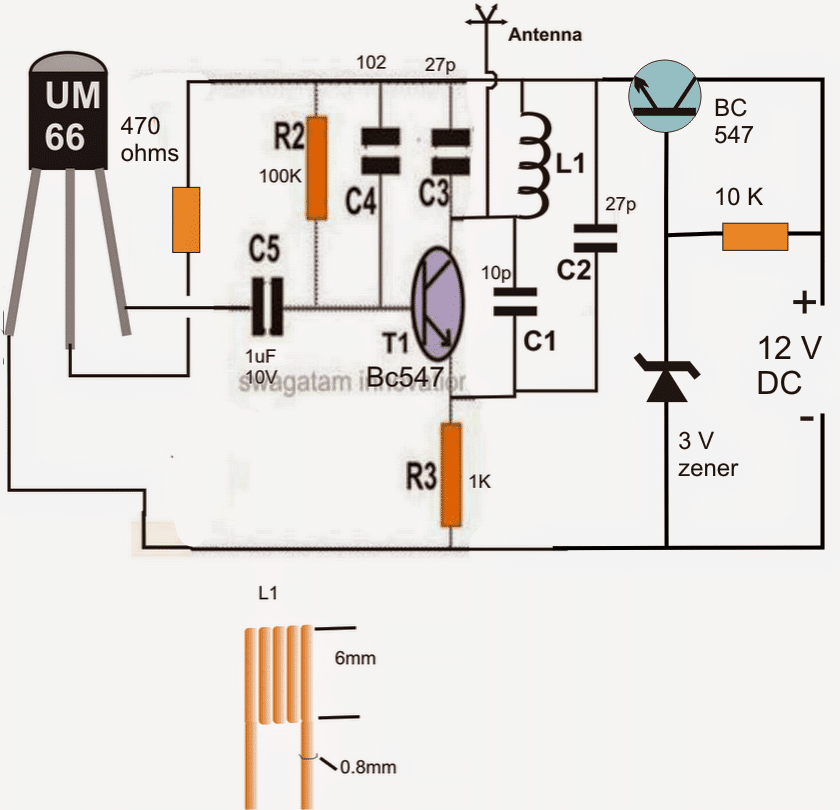
The above design represents a simple FM transmitter circuit which may be integrated with the brake light voltage signal of the motorcycle, or simply across the brake light lamp connection
The circuit generates an FM signal over the standard FM band of 80 to 108 MHz. Thus the transmitted signals become receivable over any standard FM radio placed within a radial distance of 30 meters.The coil would need tweaking for setting the exact point of reception over an FM radio
The indicated 12V lines are required to be connected directly across the brake light lamp of the bike.
The BC547 on the right along with its base zener ensures that the FM transmitter circuit receives the allotted 3 V for the operations.
The UM66 IC is a musical chip which enables the circuit to generate an AF modulated FM transmission ensuring much stronger and robust FM signals compared to a transmitter with no audio modulation stage.
Therefore each time brakes are applied, the transmitter is switched ON and sends a strong audio modulated FM signal for the FM radio positioned inside the helmet.
The FM Radio as the Receiver
Any small FM radio could be used for the purpose of receiving the transmitted signals from the above explained FM transmitter. An example circuit of a small FM radio may be seen below:
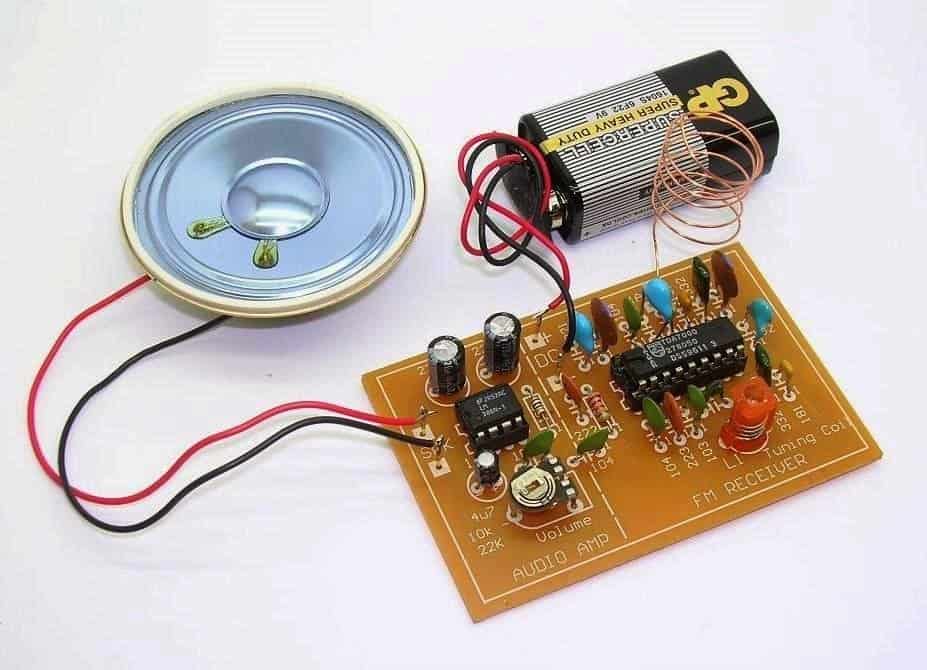
In the image we are able to see a speaker attached with the radio and also a 9 V battery as the supply source.
Both of the above mentioned attachments needs to be removed from the kit and should appear something as given below after the proposed modifications:
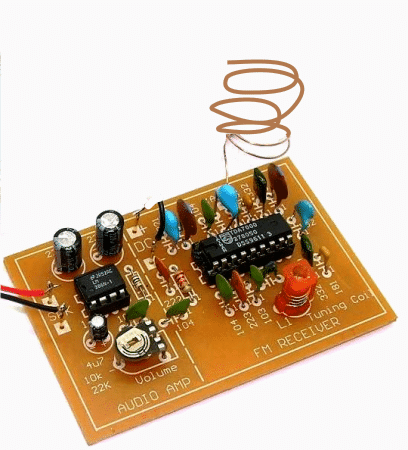
In order to make the above radio compatible with a LEd driver stage and for illuminating a set of LEDs in response to the received FM transmitter signals, we need to make some interesting electrical modifications with the shown FM radio kit.
The following figure shows how a small electrical stage consisting a BJT and inductor may be used for transforming the amplified audio from the radio into a DC which would then illuminate a set of LEds brightly each time the brakes are applied in the motor bike.
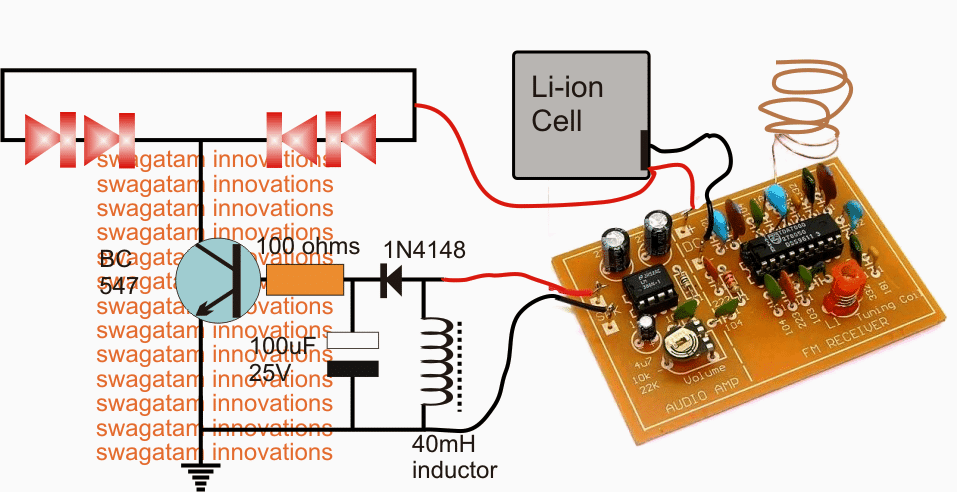
In the above diagram we see the speaker terminals of the FM radio being joined with an inductor and the output across the inductor further connected with a diode, capacitor rectifier stage for converting into a stable DC base drive for the following BC547 LED driver stage.
We can also see the 9 V battery being replaced with a 3.7 V Li-ion cell in order to make the design compact and easily inclosable inside the helmet.
When the radio begins receiving the switched audio, the weak audio frequency across the speaker wires become concentrated and boosted with the help of the connected inductor, this boosted voltage is rectified and filtered by the diode capacitor network so that the BC547 is able to receive a clean DC conversion for driving the set of LEds situated over the helmet body.
Now whenever the brakes are applied the signal from the transmitter is received by the FM radio inside the helmet resulting in the required illumination of the LED strip through the operations as explained in the above section.
How to set up the proposed LED helmet brake light circuit
Before installing the Rx LED module over the helmet, the radio board needs to be set appropriately as per the following explanation:
Switch ON the FM radio with no antenna connected and the station selection on the radio being on any random position.
You may find the LEDs glowing in this situation, now adjust the volume control preset in the amplifier section of the FM board very slowly until you find the LED just stops illuminating.
After the above setting disconnect the speaker output wires from the LED driver stage and let a speaker be connected with these wires. Also connect the antenna wire back in the shown position.
Switch ON the transmitter unit and adjust the red colored frequency coil or it could be a capacitor trimmer in other variants of FM receivers, tune it carefully until a clean and powerful musical audio (UM66 music) is detected in the speaker. Seal the tuning device with glue.
Now remove the speaker and connect the wires back with the LEd driver stage.
Switch ON the transmitter and you'll find the LEDs glowing brightly in response to the received musical transmission from the Tx unit. Switching of the Tx circuit should switch OFF the LEDs as well instantly confirming the perfect working of the system.
Check the response a few more times after which you may proceed with the final installations.



Comments
Hello Sir!
Good Day!
The diode fix worked Sir. But there is again another small problem. Before, without adding the diodes (1N4148), the LED stays ON even when Tx is OFF. Now that I added four (4) diodes in series with the transistor's base, the LED finally turned OFF when not in use. But the problem is, when Tx is activated, the LED does not attain full brightness. It responds perfectly but not so bright. I think less than half the full brightness. Why is it like that Sir? Does is has something to do with the addition of diodes? I tried removing some but the LED will illuminate if I use 3 or less diodes. Thank you so much Sir.
Hello Sir!
The 4.5v DC supply responds perfectly to the switching transistor circuit that you provided. The only downside is that it has a half second delay when turning OFF. Still, the 2.1v supply is the best, but I later found out that it does not respond to the multimeter when set to VDC. It does not fully turn OFF (zero volt) when deactivated. It has a reading of 2.1v when OFF and 2.37v when ON. And later found out that it responds better to the multimeter when set to VAC. From 0.47mVAC when OFF, to 1.5VAC when ON. What do I do now Sir? The transistor switch circuit does not respond to that set-up. Thank you so much. I really want to make use of that point (2.1v supply) because it perfectly responds even to the slightest and fastest pressing and depressing of the Tx.
…sorry my above suggestion is incorrect, try using two or three 1N4148 diodes in series with the base of the transistor…this might just work
Hello Bugoy, just try adding a capacitor in series with the transistor base….any capacitor will do, 1uF, 10uF or any other value….positive will go to the 2.1V signal.
hello sir! Good day! I already did the circuit. But there was a little problem. The 2.1v dc supply is not responding. I found out that it did not make a zero volt when Tx is release. It stays in 2.1v output. It only increases a few mV when Tx is pressed. And i found out also that the 2.1v dc is actually AC. I set my multimeter to vAC and it reads 47mVAC when OFF and becomes 1.5 vAC when ON. Whereas when the multimeter is set to vDC, it reads 2.10 vDC when OFF and 2.37 vDC when ON. Thank you in advance sir for your unending help.
i almost forgot sir, you only mentioned to ignore the capacitor and the coil. How about the 1N4148 diode sir? Do i need to include it or not? Thank you very much sir.
the diode may also be eliminated…it's not required.
hello sir! Thank you so much. The 4 Ni-Cd cells only has 1.2v each sir. Having a total of 4.5-4.8v. But the Rx only requires 3v alkaline batteries. Would it damage the circuit? Do i have to use mobile phone Li-ion cell that has 3.7v instead? I will be working on it now sir.
Hello Bugoy, you can use the N-Cd cells, but for 4.5V make sure the LEDs have around 220 ohm series resistors with each string, or you may include one more LED in the string, that is use 3 LEDs in each string with no series resistors
Hello Sir!
Good Day!
What do I do now Sir? Now that I found two points with RF outputs? What point will I use? The one with 4.5v supply but with OFF delay, or the one with 2.1v supply but perfectly sync? Thank you so much Sir.
hello sir! Good day! How are you? I worked on it this past weekend and im happy to get results. I found two points. But both have downsides. The 1st one illuminates the LED fully (i measured it at 4.5v which is exactly the same as the supply voltage), but has more than half a second delay when turning OFF. It stays ON for more than half second before turning OFF after releasing the transmitter. The 2nd one barely illuminates the LED only 1/4 the brightness (i measured it at 2.1v), but responds in sync with the transmitter's ON and OFF. By the way, i used 4 pcs Ni-Cd rechargeable batteries. What do i do now sir? Thank you very much.
….previously you mentioned 3V for the Rx, how come you are using 4 cells in series, that would produce 6V??
Good day Bogoy, use the 2.1V trigger for the application.
Assemble the transistor LED stage that's shown in the last diagram above.
Use 1K resistor instead of the shown 100 ohm, do not use any coil or capacitor ignore those components.
Connect the 1K end with the 2.1V supply, connect the emitter of the transistor to the 3V negative and LED anodes to the 3V positive….and check the response.
Hello Sir!
Thank you so much Sir. So that is the only way to find the correct point? I will do that now Sir. By the way Sir, will this test damage the circuit if I connect to a wrong or particular point? Thank you so much Sir. I will update you later when I have the result.
Hello Bugoy, the 1k resistor will prevent anything from getting damaged…connect the cathode of the LED with 1K and the 1K end to the negative of the battery….after this you can use the anode of the LED for investigating the required point in the circuit.
Hello Sir!
Good Day!
I opened up already the wireless doorbell unit. I want to show you what's inside. So you could guide me better on how to start. The unit has an LED on the receiver unit and flashes according to the tone generated. There are 36 different tones and can be selected by a tact switch. The problem is, where can I get a supply where it turns ON when the transmitter is pressed and turns OFF when released? The set-up of the doorbell is that it finishes the tone while flashing the LED even if the transmitter is depressed. And it take a few seconds to do so, giving a delay or prolonging of the action which is supposed to be OFF when transmitter is depressed. There is no tone option for one-time, one-shot switching. Also, how many LED can it power up? The transmitter requires 1.5v (one AA battery) while the receiver requires 3v (two AA batteries). I am hoping you could help me out with this Sir.
Below are some pictures for your reference Sir. Thank you so much.
i1284.photobucket.com/albums/a561/butchmillo/2014-11-27-1636_zps35722a72.jpg
i1284.photobucket.com/albums/a561/butchmillo/2014-11-27-1637_zps840319bf.jpg
i1284.photobucket.com/albums/a561/butchmillo/2014-11-27-1639_zps76228d59.jpg
i1284.photobucket.com/albums/a561/butchmillo/2014-11-27-1640_zps6b62677d.jpg
i1284.photobucket.com/albums/a561/butchmillo/2014-11-27-1641_zps2a752c58.jpg
i1284.photobucket.com/albums/a561/butchmillo/2014-11-27-1643_zps58b1e3d8.jpg
That's great Bugoy! The LED which is switching ON only momentarily will have a circuit controlling it….try to locate the input to this stage…this input will be directly linked with the Tx ON/OFF periods, so we can use this input for illuminating the brake light LEDs through a BJT buffer stage.
so please try to locate this input signal….you can check this by connecting a LED/1k resistor string across the different points with respect to the ground until the correct point is found.
Hello Sir!
Good Day!
I'm so happy! I have some good news for you Sir. Earlier, when I went to the city, I accidentally found a shop that sells battery operated wireless doorbells. There are 4 units left and I need to have one of those before its totally gone. can we make use of it sir for the wireless helmet brake light? Will it be easy to modify the unit for the desired purpose? I hope you could help me with it. Thank you so much Sir. Take care.
Hello Bugoy,
A remote door bell circuit can be effectively used for the above purpose. Whether it's easy or not will depend on the hobbyists experience, you can try it out… but I cannot guarantee success.
Hello Sir!
Good day!
How are you? I guess my enthusiasm came back after two failed attempts (though the first one, the isolated power supply, is not actually a failure because it worked. It just wont work
with the capacitive proximity sensor alarm). I tried building the stun gun featured in your blog but still I cant make it work. Maybe because I could not find exact parts like the audio transformer and the 10nF mylar caps.
…you can make use of an automobile ignition coil for trial purpose
Hello Bugoy, the transformer is the vital component, if you don't make it correctly you won't get the specified ersults.
for getting higher voltage you may have to select a higher primary/secondary turn ratio, such as 20:10,000, the 20 turns should be made by using thicker wire may be a 0.6mm while the 10,000 turns could be 6 times thinner that's 0.1mm thick……use a ferrite EE assembly for the winding.
Hello Sir!
Good Day!
Are there any stun gun circuit that you can suggest for me? When I was doing the isoalted power supply, I found out that the secondary's output is I think 300V dc but with a very low current. Can that be amplified to reach a decent few thousand volts? Im sorry, but I cant make the stun gun, you featured in your blog, work. Thank you so much Sir.
that's great Bugoy, keep up the good work!
Hello Sir!
Good Day!
I think another failure again. I cant make it Sir, I'm sorry. Maybe RF projects are not my line. I still do not have the proper and necessary know-how to do it. Also, the scarcity of parts is another problem. I am sorry to disappoint you Sir. Maybe I would think of a simple project instead. The projects that I learned from your blog are really amazing. I still use them now. Some are for household, while some are for my beloved motorcycle.
Hello Bugoy,
Don't worry, keep trying and be hopeful, because failures are often followed by success….keep it up!
Good Day Sir! How are you? It was a very sad and frustrating day for me. I could not find anywhere the UM66 chip. No store sells it here Sir. What should I do? Thank you.
Hello Bugoy, you can make a transistor astable frequency generator or a 555 frequency generator and use it in place of UM66….first make sure it produces an audible sound around 2khz to 6khz frequency by testing it separately and then join it with the Tx circuit..
Hello Sir!
Good day! Thank you for the information Sir. I will be finding such coil. Because I think there is no available ferrite core small enough to fit the application. I will be updating you asap. Thank you so much.
Good Day Sir!
How are you? I have one more question Sir. How am I going to make the 40mH inductor? The electronic stores here do not sell inductors. Thank you so much Sir. Take care.
…i meant buzzer coil…
Bugoy, you can make it home by winding the thinnest possible magnet wire around any ferrite core, about 500 turns, I had used a buzzer as the inductor in my circuit as shown in the below example:
1.bp.blogspot.com/-j-B5fWFwJVo/UQTewNIMC7I/AAAAAAAACzA/Y7WLCNIbUGs/s1600/buzzer%20coil.jpg
Good !dea. Keep on working….
thanks
Hello Sir!
Good Day! How are you? I was trying to make the circuit work but I cannot make it as steady as possible. It seems the tuned frequency varies and keeps on changing. Sometimes it works, sometimes it does not. What could be wrong Sir? Thank you. I am sorry I just messaged you now, Just got busy from work. Take care.
Hello Bugoy, did you include the UM66 or any musical chip with the transmitter input?
without an audio modulation the reception will not be accurate….I have tested this design and for me it worked flawlessly.
Hello Sir!
I already completed the parts/components. I just got home. I will be starting the project tomorrow. Please wish me luck. Take care.
Sure Bugoy, i wish you all the best, I am sure you'll succeed
Good Day Sir!
Thank you for your input Sir. I will be gathering the parts tomorrow. I hope to get them all. Any small cheap Fm radio will do Sir? How many LED can it drive Sir? A cellphone battery could be a power supply for the receiver, isn't it Sir? Thank you so much Sir. I will update you ASAP. Take care Sir.
Hello Bugoy, yes any small FM radio capable of driving a small speaker will do the job.
around 4 bright red LEDs can be lit from such radios.
Hello Sir!
Good day! No Sir, I just want to make two units. for me and for my riding buddy, my best friend. He is so good to me and I owe him a lot, so I think giving him something unique is worthwhile. So if I will but a cheap FM radio, would you help me hack it to suite the application Sir? I do not have much knowledge in RF. Maybe I will just send you a picture of the actual circuit of the FM radio so that you could guide me correctly. Thank you so much Sir for your patience.
Hello Bugoy, for just two units it will never be a problem, just set the two units on different FM bands isolated far apart.
The FM radio must have the facility or the power of driving a a small speaker…then it would be perfectly compatible for this project.
Hello Sir!
How are you? Its been so long. I was busy working on our project (wireless helmet brake light) but I do not know what to do next. Where can I find a circuit for that FM radio that you mentioned here? Also, if the antenna is cut to a shorter length, will it shorten also the transmission range? So that even if two riders are using it, it will not interfere with the other. Thank you Sir. Please keep me posted. Take care.
Hello Bugoy,
FM radio is perhaps the most basic of all the other modules…if you cannot get this then I am afraid it would be difficult for you to complete this project.
yes, the length of the antenna directly decides the sensitivity of the Tx, Rx units.
moreover the modules will need to be aligned or set over a suitable spot across the FM band and this spot will be unique to each of the modules, so cross connection is anyway less likely across adjacent bikes if any, are you planning to manufacture these units?
Dear Sir
I am Making a project there will a cable car it will go a side to another Side I want
A Circuit Wich can Change Dc Motor Ploarity After 1 minute
dear cycle, make the following circuit:
https://www.homemade-circuits.com/2014/10/power-switch-on-alarm-with-auto-off.html
select "C" to get 1 minute ON on power switch ON…use a DPDT relay instead of the shown SPDT and wire the relay with the motor as shown in the following example circuit (see only the contact connections):
https://www.homemade-circuits.com/2014/09/automatic-pwm-door-openclose-controller.html
Sir please Help Me
Can You Plz Give me a circuit that can change the polarity After 1 minute. Plz sir give me that circuit its my Happy New Year Project
Cycle, please explain the requirement with more details
Thanks…
as you can see that vout feeds positive voltage to positive terminal but i was confused as to what line feeds the negative voltage to negative terminal then it occured to me that negative voltage is actually a 0 voltage so perhaps that negative terminal does not need to be feeded by any circuit line is it ?
Hello Gururaj, all the "earth" or the zero line shown in the image will become a common line by getting interconnected and then this common line will become the negative line for the circuit.
Ofcourse the circuit will have its own negative which will need to be connected with the above explained common negative line,
without the negative and the positive connected the circuit will fail to function.
picpaste.com/Battery-eliminator-schematic-aUyXgHr5.jpeg
Hello Mr.Swagatham,
Thanks for your prompt reply.
Sorry i was late as i was not able to reply as i was facing problem acessing blogger.This is the schematic i was mentioned which you can see in the link.
Hello Mr.Swagatham,
I was always fascinated by electronics and easy schematics posted by you has motivated me to make a foray into the world of electronic hobbyist but i understand that to drive circuits i would need a good psu so i checked some schematics for transformer psu one of which caught my interest which i intend to build but its output stage has set me confused, Can you please help me ? How do i share its schematic with you as i dont have google drive or can i post a link to its image ?
Hello Gururaj,
yes you can post the image in any free image hosting site and provide me with the link.
Hi, yes the scr based grid tie inverter looks very interesting, especially the last one in the following article:
https://www.homemade-circuits.com/2014/04/simplest-grid-tie-inverter-gti-circuit.html
You can try it using smaller transformers such as a 1amp transformer and without connecting the output to the grid initially….it's important to confirm the SCr operation first before going for the final set up.