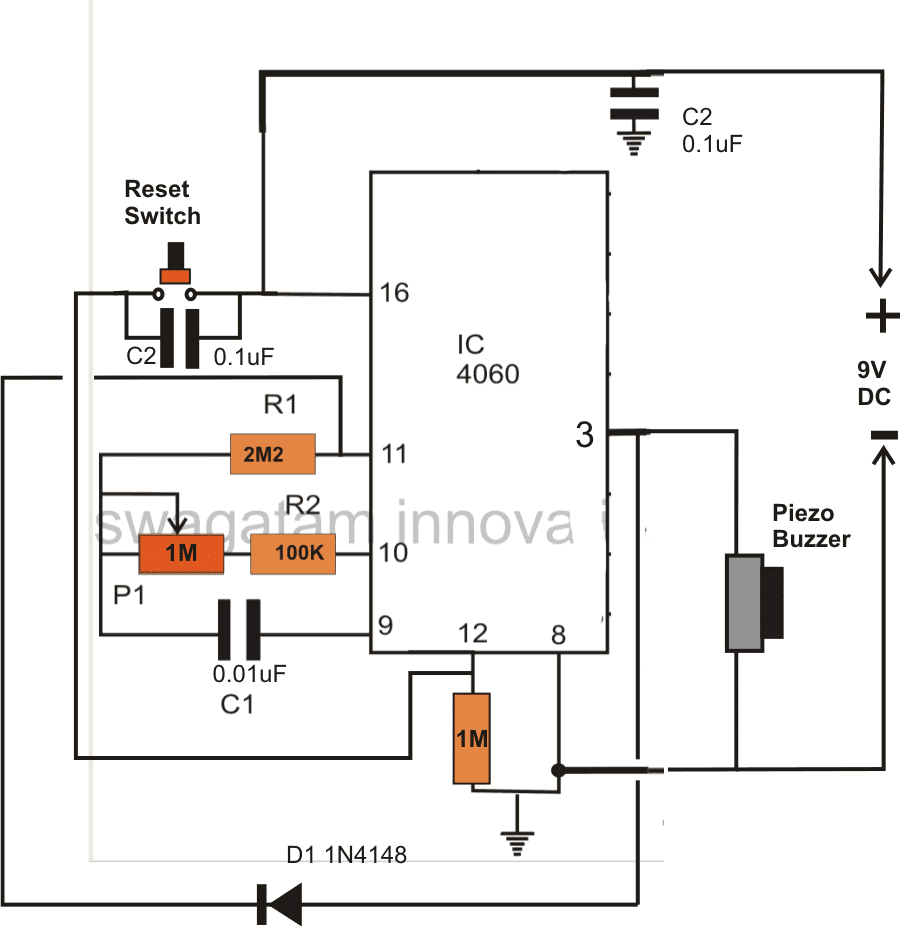
In this post I have explained how to build a simple yet accurate timer circuit using the IC 4060 and some ordinary passive components.
Main Advantage of using IC 4060 as the Timer IC
I have already discussed this IC comprehensively in one of my previous articles, everything regarding its pin outs have been discussed there in detail. We studied that the IC 4060 is specifically suited for timer applications and also as an oscillator. In this article we’ll study how a simple versatile timer can be built using the IC 4060.
Other than the IC you would require just a couple of resistors, one pot and a capacitor for making this timer.
Referring the figure, the simplicity of the design becomes evident and therefore this circuit is perfectly suited for all electronic newcomers, who can easily build this project and enjoy its useful service.
As explained earlier in one my articles, the IC has an in built oscillator that needs just a few passive external components for making it tick.
Depending upon the values of the external RC components, the oscillation periods can be varied right from a few fractions of a second to many hours.
RC components refer to the values of the external time determining components consisting of a resistor or a pot and a capacitor.
The outputs produce a varied rate of time periods; each output generates time periods that’s exactly double to that of the previous output in a certain order of the IC pin outs.
Since here we want to use this unit as a timer we have selected the pinout which is last in the order as far the length of the time period is concerned, meaning we have selected pin #3 which generates the highest delay period.
The biggest advantage of making a timer using IC 4060 is that the involved timing capacitor can be kept as small as possible by increasing the complementary timing component value, which is the resistor.
This helps to keep the circuit simple, smaller and very sleek, unlike other timer IC like 555 which require high value electrolytic capacitors for generating even ordinary time delays.
How the Circuit is Latched when Time is Elapsed
In the figure you can see a diode being introduced from the output pin #3 to one of the oscillator pin #11. This diode acts as a latching component, which latches the IC once the set time lapses and the output of the IC goes high.
If this diode is not inserted, the output would go freewheeling from logic high to logic low and keep repeating the time delays.
The circuit may be powered from a small 9 volt battery which will last almost for ever.
A buzzer is fitted at the output for the required indications of the timer output after the time delay has elapsed.
How to Reset the Timer
The IC may be reset simply by pressing the reset button or alternatively the circuit gets automatically reset when switched off and powered again.
How to Calculate Frequency or Time Delay of IC 4060 - The Formula
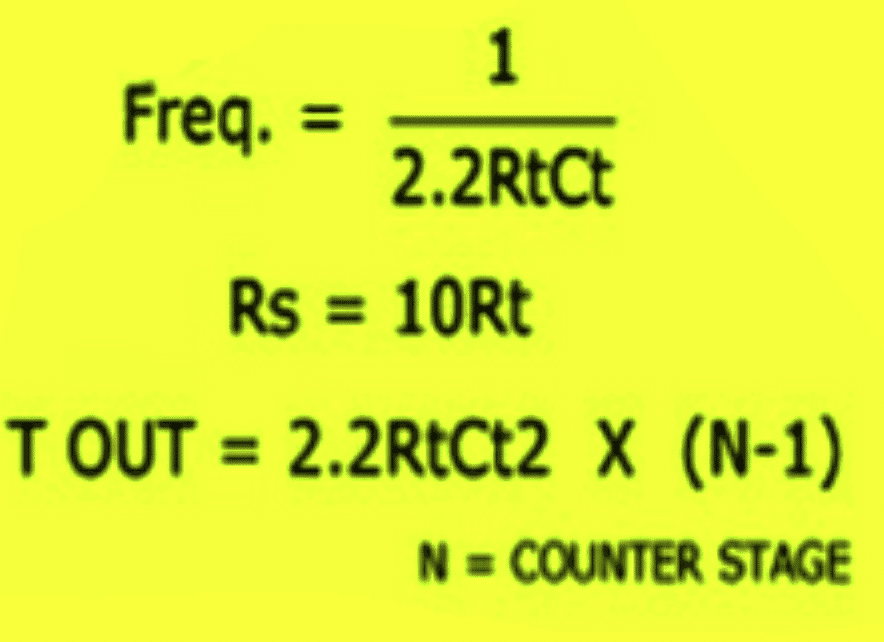
Or Alternatively the following standard formula for calculating the Rt and Ct values is:
f(osc) = 1 / 2.3 x Rt x Ct
2.3 is a constant as per the ICs internal configuration.
Rt will in Ohms and Rt in Farads
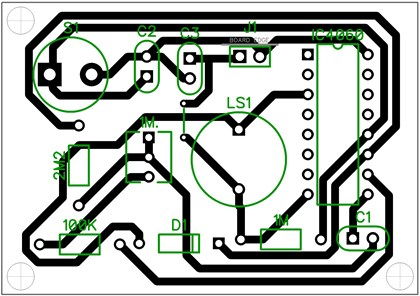
PCB Design
Adding a Relay
You can further upgrade the above design by adding a relay control to the output in order to facilitate an external mains AC load switching, as shown in the following image:
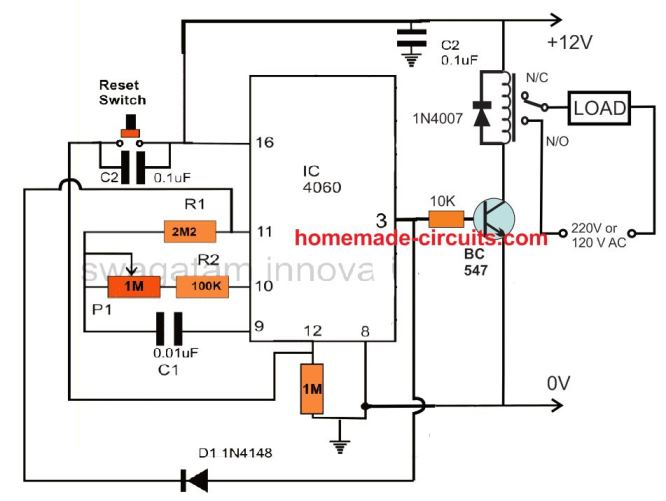
Remember the delay interval at pin3 can be increased by increasing the C1 value along with the P1 pot value. However, make sure that the C1 is always a non-polar, hence to increase its value you can connect many number non polar capacitors in parallel. For example you can connect non-polar 1uF capacitor as many numbers as you want for getting a desired long delay.
Delay OFF Timer (1 to 2 hours)
The IC 4060 can be also configured as a simple delay off timer with a delay of 1 to 2 hours or more.
A delay OFF timer basically switches ON the load initially, when the timer is switched ON, and then turns it off when the delay period lapses.
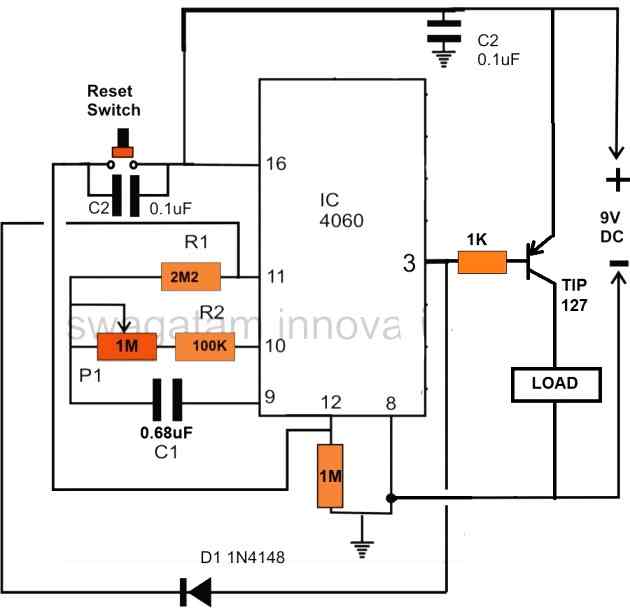
The circuit does not use a relay, instead powers the load directly through a PNP power transistor. However, if you want to include a relay, you can replace the TIP127 transistor with a BC557, and replace the "LOAD" with a relay. Don't forget to connect a freewheeling diode across the relay coil.
Note that here a PNP transistor is used for switching the load, this is done to implement the delay OFF function of the circuit. If a delay ON function is required, then the PNP transistor must be replaced with an NPN transistor.
Test Results for the above 4060 Relay based Timer Circuit
We would like to extend our deepest gratitude to Mr. Val for his exceptional expertise, unwavering dedication, and invaluable contributions to the development of our IC 4060 based timer circuit. Through his extensive knowledge and meticulous efforts, Mr. Val has not only modified and tested the circuit but also provided us with comprehensive documentation, including images and circuit diagrams, as given below.
Specifications:
- RELAY ON WHEN SWITHCED ON
- DELAYED OFF TIME WITH POT SETTING
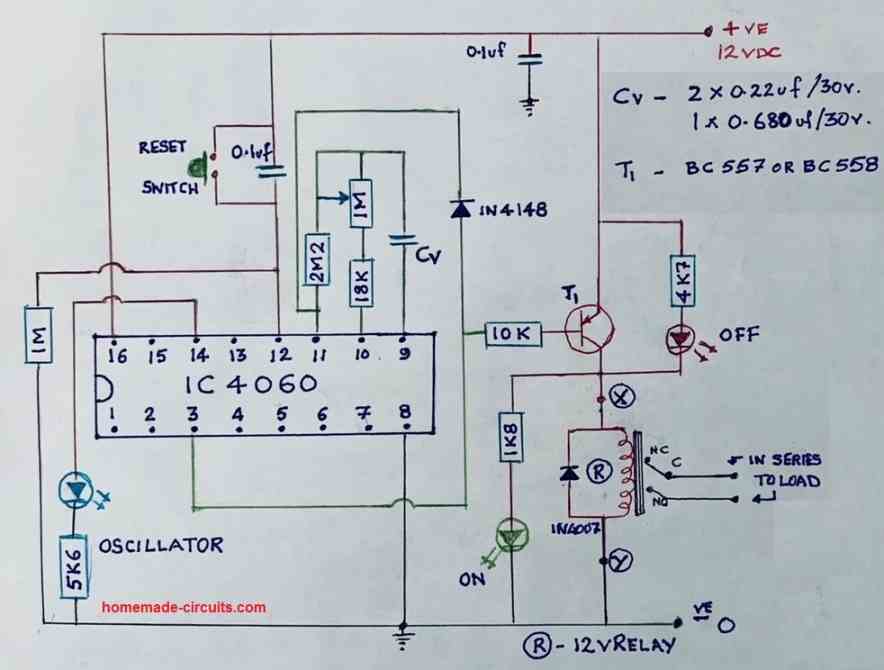
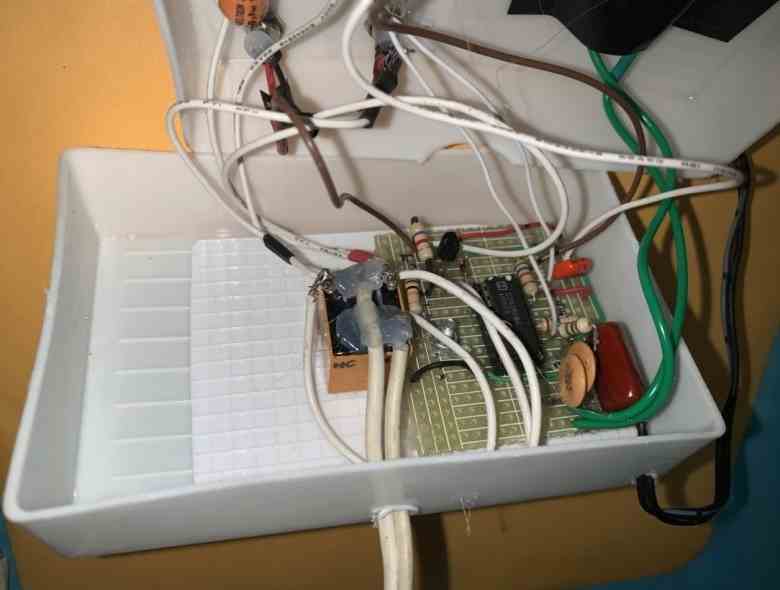
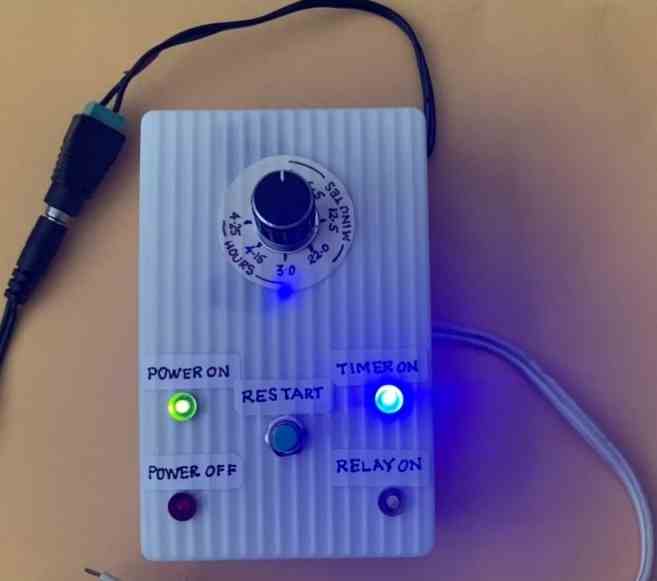
With great precision and attention to detail, Mr. Val meticulously tested the modified circuit, ensuring its flawless performance. His commitment to excellence and thoroughness in assessing every aspect of the design greatly impressed us. Through his unwavering efforts, we gained confidence in the reliability and efficiency of our timer circuit.
Understanding the Basic ON/OFF sequence of IC 4060 pinouts
The following video shows how a basic timer circuit may be configured using an IC 4060 and a few supporting passive components.
The schematic for the circuit discussed in the video can be visualized in the following diagrams:
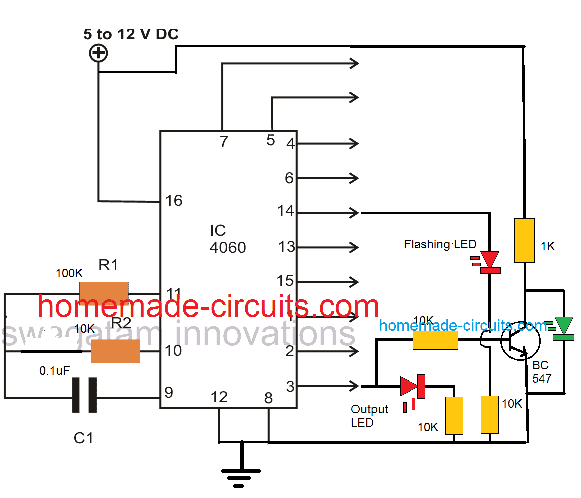
The following image shows how to latch IC 4060 output by adding a diode across the selected output pin and pin#11
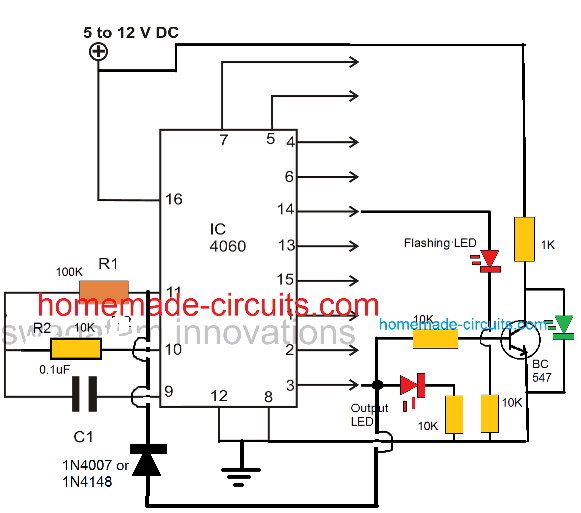
As we already know that the timing output or delay across all the shown output pins of the IC 4060 depends on the product of the values of R1 and C1, here pin#3 can be seen going after 32 logic pulses from pin#14 of the IC. Meaning when the LED at pin#14 completes 32 pulses, the LED at pin#3 switches ON, and switches OFF after another 32 pulses from pin#14. Identically you may find different equivalent rates at the other output pins of the IC.
This timing proportion is observed when R2 and C1 are selected to be 10K and 0.1uF respectively.
Simple Timer with Alarm
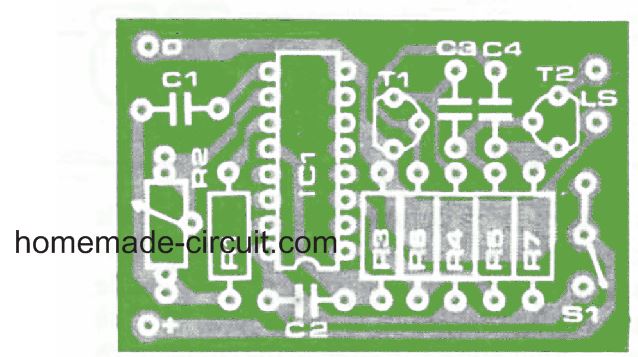
The next circuit is also designed using the CMOS IC CD4060, that includes a pulse generator and a counter. When power is switched on via S1, a reset voltage is given to the IC through C2. Simultaneously the IC built-in oscillator starts providing pulses to the counter.
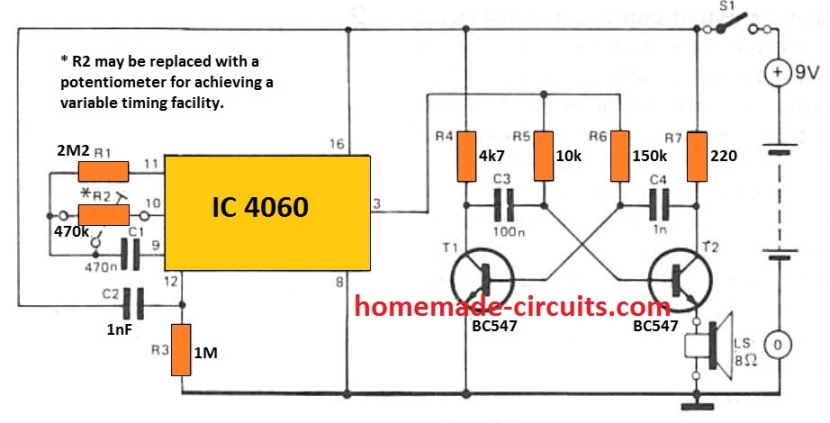
Following 213 clocks, the counter output (Q14) goes high, turning on the oscillator across T1 and T2. By doing this a sharp 3 kHz frequency that is emitted through an 8 ohm small loudspeaker. The circuit is powered down simply by turning off S1.
With the indicated R2 and C1, the buzzer will sound approximately An hour after the circuit has been started up. By upgrading R2 with a 1 M adjustable potentiometer, the buzzer time period could be varied from 5 minutes to 214 hours.
The potentiometer scale may be appropriately calibrated for quick setting up. The circuit utilizes hardly any current (0. 2 mA although the counter will be operating with 35 mA when the alarm signal is turned on) thus that a 9 V battery should promise quite an extended life.
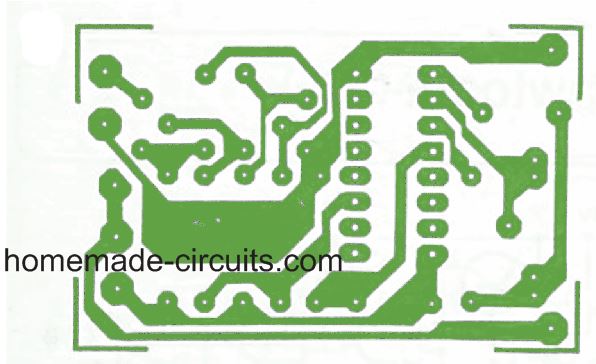
PCB Design and Component Layout for the above timer with alarm can be seen below:


Comments
Hi swagatam! Can you design me a circuit with the folllowing question?
“Design a circuit that displays the last 2 digit of your birthdate using IC7447 and Common cathode display “.
and an another request please make this simple with easily available components!
thankyou!
Good day Engr, I want to build a timer circuit with cd4060 to power a system 30 seconds ON and 10 seconds OFF. The system will repeat like that indefinitely until power is out. what modifications do I have to do. I want use variable resistors to preset the desired time intervals.
Moses, it is difficult to adjust a 4060 based timer with different ON/OFF timings, unless two of them are used, as discussed in the following post:
https://www.homemade-circuits.com/how-to-make-simple-programmable-timer/
Or you can also try a 4060 and 4017 based design for the same:
https://www.homemade-circuits.com/how-to-make-long-duration-timer-circuit/
THANK YOU SO MUCH SIR. PLEASE HOW CAN I ACHIEVE THE SAME THING WITH TWO NE555 TIMER ICs IN MONO STABLE MODE WHERE THE END OF TIMING OF ONE WILL TRIGGER THE START OF THE OTHER. I WANT TO TRY IT AS WELL.
Moses, I tried but cannot figure out how to design programmable timers using cascaded 555 ICs, I will keep trying though and let you know if there’s any luck..
Hi Jai,
You can get all the required information from the following post:
https://www.electronics-tutorials.ws/counter/7-segment-display.html
merhaba bu entegre ile 6 saatlik bir zamanlama için gereken direnç kondansatör değerleri nelerdir?
Hi, you can use the given formula, replace the f(osc) with 0.00002314814
sir I am referring the circuit that you showed in your video with out a diode
Ok, if you do not want to show the green LED response or if you do not wish to use a relay or any external load, then you can eliminate the BC547 transistor, it won’t be required…
please also tell me that polarized capacitor can be used or it is necessary for the proper functioning of the circuit to use a non polarized capacitor
if I only change resistor to a higher value time will change?
The timing capacitor at pin#9 must be strictly a non-polarized capacitor.
You can either change the resistor at pin#10, or the capacitor at pin#9 or both to vary the output time delay.
does BC 547 transistor is necessary for the working of the circuit or I can ignore initially to make simpler circuit
Arham, which circuit diagram are you referring to exactly?
sir I wanted to increase the off time but wants to keep the on time to 32 flashes please guide me how
Hi Arham, for 32 count we will have to add two 4017 ICs with the 4060 IC. Let me know if it is ok with you?
PLEASE CAN THIS FLASHING LEAD BE MADE TO REMAIN HIGH WITH FLASHING WHEN THE LOAD IS SWICHED ON
No that may not be possible, it will do the opposite.
Hi, i understand im very late to this webpage… but i need to design a circuit which has a potentiometer variable from 0minutes – 60minutes, that when the time has elapsed a buzzer and led goes off, also has a reset. Any help would be much appreciated. Thanks. @jacktroygreen@hotmail.co.uk
Hi, I think the hand drawn circuit design with the prototype images is the one which exactly matches your requirement. You can try that. For 60 minutes delay you may have to use a 5uf capacitor at pin9 of the ic, which must be non-polar, not a polarized one.
is there a way in which i could connect the circuit up to a dial knob so that i could change how long, 0-60min, externally it takes before alarm elapses?
You can connect a knob to the 1M potentiometer and calibrate it with the specific time intervals.
The calibration might need some practical trial and error method.
Also is the circuit able to be battery powered?
Yes, you can use a battery with a voltage matching the relay coil voltage.
Thanks very much. Just realised in the circuit there is no buzzer, where would i be able to addone in so that when the timer elapses the buzzer goes off? Thanks somuch for your help
No problem…You can connect the buzzer parallel to the relay coil.
Hi, still working with this circuit. Would you be able to tell me what volt battery would be able to power this circuit and where to put it, thanks
Any battery between 3V and 15V should work fine, just make sure the relay coil voltage matches the supply Voltage.
Hi Swagatham
I have constructed the third circuit in this blog (1 to 2 hours Time delay OFF) with your guidance and support and thank you immensely for the same.
I actually used suitable capacitors & pot to get the timing from 5 minutes to 4&1/2 hours with your help
I added an LED with 1.5k resistor parallel to the relay to show TIMER ON & an LED with 4.7K resistor across the Collector//Emitter of the BC 557 to indicate the TIMER OFF
In one of your earlier pictures you sent me It shows an LED with 1.8K resistor connected from Pin 3 to the negative rail to indicate TIMER OFF
Which configuration of the TIMER OFF LED do you think is safer and better for the smooth operation of this circuit
In your VIDEO in this blog where have you got the ON // OFF LEDs connected can you please let me know
Thanks once again for all your help & support Swagatham, God bless you in your endeavours
Kind regards
Val
Thank you so much Val, I greatly appreciate your interest.
I am so glad you could build the project successfully.
You are perfectly correct, you can connect an LED with a series resistor between pin#3 of the IC and the ground rail, that will give you an indication regarding the relay OFF situation (for your PNP relay driver).
All the best to you.
Where can I get the PCB designed by you.
Sorry, I don’t have the PCB design for this project…
Hello sir
This is an ON timer. Kindly describe How we can get an OFF timer using 4060 ic.
Hello kesavachandran,
if you connect a PNP transistor to the output of the IC 4060, if will invert the output and you will get a delay off timer
hello sir I want a circuit for lower current and upper current cutoff to control dry run and over load of a water motor. Can you please explain it ?
Hello Kesavachandran, please check the “Design#4” from this article, this might help:
https://www.homemade-circuits.com/underground-water-pump-motor-dry-run/
Yes understand Pin 12 is reset and start over, however, I want the capability to prematurely terminate the timing process. so if for example, I have the timer set to 2 hours and at 30 minutes want to activate the output high, how do I go about that to occur. you mentioned shorting out the capacitor but that freezes the timing cycle until the short is removed. Thanks again for your prompt reply
Unfortunately, I don’t think there’s any method through which this modification could be achieved in the IC 4060, because the capacitor, and the associated timing resistor are continuously in the oscillating mode, and the pulses from this oscillation trigger the internal flip flips which in turn switch the external outputs of the IC with different timings, so shorting the capacitor will not help. I will try researching more, If I happen to find a solution will update it here.
OK look forward to a solution, many thanks
Hi, thanks for all your great circuits and help to users.
I have a similar request to the user NomadAU October 3 2013 which was….
Thanks for publishing this circuit. I’m using it on a boat to turn on the illumination for a switch panel, running at 12V. I’ve replaced the buzzer with a PNP transistor that switches the real load (the panel back lights) when Q14 (pin 3) is low, and turns it off when the pin goes HIGH…and this works just fine.
So, when I push the momentary (reset) button, the lights come on for a period of time, long enough for me to find the panel switch I am interested in and turn it on or off.
Now I am wondering if there is a way of turning off the lights BEFORE the timer expires? What I’d like is a second momentary switch that would drive the Q14 (pin 3) HIGH and keep it HIGH until the first button was pressed again.
Any ideas?
REPLY
Swagatam says
October 3, 2013 at 4:56 am
You are welcome!
You can try putting a push-to-on momentary switch across the end terminals of P1/R2.
When you press this, C1 will quickly discharge making pin3 go high and latch the circuit….I think this would work
I have tried this to no avail, your help would be appreciated
Hi, the idea is actually much simpler, you just have to add another push button parallel to the capacitor. When you press this push button, the capacitor is instantly discharged causing the transistors and the lamp to turn off quickly.
Thanks for your quick reply, much appreciated. Tried that and it only stops the whole timing process
I have configured it as follows: Pin 9 1uf connected to Adjusting pot of 1Meg and on to a 56k to pin 10
Pin 11 is a 4M7. Note for test, pot at minimum. even tried putting a 1k5 from pin 10 to the pin 9 but nothing, just stops the timing process. I need a timer of 10 minutes to 2.5 hours with the ability to trip the timing circuit. If you have anything else that is proven would appreciate the link. Thanks again keep up the good work with your circuits – Graeme
Please ignore my previous comment, since I mistakenly assumed the article to be the one under simple delay timer circuit
With regards to the 4060 timer circuit, if you want to halt the timing process at any instance, the correct way to do this is to connect the pin#12 of the IC with the positive supply line. This can be best done through a SPDT toggle switch.
Quiero hacer un temporizador astable usando un unico 4060. Quiero un on de 30seg y un off de 1min. Y que el ciclo se repita automáticamente. He probado configurar el 4060 como el 4017 pero no hace la misma función. Gracias de antemano.
To get two isolated timing ranges, you may have to build the following circuit:
Simple Programmable Timer Circuit
Shift the cathode side resistor to the anode side of the LED. Connect a 1K resistor with a series diode between pin#3 and the LED anode. The diode cathode will be towards the LED anode
The video demonstration you the ic timing ability is very fascinating as it has a flashing LED and ANOTHER LED DEPICTING THE STATE OF THE LOAD. JUST ALL IN ONE AS I HAVE BEEN LOOKING FOR IN NE555. CAN THAT FLASHING LED BE MADE TO BE SHINING STEADY AS SOON AS THE LOAD IS ON. IF YES HOW CAN I TWEAK IT TO BEHAVE.
Hello Moses, yes that’s possible by connecting a diode between the selected output pin and the pin#11, as depicted in the first two diagrams from top.
Good day sir, is there anyway to configure this is in such a way that the load after a some time delay can stay on forever until power outage or the entire circuit switched OFF
Sorry, Vee, I don’t remember the range time limits, you may have to test it practically to confirm the same.