• Skip to main content
  • Skip to primary sidebar

Homemade Circuit Projects

Need circuit help? Post them in the comments! I've answered over 50,000!

Blog | Categories | About | Contact | Calculators-online
You are here: Home / Lamps and Lights / Remote Controlled Solar Lamp Intensity Controller Circuit

DIY Circuits | Learn Basics | Arduino Coding


Remote Controlled Solar Lamp Intensity Controller Circuit

Last Updated on January 4, 2024 by Swagatam 7 Comments

In this post I have explained a simple remote controlled solar lamp intensity controller circuit which can be used for controlling the street lamp LED intensity without practically reaching for the LED box. The idea was requested by one of the dedicated members of this website

Circuit Objectives and Requirements

  1. I have successful build this current controlled driver circuit with a 50 watt LED (5 x 10 watt) for a garden light.
  2. So far i don't want to use it the whole night and because of its elevated position (it will be about 4-5 meter above the
    earth),manual Switching is not preferable.
  3. Therefore would you mind suggesting me any remote control circuit for Controlling LED Intensity? counting on your usual co-operation!

The proposed circuit can be built using the below shown circuit design.
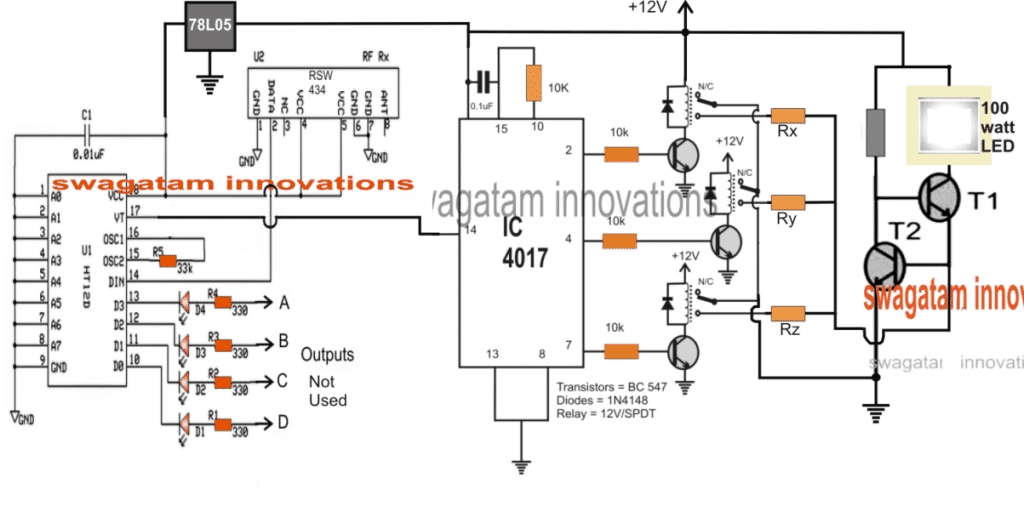
Remote Controlled Solar Lamp Intensity Controller Circuit

The Design

The design employs 3-step intensity control for the connected LED lamp which could be easily converted to a 10-step intensity controller by simply repeating the indicated relay driver stages across all the 10 pinouts of the IC 4017.

The circuit basically is made up of 3 distinct stages, which can be understood from the following explanation:

The first stage from right is a transistor based LED current controller circuit which has been already built by the user as the solar lamp, who requested this article.

The central IC 4017 stage is a 3 step relay selector switch circuit which toggles sequentially across the relay stages switching the relays ON/OFF one at a time in response to every single pulse at its pin#14.

The 3rd stage at the left side is an RF remote control receiver module, whose VT pinout is configured with the pin#14 of the IC 4017.

The pin VT of the remote module IC HT12D blinks once, each time the remote transmitter handset button is pressed (any button out of the 4 buttons).

This blinking of the VT pin is used as the toggling pulse for the IC 4017 which responds instantly causing the subsequent relay to latch, and releasing the previous relay in the sequence.

The relay contacts can be seen configured with current determining resistor Rx, Ry, Rz, which are correspondingly selected from a higher value to a lower value and vice versa by the relay contacts.

These resistors get linked with the current controlled LED driver stage altering the current restriction levels of the LED driver stage.

This action in turn renders the LED with a corresponding amount of current limit producing an equivalent level of  illumination on the LED, lower current causes the illumination to decrease and thesubsequent higher current selection allows the LED intensity to grow brighter depending on which resistor is toggled ON by relays.

The resistors Rx, Ry, Rz can be calculated by the formula provided in this 100 watt LED driver circuit article

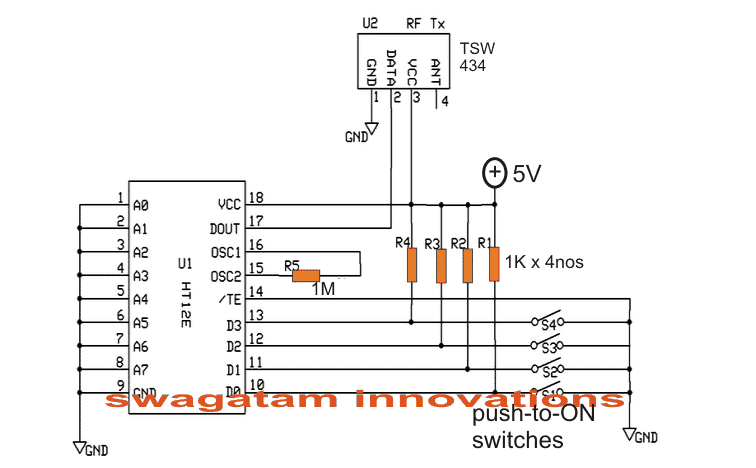
The transmitter circuit for the above explained remote controlled solar lamp intensity controller circuit can be witnessed in the following diagram and built accordingly for the lamp intensity control.
You'll also like:

  • IR and monostable multivibratorFirecracker Igniter circuit [Remote Controlled with Timer]
  • infraredfandimmercircuitRemote Controlled Ceiling Fan Regulator Circuit
  • LED fader circuit 1LED Fader Circuit – Slow Rise, Slow Fall LED Effect Generator
  • diwali 2230 Volts Bulb String Light Circuit for Diwali and Christmas

Filed Under: Lamps and Lights, Remote Control Circuits, Solar Controller Circuits Tagged With: Controlled, Controller, Intensity, Lamp, Remote, Solar

About Swagatam

I am an electronics engineer and doing practical hands-on work from more than 15 years now. Building real circuits, testing them and also making PCB layouts by myself. I really love doing all these things like inventing something new, designing electronics and also helping other people like hobby guys who want to make their own cool circuits at home.

And that is the main reason why I started this website homemade-circuits.com, to share different types of circuit ideas..

If you are having any kind of doubt or question related to circuits then just write down your question in the comment box below, I am like always checking, so I guarantee I will reply you for sure!

Previous Post: « GSM Pump Motor Controller Circuit using Arduino
Next Post: Interface Accelerometer ADXL335 with LED and Arduino (Circuit Diagram) »

Reader Interactions

Comments

Abba says:
May 8, 2020 at 11:53 pm

Must pin 15 and pin 10 be connected together or i can connect pin 15 to any of the remaining unused output pins of 4017 ic

Reply
Matrix says:
May 9, 2020 at 12:57 pm

pin10 is just after pin7 so it resets immediately after pin7, any other pin will cause the reset to be delayed depending on the order of the pin number

Reply
Abba says:
May 7, 2020 at 11:50 am

Hi Swag
I understood your explanation above. But I’m a little bit confuse. Only three output pins were used. Since its a sequencial ic will the remaining output unused pins create an extra delay before we returned back to the above three used pins? I really hope my question will be understood. Thanks alot for the great work.

Reply
Swagatam says:
May 7, 2020 at 7:51 pm

Hi Abba, the pin 10 is connected to the reset pin of the IC, so after pin7 the sequence will quickly return to pin3 and repeat the procedure.

Reply
Abba says:
May 7, 2020 at 11:00 pm

Thanks alot for your timely reply. I appreciate it.

Reply
rafu says:
December 9, 2016 at 10:23 am

Dear Sir, I note that you make a non conventionnal and original use of the 4017 in lots of your creations. The 4017 is a very common chip, easy to find and not expensive at all. I can only congratulate you for your work. Thanks.

Reply
Swagatam says:
December 9, 2016 at 11:59 am

Thanks Rafu, I appreciate your observation and interest…keep up the good work.

Reply

Need Help? Please Leave a Comment! We value your input—Kindly keep it relevant to the above topic! Cancel reply

Your email address will not be published. Required fields are marked *

Primary Sidebar

circuit simulator image


Subscribe to get New Circuits in your Email


Categories

  • Arduino Projects (93)
  • Audio and Amplifier Projects (133)
  • Automation Projects (17)
  • Automobile Electronics (101)
  • Battery Charger Circuits (85)
  • Datasheets and Components (109)
  • Electronics Theory (149)
  • Energy from Magnets (27)
  • Games and Sports Projects (11)
  • Grid and 3-Phase (20)
  • Health related Projects (27)
  • Home Electrical Circuits (13)
  • Indicator Circuits (16)
  • Inverter Circuits (95)
  • Lamps and Lights (159)
  • Meters and Testers (71)
  • Mini Projects (28)
  • Motor Controller (68)
  • Oscillator Circuits (28)
  • Pets and Pests (15)
  • Power Supply Circuits (91)
  • Remote Control Circuits (50)
  • Renewable Energy (12)
  • Security and Alarm (64)
  • Sensors and Detectors (106)
  • SMPS and Converters (34)
  • Solar Controller Circuits (60)
  • Temperature Controllers (43)
  • Timer and Delay Relay (49)
  • Voltage Control and Protection (42)
  • Water Controller (36)
  • Wireless Circuits (30)


Other Links

  • Privacy Policy
  • Cookie Policy
  • Disclaimer
  • Copyright
  • Videos
  • Sitemap


People also Search

555 Circuits | 741 Circuits | LM324 Circuits | LM338 Circuits | 4017 Circuits | Ultrasonic Projects | SMPS Projects | Christmas Projects | MOSFETs | Radio Circuits | Laser Circuits | PIR Projects |

Social Profiles

  • Twitter
  • YouTube
  • Instagram
  • Pinterest
  • My Facebook-Page
  • Stack Exchange
  • Linkedin


Recent Comments

  • Swagatam on 9 Simple Solar Battery Charger Circuits
  • Gagana on 9 Simple Solar Battery Charger Circuits
  • Swagatam on Arduino 2-Step Programmable Timer Circuit
  • Swagatam on Simple Buck-Boost Converter Circuits Explained
  • Swagatam on IC IR2111 H-Bridge MOSFET, IGBT Driver IC: Full Datasheet, Circuit Diagram

© 2026 · Swagatam Innovations