In the following post I have explained a very simple circuit idea which can be used for controlling a motor's rotational direction i.e. for moving it either clockwise or anticlockwise through alternate miss calls from your cell phone.
The Circuit Concept
I have already discussed a novel cell phone controlled remote switch circuit where the unit can be used for switching an electrical gadget through the users cell phone. The user just has to call the remote system which responds to the blank calls and generates the required alternate switching of the connected gadget.
The same circuit has been used here also, the output is appropriately modified such that now the unit becomes suitable for toggling the rotation of a DC motor.
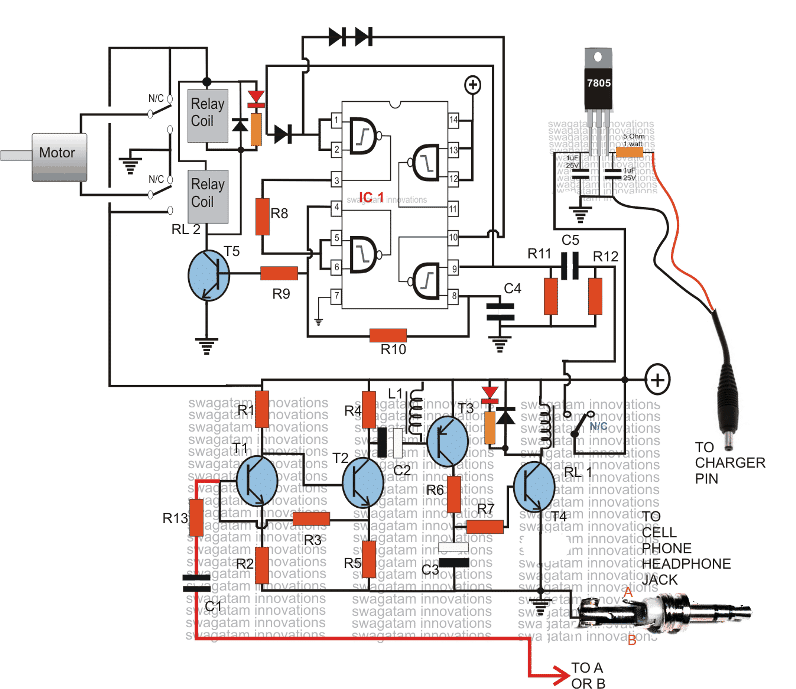
The circuit shown below can be used for controlling a motor rotational direction, let's try to understand it's functioning details:
The lower section of the diagram consisting of T1, T2, T3 and T4 along with the associated components forms a simple high gain audio amplifier circuit.
This circuit is used for amplifying the ringtone generated by the attached modem cell phone unit.
How it Works
The modem cell phone handset is an ordinary NOKIA 1280 cell phone which is permanently integrated with this circuit.
The above modem cell phone uses a prepaid SIM card and thus it becomes a self contained receiver module.
When this modem cell phone is called by the owner's cell phone, its ringtone activates and gets amplified by the above explained tone amplifier stage.
The amplified signal becomes powerful enough to triggers the relay RL1.
This relay holds or remains activated as long as the call stays connected, and breaks when the call is disconnected.
RL1's N/O contact is supplied with a 12v trigger to the adjoining stage which is a FLIP/FLOP stage, made by using four NAND gates from the IC 4093.
With every alternate missed calls from the owner's cell phone, the modem cell phone signals the tone amplifier, which activates RL1, and RL1 in turn flips or flops the IC1 circuit.
The output of the flip flop is connected with a relay driver circuit which is attached with two relays RL2 in parallel. You may use a single DPDT relay also for better convenience.
The contacts of the relays are configured in such a manner that flipping them produces opposite movements for the motor that's integrated to them.
The mains supply to the relay and the motor is taken from RL1, which means the motor flips with every subsequent "missed calls" and remains activated until the call stays connected, and then halts.
The circuit can be modified in many different ways as per the users specifications.
The modem cell phone should be appropriately assigned with a particular continuous ringtone while the default ringtone should be assigned to "empty", tis will make the unit immune to unknown numbers or wrong numbers, and the owner will be the sole controller of the attached circuit and the motors.
Parts List
All resistors are 1/4w 5% CFR unless otherwise stated.
- R1 = 22k
- R2 = 220 OHMS
- R3,R11,R12 = 100K
- R4,R6,R7,R9 = 4.7K
- R5 = 1K,
- R8 = 2.2M
- C1,C4,C5 = 0.22uF DISC TYPE
- C2,C3 = 100uF/25V
- T1,T2,T4,T5 = BC 547B
- T3 = BC557 B
- ALL DIODES = 1N4148
- IC1 = 4093
- RL1 = RELAY 12V/400 OHMS SPDT
- RL2 = Relay DPDT 12V/400 ohms
- L1 = small buzzer coil, small choke or similar.
- JACK = 3.5mm AUDIO JACK
- CELL PHONE MODEM = NOKIA 1280



Comments
Dear Swagatam,
Can you publish a circuit to control AC motor with cell phone.
thanks
Dear Chandan, yes it can be done by using DTMF technology, however I don't like the concept because it consumes your cellphone's "talk time" and therefore the procedure is never free of cost.
hai sir i need to know how to control electricity in house to reduse electricity bills. plz give me an idea with circuit diagram
use all the equipment wisely…for example use TV sets with less contrast, use fridge at lower cooling adjustment, same with ACs and fans….you will see 50% reduction in the bill..
thanks for your valuable reply. i got it what you are saying but i want to connect this circuit to the 3 phase motor starter so that im able to on off motor connected to starter..
if you have a starter with your 3 phase motor then you wouldn't require the upper 4093 flip flop stage, you can simply connect RL1 contacts in parallel with the starter switch.
make sure that you end the call immediately as soon as the motor starts, so that the supply is fed only momentarily to the starter relay.
hi swagatam im your big fan..shall i use this circuit to on off three phase motor.?
thanks Vinod, yes you can use the above circuit with 3phase motor, ignore the shown relay contact set up for the motor, for your application you will need to use a relay with 3 changeover contacts, or TPTT relay and simply connect all the 3 contacts in series with the motor wires and the 3 phase mains input.
Sir I use of CD4093 but my relay 2 always on or no turn off
go through all the comments above…you may get a clue
hai ,
I want more explanation about ON/OFF cycle ( What I meant is whether the motor will sustain for ON for long . How it is controlling the ON/ OFF. There is no explanation for IT.) From the explanation what I understood is the motor will be working only during the ringing period of the mobile .It will be sustain only for few second .
Thanks
Sreelal
The motor will run either clockwise or anticlockwise alternately, in response to the toggling of RL2….the motor will not stop until power is switched off.
hello nokia 200 is best
Sir
Thnks for givng the ckt. I did assembled this.
I got first stage, bt i can't get second flip flop stage,it's not done..pls give me a suggession.
Please see the second circuit from this link, it's the same as the above 4093 stage, this will help you to compare the stages and troubleshoot:
https://www.homemade-circuits.com/2011/12/build-these-simple-flip-flop-circuits.html
Mr. Swag I have made modification changing RL2 to I.C. 555 it work fine now, Thankyou
OK thanks.
Hi sir its been 5 days since I have carefully doing this project and checking it carefully RL1 runs really smooth and has no problem at all, but RL2 has really giving me a big problem, sometimes relay works fine sometimes it wont, if I`m correct R11 and R12 are full down voltage resistor isn't it?, I also change IC 4093 4 x just guessing that this has factory fault but still same problem giving me, I have carefully double check my layout before posting here, but RL2 really dont work properly, what might be the problem of this?, I really do hope to finish this project, can you help me check the circuit diagram what probable cause we are having now, cause lot of us has the same problem running RL2 and regarding RL1 it is running well.. Thank You So much, more power to you..
OK thanks, R11/R12 are for discharging the center capacitor so that the circuit can be initiated every time quickly
Ok Mr. Swagatam I`ll do it right away Thanks for the help, more power to you.. BTW Full down was wrong I mean pull down, sorry missed type it 🙂
…once confirmed it may be integrated back with RL1.
Hi Jerry,
Make the RL2/4093 circuit separately and test it manually by triggering its input with positive pulses, you may refer to the following diagram for better understanding:
images.brighthub.com/8c/2/8c241a49a602156dd8edcb98e3826680a7c332b2_orig.jpg
yes…
can we use opamp to amplify ?? here what is the purpose of nand gate ic…???
opamps wont work, nands are for generating On/OFF or flip flop actions on RL2
it is compulsary to use nokia 1280…???
i tested it on 1280 and therefore recommending it.
in my circuit i think the tone of the phone is not amplified upto that level required for the circuit.
use NOKiA1280, in the "assign tone" use any musical tone instead of the suggested "beep once" tone
sir,i am not understanding the usage of phone…please help its urgent..
Please read the bottom section of this article, it's comprehensively explained here:
https://www.homemade-circuits.com/2012/01/how-to-build-gsm-based-cell-phone.html
thanku for the replies…
does the motor is affected by the volume of the tone of the phone cum modem.??
The mortor has no connection with the modem, you can clearly see that the motor wires join with the positive/negative supply via the relay contacts and no connection with the modem.
yes sir i have given ground..i have connected the motor to the common terminal of both the relays is this correct ??
yes ia have given ground to them..i have connected relays to the common terminal of both the relays…is this correct?
sir, in this ckt the two led which are connected to the relays are glowing but the motor is not rotating.what is the meaing tha the led's are glowing and relay is also producing sound that means it is also working but motor is not rotating.there is some error in this circuit?please help its really urgent.
The diagram correct, in the shown position the (+) passes through upper relay N/C into the motor and comes out of the motor to pass through the N/C of the lower relay to (-), in this condition the motor will rotate in one direction,
now if the relay is activated, the opposite will happen and the motor will rotate in the opposite direction.
Did you connect the N/C and N/O of the two relays to ground(-) as shown in the diagram??
we have to
use 2 relays in relay 2 ckt..??
yes, two relays are used in the upper section, relay coils connected in parallel.
we can't use any other phone…..??
for the modem?? yes, if it includes an assign tone facility.
Dear swagatam,
i am trying to build 1st part of this circuit only but not able to toggle that relay i am building only that area which includes relay, IC 4093, BC547B & etc i didn't build receiving section but not able to understand which wires has to get sorted to trigger the relay. i tried to sort wire coming from R12 with positive wire of the supply but it didn't worked. please help me out ASAP
Thanks in Advance
Dear Ankit,
I would like like to repeat my answer which I did in your previous comment, touch the positive momentarily with the point that is going to the relay RL1, as you touch and release it T5 relay will switch ON/OFF alternately.
your previous comment was answered here:
https://www.homemade-circuits.com/2011/12/build-these-simple-flip-flop-circuits.html
No, speaker signal from cell phone is not negative based, here we require negative based signal, meaning one terminal should connect with the negative of the supply.
R10 = 2.2M
R13 = 100 ohms
hello sir,
are the relays DC or AC?
DC