In this post, I will show how to construct an Arduino based battery level indicator, where a series of 6 LEDs show the level of the battery. If you are interested in monitoring and maintenance of your 12V battery, this circuit might become handy.
Why Battery Level Monitoring is Crucial
All batteries have certain voltage limit to discharge, if it goes beyond the prescribed limit, the life span of the battery will reduce drastically.
Being electronics enthusiasts, we all might have a battery for testing our prototype circuits. Since we concentrate on the prototype during experiment, we care less on the battery.
The proposed battery charger circuit will show you how much energy left in the battery, this circuit may be connected to battery, while you prototyping your circuits. When this circuit indicates low battery, you may put the battery to charge. The circuit has 6 LEDs, one LED glow at a time to indicate the voltage level of the battery.
If your battery is full, the left most LED glows and you battery is dead or about to die, the right most LED glows.
How it Works
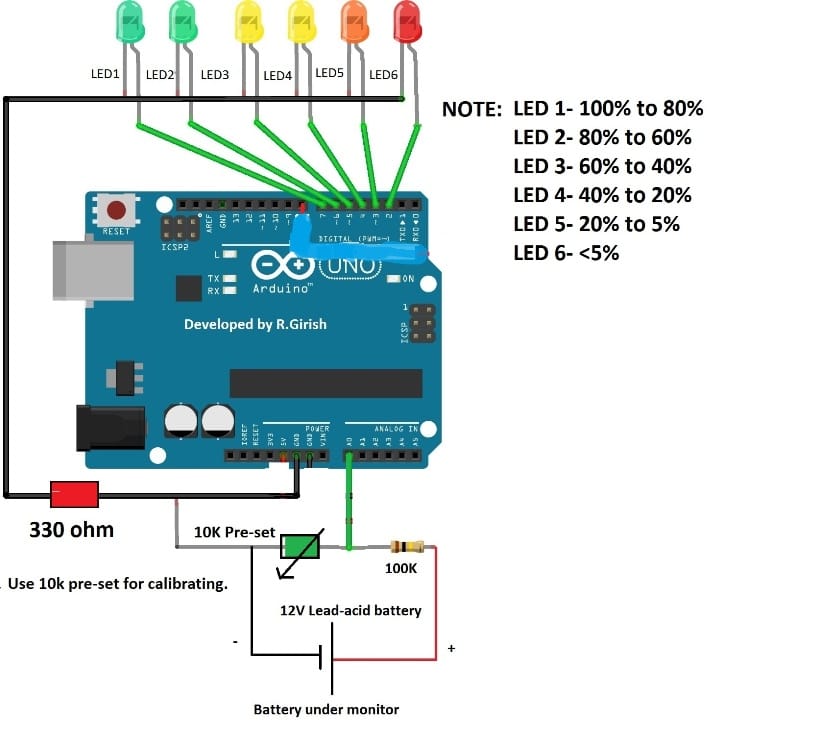
The circuit consists of Arduino which is the brain of the system, a potential divider which helps the Arduino to sample the input voltage. A pre-set resistor is used to calibrate the above setup. The series of 6 LEDs will indicate the battery level.
Calibrating LED Indicators
The relation between LED and battery level is given below:
LED1 – 100% to 80%
LED2 – 80% to 60%
LED3 – 60% to 40%
LED4 – 40% to 20%
LED5 – 20% to 5%
LED6 - <5% (charge your battery)
The Arduino measures a narrow range of voltage from 12.70V to 11.90V. A fully charged battery should have voltage above 12.70V after disconnecting from charger. A low battery voltage must not go below 11.90V for a 12V sealed lead-acid battery.
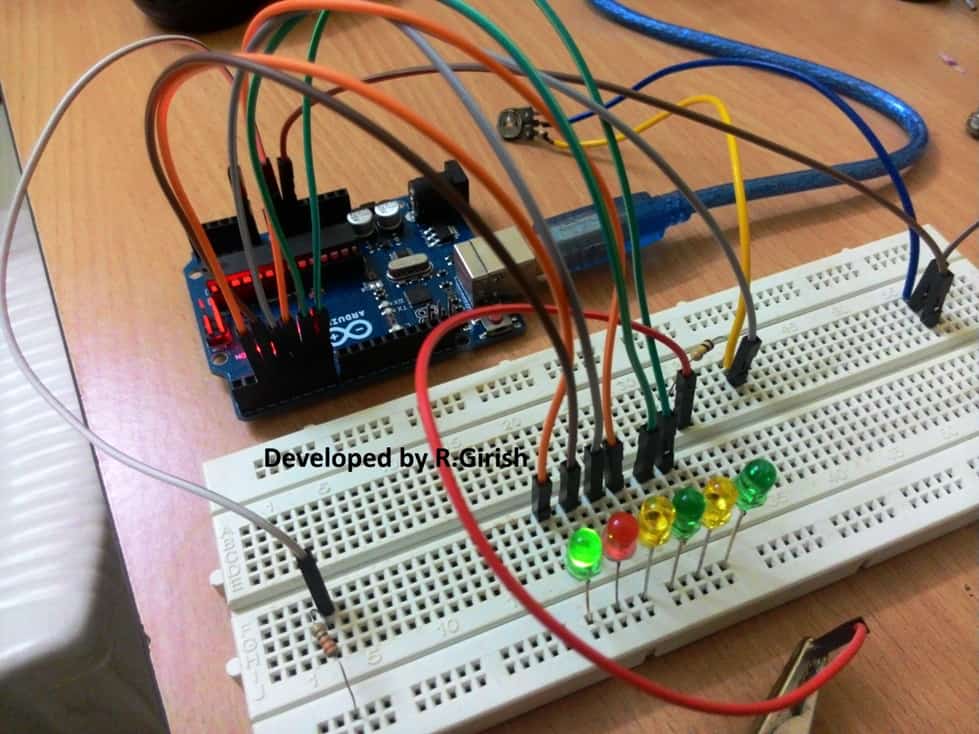
Author’s prototype:
Program Code:
//--------Program developed by R.Girish---------//

int analogInput = 0;

int f=2;

int e=3;

int d=4;

int c=5;

int b=6;

int a=7;

int s=13;

float vout = 0.0;

float vin = 0.0;

float R1 = 100000;

float R2 = 10000;

int value = 0;

void setup()

{

Serial.begin(9600);

pinMode(analogInput,INPUT);

pinMode(s,OUTPUT);

pinMode(a,OUTPUT);

pinMode(b,OUTPUT);

pinMode(c,OUTPUT);

pinMode(d,OUTPUT);

pinMode(e,OUTPUT);

pinMode(f,OUTPUT);

digitalWrite(s,LOW);

digitalWrite(a,HIGH);

delay(500);

digitalWrite(b,HIGH);

delay(500);

digitalWrite(c,HIGH);

delay(500);

digitalWrite(d,HIGH);

delay(500);

digitalWrite(e,HIGH);

delay(500);

digitalWrite(f,HIGH);

delay(500);

digitalWrite(a,LOW);

digitalWrite(b,LOW);

digitalWrite(c,LOW);

digitalWrite(d,LOW);

digitalWrite(e,LOW);

digitalWrite(f,LOW);

}

void loop()

{

value = analogRead(analogInput);

vout = (value * 5.0) / 1024;

vin = vout / (R2/(R1+R2));

Serial.println("Input Voltage = ");

Serial.println(vin);

if(vin>12.46) {digitalWrite(a,HIGH);}

else { digitalWrite(a,LOW);}

if(vin<=12.46 && vin>12.28) {digitalWrite(b,HIGH);}

else { digitalWrite(b,LOW);}

if(vin<=12.28 && vin>12.12) {digitalWrite(c,HIGH);}

else { digitalWrite(c,LOW);}

if(vin<=12.12 && vin>11.98) {digitalWrite(d,HIGH);}

else { digitalWrite(d,LOW);}

if(vin<=11.98 && vin>11.90){digitalWrite(e,HIGH);}

else {digitalWrite(e,LOW);}

if(vin<=11.90) {digitalWrite(f,HIGH);}

else {digitalWrite(f,LOW);}

delay(2000);

}

//--------Program developed by R.Girish---------//
How to Setup the circuit:
The calibration for this Arduino 6 LED battery level indicator circuit must be done carefully, if you did not calibrate correctly, the circuit will show incorrect voltage level of the battery.
When you turn on the circuit, it starts with LED test, where the LEDs glow up sequentially with some delay. This might help you to debug errors while arranging the LEDs.
1) Set the voltage of your variable power supply to precisely to 12.50V.
2) Open the serial monitor.
3) Rotate the preset resistor clock wise or counter clock wise and bring the readings to 12.50V.
4) Now, reduce the variable power supply to 12.00V, the readings on the serial monitor should show the same or very close to 12.00V
5) Now, increase the voltage to 13.00V, the readings on serial monitor should also show the same or very close.
6) At the same time when you increase or decrease the voltage, the each LED should turn on/off with different voltage levels.
Once the above steps are done successfully, your battery level indicator circuit will be ready to serve the intended purpose.
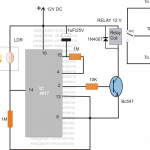
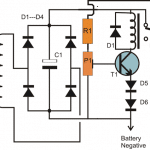
Adding an Auto Cut Off
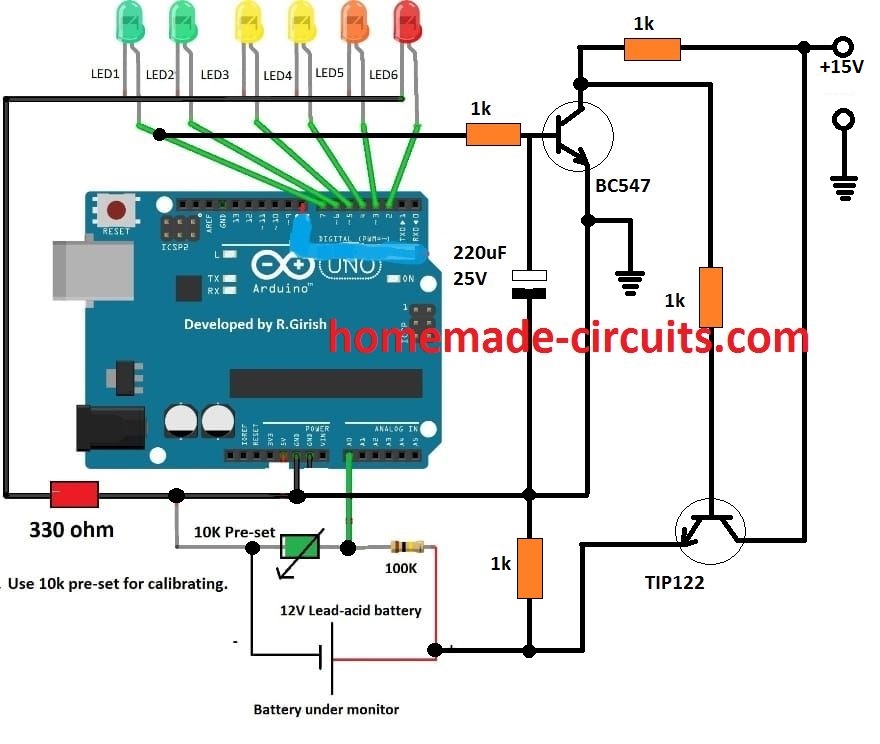
The above explained Arduino battery level indicator circuit can be further enhanced by including an automatic battery full charge cut-off facility.
The following figure shows how this may be implemented in the existing design:


Questions & Answers
Dear Sir
i have 90000 mah ,5v capacity PB & Google Pixel 7a model mobile.
i want to make switcher kit . when Battery goes below 80% level then switcher start and power bank voltage goes to mobile phone battery & when Mobile battery goes 100% it cutoff.
i want to use mcu but facing hardware problem for proper design what to do ,can u please guide how can mcu & which mosfet work proper.? i have also idea about adc level. So i first detect 80% level with help of resister divider network as a ref level of 80 to 100% & that voltage fed to mcu adc pin . but from mcu to mosfet switching for control i have less idea of good choice ckt
Dear
can we check mobile battery level ( volt )on TYPE C pin without connect charger? i want to use that volt as a ref so in application.
Nitesh, Frankly i have no idea about it, however my guess is, that may not be possible.
Dear Sir.
Yes it not possible . Mobile mfg did not give us direct bat ref voltage on C pin . we must be design mobile bluethooth app & control .Via this methode may be
Yes Nitesh, you are right, unfortunately that is not possible.
Hi Nitesh,
Sorry, Unfortunately my knowledge of Arduino is also not good, so programming the code may not be possible for me too!!
Dear Sir
ok Thanks
Sir agar mujhe led 48 volt or 60 volt se operate Krna ho toh uska programe or stecmatric kya hoga
M cahata hu bettry jb ki bettry 48 volt ki h
Current 42 pr red bettry
48 volt tak full green ho jaye
Konsa micro controller use kre
Jaiprakash,
Since I am not good with Arduino I am not sure whether the above circuit can be used with a 48V battery or not.
Why don’t to try an analogue circuit using an IC such as LM324, it would be much easier to assemble and the results would be fail proof.
Hi… please can u post a video of this circuit functioning.. i find it difficult to install to my project
Please tell me, will it work for 96V Battery system. If yes please suggest the changes need to be done.. It is very helpful for me..
I won’t recommend this circuit for monitoring a 96V battery
Hi Swagatam
Do you suggest monitoring a 48 V battery?
Hi Alamgir, I do not recommend 48V charging for the above concept.
hello sir, satya here can you send me the solar powered mobile power bank system connected to loads….circuit diagram using arduino i’m waiting for your best reply
Hello Satya, I am not an Arduino expert so I can’t help you with Arduino related projects.
Hello sir. My name is Nurlina.
I have a question.
What is the purpose of the 10k preset resistor? (sorry i just started learning this).
and i wish to use this circuit for a 3.7v li-ion battery with a capacity of 20000mAh, which part of the coding should i alter in order for my circuit to function well?
Hello Nurlina, The perset is for calibrating the LEDs so that they the exact reading for the different voltage levels.
Sorry, regarding the coding I do not have much ideas!
thank you for answering my first question, but i actually have a few more to ask.
1) what is the function of 100K resistor?
2) can i use 320ohm resistor instead for the led if i dont have any 330ohm?
3) why did u set different voltage value during calibration for the led from the one you write in you program?
The 100k is for forming a potential divider with the 10k preset for feeding a voltage reference level to the specific Arduino pin
320 ohm will also work
The article was written by another author, so I cannot suggest much on the corrections. You must build it and test it practically to learn the precise working of the circuit
Hi Swagatam, thank you for your battery level indicator. I want to use this with a tweak. I don’t know how to write the program but I need if for a 9 volt battery and I need it to work with 5 LED’s. I also need the LED’s to be able to dim with a potentiometer from 100% bright to 0% (completely dark). One last thing, I wonder if this can work with Arduino Nano. That would be even better. Do you think you can help me with that? I will be eternally grateful. Keep up the good work.
Hello I’ve question, can it use to charge mobile phone by adding USB adapter? Or just only the battery?
Thank you Tyler, however, my Arduino knowledge is also not good enough, so I won’t be able to guide you with the required code modifications, and related info!!
Hello sir,
I’m Swaraj Chavan.
I have a question???
What is the role of 330ohm resistance in the circuit??
Swaraj, it is to protect the LEDs from over current.
Thank you!
Can you suggest me battery Level indicator circuit for 3.7v 2.6Ah lithium ion battery cell??
Project detail :- We have made a charging station project for electric bikes.
In this project we develop a battery charging circuit.
This is a prototype project. we used Li-Ion( 3.7v , 2.6Ah ) batteries. Can we use Arduino Uno to protect the battery from overcharging ? Or
Can we use Arduino Uno to show how much battery is charged?
When the battery is fully charged, the battery will automatically disconnect from supply with the help of Arduino Uno. Whether this is possible or not by using Arduino Uno.
Please suggest us right way..
You can try the same circuit which is explained in the above article, just replace the battery with your 3.7V li-ion, and replace the supply input with 6V 1 amp charging supply. Make sure to provide the Arduino with a separate 5 V supply.
For auto cut you can use the last updated design
Thank you
hi sir,
Instead of led can we use an LCD to display the percentage of battery charge and also can we make automatically control the Charging of battery like if it’s become 100% automatically stop of charging and when it becomes 10% it as to start charging .
Hi Abhi, I am not good with Arduino coding, so I do not have much idea about LCD integration. For automatic battery cut off the respective LED stages can be configured with a relay driver stage for the required operations
Sir this circuit possible to measure battery life of 12V lithium or li-ion batteries
Yes it can be used for measuring the battery LEVEL of any 12 V battery
Sir, is it possible if you want to read the voltage of 2 separate batteries simultaneously with Arduino?
Anwar, sorry I am not very sure about it!
okay sir, thank you for your answer
sir i intend to construct a battery percentage monitor for a led lamp. how possible is this and how can i go about it?
You can use the same circuit which is explained above for your application
Sir can I use the nrf module codes and this codes in the same arduino
Sorry Vysakh, I have no idea about it.
Hi sir! dear sir i want to add hysteresis feature to this battery monitor so that battery upper threshold level (cut off point) = 14.4v, lower threshold level(charging start point) = 12v by adding a relay to a battery charger with the same led display using arduino. my problem is what to do with the code to add hysteresis feature so that when the battery full it my not start charging until it reach back to 12v?
Hi Sheraz, actually code modification may not be required, it could be easily done through an external opamp circuit, if possible I’ll try to update it soon….
Hy mr.Swagatam
i have home work to do project about controller baterry/automatic charging using Arduino Uno,MOSFET/Transistor and Voltage sensor…
i’m still confuged in arduino program code during charger and dischsarge….
may you help me…
Hi Melchior, the above circuit can be easily converted into an auto cut-off system by integrating a mosfet stage with the appropriately selected outputs from the Arduino.
Let me know if you want me to do this modification in the above circuit??
Thank you so much for your help…
I tried the program first …
if there is still a problem I will consult again with you …
once again
thank you very much for your kindness, have helped me
OK, no problem!
Hi sir! dear sir how can we detect the presence of a 12v battery & the charger say 12v-10amp smps charging that 12v battery using arduino at the same time? my problem is if arduino adc channel measure the voltage using led display between battery terminals while connected to battery then the circuit is correct but if we disconnect battery from the charger how the arduino will detect the absence of charger terminal at battery terminal? i mean how arduino will detect presence or absence of charger at battery terminals?
Hi Sheraz, When you connect an external voltage to a battery, the external voltage will sink and merge with the battery voltage to become a common voltage.
Suppose your battery is at 11V, and if you connect a 12V to it, then this 12V will instantly drop to 11V across the battery terminals, and then the battery will begin absorbing this voltage and charge until its terminal voltage reaches 12V. Once this happens, the charging will stop and both the sources will continue to be at this level as long as they are connected together.
Similarly, if you connect 14V, the final voltage will settle at 14V while the charger is connected.
So the only way to distinguish whether a charger is connected or not is through a current sensor stage, because the battery will begin drawing current from the charger while it’s being charged and this could be used for monitoring the presence or absence of the charger input.
sir i ‘m going to implement 10amp-12v smps design with an additional auto cutoff circuit using atmega8 and by placing 4 leds for 25%, 50%, 75% & finally 100% i will display this percent using atmega8 adc channel, like the circuit you presented in this article, i think if we power the atmega8 circuit by getting 5v from charger terminal by using some regulator then we will have to still use current sense circuit to know that whether battery is charging or not. without current sense circuit the display with also show that battery is 100% charge because the controller may sense the 12v-volt at the charger terminal if battery is disconnected. you are right sir by using current sense circuit this problem can be corrected.
That’s right Sheraz, I think the following concept could be modified for achieving current based cut off.
https://www.homemade-circuits.com/2015/04/battery-current-indicator-circuit.html
Hello Sir, may I ask a favor again to help me design a circuit for me to control my three-phase motor using remote control thank you and God bless,..
Hello Allan, I already have one related post in my website, which you can refer and try it out:
https://www.homemade-circuits.com/3-phase-induction-motor-speed/
remote control can be integrated once you successfully built the basic model as explained above.
hello Sir, kindly suggest a circuit of your own design which useful to control 3 phase motor by not just merely using start-stop that can easily be worn out due to sparks and may I ask further if can I make it wireless thanks…
we are getting 54.59 as a input voltage which was displayed in the monitor
sorry, could not understand your problem correctly, please explain it elaborately
if it is possible can you please tell me
I will have to contact the programmer for the customization, and therefore will be a paid service.
HI, In this the voltage level is indicated in the form of a LED. If it is possible to get the voltage level in the digital format
Hi, it will require modifying the entire code and may not be possible at the moment…
sir,please give PIC Microcontroller based 12V battery capacity led level meter with charge controll.thanks
Hi Pollo, presently I do not have this design, If I find one I’ll let you know…
what if i want to indicate the battery level in percentage form on an lcd display instead of using LEDS, what can i do?? please advice
Mr.GR will answer your question soon…
Hi joel,
Let me do some research on this, if it is possible to read between 0 to 100% voltage range. I will post a design soon.
Regards
Thank you sir.
Actually I want to design a controller circuit for stand alone pv system to energize the 12V DC bus. This controller must have the MPPT (with P & O algorithm). normally systems disconnected at the overcharging and over discharging the 12V battery.
I want to design a controller to disconnect MPPT at the battery charging is greater than the 95% ,then it track the voltage without MPPT until 100% charging. if the charging level less than the 95% then it connect to the MPPT again. can it do this by using arduino. ?
{i want to prevent the problem of cut off the MPPT at the No-load and fix this disconnection & re-connection in smoothly}
Dinuasha, if your requirement is to keep the charging thresholds within the margin of 100% and 95%, then I think it could be done with a simple opamp circuit, using Arduino will be an overkill for such a a simple operation.
Dear sir,
Is it only use the battery terminal voltage as input? can i used this for stand alone PV system (12V battery monitoring)?.Because I want to disconnect the battery from the load or pv array at the required charging levels.
Dear Dinusha,
Yes you can use it separately for monitoring battery only, the Arduino can be powered from the battery under monitor.
Hi,
I need to do battery level circuit for my intern project. The will be 5v at the input and there will be five leds. For example if there is 1v just one of the leds will light then for 2v first two of themcan you help me about this?
Hi, Gizem
Are you sure about your design, because a 5V (4.5v etc) battery should not be allowed to fall to 1 Volt and most of the circuit will only work above 3V in general.
I will design a circuit for you, if you want me to proceed with your requirements.
Regards
Hi, Mr, GR will be able to advise you better, I'll forward the question him soon….
Hi faizan,
You cannot calibrate the circuit for li-ion battery as the program is written for 12V battries only.
That's why you are getting unusual voltage readings on serial monitor when you connect the charger.
If you are looking for li-ion based projects this is not the right one.
Regards
OK if i calibrate for Li battery but once charging circuit connects what will be the changes to be done to detect original voltage of battery under charge? instead it add up the battery voltage with the charging circuit voltage.
Waiting for the reply anxiously.
Please refer to your previous comment above, for the reply….
hy sir i make circuit same as above but the serial monitor shows 20+ reading without battery.
and only secondary battery are use.
Hi Unknown….LOL 🙂
Please elaborate your issues and please comment you problem in a way that others can understand.
Regards
Its adding battery voltage as well
hello i have calibrated the circuit FOR LITHIUM ION battery charger i have connected the charger it shows 4.2v when no battery and when a 3.7v battery attached to it the serial monitor shows voltage more then 4.7v what to do?.Why it is not showing correct charging voltage or do i need to change the formula?
Hi, Faizan,
The circuit is NOT designed for Li-ion batteries, it is proposed for 12V SLA batteries.
The code is written for 12V batteries and will not monitor 3.7V Li-ion batteries.
Do not charge your batteries along with this circuit. It is designed to monitor the battery only on discharge.
Please read the article properly, this will keep most of the misunderstanding about the project at bay .
Regards
Hello, Mr. GR will hopefully see your question here and respond appropriately….please be patient.
If a dead battery attached to this circuit but the battery is also attached to the charging circuit how can we get low battery indication?.As charger output is above 13v so the green LED ON instead of red LED.What to do?
Please, can u help me with circuit diagram of a 12 volt battery charger with an automatic cut off
Atuh, you can try the following designs:
https://www.homemade-circuits.com/opamp-low-high-battery-charger/
Hi, Faizan
Do not charge your battery along with this circuit, it won't indicate the correct battery level.
Regards.
when a good battery is connected the supply voltage will instantly go down and settle down to the battery discharge level…but for a dead battery this might not happen and will indicate something's wrong with the battery.
Good evening….please sir how can i make the led to be constantly ON but Turn OFF when the battery is LOW
can you provide a circuit for solar panel powered battery charging circuit that charges 12V 7Ah battery
you can make the following circuit:
https://www.homemade-circuits.com/2012/04/how-to-make-solar-battery-charger.html
adjust the 10K to get exactly 14V for the battery, and use an input of 15V at 1 amp
I only need one LED to indicate so small opamp like lm393 can be use?.Please suggest a circuit.
….connect the LED cathode to the input supply ground line.
LED will ON for good battery and OFF for bad battery…for an opposite response connect the LED across opamp output and positive line.
you can try the following concept, keep only one opamp instead of the shown 4
https://www.homemade-circuits.com/2015/04/battery-current-indicator-circuit.html
Can this be done using arduino with less parts i want to achieve the result.
Hello;
I have been searching for a circuit that can detect if lithium ion 4.2v rechargeable battery is at fault i mean consuming very less current like 10-100mA but not getting the proper charging current.With LED indication.
Hello, the only way to detect this could be through a current sensing resistor and a voltage amplifier circuit which will indicate whether the cell is consuming around 1C current or not……LM3915 IC looks a candidate for making this system.
Hi Mr swagatam well I need to do my final year project. I need to do battery indicator using Bluetooth and wifi. My question is do I need to do a vdr to avoid a more volt supply to my arduino+LCD+bluetooth module. I hope you can help me
Hi Fatin, you can use a 7805 IC voltage regulator for ensuring a safe 5V for the Arduino.