In this post I have explained how to build a battery deep discharge protection circuit which can be used for protecting any type of battery from over discharge through a connected load.
Normally, we are mostly worried about battery getting over charged, and forget about a situation where the battery can get over discharged by the load. Although, overcharging a battery may be detrimental to a battery health and appropriate measures must be incorporated, an over discharge or a deep discharge can be also equally dangerous for a battery's health.
In the following paragraphs I will elucidate a very simple design for shutting off the battery to the load, as soon as the battery voltage has reached the critical deep discharge state.
The circuit is fully solid-state and uses only transistors for the switching, thus eliminating the need of bulky relays.
Circuit Specifications
The idea was actually requested by one of the dedicated readers of this blog, Mr. Saurav, as I have explained below:
Looking for some ideas/help/suggestions. I have installed a 2.2 kw off grid solar system, using loom solar panels, excide battery and excide solar inverter. The inverter has this pre-setup priority, first solar, then grid, last battery. I have disconnected the mains supply to the inverter, so for me it is solar then battery. To this overall setup, I have added an ACCL with grid as secondary.
So in the evening, whenever there is no solar and the battery is out of charge, it falls back to grid power.
This setup has one problem. ACCL switches to mains power at night, when the battery is completely drained out or deeply discharged and that's what I don't want.
I want to turn off the battery power, when the battery has 20% remaining power or the battery is at a certain voltage. That way battery life can be better.
Is this something doable? Do we have something readily available for this? Or do we need to build something for this?
The Design
The circuit design for the proposed battery deep discharge protection circuit can be witnessed in the following diagram:
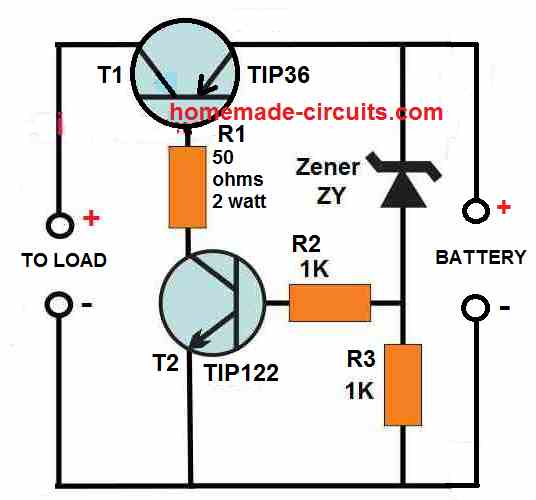
As can be seen, the circuit has a very components, and its working can be understood through the following points:
There are a couple of power transistors coupled with each other where, the base of the TIP36 transistor forms the collector load of the TIP122 transistors.
The base of TIP122 is biased through a resistor/zener diode network, where the zener diode ZY determines the cut off voltage for the TIP122.
The zener diode voltage is selected such that it matches the critical low voltage value of the battery, or any value at which the draining of the battery by the load is required to be stopped.
As long as the battery voltage stays above the zener voltage, or the voltage at which the cut-off needs to happen, the zener diode keeps conducting which in turn keeps the TIP122 in the conducting mode.
With TIP122 conducting the TIP36 gets the required base current, and it also conducts and allows the battery current to pass to the load.
However, the moment the battery voltages reaches or drops below the zener voltage which is also the deep discharge voltage level, causes the zener diode to stop conducting.
When the zener diode stops conducting, the TIP122 base voltage is cut off and it switches OFF.
With TIP122 now switched OFF, the TIP36 is unable to get its base bias current, and it also switches OFF turning off the battery current to the load.
The procedure effectively prevents the battery from further draining and depleting below its deep discharge level.
The indicated load can be any specified load, such as an inverter, a motor, an LED lamp etc.
How to Select the Zener Diode
The zener diode decides at what voltage the battery needs to cut off from the load. Therefore, the zener voltage must be approximately equal to the battery voltage at which the cut off needs to happen.
For example, if for a 12 V battery, the deep discharge cut off value is 10 V, then the zener diode ZY value can be also selected to be 10 V / 1/2 watt.
Using a MOSFET
The indicated TIP36 can supply a maximum current of 10 amps to the load. For higher current, the TIP36 could be replaced with a P-Channel MOSFET such as the MTP50P03HDL, which is rated to handle at least 30 amp current.
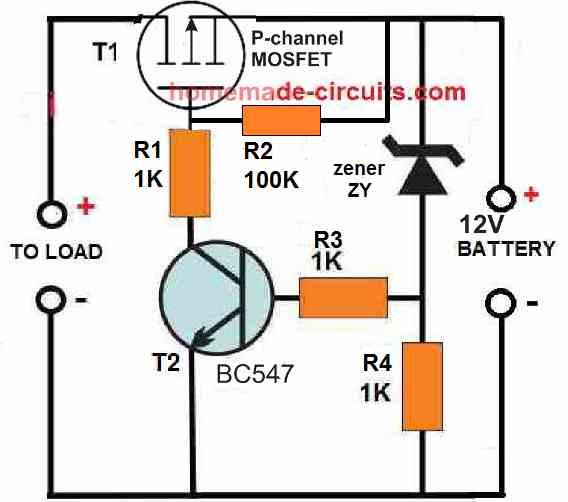
When a MOSFET is used in place of the BJT TIP36, the 50 ohms resistor can be replaced with a 1K resistor or a 10K resistor, and the TIP122 can be replaced with a BC547.
Adding a Battery Charger with a Single Transistor
The above discussed concepts are used to handle the over discharge situation of a connected battery. However, if you want the above circuit to also have its own battery charger, then the following circuit can be used for the process effectively.
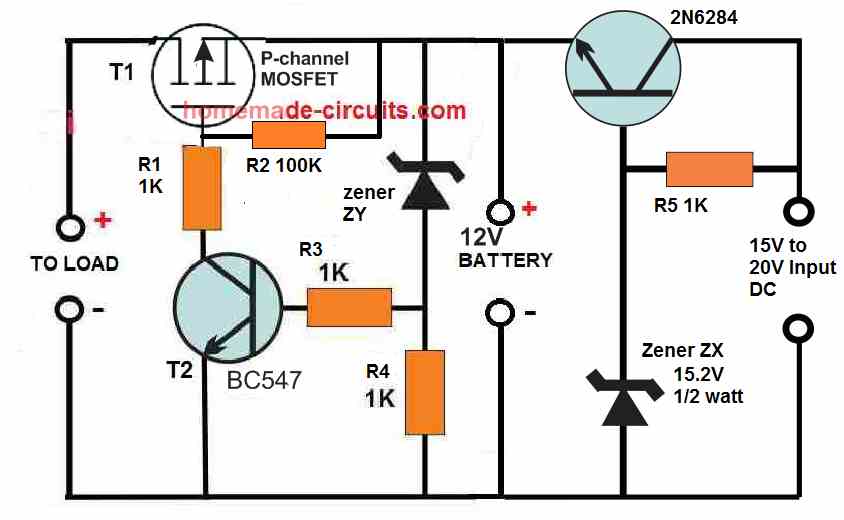
Here we can see a transistor stage on the right side of the design, which is configured as an emitter follower. The transistor is a 2N6284, which is rated to provide at least 10 amp current to the battery, which means it is able to charge even a 100 Ah battery efficiently.
Since the transistor is a Darlington transistor and configured as an emitter follower, the voltage at its emitter will always lag behind its base voltage by 1 V or 1.2 V.
The zener diode must be cautiously selected so that it compensates the emitter drop of 1.2 V by providing a potential at the base which may be 1.2 V higher than the required emitter voltage.
Since the circuit is designed to charge a 12 V battery, the full charge voltage at the emitter of this transistor must be around 14.1 V. This implies that the base voltage of the transistor must be 1.2 V higher than the emitter, which amounts to a value of around 15.2 V to 15.3 V.
This is exactly why the zener must be rated at the above specified voltage for generating a constant 14. 1 V at the emitter side and across the connected 12 V battery.
While charging the battery when the battery terminal voltage reaches the 14.1 V value, it reverse biases the emitter of the 2N6284, which shuts down the conduction of the transistor, thereby stopping any further charging of the battery, and the battery is safeguarded from over charging.
The above shown circuit thus implements a 2 in 1 procedure of preventing battery over deep discharge and also over charging through the use a just a few transistors, and still is able to control a battery that may be as big as a 12 V 100 Ah battery.
Deep Discharge Protection with more Accuracy
In the above 2 BJT concepts, cutoff drifts with load, so when load changes then behavior also shifts. Different transistor gives different cutoff point, since no two devices behave exactly same. Temperature sensitive too, so heat comes then things move. Due to this cutoff feels soft, kind of mushy, not clean break.
However in the following 3 BJT version, cut-off point stays stable, even when conditions change. Behavior is repeatable, so you build again and it works same. Disconnect of load is sharp, clear on and off. Works same with small load or large load, no deviations...
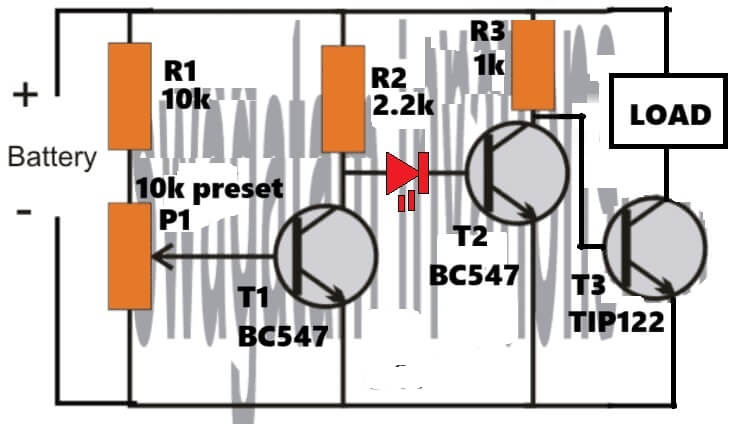
How it Works
This circuit keeps monitoring the battery voltage all the time. If the battery voltage is healthy then the LOAD stays ON and keeps working.
But when battery voltage drops below a preset level then the circuit disconnects the LOAD.
This helps prevent deep discharge, which otherwise damages batteries, especially lead-acid and Li-ion packs without BMS, so that damage part is avoided.
Blocks In The Circuit
The whole circuit can be seen as four simple functional blocks working together.
- First is the voltage sensing network using R1 and P1.
- Then comes the comparator transistor T1 (BC547).
- After that there is the switching or driver stage using T2 (BC547).
- Finally the power switching is handled by T3 (TIP122), which actually controls the LOAD.
Voltage Sensing (R1 + P1)
R1 (10k) and P1 (10k preset) form a voltage divider connected to the battery. The wiper of P1 feeds the base of T1 directly.
So as battery voltage rises or falls, the voltage at T1 base also changes along with it. P1 sets the cutoff voltage, so here you decide when the LOAD should disconnect, like at 10.8 V or 11.0 V and similar values. This part is basically the adjustment control of the whole circuit.
T1 – The Voltage Detector (BC547)
T1 works like a simple comparator here. When battery voltage is HIGH, the voltage at T1 base becomes greater than about 0.6 V, then T1 turns ON and its collector voltage drops toward ground.
When battery voltage becomes LOW, then base voltage of T1 falls below about 0.6 V, then T1 turns OFF and its collector voltage rises through R2.
So T1 converts the battery condition into logic levels, giving a LOW signal when battery is OK and a HIGH signal when battery voltage is low.
T2 – Logic Inverter + Buffer (BC547)
R2 (2.2k) pulls the base of T2 HIGH when T1 is OFF.
When the battery is OK, T1 stays ON, its collector is LOW, so T2 base is LOW and T2 remains OFF. But when battery voltage drops, T1 turns OFF, its collector goes HIGH via R2, then T2 base becomes HIGH and T2 turns ON.
In this way T2 flips the logic and also provides stronger drive for the power transistor.
LED Indicator Role
That LED is doing two jobs at the same time, it gives visual indication because when the battery voltage falls below the preset level, then the LED lights up, and because of that it acts as a LOW BATTERY indicator.
When the battery is OK the LED stays OFF, but when the battery goes LOW then the LED turns ON, simple and very useful in real-world use.
At the same time the LED also works as a reference voltage and level shift. A red LED drops about 1.6 V – 1.8 V, which is much higher and more stable than a normal diode, so because of this T2 does not turn ON immediately. It turns ON only when T1 fully releases the node, and that helps improve cutoff accuracy and noise immunity. In short, the LED creates a clean threshold for T2 switching.
Now looking at how the LED works inside this circuit, when the battery voltage is OK then T1 is ON and the node feeding the LED is pulled LOW, so the LED stays reverse biased and OFF. Because of that T2 remains OFF and TIP122 stays ON, therefore the LOAD remains powered.
But when the battery voltage drops below the preset level, then T1 turns OFF and the node rises via R2. At that point the LED becomes forward biased and lights up, so now the base of T2 gets proper bias and T2 turns ON. Once T2 turns ON, the TIP122 base is pulled LOW and therefore the LOAD disconnects.
T3 – Power Switch (TIP122)
TIP122 is a Darlington transistor, so it has very high gain and can handle high current loads easily. When battery voltage is OK, T2 stays OFF, so the base of TIP122 gets drive and TIP122 turns ON, allowing the LOAD to remain powered.
When battery voltage becomes LOW, T2 turns ON and pulls the base of TIP122 LOW, so TIP122 turns OFF and the LOAD gets disconnected. This is the stage where the actual battery protection happens.


Comments
This is exactly what I was looking for!!! Thank you very much!!!
Since I intended to handle a current no greater than 3 amps, a battery voltage of up to 20V, and protection of 14 or 15 volts, I was wondering if it would be possible to replace the TIP36 and TIP122 with ones with a lower current and thus achieve a smaller finished circuit. Thank you very much!!!!
You are welcome Matias, I am glad you found the above concept helpful.
Yes you can replace them with lower current BJTs, but TIP36 and TIP122 will ensure everything runs smoothly and coolly at 3 amp, and you may not need any heatsinks, so I would recommend keeping the design as it is…
Sir
how can i attached my file with you?
Hi Nitesh,
Regarding which circuit do you want to attach the file?
Dear
i want to show my schamatic to you for POWER BANK To mobile bcz i choose 2 c pin & i am doubt on c pin which is connect with mobile bcz i add some Cap with that c pin ground & that ground came from Drain of mos
Nitesh, Please send it to my email ID
homemadecircuits
@gmail.com
I will check it…
Thank you so much.
My question is,when the circuit is activated at the low level of the battery usually the battery tends to regain at least 4v which implies that the off and on process will continue and thereby making the inverter to be unstable,what can be done to eliminate the unstable condition?
That’s right, however this issue cannot be solved easily in a basic transistorized circuit as above, unless a relay is involved.
It can be solved if the circuit uses a relay or an op-amp based design.
This will need either a latching facility or a hysteresis facility.
Do you have any circuit on that?
You can try the following design:
https://www.homemade-circuits.com/wp-content/uploads/2012/01/opamp-low-battery-cut-off-circuit-with-latching-facility.jpg
Hi Swagatam,
I would like to build this cct. My battery cutoff voltage is 11.6V. Does that mean that I should use a 11.6V Zener instead of the 4V7 Zener. Please also explain the purpose of the reset button across the BC547.
Your assistance will be much appreciated.
Regards
Jan
Hi Jan,
The push button allows you to revert the relay to N/O point and inverter mode whenever you feel, by breaking the latch.
No need to change the 4.7V diode, the auto cut-off can be set using the preset. However if you use a 11.6 V zener in place of the 4.7V, then you can eliminate the 10k preset, and simply connect the pin#2 directly to the battery positive, and connect a 10k between pin2 and ground.
But please note that there’s no overcharge cut-off in this circuit, it has only deep discharge cut-off…. if you want I can design both in one circuit, using a single LM393 Ic…
Hi Swagatam, Thank you for your advice, but I don’t need the overcharge option as I am making use of a Smart battery charger, which will prevent overcharging. I am first going to build this project on my breadboard, just to confirm that it works OK.
Just as a matter of interest I find it strange that the inverter(Chinese) does have a non adjustable cut off voltage of 10.5V. But at this voltage the battery charge is at 10%, which will damage or shorten the life span of the battery.
Kind regards.
Jan
Thanks Jan, that Sounds great, please try it and let me how it goes, of course it will work 100%, if done correctly with prior understanding of all the stages and component operations…
Please let me know if you have any problems…
Hi Swagatam, I have decided to go with a 11V Zener, however in your post to me you dit not mention were PIN 3 should be connected to. I then connected a 1K resistor to PIN 3 & Positive and removed the 10k resistor between 2 & Gnd. This gave me some results, however not the correct results. If I adjust my Power supply to 13.8V & press the reset button PIN 6 will go high, but as I reduce the voltage PIN 6 will only go low at 5V5 instead of 11V.
Any suggestions please.
Regards
Jan
Hi Swagatam,
I have made the your cct diagram, but no luck. I have checked the cct numerous times. Component values are correct. Continuity is OK just in case there might be a bad connection somewhere. I have replaced the IC and Zener with new ones.
What I find strange is if I supply a battery voltage of 13V PIN 2 on the IC will also be 13V. If I now lower the battery voltage to 11V PIN 2 will also be 11V. If I lower the battery voltage to 5.3V the LED will switch off. I would have thought that PIN 2 would have stayed at 11V if the battery voltage was decreased from 13V to 11V, but it does not. I have also tried it with and without a load, but it makes no difference.
Any other suggestion’s?
Regards
Now I understand Jan why it is not working, I completely missed this point and I am very sorry about it.
Yes, the zener level cannot be stable here, so no fixed reference, so the comparator cannot work…
In that case, we have to either supply the zener resistor with a separate 12V DC, or go with the preset based circuit, as given below:
https://www.homemade-circuits.com/wp-content/uploads/2012/01/opamp-low-battery-cut-off-circuit-with-latching-facility.jpg
Please make sure to remove the green connection with the lower BC547 base while setting up the circuit.
Please let me know how it goes.
Hi Jan, please build the circuit in the following manner:
https://www.homemade-circuits.com/wp-content/uploads/2025/10/battery-deep-discharge-protector-circuit-with-opamp.jpg
You can see I have removed the capacitor from the base of the lower BC547 transistor since it was not required.
Please let me know how it works…
Please note that the adjustable power supply must be connected from the battery side (without any battery attached), not from the charging supply side.
Also, please disconnect the green connection from the base of the lower BC547 while testing the opamp cut-off operation.
You will find that the opamp switches the relay ON/OFF exactly at around 11V, but make sure the green wire connection remains disconnected.
Once the 11V cut-off operation is confirmed, then you can connect the green link back to its original form…
Hi Swagatam,
Regarding this post:
Hi Jan,
Since your battery is a high current battery, it will require a relay based cut off.
You can use the following circuit for implementing the battery over-discharge cut off:
https://www.homemade-circuits.com/wp-content/uploads/2024/05/battery-over-discharge-cut-off-circuit-using-741.jpg
The question is. The 10k resistor in series the zener diode, is this the correct value. If I use the 10k the cct will not work, but if I lower the resistance then I start getting results.
Your assistance will be much appreciated.
Regards
Jan
Hi Swagatam, Is it possible to give me the theory about this cct. I am experiencing problems for this cct. to shut down at 11.6V. to protect my battery from deep discharging. I am using a 11.6v zener, but it will not shut off, because pin 2 & 3 never reach the true state to switch on the 741.
Your assistance will be much appreciated.
Regards
Jan
Hi Jan,
Referring to the following design, the circuit explanation is very basic and simple.
https://www.homemade-circuits.com/wp-content/uploads/2024/05/battery-over-discharge-cut-off-circuit-using-741.jpg
Here the opamp 741 is configured as a comparator, which means it will compare the voltages across its (+) and (-) input pins and switch its output pin voltage level accordingly.
When pin#3 potential is higher than pin#2, the pin#6 voltage becomes same as the DC positive supply voltage.
When pin#2 potential is higher than pin#3, the pin#6 voltage becomes same as the ground voltage which is 0V.
There may be a +/- 2% discrepancy and the potential may not be exactly same as the +DC supply, or exactly the ground 0V.
That is why an LED is inserted in series with the base to block the leakage voltages from reaching the transistor base arising from pin#6.
To further safeguard the transistor base from any false triggers from pin#6, you can add a 2.2k or a 4.7k across base of the transistor and the supply ground.
Now suppose you have clamped the pin#2 to 11.6V, then as soon as pin#3 voltage (battery charge level) drops below 11.6V, pin#6 will instantly become 0V, LED will shut off, transistor will shut off, causing the relay common contact to return to the N/C points, cutting of power to the inverter or the load.
Please let me if you still have any doubts regrading its functioning:
Hi Jan,
10k should not cause any problems according to me, since the current around 1mA should be still sufficient to trigger ON the zener.
However for accurate results you can use the following software:
https://www.homemade-circuits.com/zener-diode-calculator/
For the current you can use 1 mA….
thank you too much sir, i would like to ask you if this configuration were tested or not ? thank you again
mostafa, the circuit is tested and will work if everything is done correctly and with proper understanding…
Muchas gracias por bienvenida.
Estoy muy confiado en lo que pueda aprender de uds y reforzar aun mas mis conocimientos sobre este fascinante mundo electrónico.
You are most welcome, and wish you all the best!
Hello,
Your circuits are very interesting.
I guess the circuit with MOSFET transistors is recommanded in all case because they will drain the baterry much less than the version with BJT transistor?
Thanks Philippe, you are right, the MOSFET version will be more efficient than the BJT…
Hello, I consider these information deliveries for electronics very good. I wish if you can further explain the following … ” when the battery reaches the value of 14.1 volt inversely polarizes the emitter of 2N6284 … which turns off the drive of the transistor ”
that concept is not clear to me.
Thank you
Thanks Luciano,
It simply means that when the battery terminal voltage becomes equal to the emitter output voltage of 2N6284, current cannot flow from the emitter towards the battery, because as we know that when there’s no potential difference, current cannot flow.
Gracias sr Swagatam por su pronta y satisfactoria respuesta. Su agradecido alumno y cuento con ud como profesor.
Le saludo atentamente
You are most Welcome, Luciano!
How to make deep-dicharge protection for 1S li-ion battery. Can we modify the 2nd circuit to get it
You can modify the circuits as per the specifications of any type of battery you may have…
Circuit Working fine but not much efficient.
You may have to use an opamp based design for higher efficiency.
Hello Mr Swagatam, thank you very much for this circuit. Exactly what I was looking. My question is regarding the voltage from the panel, what will happen when it reaches 18 volts? does that mean that the voltage to be received by the battery will be 17.8v? or do I need a voltage regulator to limit the voltage to just 16v?
Thanks
Thank you Jibril, Glad you found the post helpful.
Yes, in the first circuit since there’s no voltage regulator, the full solar panel voltage will reach the battery terminals, which is not good.
In order to ensure a regulated voltage to be available across the battery terminals, regardless of the input voltage level, you can use the last circuit explained in the above article.
Hiw can one connect battery bank proper wiring to ensure maximum charging
Sir I have 12V 9 A Battery. I want to cutt off load when battery goes 11.9V. I don’t need a charger option just reason of I already have it. Suggest me a low voltage Cutt off circuit. Please
Hi Jobayer,
you can simply use the first circuit from the above article by adjusting the zener diode value to 11.9V.
Hi Jan,
The zener value should be exactly equal to the desired low battery cut-off level.
So 12V zener is the correct value that you have chosen.
With this zener value, the relay will cut-off as soon as the battery voltage drops below 12V.
The best way to confirm the cut-off level is by replacing the battery with a variable power supply input.
Hi Swagatam,
Please assist me with the voltage of the Zener diode I should use. I am using a 12V diode at the moment, but according to a battery chart it must be a 12.9V diode. Is this correct?
Regards
Jan
Thank you Jan, Glad it is working.
To prevent relay chattering you can simply add a 100uF/25V capacitor across the base/ground of the BC547 relay driver transistor.
Hi Swagatam, I have completed this cct and it works very well. Just one small problem. The relay chatters slightly when switching at 10V. How can I prevent this?
Regards
Jan
Hi Swagatam, Can you please explain the purpose of the LED on the base of the BC547.
Regards
Jan
Hi Jan, when the LED is ON it indicates that the relay is ON and the inverter is getting normal battery power.
When the battery is over discharged, the LED shuts down indicating that the relay is OFF and the battery is charging.
LED ON simply means the battery is not yet fully discharged.
Additionally, the LED also blocks the leakage voltage from the opamp output and prevents the transistor/relay from false switching.
Hi Jan,
Unfortunately SCRs cannot be used with a DC supply, because once switched ON the SCR will get latched permanently, so it cannot be turned off simply by turning off the gate supply.
However, you can use a MOSFET instead.
Let me know your opinion on this.
Hi Swagatam,
Is it possible that I can use a SCR instead of a relay?
I have some heavy duty SCR’s in stock namely FS08E 647A. I have tried to get the specs. on this but was unsuccessful. I assume the 647A is the amp rating of this SCR?
If this is feasible could you please help me with the cct required.
My load is an 2000W inverter with a 120Ah 12V battery. If my calculation is correct then Max amp draw is 160A?
Your help will be much appreciated.
Regards
Jan
You are welcome Jan!