In this article I have compiled 10 interesting yet simple LED chaser circuits, which not only create beautiful running light effect but are also easy to build.
These primarily incorporate LEDs as well as mains operated bulbs through triacs. The proposed circuit is transformerless and is thus a lot compact and light weight.
What is a Light Chaser
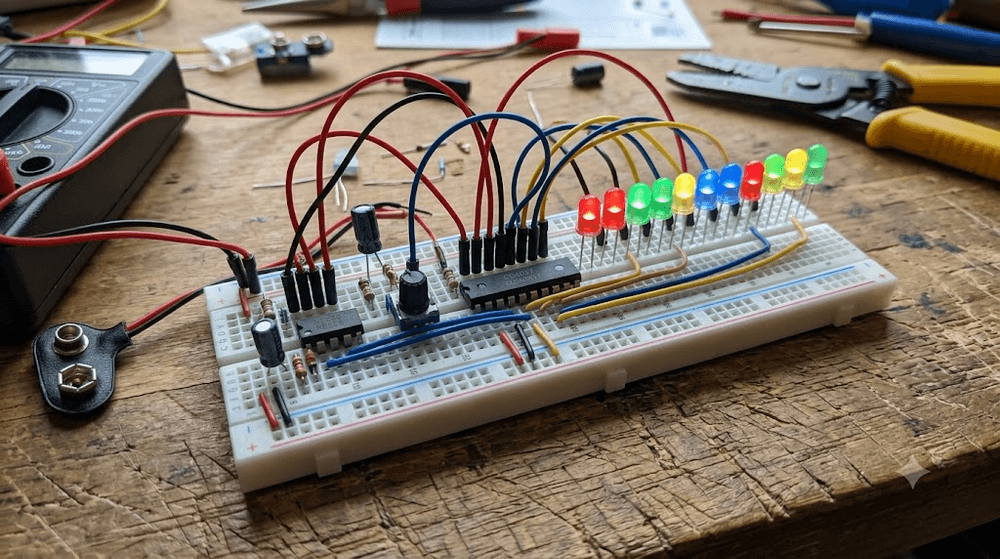
An LED light chaser circuit is a device which is designed to turn ON and OFF a string of LED lamps so that it creates a "running" light kind of effect.
These look very interesting and are surely eye catching and that’s why these types of lighting arrangement have gained immense popularity in today’s world.
1) Simple LED Chaser Circuit using IC 555 and IC 4017
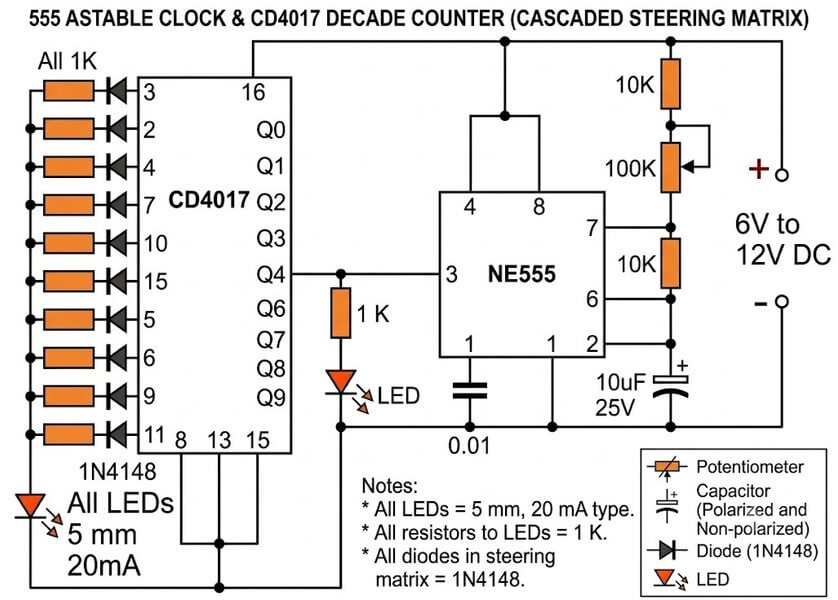
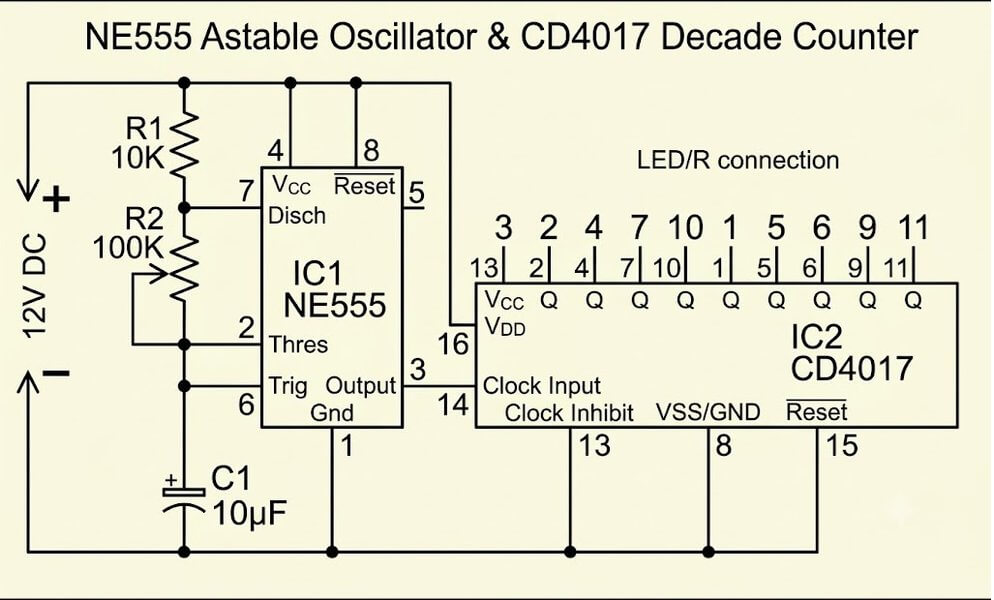
This is a very simple LED chaser circuit, good for beginners who want to try their first electronics project. It uses just a few common parts, so building it is not very difficult for you.
The 555 IC works as an oscillator and sends clock pulses to the CD4017 IC.
The 4017 then lights up the 10 LEDs one after another, giving us the running light effect.
You can also adjust the chasing speed by turning the 100k pot, either faster or slower as you like.
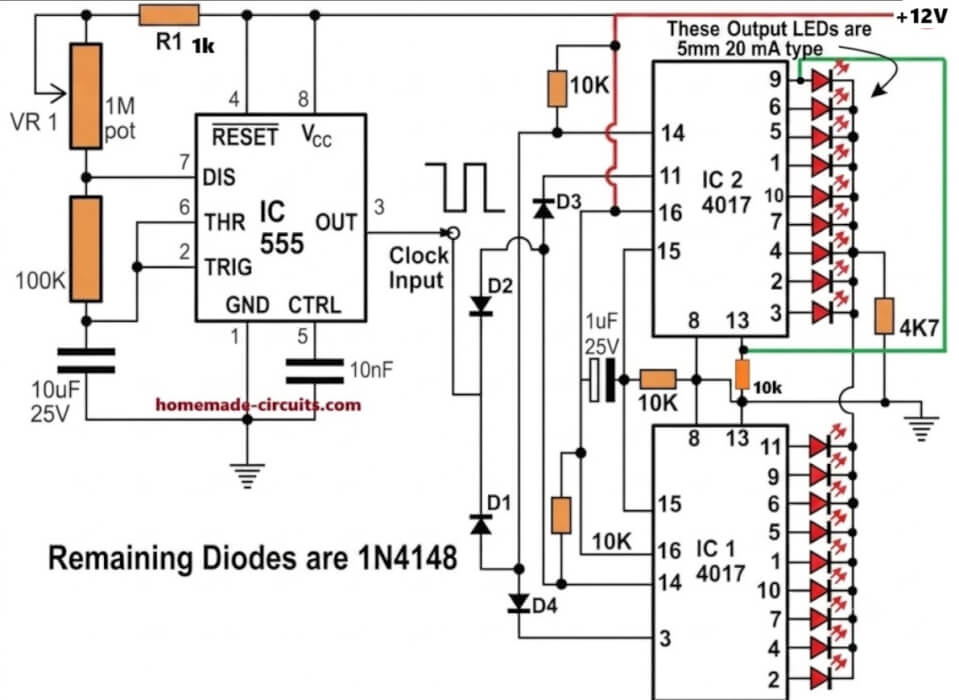
2) 18 LED Light Chaser Circuit Using Two IC 4017 and IC 555
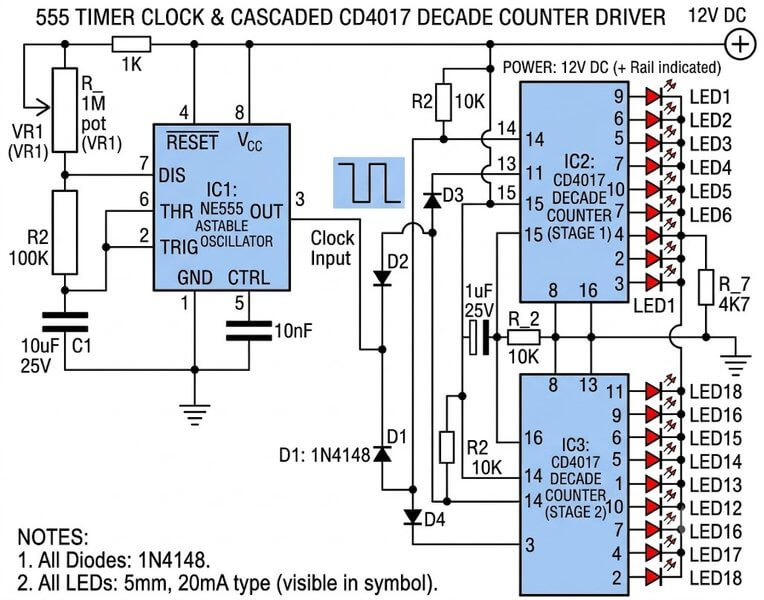
Normally, one IC 4017 can run only 10 LEDs in sequence. But if we want to run more LEDs, we can connect two 4017 ICs together. Here a 555 IC is used to generate the clock pulses, which makes the 18 LEDs light up one after another.
Cascading Two IC 4017 Johnsons Counters for the 18 LED Effect
Here we can see how two 4017 ICs are connected together to run 18 LEDs. A few diodes are used between the two ICs so that when the first IC completes its counting, the second IC starts counting next.
In this way, the LEDs keep running one after another across all 18 LEDs. The circuit can work with any 6V to 12V DC supply.
3) 100 to 200 LED Reverse Forward Chaser Circuit for Diwali, Christmas Decorations
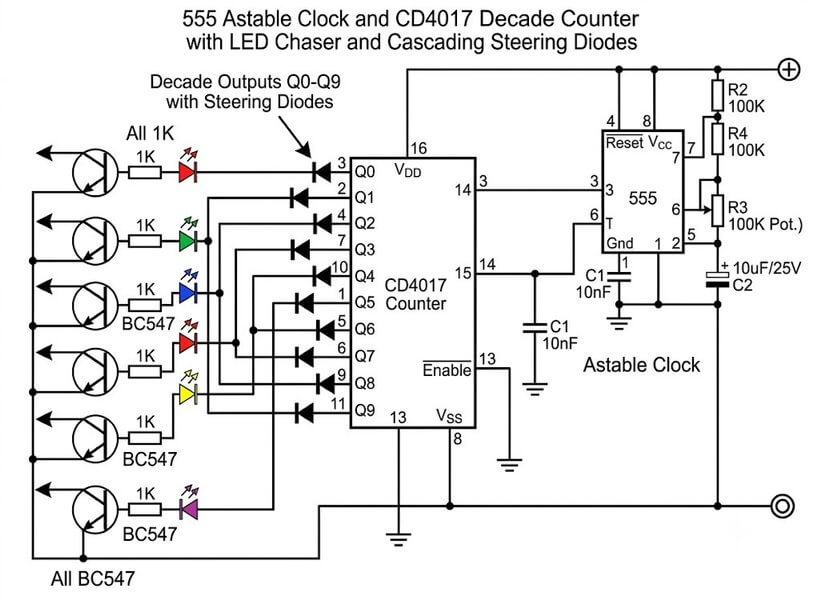
A normal LED chaser is good for small projects but for Diwali or Christmas decoration we may want to run more LEDs and get some different effects.
In this circuit we will see how to make the LEDs move forward and then come back in reverse direction, giving a nice to and fro running light effect.
We can also increase the number of LEDs up to 200 for bigger decoration work.
4) LED Chaser Circuit with Blinker Effect
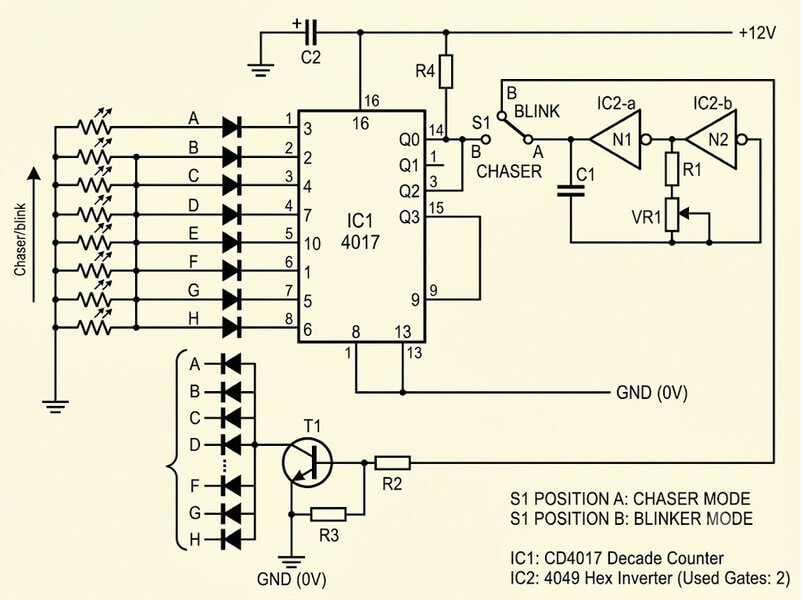
One of my blog readers Joe, asked if it is possible to make an LED chaser circuit which can also work like a normal LED blinker. That means in one mode the LEDs should keep running one after another, and in the other mode all the LEDs should blink together at the same time.
So here we have a simple circuit arrangement where a small toggle switch can be used to select between these two effects. When the switch is kept in one position, then LEDs keep chasing one after another as usual. But when we change the switch to the other position, then all the LEDs start flashing together instead of running in sequence.
This way we can get both effects from the same circuit, without having to build two separate circuits for the two functions.
5) Outward Chasing LED Circuit
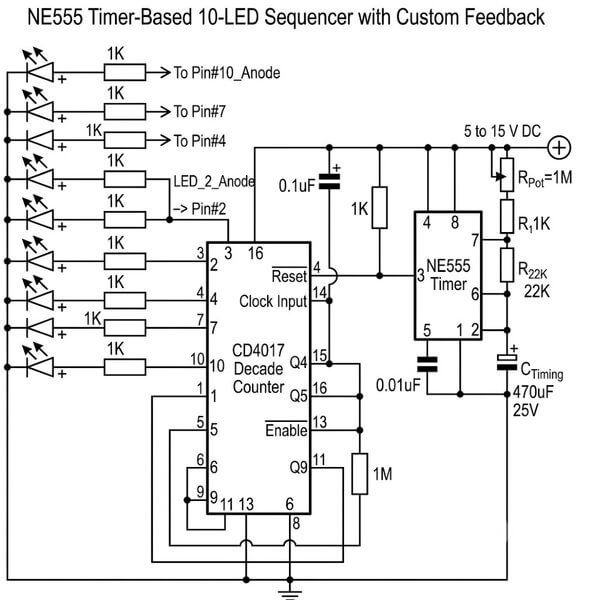
This circuit gives a different type of LED chasing effect. Here the LEDs do not move from left to right like in the normal chaser circuits.
Instead the lighting starts from the middle of the LED row and then slowly moves towards both sides.
So the LEDs on the left and right side light up one after another at the same time. This gives a nice effect as if the light is spreading out from the center towards both ends.
It is a simple idea but the effect looks quite different from the usual running LED circuits.
6) Making a Knight Rider Type LED Chaser Effect
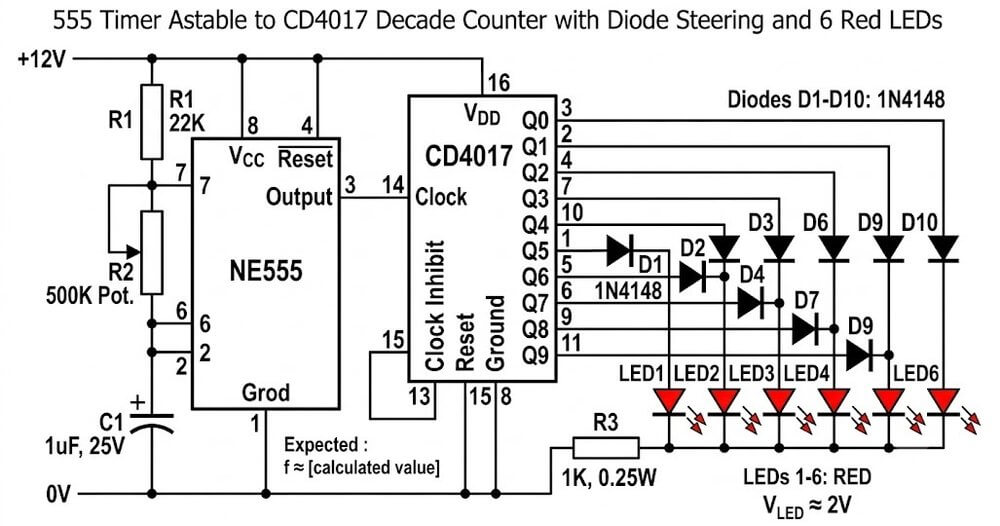
If you have seen the old Knight Rider TV show then you may remember the red light moving from one side to the other on the front of the KITT car. We can make a similar type of running light effect using a 555 timer IC and a 4017 counter IC with a few diodes.
The circuit makes six LEDs light up one after another and gives that old Knight Rider scanning effect.
Here we will see how the circuit is made and how the different parts work together to produce this moving light effect. A simple transformerless power supply is also explained for powering the circuit.
7) LED Chaser Circuit with Slow Adjustable Fading Effect
One of my blog readers Tamam wanted an LED chaser circuit where the LEDs would not just switch ON and OFF suddenly.
He wanted the LEDs to glow slowly and then fade out slowly before the next group of LEDs starts glowing. So here we will see how this type of LED chaser effect can be made using some simple electronic parts.
The circuit does not use any microcontroller or programming. Everything is done using normal transistors and capacitors which help the LEDs to fade gradually and make the whole chasing effect look more smooth.
8) Simple LED Chaser Using IC 74C164
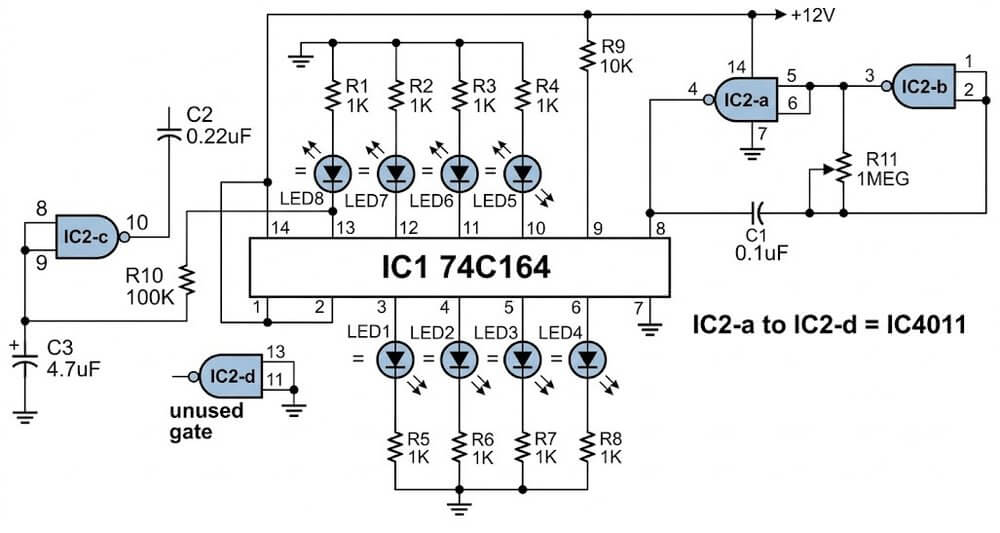
If you want to make an LED chaser using some other IC instead of the normal 4017 IC then you can also try the 74C164 shift register IC.
This IC works in a different way and can be used to make a nice running LED effect. In this circuit we use a 4011 IC which has NAND gates inside it.
Two of these gates are used for making the clock pulses which keep shifting the LED sequence from one output to the next.
An RC network is also connected in the circuit for automatic reset. Once the 8 LED sequence is completed the circuit resets itself and starts the same sequence again.
9) Using IC 74LS164 as the Controller
Here we are using two 74LS164 shift register ICs along with a 555 timer to make a different type of LED display. A changeover switch is used to change the working of the circuit. When the circuit starts working the LEDs begin to light up one after another from both ends and finally meet in the middle. After this a transistor stage resets the circuit and the same sequence starts again. So we get a nice LED bar effect using these simple ICs and a few other components.
Enabling Rapid Up/Down Sequence
Now if we want to make this LED display a little more interesting we can add one more oscillator circuit using an IC 4017. This extra circuit helps to hold the main LED bar in one position and then starts a fast up and down flashing effect. This way we can get another type of LED movement from the same setup without making the whole circuit too complicated. It is a simple addition for those who want to try some different LED display effects.
10) 16 LED Reverse/Forward Chaser Circuit
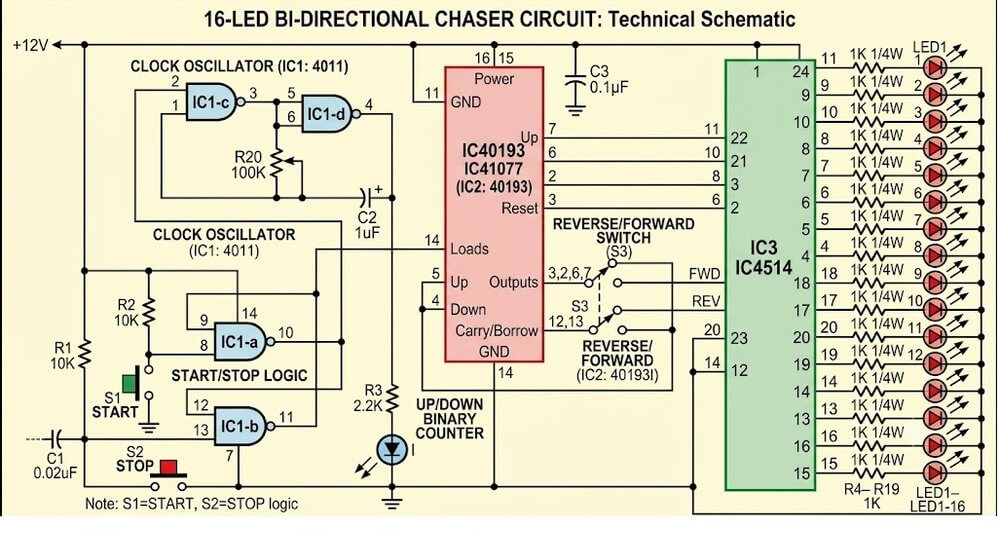
Here is another LED chaser circuit which can run 16 steps in forward and reverse direction. In this circuit we are not using the usual 4017 IC. Instead we are using a 40193 up/down counter along with a 4514 decoder IC to control the LED sequence.
The circuit also uses a few NAND gates to make a latch section. Some switches are provided so that we can control the forward and reverse movement of the LEDs as required. So with this setup we can make the LEDs move forward and then bring them back in reverse direction to get the chasing effect.


Questions & Answers
sir,do u have single time LED Chaser after stop.and glow single LED >?
Bhavin, I could not understand your requirement….please explain it elaborately…
sir,need circuit diagram one time LED chasing after stop chasing
Bhavin, if you want the LEDs to illuminate sequentially only once, and then stop with one LED lit up, you can try the following circuit, see how pin#13 and pin#15 are configured:
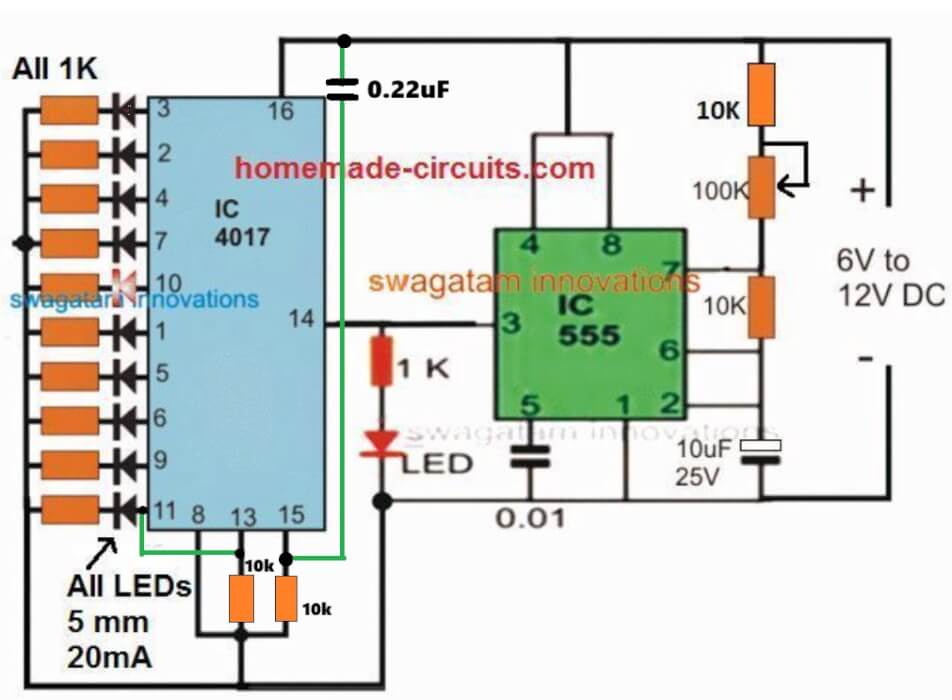
in this diagram last 11 no pin glow and 14 no pin blinking
Yes, that will happen, because one full chasing sequencing stops at the last pin11, as you wanted. You can remove pin14 LED, if you don’t want it…
I want to make a round LED chaser circuit. It will be placed around the doorbell switch
You can remove LEDs on pin11 and pin14, if you do not want them…
no of led increase 18 then what will circuit diagram
use the 74LS164 based circuit.in this solution how many led operate in single ic
8 LEDs on one IC:
https://www.homemade-circuits.com/led-chaser-circuit-using-ic-74ls164-leds-illuminate-in-bar-mode-then-shut-off-together-or-one-by-one/
please share circuit diagram
It is given under 4) LED Scanner Circuit Mustang Type, in the above article…
sir,planning change in circuit.LED chase once after all LED are glow.please share circuit diagram
4017 circuit cannot easily modified for LEDs to glow all together after one chase, for that you may have to use the 74LS164 based circuit explained in the above article…
You can try this:
love your 18 chaser light circuit only problem it needs to run on 1.2v dc i want
to use on my solar light i have in my yard that failed. it is a 8 pin single ic that
runs all 18 leds. so your circuit peaked my interest. the original 8 pin ic i cant
see any numbers on it to maybe replace it. so im looking at your circuit with
the 555 and a pair of 4017. any thoughts on what to do?
gary
I am glad you found the circuit interesting, however the IC 4017 and 555 cannot work with voltages below 3V, so 1.2V seems too low for them to operate correctly.
You caan do one thing, boost the 1.2V to maybe 5V and see if the 18 LED circuit works or not.
For the 555 IC please replace it with IC 7555 or LMC555 versions.
For bosting 1.2V to 5V, you can try the following circuit:
https://www.homemade-circuits.com/wp-content/uploads/2026/05/boost-converter-using-joule-thief-circuit.jpg
Hi Swagatam,
First, thanks for all your efforts.
I have doubt, may be a silly one. In the 18 LED light chaser circuit, how long can I expect the circuit to function efficiently, that is without the battery getting heated or the LEDs getting burnt out. Is it safe to use the same circuit with the mentioned components as I would like to build it for a school project?
Thanks in advance.
Thanks Uma,
There’s no way the circuit can degrade or LEDs burn as long as the DC supply is as per the design specifications…It can keep on working efficiently practically forever..
Yes, it is 100% safe to use the design as exactly shown in the diagram with the indicated supply voltage DC.
You can surely build it for your school project, and let me know if you have any issues with the working of the circuit..
I was hoping to see the dual 4017 knight rider circuit in action, but the link did nothing. Do you have a video of the fading effect also?
Thanks.
which link are you referring to??
Hi
Swagatam finally got to work on the modified chaser circuit found a error on my side the leds flash now after they go through a sequence then latch then the whole array flash a couple of times but they won’t reset just stay static as if the tip122 is keeping them lit and won’t reset if I disconnect the 1uf cap at pin 9 of the 4017 the led will reset but not flash connecting this cap back the leds will flash but not reset
would you have any ideas
regards
Thank you Sparks, glad to know the LEDs are doing are sequencing and flashing as required.
It seems like the capacitor is leaking current to pin#13, that is why it is getting permanently latched.
Please replace the pin#9 capacitor with a 1uF non-polar capacitor, and the associated 100k with a 1M.
And now check the difference.
Hi swagatam
Thanks will let you know how I get on
regards
Sure Sparks, no problems!
Hi Swagatam
The lights do not flash after the last count and do not reset when I connect the supply the 4017 Counts but will not flash or reset eg LEDs will stay illuminated
regards
Thanks Sparks, please do the following modifications:
please connect pin#15 to ground through a 10k resistor, and connect a 0.1uF between the positive supply and pin#15, this will ensure the sequencing always starts from pin#3 onwards whenever the circuit is powered ON..
Use a non-polar capacitor 1uF for the pin#9 of 4017.
Disconnect the base of TIP122 from the collector of the BC547.
Now check how the LEDs respond. Tis will confirm the basic work of the circuit as per the following concept:
https://www.homemade-circuits.com/sequential-bar-graph-turn-light/
Please let me know the results…
hi Swagatam
I have already taken the bc547 emitter to pin 1 but what is strange is that it will start sequencing but for some reason will not reset and will not flash at the end of the cycle it works ok using the original circuit but I am having problems with the modified circuit to get it working as it should
reqards
Hi Sparks,
You said that the 4017 circuit stage works correctly and the LEDs illuminate sequentially and also reset normally to repeat the process when it is tested as a standalone circuit. So can you please tell me in what situation does this normal working stops, meaning with which circuit connection does this normal functioning gets disturbed and stops?
https://www.homemade-circuits.com/wp-content/uploads/2025/05/LEDs-illuminate-one-after-the-other-sequentially-then-flash-and-then-repeat.jpg
hi swagatam
thank you for your quick reply if I leave the emitter open and say connect the led to the 2n2907 collector and to to scr anode the led will be lit and reset and.start the sequence but when I connect it to the tip122 emitter the led will be lit (but not reset or flash the leds )
reqards
sparks
Hi Sparks,
please connect the emitter of the BC547 with pin#1 of IC 4060 to slow down the flashing effect.
The scrs should turn off once the 4017 sequence reaches pin#11. Because at pin#11 2N2907 turns off so there’s no holding current for the SCRs, and since the LEDs are flashing that means these would also cut off current at one instant, which would mean all SCRs latch breaking off due to the complete absence of anode/cathode current and gate current, so at this moment the SCRs would turn off.
Please let me know.
Hi swagatam
A while back you did me modified circuit of.the sequential led array light circuit (that worked ) Then you designed so all the led I am using all flashed at once then reset but I have build it and cannot get it to work you said connect load to Tip122 and anode on scr but the lights stay on plus they no ref to ground
the transistors Tip122 and 2n2907 are both at +voltage
hope you can help
reqards
hope
Hi Sparks,
Yes, I think you are referring to the following circuit idea.
We will have to check and diagnose the circuit step wise.
Initially can you please tell me how the LEDs respond without the TIP122 emitter connected (open)?
https://www.homemade-circuits.com/wp-content/uploads/2025/05/LEDs-illuminate-one-after-the-other-sequentially-then-flash-and-then-repeat.jpg
BUEN DIA Y CORDIAL SALUDO
DESOHACER UN LETRERO LUMINOSO CON MAS DE 100 LEDS Y ME GUSTARIA CONOCER ESQUEMAS QUE ME PERMITAN ESTO USANDO POCOS ELEMENTOS, TALES COMO:
LEDS
RESISTENCIAS
CAPACITORES
TRANSISTORES
OTRS ELEMENTOS QUE CONSIDEREN INDISPENSALES
Sure, you can try the following circuit design. You can put 4 LEDs in series on each transistor collector arm, adjusting the series resistor value accordingly:
https://www.homemade-circuits.com/wp-content/uploads/2022/04/transistor-light-chaser-circuit.jpg
Hi Swagatam, I built the outward chasing LED circuit No:9 by connecting all the parts as shown in your diagram. But my circuit is not working. Capacitor value is shown as 470uF 25V. Is it correct? Can you please assure me that there is no error in the circuit diagram?
Hi Mahesh,
There’s no error in the outward LED chaser circuit configuration, except the IC 555 part values. Please change them to the following values. Replace the 1M pot with 100k pot, 22k resistor with 100k resistor, and 470uF capacitor with a 10uF/25V capacitor. Also, please replace the 555 pin#3 1K resistor with a 10k resistor.
Goodmornig Sir. In the Knight Rider Chaser schematic it mentions 10x1n4008 diodes but only 8 of them are visible. Maybe they go on outputs d1 and 3 of the 4017?
Thanks
Good Evening Rosario,
I think the diodes needs to be configured in the following way, if 10 diodes are used:
https://www.homemade-circuits.com/wp-content/uploads/2012/10/reverse-forward-led.png
Hi Swagatam,
In the circuit 16 LED Reverse/Forward Chaser Circuit, if I wanted to use only 14 LED, omitting the last 2, would the circuit continue to function normally?Best Regards.
Nélio.
Hi Nelio,
Yes, if you do not use the last two inputs the circuit should still work normally, according to me.
But since this circuit is not designed by me, I am not entirely sure about its functioning and whether it will successfully work or not, and also I am not well-versed with those ICs.
In your circuit No. 6 – 18 Led chaser circuit If I want to use 3 mm Led
then what changes should I Do ?
No need to change anything in the design, you can use the same circuit design without any changes….
Hi Swagatam,
I have had a look through the prior projects and experiments and could not find a suitably matched project for my needs.
I need to build a circuit that makes 3 or 4 LEDs “breathe” – fade in/ fade out over 2 to 5 seconds. There is a FADE IN/OUT Arduino project in the library but I do want to incorporate Arduino for this setup. I read about using 2 NE555s set slightly out of phase and the pulsing would be equivalent to the beat frequency of the output. The article lost me when it was suggesting XORing the output to the LEDs. Does this make sense to you? How would you do this? Or would you do it differently?
Thanks
Thank you Michael,
Did you check the following article?
https://www.homemade-circuits.com/alternate-onoff-led-fader-circuit/
I think this circuit should be able to fulfill your requirement.
A 5 seconds timer can be added through additional BJT circuit stage.
Please let me know if there’s any specific thing missing in the design.
Alternatively, a single 4093 IC could be also used to get all the required feature from a single chip.
Thanks for this. It’s virtually perfect as is. Any ideas how to make the LEDs brighter. It looks like the highest voltage through them is around 5v. Do you think I could safely bump the input to 19v? What is the BJT circuit?
Cheers
Sure, the LED brightness can be adjusted by adjusting the values of the R6 and R7 resistors.
The IC can work with up to 32 V, so 19 V can never be an issue. Just make sure the voltage rating of C1 and C2 capacitors are at least 1.5 times of 19V or higher. The R6, R7 must be appropriately calculated so that the current does not exceed their max specifications.
The transistors T1 and T2 are the BJTs, and form the BJT circuit.
Hello, Swagatam!
First, THANK YOU for having this website! It’s very generous to do this 🙂
I’m very interested in Circuit #1 and Circuit #5, because those look like something I can actually do and my goal is that I want something I can fit into a sort of “shadowbox greeting card” to be mailed to people.
My question is:
Since I’m looking at either the TLC551 or the LMC555, which as far as I can tell operate a 1V and 1.5V respectively, which values do I need to recalculate to run off of a 3V battery? Or is that not even do-able? I can go up to 6V, because I’ll be using CR2032 button cell(s) and minimal holders.
I’ve been looking, and asking, for the answer of how to go from a 5V-NE555, to a 1V or 1.5V CMOS-555 for three months – no exaggeration! -, but I still have no idea at all what values I need to recalculate to adjust the circuit from the NE555 to the CMOS low-power 555 or 551 IC.
If you could tell me what to recalculate, that would be a huge kindness! Not even do the calculations, but only tell me which things need to be recalculated, would be a big help!Even if I still need 6V but maybe only need to add a resistor to not “blow out” the CMOS timer, if you could tell me that, it would be a major kindness to me!
Thank you!
Hi Kris,
Thank you so much for liking this website, glad you found it useful.
If you check the datasheet of the cmos 555 ic it shows a formula for calculating the operating frequency which does take the supply voltage into account.
https://www.homemade-circuits.com/cmos-ic-lmc555-datasheet-works-with-1-5-v-supply/
That means regardless of the supply voltage the resistor capacitor values can remain the same.
So you can feel free to use the same circuit configuration which are shown in the above article for your specificapplication.
I think a 3V battery supply would be more appropriate instead of a 1.5V, as it would allow sufficient voltage margin for optimal illumination of the LEDs.
Please let me know if you have any further questions or doubts, I will be most happy to solve them for you.