In this post I have explained an innovative wireless LED brake light circuit which can be attached to a biker's helmet. The LEDs attached with the helmet circuit illuminates in response to the motorcycle braking generating an enhanced brake light effect from the user's helmet. The idea was requested by Mr. Bugoy.
Technical Specifications
Good day Sir! How are you? Yes, it was indeed a very interesting project. I am really an advocate of safety and security when it comes to my bike Sir.
I wish you could see it soon. By the way, here are some links of an aftermarket product:
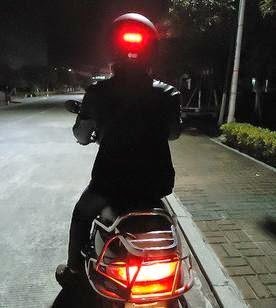
I am thinking of hacking a wireless doorbell or a remote controlled toy car with lights. But I do not know how to do it. So I'm asking for your help Sir if you know of a simple RF transceiver and receiver that could drive LED's.
Thank you so much Sir.
The Design
The proposed helmet brake light circuit could be easily implemented by using an inexpensive homemade FM transmitter and a small FM transistor radio.
A small FM transmitter can be seen in the following diagram which becomes the brake light transmitter circuit for the helmet LEDs.
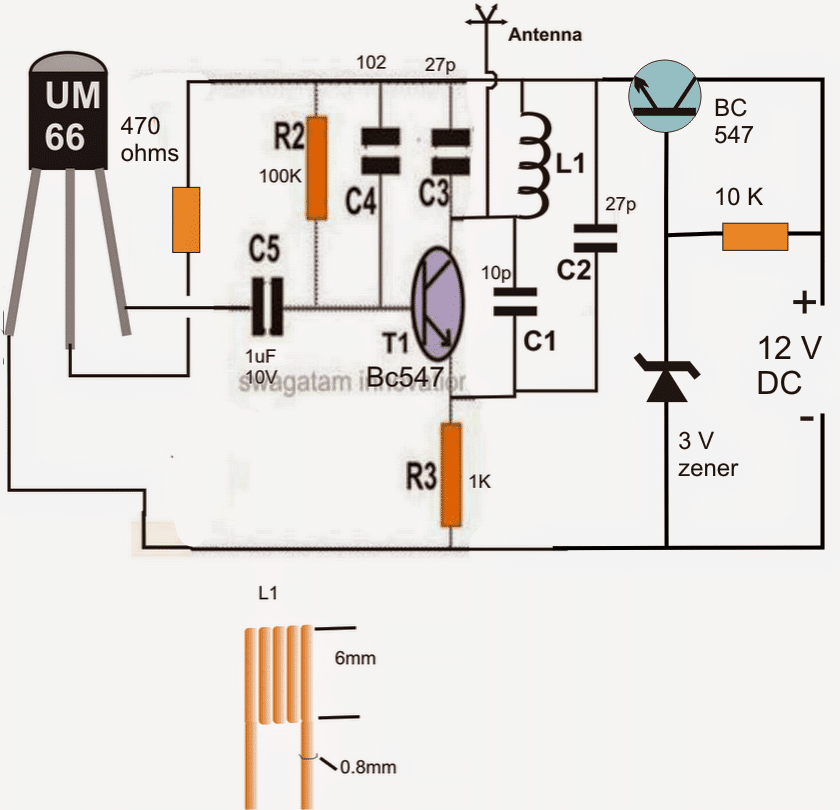
The above design represents a simple FM transmitter circuit which may be integrated with the brake light voltage signal of the motorcycle, or simply across the brake light lamp connection
The circuit generates an FM signal over the standard FM band of 80 to 108 MHz. Thus the transmitted signals become receivable over any standard FM radio placed within a radial distance of 30 meters.The coil would need tweaking for setting the exact point of reception over an FM radio
The indicated 12V lines are required to be connected directly across the brake light lamp of the bike.
The BC547 on the right along with its base zener ensures that the FM transmitter circuit receives the allotted 3 V for the operations.
The UM66 IC is a musical chip which enables the circuit to generate an AF modulated FM transmission ensuring much stronger and robust FM signals compared to a transmitter with no audio modulation stage.
Therefore each time brakes are applied, the transmitter is switched ON and sends a strong audio modulated FM signal for the FM radio positioned inside the helmet.
The FM Radio as the Receiver
Any small FM radio could be used for the purpose of receiving the transmitted signals from the above explained FM transmitter. An example circuit of a small FM radio may be seen below:
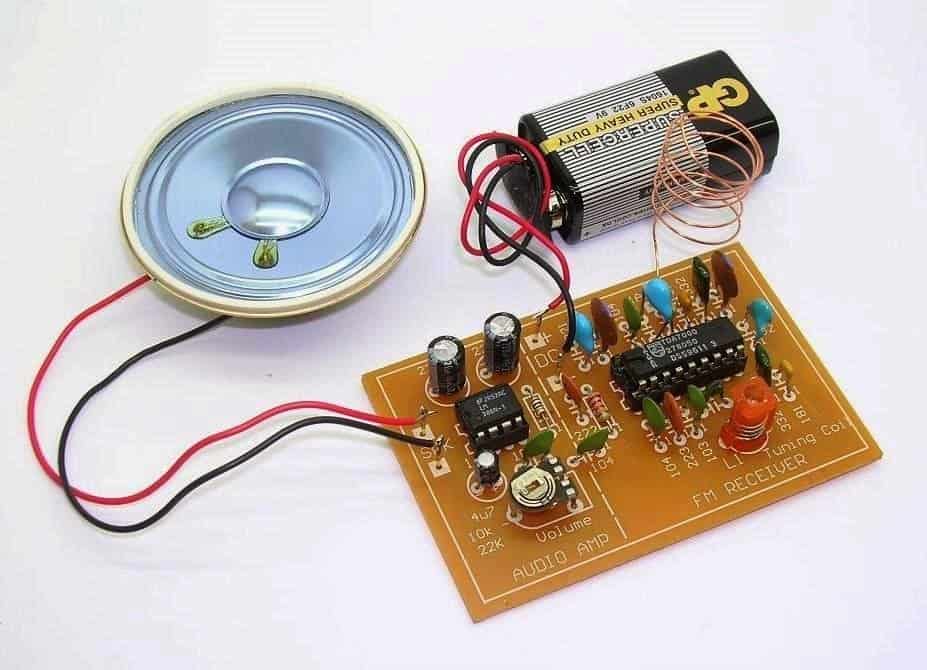
In the image we are able to see a speaker attached with the radio and also a 9 V battery as the supply source.
Both of the above mentioned attachments needs to be removed from the kit and should appear something as given below after the proposed modifications:
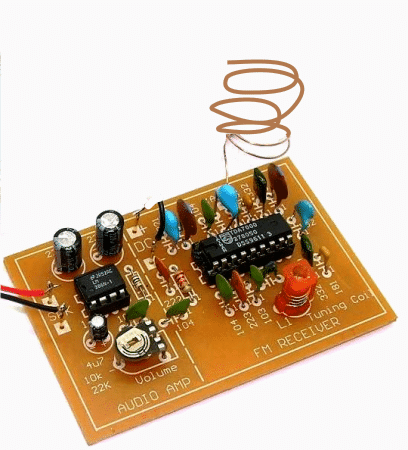
In order to make the above radio compatible with a LEd driver stage and for illuminating a set of LEDs in response to the received FM transmitter signals, we need to make some interesting electrical modifications with the shown FM radio kit.
The following figure shows how a small electrical stage consisting a BJT and inductor may be used for transforming the amplified audio from the radio into a DC which would then illuminate a set of LEds brightly each time the brakes are applied in the motor bike.
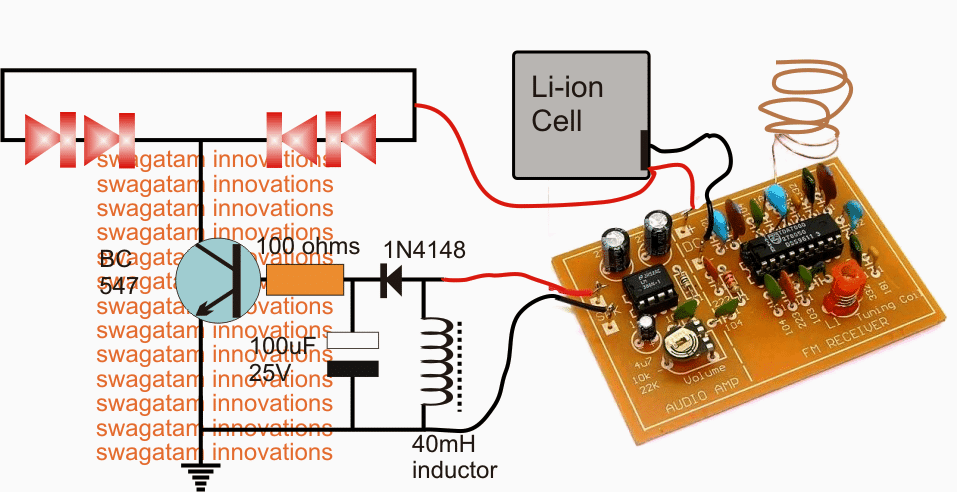
In the above diagram we see the speaker terminals of the FM radio being joined with an inductor and the output across the inductor further connected with a diode, capacitor rectifier stage for converting into a stable DC base drive for the following BC547 LED driver stage.
We can also see the 9 V battery being replaced with a 3.7 V Li-ion cell in order to make the design compact and easily inclosable inside the helmet.
When the radio begins receiving the switched audio, the weak audio frequency across the speaker wires become concentrated and boosted with the help of the connected inductor, this boosted voltage is rectified and filtered by the diode capacitor network so that the BC547 is able to receive a clean DC conversion for driving the set of LEds situated over the helmet body.
Now whenever the brakes are applied the signal from the transmitter is received by the FM radio inside the helmet resulting in the required illumination of the LED strip through the operations as explained in the above section.
How to set up the proposed LED helmet brake light circuit
Before installing the Rx LED module over the helmet, the radio board needs to be set appropriately as per the following explanation:
Switch ON the FM radio with no antenna connected and the station selection on the radio being on any random position.
You may find the LEDs glowing in this situation, now adjust the volume control preset in the amplifier section of the FM board very slowly until you find the LED just stops illuminating.
After the above setting disconnect the speaker output wires from the LED driver stage and let a speaker be connected with these wires. Also connect the antenna wire back in the shown position.
Switch ON the transmitter unit and adjust the red colored frequency coil or it could be a capacitor trimmer in other variants of FM receivers, tune it carefully until a clean and powerful musical audio (UM66 music) is detected in the speaker. Seal the tuning device with glue.
Now remove the speaker and connect the wires back with the LEd driver stage.
Switch ON the transmitter and you'll find the LEDs glowing brightly in response to the received musical transmission from the Tx unit. Switching of the Tx circuit should switch OFF the LEDs as well instantly confirming the perfect working of the system.
Check the response a few more times after which you may proceed with the final installations.


Comments
Hey Swagatam,
I am a sort of hobbyist and been working on wireless indicator system for my motorbike. so i need some help in connecting the wireless indicator system to my bike.
So what i did: opened the old RC Car, figure it out to grow the 2 LED strip (Red and blue brought it online) when press right and left separately. Same like the bike indicator.
Now the challenge i am facing is how to connect the right and left remote control switch to the bike indicator switch. Hope you get it what i am trying to say.
I'll grateful if you help to solve the problem. You can contact me @ kuntaldchowdhury@gmail.com
Hi Kuntal,
For a wireless turn signal system the wiring will need to be entirely independent, and noway associated with the bike's existing switches.
The transmitter switches will become the new turn signal switches, which will have no connection with the bike's existing wired switches.
the turn signal lamps will also need to be wired separately with the wireless receiver's relay contacts.
A 2-channel Tx/Rx unit could be used for the implementation
Sir..
Can u plzz help me I m making something.. But I cant find a suitable circuit for it..
I need something as smaal as possible.. It should be portable and main thing it can generate voltage as same as stun gun… I wll be glad if you can help me out..
Ujjwal, you can try the following circuit which is actually an inverter circuit and will generate 220V from a 12V battery source
https://www.homemade-circuits.com/2012/02/how-to-make-simplest-inverter-circuit.html
Hello Sir, Thanks for your post about DIY circuits. In this example of using FM transmitter/receiver for communicating with the helmet, if there are many users whose helmet's FM receivers are tuned to same frequency, then if one user applies brake , then all users' helmets will turn on. Is there any way to send unique signal for each user?
Hello RC, the above design is just for testing and hobby purpose, although this circuit too has the feature of a frequency adjustment so many 100s of unique sets could be produced using the above concept, however for a mass production one would have to employ a more advanced remote control modules.
Good Day Sir!
How will I connect the meter Sir? In amps or in volts? How is it exactly to monitor rate of discharge? Thank you Sir. I am so close to completing the project.
Bugoy, keep it connected as you have shown here:
s1284.photobucket.com/user/butchmillo/media/2015-01-06-1715_zps554c20bb.jpg.html
and monitor after how much time the 200mA drops to less than 50mA.
Sir, the amp reading for both battery and DC supply are almost the same Sir. More or less 200mA.
Bugoy, yes it's 200mA confirmed…keep the cell connected with the Tx and monitor the rate of discharge with the meter continuosly….
at 200mA a 800mAH cell shouldn't last more than 1/2 hour.
Sir, the AA battery does not get drained. I am using it for almost a month now for my testing. I even turned it ON for 1 hour straight. It is still working and reads 1.34volts.
Hello Sir!
Good Day!
I verified the current consumption using AA battery and it was also 200mA Sir. Below are some links for the picture of my measurements, both for battery and for LM7805 with 1N4148 diodes. The multimeter is set to 10A, so the reading 0.208 and 0.225 are in mA.
i1284.photobucket.com/albums/a561/butchmillo/2015-01-06-1713_zps5211ca6d.jpg
i1284.photobucket.com/albums/a561/butchmillo/2015-01-06-1715_zps554c20bb.jpg
Also, why is that an ordinary AA battery dont even get hot? What is the reason behind it Sir?
Sir, but even if the Tx is consuming 200mA, why is that a single AA battery could last long?
Hello Sir!
Is there a way to do that Sir? To lower the current consumption level? Because even the versatile LM317 gets hot so much.
Hello Bugoy, My suggestions are as per your readings which seem to be very contradictory, so it's a mystery to me how things are working.
If your AAA cell is not getting drained it means the Tx is not consuming much current through it….but if the 1.5V DC is applied from a 317 IC it's showing 200mA consumption…how can this happen??….whether it's from a 1.5cell or from any other source the current consumption will be the same always….it can't show different readings for a cell and for other DC sources.
Did you check the amp reading with a 1.5V cell, please check it and confirm if it's the same.
Or may be you are connecting the DC supply on some other points…connect the 1.5v from the 317 across the battery points or the connector points that's supposed to be for the cell fitting.
Hello Sir!
Happy New Year!
How are you? I finally came up with a more stable 12v to 1.5v converter. It goes like this. I used LM7805 and put 4 1N4007 in series with its output, cathode towards output. But the LM7805 and the diodes gets hot to the touch. Is there a way Sir to lessen the heat aside from using a heatsink? Thank you so much Sir.
Happy New Year to you too Bugoy!
Since your Tx is consuming 200mA current the involved devices will become slightly hot, there's no way to prevent it….unless the 200mA is reduced to much lower levels…
hello sir. Good day. I tested again last night, and found out that the Tx is using 205mA, both if using the emitter follower and a battery. I am sure that there is nothing wrong with the units sir, because they are both working well and they are brand new doorbells. The only thing is, it shorts any electronic power supply but still works.
Hello Bugoy, that answers everything, it means your Tx is very powerful and rated at 300mW which may have a range of more than 300 meters.
A BC547 is rated to handle at the most 100mA therefore it cannot be used in the emitter follower, you can try TIP122 and it will not heat up by much….or continue with the LM317 circuit.
Hello Sir!
Ok Sir, I will try your suggestions Sir. But it is really strange, because the Tx also makes my bench power supply shorted. The LED indicator on my bench power supply dims whenever I connect the Tx. Furthermore, I adjusted the LM317 to exactly 1.5V Sir. If I keep the 1k resistor in the emitter side, the voltage drops to only 0.6v Sir. So I omitted the 1k in the emitter side.
Hello Bugoy, such a thing can happen only if the load consumes excessive current, it means your Tx is consuming high amount of current….not sure why. In that case a 1.5V cell will also get drained within minutes.
Somewhere something may not be correct…can't troubleshoot without checking it practically.
Hello Sir!
Good day! I am sorry, I have a slight mistake in the diagram that I sent you. The 1k resistor should be on the collector side. Here are the revised diagrams. Thank you Sir. Even when using a voltage regulator circuit, it heats up the LM317.
i1284.photobucket.com/albums/a561/butchmillo/13_zps31e41f7f.jpg
i1284.photobucket.com/albums/a561/butchmillo/11_zps8baadac8.jpg
Hello Bugoy,
Your diagrams are perfect….however the results are very strange. A LM317 IC will not heat up if its output is adjusted according to the load voltage specs, here if you have adjusted the 317 output to 1.5V then it should not heat up, I can assure you that.
In the emitter follower design keep the 1K resistor on the emitter side and check the response….you may also try increasing the value of the base 10K to 47K or 100K and see if the transistor still heats up.
Hello Sir!
Yes sir, I am sure the supply is 12V. I measured it with my multimeter. Here are some pictures again sir for your reference. Why is that it also makes the LM317 (voltage regulator circuit) heats up so badly? Thank you Sir again for your unending patience.
i1284.photobucket.com/albums/a561/butchmillo/10_zpsab4e93ed.jpg
i1284.photobucket.com/albums/a561/butchmillo/11_zps8baadac8.jpg
Sir, here are some pictures of the Tx and I edited the underside to show you what I did with the emitter follower. Please refer to it, maybe you can have a better understanding Sir. Thank you, thank you so much.
i1284.photobucket.com/albums/a561/butchmillo/1_zps80fe0483.jpg
i1284.photobucket.com/albums/a561/butchmillo/2_zpsfbee8646.jpg
Yes the diagram and the connections are correct….do one thing increase the base resistor of the transistor to 33k or above and check the response, also if possible show me through a drawing or image how you have practically connected the BC547 pins…
Hello Sir! I tried connecting a 100 ohm and 1k resistor to the collector of the BC547. The BC547 dont heat up that much, but the resistor does. It heats up that I cant even touch it.
Hello Bugoy, 1K will not heat up even if it's connected directly across the 12V terminals, are you sure the input is 12V…or is it 24V??
Hello Sir!
How are you? I found out something. The Tx really makes everything shorted. I used the 7805 and it heats up. I used the adjustable voltage regulator LM317 and it also heats up. But still the Tx works well. Its just that it becomes shorted when connected to power. But when I use a AA battery, it does not heat up. Why is that Sir? The Tx makes every electronic power supply shorted. I bought another unit, and the result is the same. So I assume that there is nothing wrong with the Tx. What to do now Sir? Thank you so much.
Hello Bugoy, connect your Tx directly through a 1K resistor to the 12V supply and check the response, it seems it has a built in 1.5V zener diode.
but even if it has a 1.5V zener, the emitter follower circuit should not heat up because its output voltage is also at the same level that is at 1.5V….something is doubtful in your proceedings, can't trace it.
The Tx diagram shown in the above article already includes an emitter follower so you can refer to it for the details.
first try the Tx with a 1K resistor….
Hello Sir!
Can you please provide a schematic for that "emitter follower" circuit. Maybe I just misunderstood your instructions. Thank you Sir. The Tx works great using 1.5v AA battery. But if I use the "emitter follower", the BC547's collector heats up rapidly.
Hello Bugoy, you can see an example circuit in the following article:
https://www.homemade-circuits.com/2012/08/simplest-dc-cell-phone-charger-circuit.html
here cell phone is being fed the charging volatge through a emitter follower BJT.
The 9V zener clamps the emitter voltage to 9V.
hello sir. Merry christmas. I am already on the final stage of our project. But we still have the same small problem. The bc547 collector is still heating up after a couple of minutes. It also affects the wire itself that goes to the motorcycle brake light supply. Have you tried doing the circuit sir and supplied 12-14v? Notice the collector, it really heats up. I used several bc547 but still the same. Thank you.
..Merry Christmas to you too!!
hello Bugoy, I have tried such "emitter follower" circuits on many occasions, it will burn only if the load is faulty or short circuit, check your transmitter circuit separately with a 1.5V cell.
Alternatively, you can also try using a 7805 IC with 6nos 1N4007 diodes in series at its (+) output for getting 1.5V for the Tx.
Hello Sir!
How are you? Just got busy from work these past days. Anyway, an update regarding our project Sir. LED strips are not advisable due to its 12v rating. I tried wiring up only 3 of them but still it wont light up. So i custom-made a 4-LED strip made of recycled and junk parts. I will send some pictures next time Sir. But now I have a small problem. The BC547 that was added to the transmitter gets hot after about a couple of minutes of continuous activation. Why is that Sir? What if I need to press the brakes longer that 2 minutes? I'm afraid I might burn something. Thank you.
Hello Bugoy, that should not happen, because the Tx would be consuming only a few mA current…….check with another transistor, there could be something wrong with the transistor or its pin configuration.
If it still happens, try connecting a 100 ohm resistor in series with the emitter of the transistor.
Hello Sir!
Yes, it was indeed 1.8v across base and ground. When I added a 1k resistor across emitter and ground, it measured 1.3v. Thank you Sir. Now, I am on the process of thinking how to build the LED strip or housing for the helmet. Any suggestion Sir? Considering the helmet has a spherical shape and not flat. Thank you so much.
nowadays LED strips and ribbons have become very popular you can make use of them, a small section of these strip or ribbon can be tried.
Hello Bugoy, it can be assembled over a flexible plastic strip, but first first it's important to check whether the circuits are responding as per the required specs or not.
hello sir. I made the circuit on a breadboard. Unfortunately, its output is 3.5v sir. I supplied 14v from my power supply. What to do sir? Thank you.
Hello Bugoy, check the base voltage of the transistor, the emitter voltage will be equal to the base voltage, with three diodes the base voltage should be around 1.8V….also,, connect a load 1K resistor across the emitter and ground of the transistor and check again….3.5V could be due to absence of any load.
Hello Sir!
Good Day!
Thank you for the suggestion. I will be buying the parts today. Is that for 12v supply only Sir? The bike is generating 14-15v when running. And the brake is only used when running. Will the circuit be sufficient enough for 14-15v supply? Thank you sir.
Hello Bugoy,
The suggestion will work for 14-15V inputs also, before connecting the output to the Tx, first confirm whether the emitter of the BC547 is producing the required 1.5/1.8V approximately…once confirmed you may proceed with the integrations
hello sir! Good day. I finally got it working sir. I used the other test point but with a slight delay. Is there a way to eliminate that delay sir? By the way sir, how am i going to convert the Tx to be used with the motorcycle's 12-14v supply? It only uses one AA battery (1.5v). Thank you in advance sir. Take care.
….also remember to connect the negative of the Tx with the bike's negative.
Hello Bugoy, try to locate a nearby capacitor that may be responsible for this delay. you can simply remove it for preventing the delay effect.
for the Tx you can do the following…take a BC547 connect its emitter with the positive of the Tx circuit, collector with the motorcycle brake light positive signal.
connect the base with the above brake positive through a 10k resistor…..and connect the 3 series 1N4148 diodes across base and ground….cathodes towards ground
the above will allow the Tx to get the required 1.5V only from the bike's 12V supply
Good Day Sir!
My assessment is that, the 2.1v supply is not fully saturating the transistor to fully switch it that is why the LEDs are not in full brightness. But if I reduce the number of diodes, the LEDs are lighting up a small amount. I used 4 1N4148 to fully OFF the LEDs when not activated. Three or less makes the LEDs light up a little bit. What to do Sir? Thank you.
Hello Bugoy, I think either you'll have to trace out some other well defined signal point in the circuit or use an opamp circuit for the present signal source, because sensing a difference of 0.3V may not be feasible using a transistor circuit