• Skip to main content
  • Skip to primary sidebar

Homemade Circuit Projects

Need circuit help? Post them in the comments! I've answered over 50,000!

Blog | Categories | About | Contact | Calculators-online
You are here: Home / Arduino Projects / Digital Clock Circuit Using 16×2 LCD Display

DIY Circuits | Learn Basics | Arduino Coding


Digital Clock Circuit Using 16×2 LCD Display

Last Updated on December 5, 2024 by Swagatam 6 Comments

In this post I have explained how to make a simple digital clock using Arduino and a 16 x 2 LCD display.

Introduction

As an electronics enthusiast at a stage we would have thought, how to make a digital clock, especially who are interested in the field of digital electronics. In this article we are going to see how to make a digital clock and the design is so simple that a noob in Arduino can accomplish the project without any head ache.

This digital clock has just two main components, the Arduino and LCD display. The Arduino is the brain of the clock, which does mathematical and logical functions to updates the clock every second.

Prototype Image:
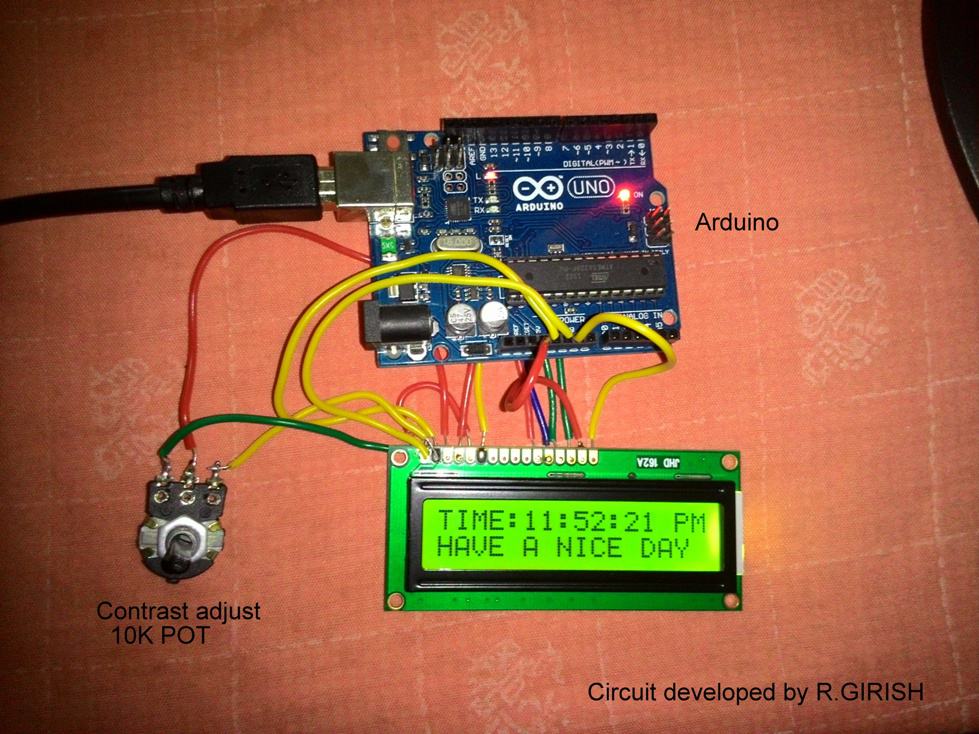
wire connection between the LCD and Arduino

The LCD screen is a standard 16 pin interfaced display. It has 16 rows and 2 columns, this means it can display 16 ASCII character in a row and it has two columns and that’s why it is called 16x2 display.

The wire connection between the LCD and Arduino is standard and we can find the similar kind of connections in most of the other Arduino-LCD based projects.

The potentiometer is used to adjust the contrast of the display.

The user must set this optimally so that the user can see the displayed digits/characters properly under all light situations.

There is backlight which enables the user to see the display during dark situation. The arduino can be powered externally from DC jack from 7 volt to 12 volt.

Circuit diagram:
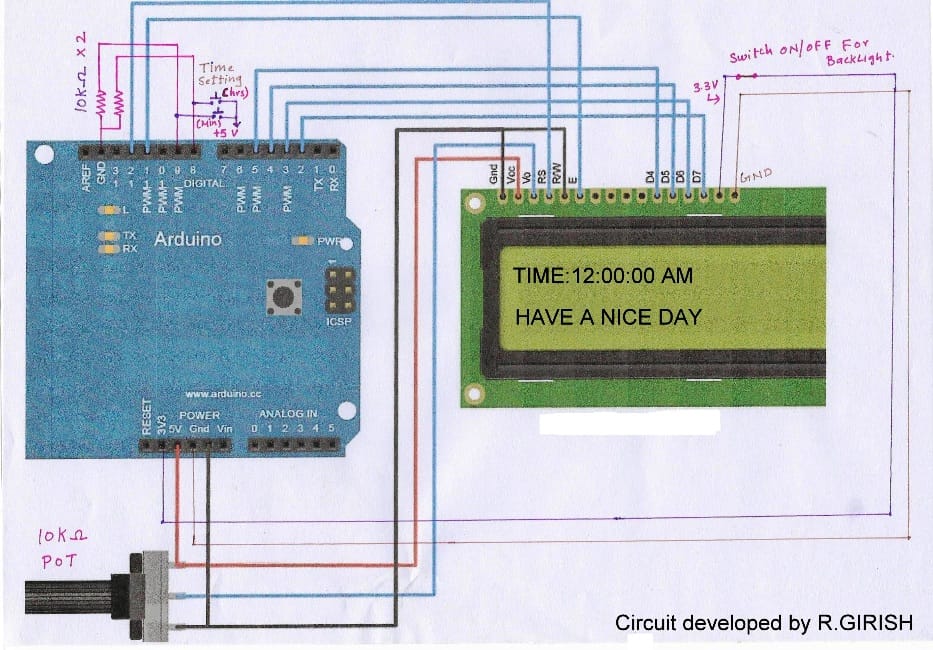
potentiometer is used to adjust the contrast of the display.

ARDUINO PROGRAM CODE:

//-------- Program developed by R.GIRISH-------//
#include <LiquidCrystal.h>
LiquidCrystal lcd(12,11,5,4,3,2);
int h=12;
int m;
int s;
int flag;
int TIME;
const int hs=8;
const int ms=9;
int state1;
int state2;
void setup()
{
lcd.begin(16,2);
}
void loop()
{
lcd.setCursor(0,0);
s=s+1;
lcd.print("TIME:" );
lcd.print(h);
lcd.print(":");
lcd.print(m);
lcd.print(":");
lcd.print(s);
if(flag<12) lcd.print(" AM");
if(flag==12) lcd.print(" PM");
if(flag>12) lcd.print(" PM");
if(flag==24) flag=0;
delay(1000);
lcd.clear();
if(s==60) {
s=0;
m=m+1;
}
if(m==60)
{
m=0;
h=h+1;
flag=flag+1;
}
if(h==13)
{
h=1;
}
lcd.setCursor(0,1);
lcd.print("HAVE A NICE DAY");
//-----------Time setting----------//
state1=digitalRead(hs);
if(state1==1)
{
h=h+1;
flag=flag+1;
if(flag<12) lcd.print(" AM");
if(flag==12) lcd.print(" PM");
if(flag>12) lcd.print(" PM");
if(flag==24) flag=0;
if(h==13) h=1;
}
state2=digitalRead(ms);
if(state2==1) {
s=0;
m=m+1;
}
}
//-------- Program developed by R.GIRISH-------//

NOTE: The above program is verified and error free. In case you got any warning or error, please add the LiquidCrystal library manually.

Time setting:

There are two push button one for setting hours and another for setting for minutes. Pressing either one will increment the corresponding digits. For setting hours press hrs the button till the correct time displays, similarly for minutes.

NOTE:

· While setting time the keep the button depressed till the desired time reaches. Pressing the button momentarily may not change the time.

· Each digit gets incremented only second after second, this is because the whole loop of the program delayed for 1 second.

· The seconds’ digit goes from 01 to 60 and loops again and won’t display “00” as traditional digital clock does.

You'll also like:

  • arduinoArduino Pure Sine Wave Inverter Circuit with Full Program Code
  • Interfacing SD Card Module for Data Logging
  • High Current Motor Control Circuit using Arduino
  • pwmBuck Converter Circuit Using Arduino

Filed Under: Arduino Projects Tagged With: 16x2, Clock, Digital, Display, LCD

About Swagatam

I am an electronics engineer and doing practical hands-on work from more than 15 years now. Building real circuits, testing them and also making PCB layouts by myself. I really love doing all these things like inventing something new, designing electronics and also helping other people like hobby guys who want to make their own cool circuits at home.

And that is the main reason why I started this website homemade-circuits.com, to share different types of circuit ideas..

If you are having any kind of doubt or question related to circuits then just write down your question in the comment box below, I am like always checking, so I guarantee I will reply you for sure!

Previous Post: « Solar Inverter for 1.5 Ton Air Conditioner
Next Post: Simple Vertical Axis Wind Turbine Generator Circuit »

Reader Interactions

Comments

Sayantan says:
April 25, 2018 at 11:22 am

I want to add alarm features to this project .What will be the complete program code for that ?

Reply
Swagatam says:
April 25, 2018 at 2:10 pm

designing customized codes will require a fee to be paid for the service

Reply
Basanta Panigrahy says:
December 19, 2016 at 10:57 am

Sir can you send sketch for multi function ledchaser 12 channel

Reply
Kaushik Mb says:
June 6, 2016 at 6:29 pm

dude the time lags for about 10mins a day, so for a week its about an hour slow…

Reply
Kaushik Mb says:
June 11, 2016 at 4:40 am

Thanks for the reply GR, due to the time lag problem, i purchased an RTC DS1307 IC, i still dint try with it. Hope it works well…

Reply
GR says:
June 11, 2016 at 1:43 am

Hi kaushik,

The time lag is due to the ceramic based resonator in the ATmega328P, the delay function is independent of the crystal. It varies with ambient temperature, but we can compensate it by adding few millisecond to delay function, for example try delay(1050); instead of delay(1000); calculate the time lag and add few milliseconds.

If your clock leads the time try reducing delay.

Regards

Reply

Need Help? Please Leave a Comment! We value your input—Kindly keep it relevant to the above topic! Cancel reply

Your email address will not be published. Required fields are marked *

Primary Sidebar

circuit simulator image


Subscribe to get New Circuits in your Email


Categories

  • Arduino Projects (95)
  • Audio and Amplifier Projects (133)
  • Automation Projects (18)
  • Automobile Electronics (103)
  • Battery Charger Circuits (87)
  • Datasheets and Components (109)
  • Electronics Theory (149)
  • Energy from Magnets (27)
  • Games and Sports Projects (11)
  • Grid and 3-Phase (20)
  • Health related Projects (27)
  • Home Electrical Circuits (13)
  • Indicator Circuits (16)
  • Inverter Circuits (95)
  • Lamps and Lights (159)
  • Meters and Testers (71)
  • Mini Projects (28)
  • Motor Controller (68)
  • Oscillator Circuits (28)
  • Pets and Pests (15)
  • Power Supply Circuits (91)
  • Remote Control Circuits (50)
  • Renewable Energy (12)
  • Security and Alarm (64)
  • Sensors and Detectors (106)
  • SMPS and Converters (34)
  • Solar Controller Circuits (60)
  • Temperature Controllers (43)
  • Timer and Delay Relay (49)
  • Voltage Control and Protection (42)
  • Water Controller (37)
  • Wireless Circuits (31)


Other Links

  • Privacy Policy
  • Cookie Policy
  • Disclaimer
  • Copyright
  • Videos
  • Sitemap


People also Search

555 Circuits | 741 Circuits | LM324 Circuits | LM338 Circuits | 4017 Circuits | Ultrasonic Projects | SMPS Projects | Christmas Projects | MOSFETs | Radio Circuits | Laser Circuits | PIR Projects |

Social Profiles

  • Twitter
  • YouTube
  • Instagram
  • Pinterest
  • My Facebook-Page
  • Stack Exchange
  • Linkedin


Recent Comments

  • Swagatam on How to Manufacture Automobile Electronic Parts and Earn a Handsome Income
  • Swagatam on Door Security Alarm Circuit for Alerting if Door was Opened
  • Swagatam on High Wattage Brushless Motor Controller Circuit
  • Swagatam on Arduino 2-Step Programmable Timer Circuit
  • Duff on Door Security Alarm Circuit for Alerting if Door was Opened

© 2026 · Swagatam Innovations