• Skip to main content
  • Skip to primary sidebar

Homemade Circuit Projects

Need circuit help? Post them in the comments! I've answered over 50,000!

Blog | Categories | About | Contact | Calculators-online
You are here: Home / Games and Sports Projects / Electronic Scoreboard Circuit Using IC 4033 Counter

DIY Circuits | Learn Basics | Arduino Coding


Electronic Scoreboard Circuit Using IC 4033 Counter

Last Updated on January 3, 2024 by Swagatam 12 Comments

A simple multi-digit electronic score board system can be built using a basic 4033 IC counter circuit. The whole procedure is explained in the following article.

So far we have learned quiet a lot about this interesting IC 4033 through the following posts that have comprehensively discussed the pinouts and cascading procedures of the chip.

4033 pinouts

cascading 4033

In this post I have explained how to make a simple counter circuit for counting number of positive pulses applied manually in the form of high logics at the input of the IC.

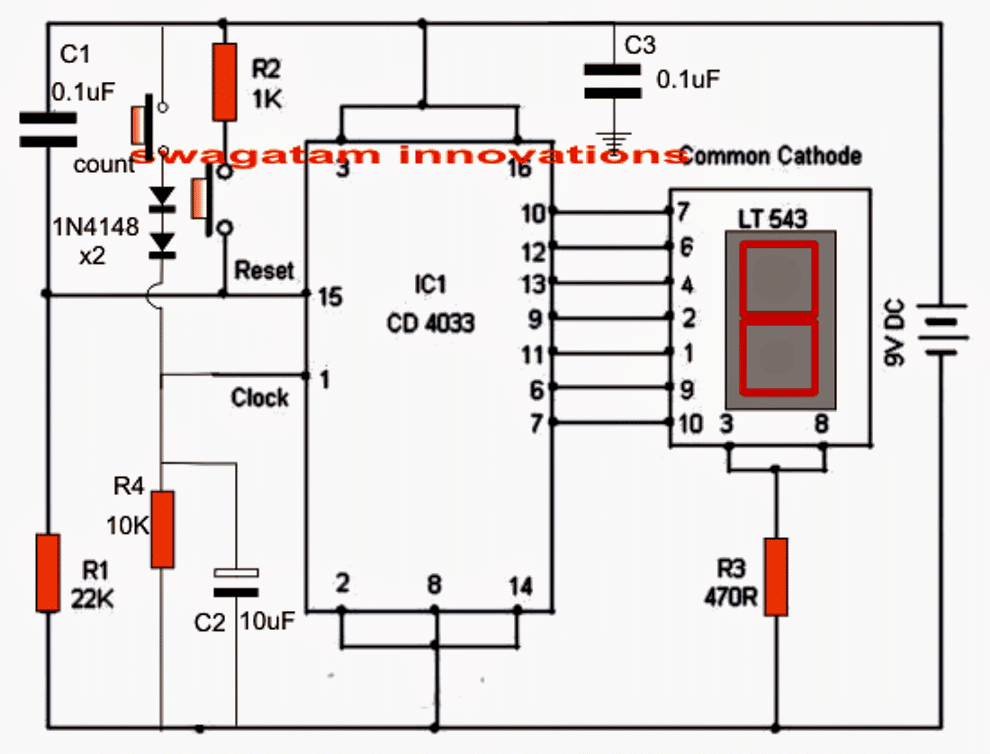
Referring to the shown simple counter circuit diagram, the IC 4033 which is a Johnson's counter/divider display decoder driver IC is configured solely for the required counting actions.

Circuit Operation

The circuit is pretty straightforward, the various pinouts used in the configuration may be understood with the following points:

Pin#1 is the clock input which is connected to a push switch via a couple of diodes and is also terminated to ground through R4 and C2.

Here the push-switch is used for pulsing the input of the IC for getting the corresponding count over the connected common cathode display across its output pins: 7,6,11,9,13,12,10.

The two diodes make sure that the IC responds only to legit switching and not to accidental spurious triggers.

R4 and C2 prevent debouncing effect that could occur during the clocking operations.
With every push of this switch, the output advances by one digit until it reaches 9 after which the display returns back to zero in order to repeat the cycle.

Another push switch can be seen connected at pin#15 of the IC 4033, this is used for resetting the IC output reading to zero at any desired instant in the course of the counting process.

C1 ensures that the IC always displays a 0 over the connected display during power switch ON.

R1 ensures the required logic zero to pin#15 of the IC for making it functional.

C3 is the decoupling capacitor, imperative for all logic ICs as per the standard rules.
Using IC 4033 IC Modules

The simplest and the best method is to use many such modules as explained above and arrange them in line for acquiring the required number of displays on the scoreboard.

Suppose we need a 4 digit scoreboard for the application, then 4 of these modules may be fixed one beside the other for implementing the scoreboard display system.

Now by simply pressing the relevant push buttons one could allow the desired number to appear in the relevant slot of the multi-digit display board.

Using the above method provides the facility of setting/resetting of any particular digit as per individual wish or requirements. This is simply done either by using the clock push button, the reset button or perhaps both during the counting operations.

Thus the above suggested electronic scoreboard becomes very easy to handle even by novices in the filed, or by any layman.

You'll also like:

  • levitation set up compressedElectromagnetic Levitation Circuit [Anti-gravity]
  • random LED generator circuitRandom LED Number Generator for Gambling Application
  • stopwatchcircuitSimple Digital Stopwatch Circuit (4-Digit)
  • DSC0410 1Making an Automatic Stopwatch for Runners, Athletes and Sportpersons

Filed Under: Games and Sports Projects Tagged With: 4033, Counter, Electronic, Scoreboard

About Swagatam

I am an electronics engineer and doing practical hands-on work from more than 15 years now. Building real circuits, testing them and also making PCB layouts by myself. I really love doing all these things like inventing something new, designing electronics and also helping other people like hobby guys who want to make their own cool circuits at home.

And that is the main reason why I started this website homemade-circuits.com, to share different types of circuit ideas..

If you are having any kind of doubt or question related to circuits then just write down your question in the comment box below, I am like always checking, so I guarantee I will reply you for sure!

Previous Post: « Treadmill Motor Speed Controller Circuit
Next Post: Blinking an LED with Delay – Arduino Basics »

Reader Interactions

Comments

Anna says:
September 25, 2021 at 5:08 am

Hi there

Is it possible to use a remote controller with the – Digital Counter DC LED 4 Digit 0-9999 Up/Down Plus/Minus Panel Counter Meters? I would like to have electronic scoreboards for playing table tennis? If so do the RF 433Mhz Transmitter/Receiver Modules still apply?

Cheers

Reply
Swagatam says:
September 25, 2021 at 12:30 pm

Hi, yes definitely a remote controlled operation is possible with the above circuit, using the 433MHz module. You simply need to configure the relay contacts of the 433MHz receiver with the “count” switch of the circuit

Reply
Radhika Nikum says:
February 5, 2020 at 5:29 pm

On Simulating this circuits do not work?

Reply
Robin Closen says:
August 7, 2017 at 1:51 am

Can I use this with a scoreboard digit made from 7 12 volt LED strip lights ?

Reply
Swagatam says:
August 7, 2017 at 3:45 am

you will require BJT current amplifier stages for operating the strips, the IC directly won't be able to drive them

Reply
Miraj Htm says:
February 26, 2016 at 6:45 am

another question. can i use down button in this circuit( sometimes i need to count down)

Reply
Swagatam says:
February 26, 2016 at 11:26 am

sorry there is no "down" feature in this circuit

Reply
Miraj Htm says:
February 26, 2016 at 6:43 am

i tried but only 8 is illuminated. nothing happen when i press button

Reply
Swagatam says:
February 26, 2016 at 11:25 am

with every press of the "count" button there will be an increment of 1 digit on the readout…

check your IC connections.

Reply
Swagatam says:
August 1, 2015 at 3:36 pm

John, you can use CD 4026B instead of 4033, for the display you can use any 7-digit common cathode type module

Reply
John Bufete says:
August 1, 2015 at 7:50 am

Sir, the LT 543 and CD 4033 are not available in our place, what are the possible options or replacements for these? I'm a student sir and I always browse this website for my projects. Thank you

Reply
Cycle Zone says:
October 18, 2014 at 12:30 pm

Dear plz give me an auto polarity changer circuit

Reply

Need Help? Please Leave a Comment! We value your input—Kindly keep it relevant to the above topic! Cancel reply

Your email address will not be published. Required fields are marked *

Primary Sidebar

circuit simulator image


Subscribe to get New Circuits in your Email


Categories

  • Arduino Projects (93)
  • Audio and Amplifier Projects (133)
  • Automation Projects (17)
  • Automobile Electronics (101)
  • Battery Charger Circuits (85)
  • Datasheets and Components (109)
  • Electronics Theory (149)
  • Energy from Magnets (27)
  • Games and Sports Projects (11)
  • Grid and 3-Phase (20)
  • Health related Projects (27)
  • Home Electrical Circuits (13)
  • Indicator Circuits (16)
  • Inverter Circuits (95)
  • Lamps and Lights (159)
  • Meters and Testers (71)
  • Mini Projects (28)
  • Motor Controller (68)
  • Oscillator Circuits (28)
  • Pets and Pests (15)
  • Power Supply Circuits (91)
  • Remote Control Circuits (50)
  • Renewable Energy (12)
  • Security and Alarm (64)
  • Sensors and Detectors (106)
  • SMPS and Converters (34)
  • Solar Controller Circuits (60)
  • Temperature Controllers (43)
  • Timer and Delay Relay (49)
  • Voltage Control and Protection (42)
  • Water Controller (36)
  • Wireless Circuits (30)


Other Links

  • Privacy Policy
  • Cookie Policy
  • Disclaimer
  • Copyright
  • Videos
  • Sitemap


People also Search

555 Circuits | 741 Circuits | LM324 Circuits | LM338 Circuits | 4017 Circuits | Ultrasonic Projects | SMPS Projects | Christmas Projects | MOSFETs | Radio Circuits | Laser Circuits | PIR Projects |

Social Profiles

  • Twitter
  • YouTube
  • Instagram
  • Pinterest
  • My Facebook-Page
  • Stack Exchange
  • Linkedin


Recent Comments

  • Swagatam on Arduino 2-Step Programmable Timer Circuit
  • Swagatam on Simple Buck-Boost Converter Circuits Explained
  • Swagatam on IC IR2111 H-Bridge MOSFET, IGBT Driver IC: Full Datasheet, Circuit Diagram
  • Swagatam on Electronic Circuit Projects, Tutorials, and Practical Engineering Solutions
  • Kadir on Simple 3 Phase Inverter Circuit

© 2026 · Swagatam Innovations