In this article I have explained a simple walkie talkie circuit that can be easily built by any hobbyist and used for communicating between rooms or floors or simply for having some fun across neighbors and friends. The range of this system is around 30 meters.
A walkie-talkie, also commonly referred to as handheld transceiver is a small, portable hand-held two-way radio transceiver, which enables voice communication across a specified radial distance without using physical wire connections across the devices.
The initial research on walkie talkie concept during the 2nd world war era, has been variously credited to Donald L. Hings, Alfred J. Gross, and engineering experts at Motorola.
Walkie talkies were first supplied for infantry use, and soon it also became indispensable among field artillery and tank units.
Due to their outstanding wireless communication ability, these units quickly became popular among the masses and became a commercial product for the various manufacturers.
Circuit Operation
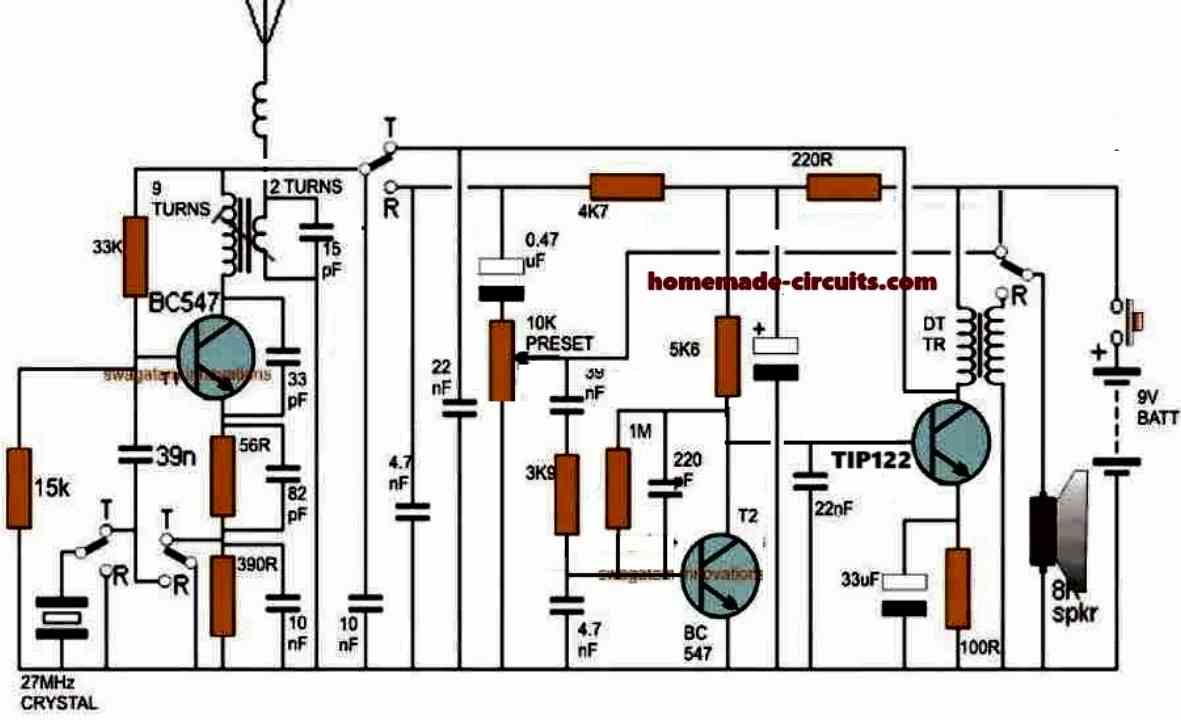
The figure shows a four stage transistorized circuit which behaves both like a transmitter and a receiver unit, making the design very economical and versatile.
An ordinary “4-pole double throw” switch serves the purpose well for transforming the unit either to a transmitter or a receiver while communicating with another identical transmitter/receiver set.
As can be seen in the diagram three transistors are directly coupled for making an audio amplifier stage set to operate at a significantly high gain.
The first transistor functions as a pre-amplifier which pulls the minute voice signals to some higher level and feeds to the next high gain Darlington stage which further amplifies the received audio frequencies and dumps it across the primary of a driver transformer.
How Driver Transformer Works
The driver transformer steps up the level of the signals such that it becomes clearly audible over the connected loudspeaker.
The speaker may be salvaged from an old small transistor radio or from a landline phone (earpice).
The speaker in the shown design is configured in an interesting manner. Depending upon the position of the walkie talkie switch, the speaker works like a sound reproducer when it’s in the receiver mode and like a super dynamic microphone when the switch is toggled in the transmitter mode.
While the speaker is being used as a sound reproducer or simply in the receiver mode, the first transistor acts like a signal receiver, picking up the audio across the 4k7 load resistor through the 0.47uF capacitor.
The signals then has to pass through a connected volume control stage to finally reach the three transistor amplifier stage discussed above.
However while the proposed walkie talkie circuit is flipped in the transmitter mode, the speaker gets rigged right at the input of the amplifier stage such that the spoken voice hits the speaker diaphragm and gets amplified by the same transistor stage.
This amplified voice signal is now applied in the form of supply voltage for the circuit in the transmitter mode. The switch also makes sure that the 27 MHz crystal gets connected with the first stage while the transistor gain is uplifted by eliminating the 390 ohm resistor and using a 59 ohm resistor at the emitter of the transistor.
In the transmitter mode the speaker transformer secondary now has no connection with the voltage step-up function rather simply acts like a series inductor for coupling the output of the audio amplifier with the supply rail and for sending the signal across the winding to the transmitter stage in the form of a fluctuating supply voltage.
As the above signal witnesses a rise and fall in response to the spoken voice, the gain of the first transistor stage is forced to change correspondingly which in turn results in a varying amplitude for the carrier waves transmitted by this stage over the attached antenna.
Thus the spoken voice now gets converted to an amplitude modulated (AM) RF 27MHz signal which may be picked by another identical unit placed in the vicinity for the same reason.
Parts List
All resistors are 1/4 watt 5% CFR
100 ohm - 1
220 ohm - 1
5.6K - 1
4.7K - 1
3.9K - 1
1M - 1
15K - 1
33K - 1
56 ohms - 1
390 ohms - 1
10 k preset - 1
Capacitors Electrolytic
33uF/25V
100uF/25V
Capacitors ceramic disc
0.47uF - 1
22nF -2
220pF- 1
4.7nF - 2
10nF - 2
82pF - 1
33pF - 1
15pF - 1
39nF - 1
Transistors
BC547 - 1
TIP122 - 1
Miscellaneous
Crystal 27MHz - 1
TPTT 3 pole triple throw switch - 1
Audio transformer - 1
small speaker 8 ohm 1 watt - 1
9V battery - 1
Inductor as I have explained below
How to Wind the Antenna Coil
The coil associated with T1 (BC547) collector is the antenna coil. It is constructed over a ready made variable inductor slug (see image below) having an approximate 3mm diameter and around 7 to 10mm height.
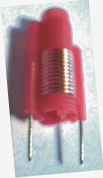
The wire used is a 0.3 to 0.5mm super enameled copper.
Start with the primary 9 turns first, directly on this wind the secondary 2 turns.
The coil in series with the antenna is s simple air core coil made by winding 5 turns of 0.3mm with 5mm diameter.
How to Wind the speaker coil
You may use a small audio transformer for the shown speaker transformer, or alternatively build it by winding around 70 turns for the primary (left side), and 500 turns at the secondary (speaker side).
The wire may be a 0.2mm super enameled copper wire wound over a 3 inch long iron screw.
How to Set up the Circuit
After you have built the above explained walkie talkie circuit it's time to check its response by powering it with a 9V PP3 battery.
Initially let the switch contacts be positioned for activating the transmitter stage.
For knowing whether the transmitter is generating the required 27MHz frequencies or not you will first need to make an RF sniffer circuit as explained HERE
Switch ON both the circuits, position the above RF detector circuit about 10 inches away from the walkie talkie antenna, and begin adjusting its variable inductor slug gently using an insulated screw driver which are typically used for adjusting FM radio GANG trimmers.
If every thing's done correctly you'll hopefully see the RF detector LED glowing brightly at some point of the adjustment process.
Seal and glue the variable inductor at this position, and you can assume your walkie talkie to be all set for having some great time with your friends.
However you would need to build another identical set for exchanging the conversations with the other guy, otherwise a single unit wouldn't have much of an importance.
What's the Range of this Walkie Talkie
The range of this 27 MHz walkie Talkie can be around 1 Km, provided the trimmers are correctly adjusted and the antenna is long enough for the wide radial transmission.


Comments
Thank you for sharing your work! I’m planning to build this for a school project, and I was wondering if you’ve personally built and tested this circuit—did it work well for you?
I previously tried making a similar walkie-talkie circuit from a YouTube tutorial, but the audio quality was really poor—I could only hear high-frequency noise and couldn’t understand any speech. So I just wanted to check your experience before I start.
Hi, sorry, no I haven’t tested this practically, however I can assure you that if you build it correctly and stage-wise then this circuit will definitely work.
You can start with the only left side transistor FM circuit and check separately if it sends the signals correctly to a nearby FM radio, once this is confirmed, then you can assume the circuit to be perfectly fine and then you can proceed with the whole setup further…If you have any issues, let me know, I will try to solve it for you…
I am not able to find TPTT 3 pole triple throw switch in market can i use different switch . when i searched for this ,a big switch is being shown
Please Google with the following phrase: 3-pole triple throw toggle switch
The toggle switch with 9 pins is the one you can try…
These switches are not big…
Hello
why does the rf transformer have only two terminals even though circuit shoes 4?
Hi, the image shows an example of the RF coil with an adjustable slug which you can use and modify it with the winding details as given in the article.
im unable to find the slug on any virtual platform as well as electronics shop sir, any advice?
Then you can ignore the slug type inductor and use a fixed inductor and for tuning the frequency you can use a trimmer capacitor for the 15pF capacitor
Hello I try to do same circuit but for 9 turn to 2 turn thing will be variable transformer or variable inductor I couldn’t understand or did you just use the plastic piece to connect the primary and secondary wiring? Because when I look internet about it variable inductor just have 2 pins.
On the plastic former, wind the 9 turns first, then wind the 2 turns over the 9 turns.
To enable firm fixing on the PCB, you can solder the two pins of the plastic former. These two pins can be connected to the 9 turn winding wires.
Then what about 2 turn wire because on diagram you use 4 pins instead of 2 pin
Or basically I just gonna do normal transformer with 9 turn primer and 2 turn seconder wiring.
I am sorry if I don’t get it
The two leads of the plastic former is only to provide a firm support to the transformer by soldering the two leads on PCB. So that it allows a comfortable adjustment of the slug. You can keep these two leads blank without any wire connections. Solder the two leads on a blank pads of the PCB. Now you can solder the 9 turn, 2 turns separately on the relevant points of the circuit.
How to make the variable transformer, I’m having trouble understanding on how to make it with the variable inductor coil slug
You can purchase it online:
https://www.google.com/search?q=buy%20variable%20coil%20slug%20screw%20type&tbm=isch&tbs=rimg:CQ15bFxpX3nPYagcvGgxWOFDsgIQCgIIABAAKAE6BAgBEAFAAcACAA&hl=en&sa=X&ved=0CBsQuIIBahcKEwi4gqXOzLr9AhUAAAAAHQAAAAAQCA&biw=1583&bih=757
Just let know I found the Audio Transformer it is 1K x 8 ohm.
Hard to find to day. Today I can find 1.3K x 8ohm.
The biggest limit to range is the antenna.
The walkie talkie used about 36″ or 1 meter. I did find on high smog from 6 to 7 also also limit the range. After 9 pm and no smog day with give best range and using a longer antenna gave max range.
Dave
Thanks for the update! Glad you found the important parts. Hope you are able to assemble them correctly and get the intended results.
Check on parts on hand.
The equivalent for the Transistors BC547 and BC338 is a 2N2222. Do you know if 2N2222 will work for both BC547 and BC338?
Are there any photos of past on builds of the walkie talkie?
Thank you
Yes 2N2222 will work.
I don’t have any photos but the above circuit is a tested one.
Do you now hhe power out put?
The power output is around 80 mW
A 3P2P Switch can be use
If look schematic on left hand side the crystal do not need to be switched to ground this happens when switch to receiver side. https://www.jameco.com/z/01-690DB-RH-Jameco-Valuepro-3PDT-Pushbutton-Foot-Switch-ON-ON_2181415.html
Can be found on other sites like Amazon and other electronic suppliers
I had this walky talky new back it great.
The down side was the Antenna was to short. If used a 34 feet of wire you could transmit around 5 miles and receive over 15 miles.
If you in mountains use [b]Channel 4 it used by 4×4 clubs. 27.005Mhz or just 27[/b]
It hard to find today any listening to emergency channel 9. I did for 20 years and did here anyone except for someone using the wrong channel.
I would use a voltage regular for 9 volts.
The 9 volt battery did not last long and receiver need adjustment.
Today I planned to 12 volts and a regular to 9 volts
Hope this helps
Dave
I don’t think a 3P2P switch would work, since all the T and the R sides of the switches need to be switched simultaneously. A 4 pole 4 throw switch will be required for this.
It moving the the resistor R390 and Capacitor 10nf.
Then switch is moved bottom of crystal group. The receiver side is switched to ground.
According the switch symbols in the diagram, the R indicates that the switch needs to switched towards R otherwise the circuit will not not operate in the receiver mode.
After drawing a schematic out it did work SORRY.
I am using DPDT Relay. I found the push button switch. It is a large and costly switch.
I am hand wiring both Audio transformer and Inductor coil buying off shelf was too costly.
I have all parts for antenna coil and antenna.
I did not find the 330R on the the schematic I think it is the 390R?
{connected to the first stage and the gain of the transistor is increased by removing the 330R and only using a 56R }
Hand winding might not work, you must buy the transformer ready made
Where is best place to but the audio transformer?
I did not find the 330R on the the schematic I think it is the 390R?
Thank you
You will have to search for the audio transformer online.
There’s no 330R in the schematic or the article…there’s only 390R or 390 Ohms
Thank you
This is what I found on internet on the
Audio transformer.
{How to Wind the speaker coil
You may use a small audio transformer for the shown speaker transformer, or alternatively build it by winding around 70 turns for the primary (left side), and 500 turns at the secondary (speaker side).}
This walky talky was manufactured in the 1960’s sold by Wards
I have found all other parts on internet and push button by using a low cost relay.
I think before trying this complicated part, you can first build the crystal controlled transmitter section and check whether you can build it successfully or not. Once the transmitter section is confirmed then you can experiment with the audio transformer.
I do agree with you.
But this walky talky uses the audio transformer as part of transmitter as choke.
I was even think using just choke for just the transmitter witch make it simpler.
Yes, you can try a simple choke and see how it works.
I’m new in this, I have difficulty in understanding the three circle and a black line in connecting Crystal,transformer,etc. I can see four times in the schematic, I cannot understand the connection,please help me understand how to connect it, your help will be very much appreciated.
Those are switch symbols, which indicates that all those 4 switches must be operated together, so that all the “T” positions are selected together, or all the “R” positions are selected together while the switch is operated. It can be something like this:
https://www.homemade-circuits.com/wp-content/uploads/2022/09/4-pole-4-throw-switch.jpg
I assure you will surely achieve your goal in life for being so kind to me, thanks a million.
You are most welcome!!
I need a drone jammer circuit diagram for (2.4-2.5) GHz range 10km and mobile jammer circuit diagram for 1800 MHz and 2100MHz.
Please Help me……….
sorry I don’t have this circuit at this moment…
Some images are missing from this article making it almost impossible to understand. Please reupload the images if you can. Thanks!
I have compressed the image and uploaded it again, please check it now…
Sir, can you tell the value of the inductance then it would be very easy to make the inductor.
Swagata, sorry I do not have the inductance value at this moment, however, if the the indicated number of turns and dimension are implemented correctly it will produce the correct required inductance
ok thank you sir
dear swagatam can i use three 3v button cells to get the 9v required for the circuit . i’m making this circuit to put into a star trek original series communicator and this communicator only has 2 tripple a compartment holder built into it . plus can i also use a bought inductor coil for t1 .or is that what the inductor slug is for. plus can i use aluminum foil to wrap around that said communicators antenna grid, or is aluminum foil a bad metal to use, for an antenna. the antenna grid with that communicator i bought is made of plastic.thanks for any help. cordially, Byronc3.
Dear Byron, yes you can use 3 buttons in series to get 9V for the circuit. However the antenna coil must be wound exactly with the same dimension as given in the text. The slug with a iron screw is recommended since the iron screw can be used for tuning the coil precisely. Aluminum foil is actually not necessary anywhere for this design.
hey sir what simulation software did you use?
You can use a simple 4ohm 0.5watts speaker for this.
I am sorry Sarath, I don not sell parts, but it may be possible through other online stores. Another good idea would be to purchase a wireless electronic bell and then modify it into a walkie talkie.
Hi Swag, is there any way we can order this complete parts kit.
Thanks for reply…..
And please make it soon and give me a idea plzz.