• Skip to main content
  • Skip to primary sidebar

Homemade Circuit Projects

Need circuit help? Post them in the comments! I've answered over 50,000!

Blog | Categories | About | Contact | Calculators-online
You are here: Home / Arduino Projects / Arduino Random RGB Light Generator Circuit

DIY Circuits | Learn Basics | Arduino Coding

Arduino Random RGB Light Generator Circuit

Last Updated on December 5, 2024 by Swagatam 1 Comment

The  article discusses a simple,Arduino red, green, blue LED light effect generator circuit in a random pattern.

In one of the earlier posts we came across a similar RGB LED effect generator circuit using Arduino which was programmed to produce the effect in a flowing sequential manner, whereas here the set up can be expected to generate randomly changing RGB LED effect.

Hardware Required

What you will need for making this system:

1) An Arduino Board

2) A RGB LED

3) A 220 Ohm 1/4 watt resistor

4) A 9V AC to DC adapter Unit

Once you have acquired the above units, it's just about programming the Arduino IC with the following sample code, and subsequently integrating the LED, resistor and the power supply with the Arduino board as shown below:
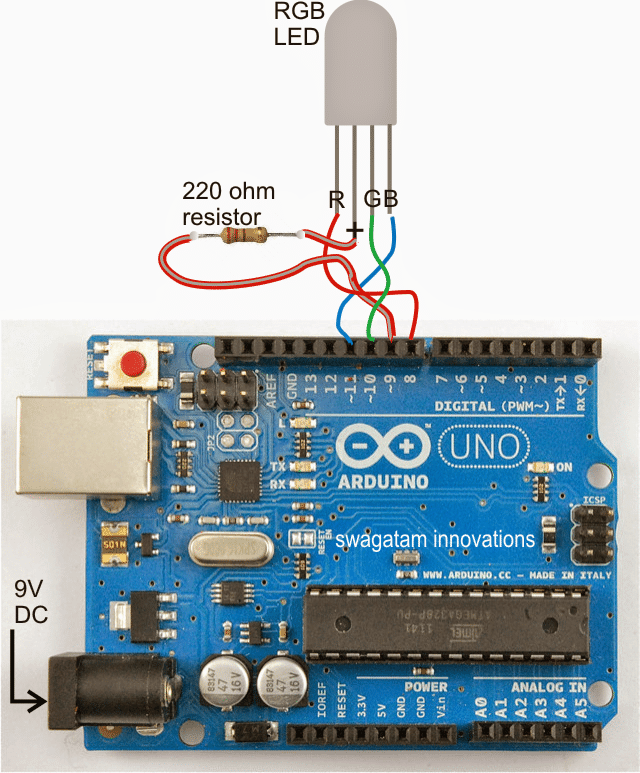
Arduino Random RGB Light Generator Circuit

How to Wire Arduino with LED

The set up appears to be exactly similar to our previous RGB Arduino project, yes it is so, except the program which has been now changed for generating a random RGB LED light effect rather than the earlier sequentially flowing RGB color effect.

The LED used here is a 5mm 30 mA RGB LED, which is supposed to produce pretty high illumination, however for operating more nummer of LEDs from the same set up you may have to use transistor drivers across the pin#8, 10, 11, which may allow you you to add many RGB LEDs in parallel with the proposed random color effect.

The Code

The sample code for the above explained Arduino RGB color generator circuit is furnished below:

*
RGB LED random
color
Displays a
sequence of random colors on an RGB LED
by Jeremy
Fonte
Copyright (c)
2012 Jeremy Fonte. All rights reserved.
This code is
released under the MIT license:
https://opensource.org/licenses/MIT
*/
//one variable for each of red, green, and blue
int r = 0;
int g = 0;
int b = 0;
// the setup routine runs once when you press reset:
void setup() {
// initialize
the four digital pins as outputs.
pinMode(8,
OUTPUT);
pinMode(9,
OUTPUT);
pinMode(10,
OUTPUT);
pinMode(11,
OUTPUT);
digitalWrite(9, HIGH);
}
// the loop routine runs over and over again forever:
void loop() {
r = random(0,
255);
g = random(0,
255);
b = random(0,
255);
analogWrite(8,
r);
analogWrite(10, g);
analogWrite(11, b);
delay(1000);
}

You'll also like:

  • W 2“WELCOME” LED Display Circuit
  • push button dimmer circuit project compressedPush-Button Light Dimmer Circuit
  • Sunrise Sunset Simulator LED Circuit
  • Sound Activated LED Lamp Circuit

Filed Under: Arduino Projects, Lamps and Lights Tagged With: Arduino, Generator, Light, Random, RGB

About Swagatam

I am an electronics engineer and doing practical hands-on work from more than 15 years now. Building real circuits, testing them and also making PCB layouts by myself. I really love doing all these things like inventing something new, designing electronics and also helping other people like hobby guys who want to make their own cool circuits at home.

And that is the main reason why I started this website homemade-circuits.com, to share different types of circuit ideas..

If you are having any kind of doubt or question related to circuits then just write down your question in the comment box below, I am like always checking, so I guarantee I will reply you for sure!

Previous Post: « Making an Automatic Stopwatch for Runners, Athletes and Sportpersons
Next Post: Flashing Red, Green Railway Signal Lamp Circuit »

Reader Interactions

Comments

Dawit says:
April 7, 2018 at 9:07 pm

really helpful!

Reply

Need Help? Please Leave a Comment! We value your input—Kindly keep it relevant to the above topic! Cancel reply

Your email address will not be published. Required fields are marked *

Primary Sidebar

circuit simulator image

Subscribe to get New Circuits in your Email

Categories

  • Arduino Projects (95)
  • Audio and Amplifier Projects (133)
  • Automation Projects (18)
  • Automobile Electronics (103)
  • Battery Charger Circuits (87)
  • Datasheets and Components (109)
  • Electronics Theory (149)
  • Energy from Magnets (27)
  • Games and Sports Projects (11)
  • Grid and 3-Phase (20)
  • Health related Projects (27)
  • Home Electrical Circuits (13)
  • Indicator Circuits (16)
  • Inverter Circuits (95)
  • Lamps and Lights (159)
  • Meters and Testers (71)
  • Mini Projects (28)
  • Motor Controller (68)
  • Oscillator Circuits (28)
  • Pets and Pests (15)
  • Power Supply Circuits (91)
  • Remote Control Circuits (50)
  • Renewable Energy (12)
  • Security and Alarm (64)
  • Sensors and Detectors (106)
  • SMPS and Converters (34)
  • Solar Controller Circuits (60)
  • Temperature Controllers (43)
  • Timer and Delay Relay (49)
  • Voltage Control and Protection (42)
  • Water Controller (37)
  • Wireless Circuits (31)

Other Links

  • Privacy Policy
  • Cookie Policy
  • Disclaimer
  • Copyright
  • Videos
  • Sitemap

People also Search

555 Circuits | 741 Circuits | LM324 Circuits | LM338 Circuits | 4017 Circuits | Ultrasonic Projects | SMPS Projects | Christmas Projects | MOSFETs | Radio Circuits | Laser Circuits | PIR Projects |

Social Profiles

  • Twitter
  • YouTube
  • Instagram
  • Pinterest
  • My Facebook-Page
  • Stack Exchange
  • Linkedin

Recent Comments

  • Swagatam on HX710B Air Pressure Sensor Datasheet, How to Connect
  • Swagatam on Boost Converter Calculator (Non-Isolated)
  • Swagatam on How to Make Dog Barking Preventer Circuit using High Frequency Deterrence
  • NgPark on Boost Converter Calculator (Non-Isolated)
  • Yogesh on How to Make Dog Barking Preventer Circuit using High Frequency Deterrence

© 2026 · Swagatam Innovations