The post presents a simple transformerless 1.5V DC power supply circuit which can be used for powering wall clocks directly from mains, and also keep a stand by back-up cell fully charged for enabling an uninterrupted operation of the clock even during mains failures. The idea was requested by Cheekin
Warning: This circuit is not isolated from mains AC and therefore is extremely dangerous to touch in powered condition, users are advised to apply extreme caution while handling it or testing in an uncovered position.
The Design
The figure shows a simple 1.5V transformerless power supply circuit for wall clocks that would never allow the clock to stop due to a depleted battery as it would keep running from the mains and also be reinforced with a battery power to ensure that the clock does not stop even during a mains failure.
The below shown design is a simple transformerless power supply using a 0.33uF capacitor as the input current limiter component in order to restrict the mains current to a modest 16mA.
Circuit Diagram
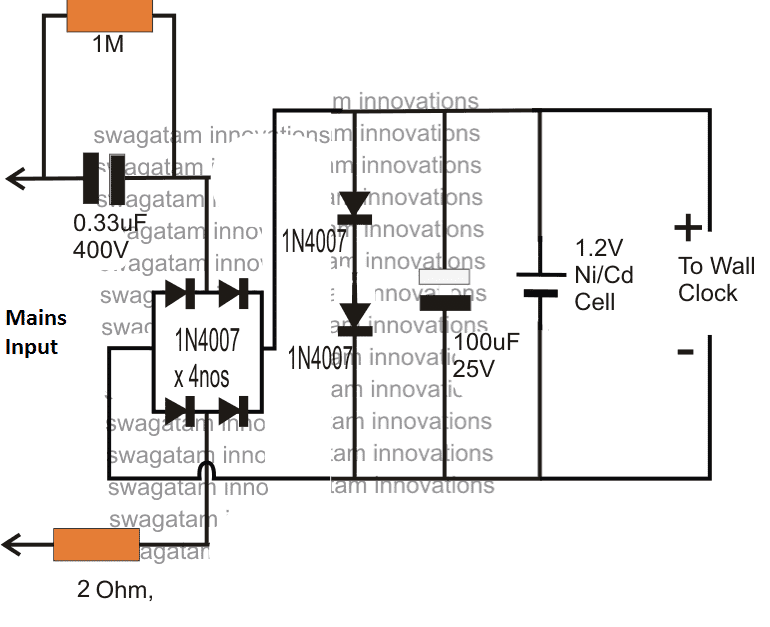
Hopefully this current will keep the clock ticking satisfactorily and also keep the attached Ni/Cd cell trickle charged and ready for an emergency back up.
If the 0.33uF does not provide adequate current for the operations, you can increase it to a higher value which just satisfies the application needs.
The indicated 1.5V transformeless power supply for a wall clock is able to develop the required 1.5V DC at the output with the aid of the two forward biased 1N4007 rectifier diodes across the (+), (-) terminals of the supply, which effectively shunts the massive 330V mains (@ 20mA) to a nominal 1.5V DC.
The inclusion of the two shunting diodes also ensures an entirely surge free supply for the clock and the charging cell, and therefore the design is relieved from other conventional forms of surge protection devices.
How it Works
Briefly the 1.5V transformerless supply circuit for clocks can be explained as follows
The mains input current is dropped to a lower 20mA by the 0.33uF/400V capacitor.
The bridge rectifier converts the above low current input to a low current DC variant, which is further acted upon by the two 1N4007 diodes which shunts the DC to a fixed 1.5V approximately.
This 1.5V / 20 mA DC is finally used for operating the desired wall clock, and also for charging a connected 1.2V Ni/Cd cell which reverts its DC each time mains fails, ensuring a failproof uninterrupted supply for the clock so that the unit never stops due to any adverse reasons.



Comments
Hi Swagatam
how can I get pcb for 1.2 volt ni-cd battery for wall clock
Hi Haider, Sorry, It is not available readymade, you will have to contact a professional PCB designer for getting the PCB ready for you.
Hello Again Swagatam,
I hope you are doing well.
I just tried the final 1.2v circuit you sent earlier, and it doesn’t work as expected. The LED is lit okay, but the battery doesn’t charge, and the output is pretty high.
AC input is 220v – 230v
The voltage for the battery is 1.3v DC.
The voltage for the output is 2.3v DC.
Which is entirely wrong! It should be 1.5V or 1.6V for the battery and 1.2V for the output load.
Here is the final circuit I just made:
final-circuit-not-working-as-expected
Thank you Waleed,
You are saying the following circuit is wrong:
https://www.homemade-circuits.com/wp-content/uploads/2024/12/AC-220V-1.2V-charger-with-LED-indicator-circuit.jpg
I am sure you have understood the technical aspects of the design, so I am interested to know how the output to the load can be 2.3V?
And how the voltage to the battery can be 1.3V?
Let me explain you how it works, for your understanding.
You can see the bottom 3 diodes in series, together they clamp the output voltage to 0.6 * 3 = 1.8V. The series diode near the switch deducts 0.6V again, making the output voltage to the load 1.8 – 0.6 = 1.2 V.
Since the battery is connected before the above diode, it gets the full 1.8V, which is OK, because the 10 ohm diode limits the current to the battery and restricts it to the required safe limit.
By the way how did you measure the voltages?
You must measure the voltage without the actual load and the battery, in the following manner:
Replace the battery with a 1k resistor and replace the load also with a 1k resistor, and now measure the respective voltages across these 1k resistors.
There may be some differences in the above explained voltage levels… because the 1N4148 may not drop the exact 0.6V across them.
The link you provided is not opening in my computer, please upload it some other image hosting site, I will check it out.
Hi Swagatam,
Thanks for the quick reply.
First, I tested without connecting the SPDT button to check the output voltage.
As you said, I double-checked and tested before connecting the battery without a load connection.
The battery’s voltage is 1.3v, and the load is 2.3v even after connecting the battery, but not the load.
Here are the hosted images:
Final Circuit:
https://drive.google.com/file/d/1eIlkEUWOSQXNEuIo21mf5t8uhH1Y6XFM/view?usp=sharing
With the battery:
https://drive.google.com/file/d/16T3Umn0FN_hwy6FYKnp4xQ36yYKGNJUH/view?usp=sharing
Without the battery:
https://drive.google.com/file/d/1TnkBNK2xR1_4je-6FDbARO2wUjuMuk0P/view?usp=sharing
Please check if I connected something wrong.
I appreciate any help you can provide.
Hi Waleed,
You circuit connections are correct.
Now please replace the battery points with a 1k resistor and check the voltage across this resistor and let me know.
Remember, the output voltage will ultimately depend on the individual diode’s forward voltage drop specifications, which is beyond our control.
Hi Swagatam,
I have connected 1k resistor and the voltage between it is only 1v DC but when turn the motor on the voltage drop to 0.9v or less.
I also tried to remove the led and the same output still occur 😔
Thank you Waleed,
As I said earlier, the final voltage will depend on the diode forward drop specifications. 1V instead of 1.2V is OK, because it is just 0.2V less, it is impossible to get exact 1.2V using diodes only.
If your trimmer working without issues then it is fine. The 0.9V drop also looks fine to me.
If the trimmer is not working good, then you can try increasing the input capacitor value to 1.5uF/400V, or add a 474/400V (0.47uF/400V) cap to the existing 1uF/400V.
Hi,
Maybe calculations are a thing, and real-life testing is another thing.
I said the battery’s charging voltage now is 1v or less not for the load, and you said it takes 8 hours to charge!! I know it takes that long, well, but the charging voltage should be at least 1.5v, so now the battery does not trigger the charge action.
Get my point?
I know the charging voltage must be 1.5V, that’s why i have tapped the voltage after series 3 diodes. Each diode drops 0.6 to 0.7V, so adding them gets over 1.5V.
You must first check whether the 3 series diodes are generating the voltage above 1.5V or not.
Did you check by connecting a 1k first?
Yes, I checked before and after connecting the 1k resistor, and it generates from 1v – 700mv – 400mv. Can you please re-check the required components and the connection once again? Is it possible to apply it yourself? I know you don’t have enough time.
I have explained you the function of the diodes, so please check the voltage across the 3 series diodes, and then across each of those 3 diodes. Do this with the 1k connected and without any battery or motor connected.
This will tell you why your circuit is generating 1V only.
By the way the voltage should not fluctuate between 1V, 0.7V. 0.4 V, otherwise it means something’s not right with your components.
The circuit diagram is correct.
I completed the circuit by connecting the 1.2v battery and the DC motor, but the battery was still not charging, and the motor stopped after the battery died. Ok, I’ll connect the 1k resistor and tell you the voltage.
Here is another image of the completed circuit:
https://drive.google.com/file/d/1GU3YsGjSm7ufsTMRqYtDY9eggwhAbWy4/view?usp=sharing
The battery will take 7 to 10 hours to charge and during this time the motor should not be used with the battery.
If you use a push button rated at around 1 amp or higher, then the push button will be also safe.
Hello Waleed,
The capacitor is the one and the only way to increase the current, there’s no other way to increase the current.
The bridge rectifier is merely allowing the both the phases to reach the load, which was being inhibited by using a single diode.
The LED is always safe due to the presence of the 5 series clamping diodes. 5 * 0.6 = 3V fixed across the LED. The LED will burn if the diodes happen to have a forward drop of 0.7V or higher, in that case 0,7 * 5 = 3.5V which also looks ok, although risky.
You can add 1k for extra safety to the LED.
Also, if I doubled the current, it’s better to use the SPDT button to run the motor on both the battery and direct AC. Right?
Hello Swagatam,
Thanks for your interest.
I told you there should be some way to increase the current instead of expanding the capacitor.
Anyway, I’ll try the recent circuit and tell you the results.
I am using a 1.5uf cap, so if the current doubles, will that affect the LED?
I tried increasing the current as you described before, but the high current burned 3 LEDs.
Shall I add a 1k resistor to the LED to protect it from high current?
Waleed, I just forgot to tell you that the current to the load can be doubled simply by using a bridge rectified instead of a single diode at the input. here’s the full diagram with the push button attached:
https://www.homemade-circuits.com/wp-content/uploads/2025/01/220V-to-1.6V-converter-circuit.jpg
Try this and check if the motor operates correctly or not.
Hello Waleed,
The capacitor controls the input current, so a transistor can do nothing. The transistor will supply only what the capacitor provides.
Push to ON and OFF function can be implemented with an extra complex circuit, which is not recommended according to me.
One terminal of the push button will connect with the battery positive.
The other terminal of the push button will connect with the motor positive.
The negative of the motor will connect with the battery negative.
That’s all.
You don’t need the output side single diode and the the SPDT switch connections, so you can remove them all.
Let me know if you understood the connections or not.
Okay, according to you, I’ll stick with your previous instructions.
But can you please show me how to connect the push button to the current circuit in a simple diagram or handwritten image?
I already connected one but canceled the final output diode, so I got the positive line right after the 10R resistor and the negative from the battery. Is that okay?
Hello Swagatam,
Okay, but I think there are many ways to increase the ampere instead of just increasing the capacitor value, such as adding an amplifier transistor.
Regarding the push button, I already replaced it and connected the two wires with the positive and negative of the output, but it only runs when I keep pushing it; if I release my hand, the motor stops.
I need a single click to run and another to stop it. Is that possible, and if not, why?
Sorry for those annoying questions 🙂
Thank you Waleed,
It seems your motor requires more than 500 mA for operating optimally.
You can confirm the actual rating of the load by adding an ammeter in series with the battery supply and the load.
For using a push button, remove the SPDT switch and the extra single diode at the output.
After this just wire the push button terminals in series with the positive of the battery and the load positive.
The other wire of the load will connect with the negative of the battery.
Hello Swagatam,
How are you?
It seems I need a capacitor as large as an apple 🙂
Well, I tried adding a 3.3uf cap to run the motor on AC 220v, but it’s not running. I’ve tried increasing it by connecting 2 caps together to get 6.6uf, and it’s barely running.
Finally, I tried to add 2 caps, 4.7uf / each, which gave me 9.4uf, but the motor ran very slowly.
So, I think it’s better to stick only with the battery as the main source of power.
Finally, is there a way to run the motor with a push button instead of the SPDT one?
Hello Waleed,
If 1uF generates around 60mA, then you may require around 350/60 = 6uF/400V capacitor for generating 350mA current.
Electrolytic will not work and will burst after sometime.
3.3 * 60 = 200mA, which might be not sufficient for your load.
Make sure the series resistor with the battery is appropriately calculated using Ohms law
R = V/I = 1.2V/0.07mA
Hello Swagatam,
How are you?
I replaced the 1uf polyester cap with a slightly higher one (1.5uf 400v) with the same settings, but the motor still did not work on the mains.
As I told you before, the motor current is 350 mA.
You recommended that I use a 4uf 400v cap. I searched for it on my staff and could not find it.
Is it okay to use 4.7uf 400v (Electrolytic cap) instead of polyester?
What is the difference?
Also, I have 8.2uf 400v (Electrolytic cap). If I used it, are there any components I could change?
If electrolytic caps do not work, what will the current be if I use 3.3uf 400v polyester (which is available in my area)?
Thank you.
Thank you Waleed,
Please check your motor current specifications. The 1uF/400V can supply a maximum of 60 mA only, which might not be sufficient for the motor.
You may have to increase the input capacitor value according to the motor’s Amp specifications, and also upgrade the battery series resistor accordingly.
Hello Swagatam,
How are you today? Sorry if it bothers you.
Well, I tried your instructions and swapped the lines. The motor is positive in the center between the battery and mains.
But it still works only on battery 🙁
I measured the voltage when the first line (circuit positive end line with the diode) and the voltage was 1.3v without the motor connected, but when I ran the motor, the voltage disappeared, and the red LED dimmed.
What do you think? Shall I remove the diode, or what?
Also, how would the connections be if I wanted to connect only 2 pins SPDT?
Sorry for asking too many questions.
Hello Waleed,
You can see in the previous schematic, the center pin of the switch goes to the load. So please swap the two RED wires and make sure the center pin of the switch connects with the load (motor).
Hello Swagatam,
Okay, there is no problem with the charging time. But I can’t seem to get the second part of your reply?!!!
Currently, I can run the load only on the battery, even if the AC mains is connected.
Please check the attached image to see if I connected it the wrong way!!!
As you can see, I connected:
The yellow line comes from the last diode to the first pin of spdt.
Connected the battery-positive red line to the spdt center pin.
Connected the 3rd spdt pin to motor positive.
Connected the battery negative black line to the motor negative.
I can only run the motor with this connection if the center and 3rd pins are met.
https://www.homemade-circuits.com/wp-content/uploads/2025/01/1000024462-1735920086.8022-scaled-1.jpg
Ni-Cd cells have similar characteristics like lead acid batteries, and might take minimum 10 to 15 hours to charge fully with a recommended safe charging current that is around 10% of its mAh rating.
If you increase the current, it will charge the cell faster, but it may have its own disadvantages and cause reduced life span of the cell.
With 2 pin switch you an only toggle the power ON/OFF, you cannot select between load through battery power or load through AC mains.
Sure, but the charging is very slow!!! Is that okay? And how long does it need to reach 1.4v or more with these settings?
Also, is there a way to replace the 3-pin SPDT button with the 2-pin one?
Sure, no problem, let me know if you have any further issues with the circuit.
Okay, I’ll keep the current settings as is and check for other battery cells. Thank you so much.
Thank you Waleed, I am good!
Please remember that the voltage for the battery charging must be checked “without a battery connected”. And when the battery is connected, this voltage must drop to the discharged level of the battery.
So if your 1.6V is dropping to 1.4V, that’s correct, and the drop is indicating that the battery is consuming the current and charging.
As the battery charges up, this level will slowly increase across the battery terminals until 1.6V is reached.
1.7V after connecting the battery is NOT great for charging, it is bad, and this might damage your battery slowly.
The initial 1.6V without battery connected is the correct setting, which should be good for the battery.
So you can keep the LED connected.
Hello again Swagatam,
How are you? I hope everything is okay.
I played a bit with the circuit and finally got it to work as needed.
I removed one diode from the two right after the LED, and the voltage increased from 1.1v to 1.6v as needed. When I connected the battery, the voltage decreased to 1.4v, which is slightly enough to trigger the charging.
What do you think?
Before removing the diode, I removed the LED, and the voltage increased to 2v. When I connected the battery, the voltage decreased to 1.7v, which is great for charging.
But I need the LED. Is there a way to increase the voltage to 2V without removing the LED? Should I remove the second diode?
I removed the one with the red X. Shall I remove the other one from the red circle?
Please check the attached image.
https://www.homemade-circuits.com/wp-content/uploads/2025/01/11ss2nxx-1735887945.0858.jpg
Hi Waleed,
1/4 watt resistor should also work. Check if it is heating up or not (after switching off power), if not then it is fine.
If the push button is momentary type, then it will not work, it should be a 2-way toggle switch.
Hi again,
regarding the final circuit you sent. I noticed that there is a 10R 1w resistor. I only have it on 1/4w. is it okay or should it have to be 1w.
also for the spdt button, I want to replace it with push button 4 legs is it okay?
You are welcome Waleed, all the best to you!
Thank you so much, Swagatam. I’ll create and test the circuit you recommended and tell you the results (If I am still alive) 😁
That’s right!
Hi Waleed, in the new diagram the diode configuration is different. Yes, it allows 1.6V for the battery charging and restricts the output to 1.2V for the motor operation.
okay, I noticed the extra diode before the spdt switch. does it keep 1.5v for battery charging and let the output for the motor is 1.2v? right?
Hi Swagatam,
I’m sorry but the last image you sent is the same as the previous one = the output still 1.2v and no difference 🤔
Yes, you are right, in that case please try the following design.
https://www.homemade-circuits.com/wp-content/uploads/2024/12/AC-220V-1.2V-charger-with-LED-indicator-circuit.jpg
After 10 replies the comment thread closes automatically, that is why we cannot reply after 10 comment replies are over…
Hi Swagatam,
I’m sorry I cannot reply to your last message (I don’t know why).
Anyway, I got the final image of the circuit with the LED indicator.
But I noticed that the output is only 1.2v (it’s great for the motor).
It won’t be enough to charge the battery. It needs at least 1.5v or a bit higher. Right? Or do I understand it wrong?
Hi Swagatam,
Well, I only need to know that the AC 220v main is on, so when the AC is plugged in, the LED turns on, and vice versa.
I know that charging complete and cutoff options are complicated; I only need to know that the AC main is plugged in.
Hi Waleed,
You can try the following circuit: The LED does not require a resistor since the voltage is regulated at 3V for the LED…
https://www.homemade-circuits.com/wp-content/uploads/2024/12/AC-220V-1.2V-charger-with-LED-indicator.jpg
Hi Waleed,
Can you please tell me what exactly should the LED indicate in the circuit? I will try to solve it for you…