
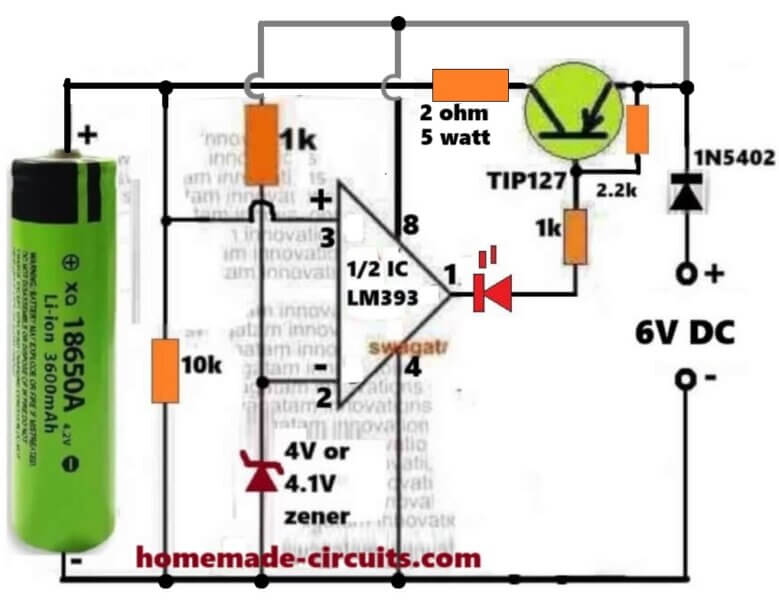
In this article we study a simple 3.7V li-ion battery charger circuit with auto-cut off, which can be charged from your computer USB port or any other 5 V regulated source.
Simplest 3.7V Li-ion Battery Charger with Auto Cut-off using LM393 IC
If you do not wish to read the following long explanation, you can just watch the same in this video:

How it Works
Here we see that this small circuit is made for charging one 3.7V Li-Ion cell like 18650 type, and we also see that it automatically stops the charging when the cell voltage becomes full around 4.1V or 4.2V.
So we can say that this is an automatic over charge protector using one half section of LM393 and one PNP transistor TIP127 which is working like a main current switch.
How The Whole Circuit Works Step By Step
Power Source And Battery Connection
We start by giving 6V DC supply to the circuit which acts like the charging input. The 3.7V battery is connected on the left side, so that the current flows from 6V supply through the TIP127 transistor to the battery for charging purpose.
Voltage Divider For Sensing Battery Level
The pin#3 of the LM393 is connected directly to the battery positive so it can sense the battery volatge level directly. So this way pin3 can sense the present battery level.
Reference Voltage From Zener Diode
We have one 4V or 4.1V zener diode connected to the inverting input pin2 of LM393. That zener is giving a fixed reference voltage which stays constant even if the battery voltage changes. So we can say that pin2 is having fixed 4.1V reference while pin3 is showing actual battery sample voltage.
Comparator Working Principle
Now we understand that LM393 is acting like one comparator, so it is comparing the voltages present at pin3 and pin2.
Case 1: Battery Voltage Is Low Or Discharged (below 4V or 4.1V)
So now that battery voltage is less than 4.1V, so voltage at pin3 is lower than voltage at pin2. Then the LM393 output transistor from inside becomes ON and it pulls pin1 to ground.
Because of this, pin1 becomes low and that low goes to the base of TIP127 through one 1k resistor. Since TIP127 is a PNP transistor, so its base getting low will make it conduct hard, so the current now starts flowing from emitter to collector and reaches the battery and the battery begins to get charged.
The LED also turns ON in this time because its cathode at pin1 goes to ground.
So we can now say in this condition:
LM393 output = LOW (Ground).
TIP127 = ON.
LED = ON.
Battery = Charging.
Case 2: Battery Voltage Is Full (4.1V Or 4.2V)
Now after sometime the battery gets almost charged, so that the voltage at pin3 becomes slightly higher than pin2. Then in this situation the internal transistor of LM393 turns OFF and its pin1 becomes open collector, that means pin#1 is now floating, without any logic level (open).
Now since pin1 is open, it cannot pull low anymore, so in this situation the 2.2k resistor now becomes active. That 2.2k resistor is connected from +6V to TIP127 base node so it pulls the base of TIP127 towards positive potential.
So when the base is pulled high and becomes near the emitter voltage, forces the TIP127 hard to stop conducting completely. So current cannot flow anymore from emitter to collector. The battery is disconnected from the charger. The LED also turns OFF because now there is no current path to ground through pin1.
So we can say now:
LM393 output = OPEN.
TIP127 = OFF.
LED = OFF.
Battery = Cut Off.
Role Of The 2.2k Resistor
Now we explain that 2.2k resistor which is very important here. It is actually working like a pull-up resistor, so that resistor is keeping the TIP127 base in one correct position depending on the output of LM393.
So when LM393 output is low, then that resistor becomes inactive because LM393 is grounding the base through the 1k resistor. So charging goes ON.
But when LM393 output is open then that 2.2k resistor pulls the TIP127 base high towards the emitter potential. So the transistor gets turned OFF strongly and it cannot conduct any leakage current. So this resistor ensures that the base never floats and the transistor never stays in half ON condition.
If that resistor is not there then the base of TIP127 may stay floating after LM393 goes open and this may allow some small leakage current to flow continuously, and the battery may keep trickle charging which is unsafe for Li-ion cell. So this 2.2k resistor saves the battery from such leakage problem.
Step By Step Summary Table
| Battery Condition | Pin3 Vs Pin2 | LM393 Output | Role Of 2.2k | TIP127 | LED | Battery |
|---|---|---|---|---|---|---|
| Low Or Discharged | Pin3 < Pin2 | Pin1 = Ground | Inactive | ON | ON | Charging |
| Fully Charged | Pin3 > Pin2 | Pin1 = Open | Active | OFF | OFF | Cut Off |
Main Points To Remember
So we now understand that LM393 works as one precise voltage comparator. The 4.1V zener sets the final cut-off limit. TIP127 handles the charging current. The LED gives visual indication of the charging status. The 2.2k resistor ensures proper base pull-up. And the diode 1N5402 stops the reverse current flow from battery to the circuit whenever the charger is unplugged.
Summary Of The Operation
We can now say everything in one line like this:
When the battery is below 4.1V then the LM393 output becomes low, then the TIP127 conducts, then the battery charges and LED glows. When the battery becomes full near 4.1V or 4.2V then the LM393 output becomes open, then the TIP127 stops conducting, then charging stops, and LED goes OFF.
So it works fully automatic and safe for 3.7V Li-ion cells.
How to Set up
It is actually very Easy.
During the setup procedure, do not connect any battery, instead, connect a variable power supply DC input on the battery side, meaning replace the battery points with this variable power supply DC input.
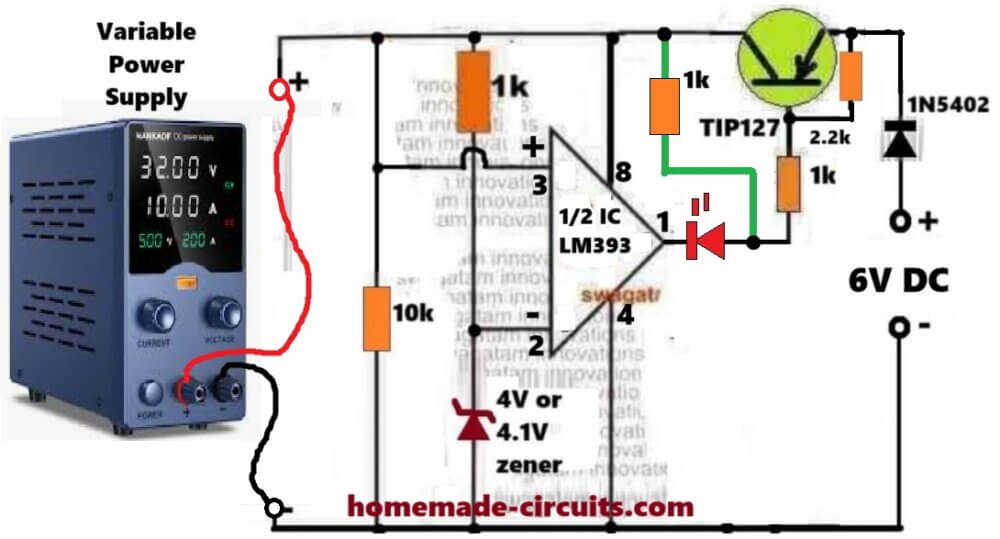
Connect a 1k temporary resistor between pin#8 of the IC and the anode of the red LED.
Keep the supply at zero volts and gradually increase it, until it reaches above 4.1V, or 4V.
At around 3V, you must see the LED turning ON.
Keep increasing the variable power supply voltage until it is above 4V or 4.1V. At this point you must see the LED shutting off.
That's all, this will prove that you LM393 based auto cut off is working correctly.
Now you can remove the above mentioned temporary resistor, and start charging any discharged 3.7V Li-ion battery using the normal configuration, as depicted in the above image.
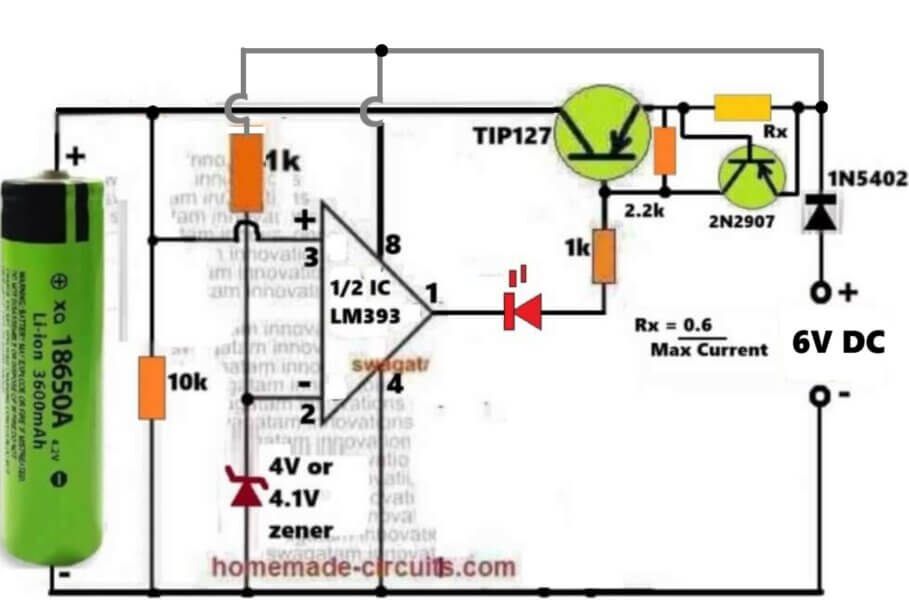
Constant Current Version
The above circuit can be further upgraded into a constant current version, as shown in the following diagram:
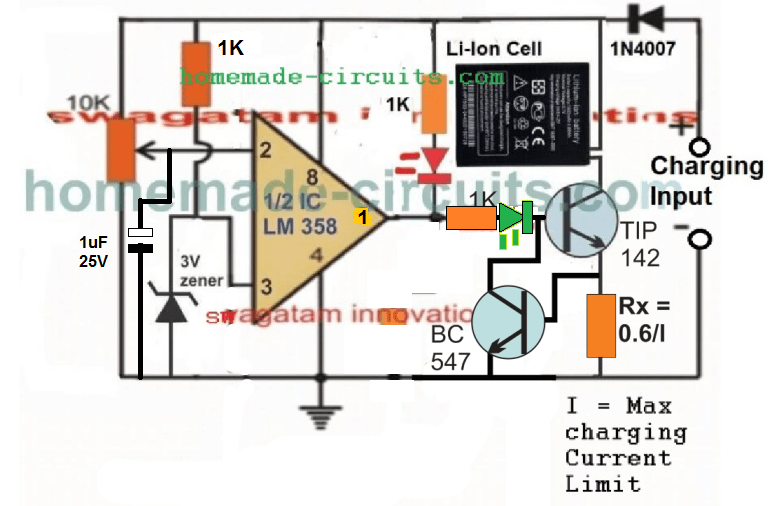
3.7V Auto Cut-off Circuit using IC 741
The following IC 741 auto cut off Li-ion battery charger circuit can be understood with the help of the following description:
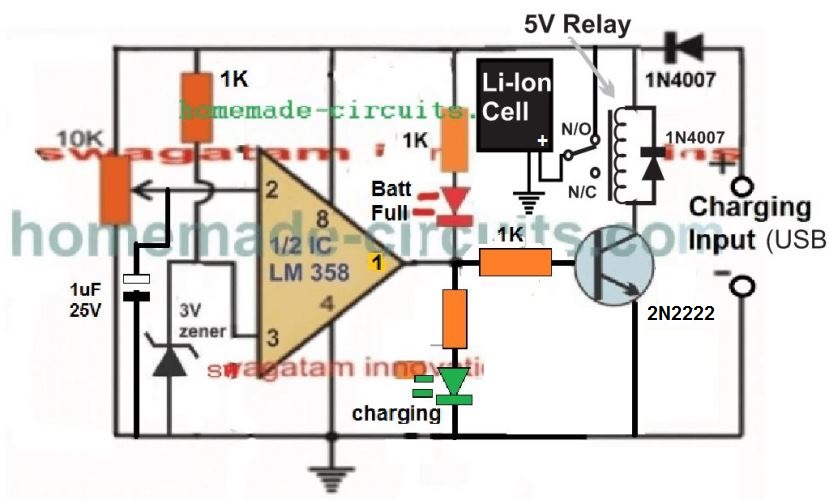
The IC LM358 is configured as a comparator. The IC LM741 is not used since it is not specified to work with voltages lower than 4.5V.
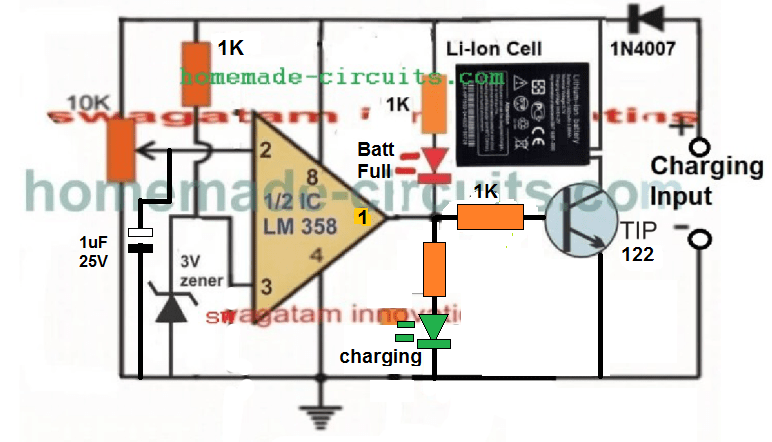
Pin#2 which is the inverting input of the IC is used as the sensing pin and is attached with a preset for the required adjustments and setting.
Pin#3 which is the non-inverting input of the opamps is reference at 3V by clamping it with a 3V zener diode.
A couple of LEDs can be seen wired across the output pin of the opamp, for detecting and indicating the charging condition of the circuit. Green LED indicates the battery is being charged while the red illuminates as soon as the battery is fully charged, and supply is cut off to the battery.
How to Charge using USB Port
Please remember that the charging process can be quite slow and may take many hours, because the current from USB of a computer is normally very low and may range between 200 mA to 500 mA depending on which number port is used for the purpose.
Once the circuit is assembled and set up, the below shown design can be used for charging any spare Li-Ion Battery through the USB port.
First connect the battery across the indicated points, and then plug in the USB connector with your computer's USB socket. The green LED should instant become ON indicating the battery is being charged.
You can attach a voltmeter across the battery to monitor its charging, and check whether the circuit cuts off the supply correctly or not at the specified limit.
Since the current from a computer USB can be quite less, the current control stage can be ignored and the above design can be much simplified as shown below:
Video Clip showing the automatic cut off action, when the Li-Ion cell is charged upto 4.11V:

Please note that the circuit will not initiate charging unless a battery is connected prior to power switch ON, therefore please connect the battery first before connecting it to a 5 V supply source.
An LM358 has two opamps which means one opamp is wasted here and remains unused, therefore LM321 may be tried instead to avoid the presence of an idle unused opamp.
How to Set up the above 3.7 V Li-ion Charger Circuit:
That's extremely easy to implement.
- First, make sure the preset is moved at the ground side fully. Meaning, the pin#2 should be at ground level through the preset initially.
- Next, without any battery connected, apply an exact 4.2 V across the +/- supply lines of the circuit, through an accurate adjustable power supply.
- You will see the green LED coming ON instantly.
- Now, slowly rotate the preset, until the green LED just shuts OFF, and the RED LED switches ON.
- That's all! The circuit is now all set to cut off at 4.2 V when the actual Li-Ion cell reaches this level.
- For the final testing, connect a discharged battery to the shown position, plug-in the input power through a 5 V source, and have fun watching the cell getting charged and cut-off at the stipulated 4.2 V threshold.
Constant Current CC Feature Added
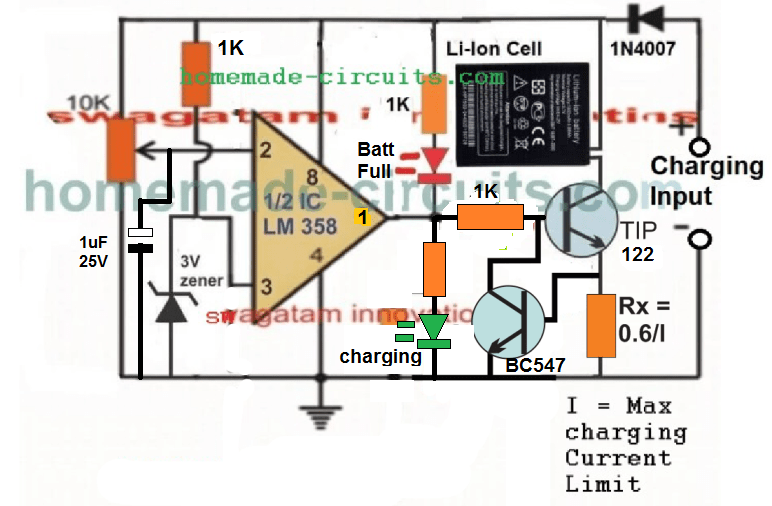
As can be seen , a constant current feature has been added by integrating the BC547 stage with base of the main BJT.
Here the Rx resistor determines the current sensing resistor, and in case the maximum current limit is reached, the potential drop developed across this resistor quickly triggers the BC547, which grounds the base of the driver BJT, shutting down its conduction and charging of the battery.
Now, this action keeps oscillating at the current limit threshold, enabling the required constant current, CC controlled charging for the connected Li-ion battery.
Current Limiting not Required for USB Power
Although a current limiting facility is shown, this may not be required when the circuit is used with an USB since the USB already is quite low with current and adding a limiter may be useless.
The current limiter should be used only when the source current is substantially high, such as from a solar anel or from another battery
Improving the Circuit Further
After some testing it appeared that the Darlington transistor was unable to switch sufficient current to a Li-Ion cells, especially which were deeply discharged. This resulted in a difference in voltage levels across the cell, and across the supply rails of the circuit.
To combat this issue, I tried to improve the design further, by replacing the single Darlington BJT with a pair of NPN/PNP network, as given below:
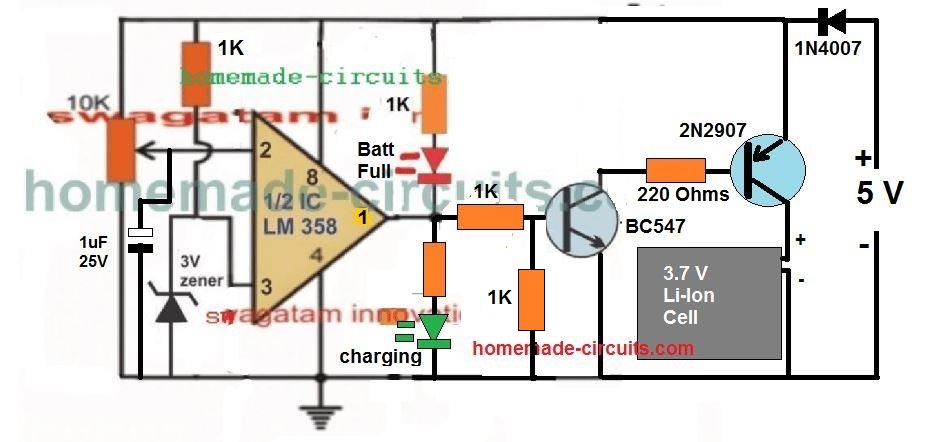
This design improved the current delivery significantly, and resulted in a reduction in the margin of difference between the battery terminal voltage level and the actual supply voltage level, and therefore false cut-off switching.
The following video, shows the test result using the above circuit:

Adding Current Control to the above Design
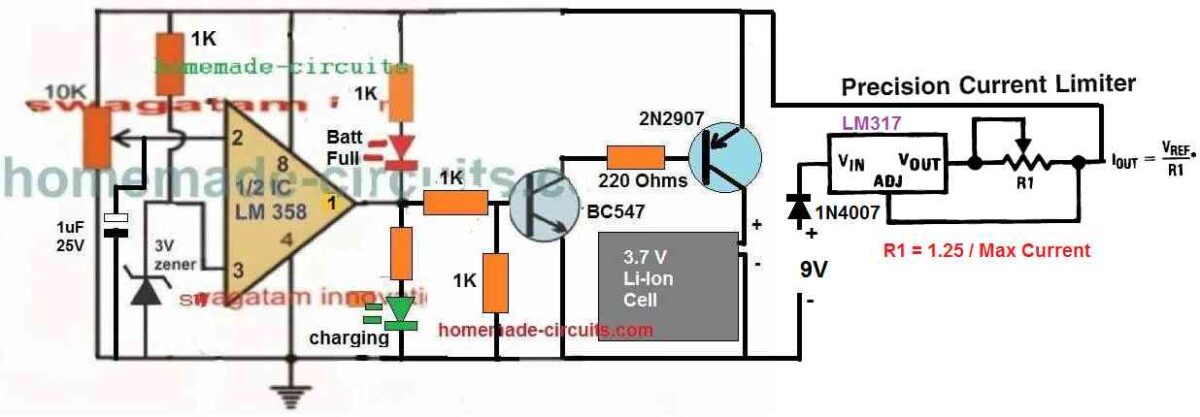
Using a 5V Relay
The above designs can be also built using a 5V, which will ensure the best possible current delivery to the cell and faster charging. The circuit diagram can be seen below:
Please Note:
This article was substantially changed recently and therefore the older comment discussions may not match with the circuit diagram shown in this present updated design and explanation.
Another Ideal 3.7 V Battery Charger Circuit with Auto Cut-off
Here's a 3.7 V Battery charger circuit which looks perfect in for the automatic cut-off and a self-monitoring of the 3.7 V battery.
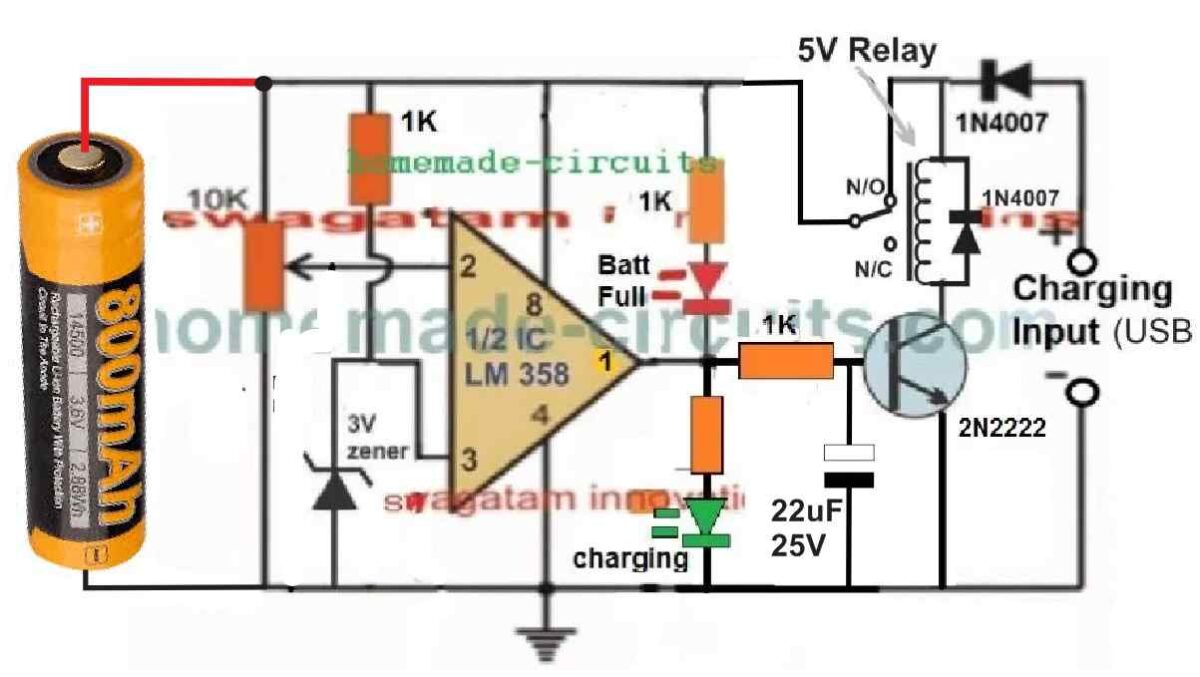
In the relay based circuit previous to the above design, there seems to a serious drawback.
In the previous design the battery needs to be connected first, before applying the input power. This is crucial, otherwise the relay can start chattering, if the power is switched ON first without a battery connected.
But in the above new design where the battery can be seen connected on the left side, the chattering of relay problem is completely eliminated.
Moreover, this design has an added advantage. The circuit will be able to continuously monitor the battery level and self-regulate the circuit to ensure that the battery is automatically disconnected when it reaches full charge level, and automatically connected to the supply when it is discharged to some lower level.
The input supply can can be from any 5V regulated source. However make sure the current spec of the supply is restricted to 0.5 C. Meaning the current of the 5V source must not be 50% of the battery mAh value.
How to Adjust the Preset
The auto cut off preset setting up is easy.
Initially, do not connect any battery or the input supply, and rotate the preset wiper to the ground level.
Next, take a variable DC power supply. Adjust its output to precisely 4.1 V, which is the optimum full charge level of a standard 3.7 V battery.
Connect this supply to the circuit from the left side, across the points where the battery is supposed to be connected.
You will see the GREEN LED illuminating. At this stage the relay must switch ON, however it won't since there's no 5V supply from the right side of the circuit. No worries, we can still setup the circuit by looking at the LEDs.
After this, slowly adjust the preset until the GREEN LED just switches off and the RED LED just switches ON.
That's all, the auto cut off set up is complete for the circuit.
Now, to test the circuit LIVE, you can connect a discharged 3.7V cell across the indicated points, and a 5 V supply from the relay side and see the actually cut-off happening, as soon as the battery is fully charged at 4.1 V.